
How to run role simulations through video interview prompts?
Learn how to run role simulations through video interview prompts to assess real-world skills, communication, and job readiness

Role simulations help employers evaluate how candidates perform in realistic job situations. Instead of answering theoretical questions, candidates respond to scenarios that reflect actual workplace challenges.
Recruiters are increasingly using conversational AI interviewing tools to create realistic role simulations during the hiring process. These platforms allow hiring teams to provide prompts to an AI interviewer, which then generates dynamic, job-specific interview scenarios.
The effectiveness of these simulations depends heavily on the quality of the prompts recruiters provide to the AI interviewer. Well-designed prompts create realistic conversations that accurately measure communication skills, judgment, problem-solving, and role readiness.
This article explains how to run role simulations through video interview prompts using conversational AI interviewing tools. It also covers prompt design strategies, scoring tips, and common mistakes to avoid.
 ChatGPT
 Gemini
 Claude
 Grok
Grok Perplexity
What are role simulations?
Role simulations are structured job-task exercises that candidates complete in a recorded video format. Each simulation places the candidate inside a real workplace situation tied to the role they applied for.
A “video interview prompt” is the question, scenario, or task that triggers the candidate’s recorded response. Modern platforms pair these prompts with an AI interviewer, which is a conversational AI system that asks follow-up questions and scores answers in real time.
Traditional interviews ask candidates to describe past behavior. Role simulations ask candidates to demonstrate current capability under realistic conditions.

Why do role simulations outperform traditional interviews?
Traditional unstructured interviews predict only 14% of on-the-job success. Role simulations push that predictive validity above 54% because they sample the actual work, not stories about the work.
LinkedIn’s Global Talent Trends report shows 76% of talent professionals rank skills-based hiring as their top priority for the next five years. Job simulations operationalize skills-based hiring at scale, while resumes and conversational Q&A reinforce credential-based shortcuts.
McKinsey’s research on talent assessment confirms skill-based practices reduce mis-hires by surfacing real competency gaps. Candidates also self-select more accurately when prompts reflect the actual job.
How to design effective video interview prompts for role simulations?
Effective prompts start with the job’s three to five highest-impact tasks. You then convert each task into a scenario that candidates can complete within two to four minutes on camera.
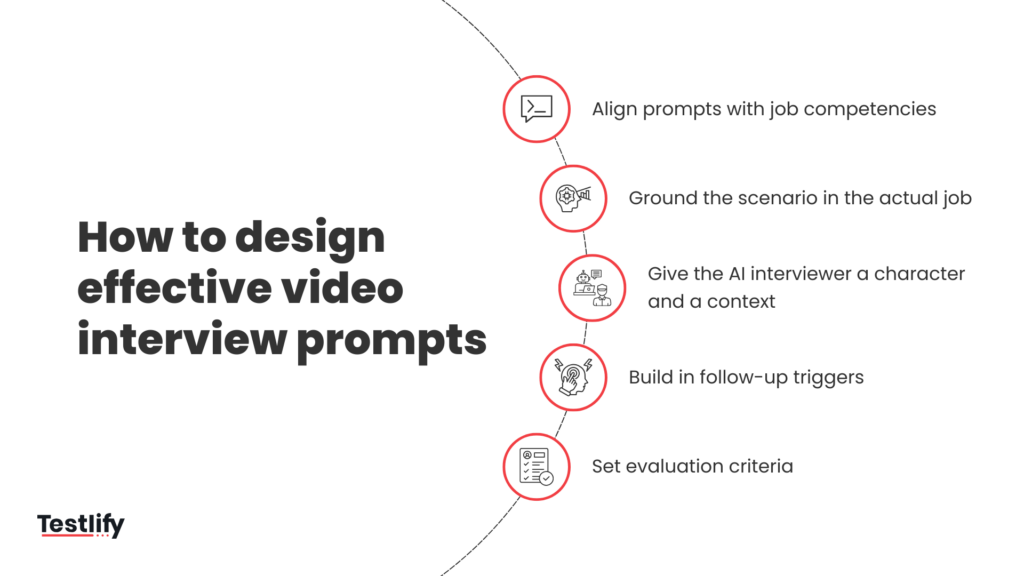
Align prompts with job competencies
Map every prompt to a specific competency in the role’s job description. A sales role needs prompts for discovery calls, objection handling, and pipeline qualification, not generic “tell me about yourself” questions.
Use a competency matrix that lists each skill on one axis and each simulation prompt on the other. This matrix proves coverage and prevents redundant testing across your structured interview flow.
Ground the scenario in the actual job
The most effective prompts are drawn directly from the real challenges of the role. Before writing a prompt, ask:
- What does this person actually deal with on a typical workday?
- What situations require the most judgment, communication, or skill?
- What kinds of problems separate strong performers from mediocre ones?
Write prompts using real customer language, real internal terminology, and real edge cases your team faces every week. A customer success simulation might present an actual escalation email and ask the candidate to record their response.
Avoid hypothetical or abstract framing. Candidates perform better when the scenario feels like Tuesday at 2 pm in the actual role, which also improves your candidate experience scores.
Give the AI interviewer a character and a context
Rather than giving the AI a list of questions to ask, effective prompts instruct the AI to play a role within the scenario.
This makes the simulation feel more real and forces the candidate to engage authentically rather than lecture into a camera.
For example: “You are a frustrated client who has just discovered that a promised product feature won’t be delivered on time. You haven’t been notified by the candidate’s company yet you’re finding out for the first time in this call. You are disappointed but professional. Start the conversation by mentioning that you saw the product release notes and are confused about where the feature went.”
This level of detail gives the AI interviewer enough to generate a realistic, sustained conversation without tipping the candidate off to exactly what’s coming.
Build in follow-up triggers
Strong prompts anticipate how candidates might respond and include instructions for how the AI should follow up in different situations.
For example, if a candidate gives a vague answer, the AI should press for specifics. On the other hand ff a candidate handles the scenario confidently, the AI should introduce a complication to test their depth.
These follow-up triggers are what separate a simulation from a scripted questionnaire. They create the unpredictability that encourages candidates to think on their feet to resolve problems.
Set evaluation criteria
Define a rubric with three to five observable behaviors per prompt before any candidate records a response. Each behavior gets a 1 to 5 anchor scale with concrete examples for each score.
Calibrate the rubric with two evaluators scoring the same five responses independently. You roll out the simulation only after inter-rater agreement crosses 80%, which removes a major source of hiring bias.
Which roles benefit most from video-based job simulations?
Customer-facing roles benefit most because communication and judgment drive daily performance.
Sales reps, customer success managers, support specialists, and account executives reveal core skills within minutes of a well-designed prompt.
Technical roles also benefit when prompts include live problem framing or code walkthroughs. Engineers, analysts, and product managers explain their reasoning through scenario-based prompts that reveal thinking quality during structured technical assessments.
How to score role simulation responses
Scoring role simulations requires a different approach than scoring traditional interview answers.
Because the conversation is dynamic, evaluators need to assess behavior patterns rather than checking whether a candidate hit specific talking points.
Use a competency-anchored rubric
For each competency the simulation is designed to measure, define what strong, acceptable, and weak performance looks like in behavioral terms. Avoid vague descriptors like “communicated well” or “seemed confident.” Instead, anchor each score level to observable behaviors:
- Strong: Acknowledged the issue without defensiveness, proposed a specific next step with a timeline, and checked for alignment before ending the conversation.
- Acceptable: Addressed the issue and offered a solution, but didn’t confirm whether it resolved the client’s concern.
- Weak: Became defensive, over-apologized without offering a resolution, or redirected blame.
Score independently before discussing
When multiple reviewers score the same simulation, each should complete their scoring independently before comparing notes.
Group discussion before individual scoring tends to anchor everyone to the first opinion expressed, reducing the value of having multiple reviewers at all.
Weight competencies by role criticality
Not all competencies matter equally for every role. For example, a sales role simulation might weigh objection handling more heavily than empathy, whereas a leadership simulation might weigh psychological safety and transparency above tactical problem-solving.
Define these weights before scoring begins so that the final evaluation reflects what actually matters for the role.
Look at the trajectory, not just the peak
In a job simulation, candidates will often stumble before recovering or start strong and deteriorate under pressure. The trajectory of the conversation is itself a data point.
A candidate who recovers gracefully from an early misstep may be more valuable than one who performs smoothly on the first turn but struggles when the scenario gets harder.
How does Testlify’s conversational AI interviewer run role simulations?
Testlify’s conversational AI interviews replace static video prompts with a dynamic AI interviewer that adapts to each candidate’s response. The AI asks the initial scenario, listens to the candidate’s answer, and probes deeper with follow-up questions tied to the role’s competency rubric.
The platform scores responses against your rubric automatically, flags strong and weak signals per competency, and delivers a ranked shortlist within hours. Hiring teams review only the top candidates, which compresses your time-to-hire from weeks to days.
You can launch role simulations across customer success, sales, support, marketing, finance, and engineering roles without building prompts from scratch.
Common mistakes recruiters make with video role simulations
Recruiters often write prompts that test confidence instead of competence. A prompt asking candidates to “tell us why you’re a great fit” rewards speechcraft, not skill, which defeats the purpose of pre-employment testing.
With that said, these are the most common mistakes recruiters make when designing and evaluating role simulations:
- Uncalibrated scoring rubrics produce large recruiter scoring gaps and unreliable hiring decisions.
- Many recruiters evaluate responses emotionally instead of using structured competency-based scoring criteria.
- Prompts longer than four minutes significantly increase candidate drop-offs and reduce completion rates.
- Overcomplicated scenarios confuse candidates and weaken the accuracy of role simulation outcomes.
- Simulations often fail to reflect real workplace challenges candidates will actually face daily.
- Poor instructions damage candidate experience and weaken employer brand perception.
How do you measure success with simulation-based hiring?
Track four metrics during the first 90 days after launching role simulations. Quality-of-hire scores from hiring managers, 90-day retention rates, time-to-productivity, and candidate NPS form the core scorecard.
Compare these metrics against your pre-simulation baseline.
Add recruitment automation metrics like screening hours saved and recruiter capacity gained. These numbers translate directly into recruiter ROI for executive reviews.
How do you prevent cheating in video-based role simulations?
Use AI proctoring features like browser lockdown, identity verification, and anomaly detection in voice and facial patterns. Time-boxed prompts also reduce the window for external help, and dynamic AI follow-up questions catch scripted answers instantly through AI proctoring.
Randomize prompt order across candidates so no two applicants see the same sequence. This single step kills most prompt-sharing on community forums.
Final thoughts
Candidates will keep using AI tools and coaching resources to optimize how they present themselves. The hiring teams that stay ahead will be the ones evaluating what candidates do, not just what they say.
Conversational AI interviewing tools make that shift accessible at scale. What determines whether your process gets smarter is the quality of the prompts you build and the consistency with which you apply them.
Role simulations don’t replace good hiring judgment, they make it better informed. When you put candidates into realistic situations before extending an offer, you stop guessing and start knowing.
Ready to see it in action?
Testlify gives hiring teams the tools to build and run AI-powered role simulations that surface real candidate behavior, not rehearsed answers.
From prompt design to scoring, Testlify’s conversational AI interviewing platform makes it easy to design role simulations and evaluate candidate performance at scale
Whether you’re hiring for customer-facing roles, technical positions, or leadership, Testlify helps you move faster, reduce bias, and make confident hiring decisions.
Book a demo today and experience a smarter way to hire.

Related resources
View all
AI in recruitment
What tools offer AI-generated questions for custom assessments?

AI in recruitment
How does Testlify’s AI scoring handle open-ended answers and code quality?

AI in recruitment
How to use AI in recruiting using Testlify

AI in recruitment
AI recruitment platforms: Buyer’s guide

AI in recruitment
Will AI replace recruiters in 2026? The real answer

AI in recruitment
Top AI use cases in recruitment by funnel stage
Get started.
Hire on proof, not resumes.
Run your first skills-based assessment free — no credit card required.