
How to simplify candidate screening with SQL tests
A practical way to screen data and engineering candidates with an SQL assessment: what to test by role, where it fits, and how to score it.

Knowing how to simplify candidate screening with SQL tests comes down to one change: check the skill before you read the resume in detail. A short, job-based SQL assessment sent early in the process shows who can actually query, join and summarize data, so recruiters and hiring managers spend interview time only on candidates who can do the work.
TL;DR:
- Send a short SQL assessment right after the application or a quick knockout check, before resume deep-dives and phone screens.
- Match the test to the role and level: basic SELECT, filters and joins for junior analysts; window functions, query tuning and schema design for engineers and DBAs.
- Use hands-on query tasks for the core skill and a few multiple-choice questions for concepts. Keep a first screen to roughly 10 to 30 minutes.
- Score every candidate on the same rubric and set the cutoff by testing current team members first, not by picking a round number.
- SQL is used by 58.6% of developers in the 2025 Stack Overflow survey, so most data and back-end roles need some SQL check.
- Keep the screen fair: tell candidates the format in advance, offer accommodations and use the score with interviews, never as the only signal.
 ChatGPT
 Gemini
 Claude
 Grok
 Perplexity
Why use an SQL assessment to screen candidates?
An SQL assessment screens candidates by asking them to write or read real queries, which shows hands-on skill that a resume line like "advanced SQL" cannot prove. Hiring teams use it to filter large applicant pools fast, compare everyone on the same tasks and spot the strongest people early.
SQL is one of the most common skills in technical hiring. In the 2025 Stack Overflow Developer Survey, 58.6% of all respondents and 61.3% of professional developers said they used SQL in the past year, and PostgreSQL (55.6%) and MySQL (40.5%) were among the most used databases. That reach means many applicants list SQL, and the skill level behind the word varies a lot.
An SQL screen helps in four ways:
- Checking technical skills: Candidates show whether they can write a working query and understand basic database concepts, not only describe them.
- Fair evaluation: Every candidate gets the same tasks and the same scoring, which removes much of the guesswork of resume reading.
- Faster filtering: Sending the test early removes candidates without the minimum SQL skill before anyone books an interview.
- Spotting the best candidates: Real-world problems separate people who can solve messy data questions from those who only know syntax.

Which roles need SQL screening, and at what level?
Roles that need SQL screening include data analysts, BI developers, data engineers, back-end developers and database administrators, and each needs a different level. A junior analyst needs clean SELECT, filter and join skills; a senior data engineer or DBA needs query tuning, schema design and performance work.
Demand for these roles keeps growing. The US Bureau of Labor Statistics projects data scientist jobs to grow 35% from 2025 to 2035, with about 24,800 openings a year. According to the same BLS outlook data, database architect jobs are projected to grow 9% over that decade.
Role | Level to test | What to test | Best format | First-screen length |
|---|---|---|---|---|
Junior data analyst | Basic | SELECT, WHERE, ORDER BY, simple joins, COUNT and SUM | Query tasks plus a few MCQs | 10 to 20 minutes |
Data analyst / BI developer | Intermediate | Multi-table joins, GROUP BY and HAVING, subqueries, NULL handling, CASE | Scenario query tasks on a sample dataset | 20 to 30 minutes |
Data engineer | Advanced | Window functions, CTEs, deduplication, large-table performance | Query writing plus debugging a slow query | 30 to 45 minutes |
Back-end developer | Intermediate | CRUD queries, joins, indexes, transactions | Query tasks inside a coding test | 20 to 30 minutes |
Database administrator | Advanced | Indexing, execution plans, backups, permissions, constraints | Scenario questions plus troubleshooting tasks | 30 to 45 minutes |
For a full list of topics by level, see the SQL concepts to include in an SQL programming test. If the role uses one database, add a screening check such as the PostgreSQL test or MySQL test.
Where should the SQL screen sit in your hiring funnel?
The SQL screen works best right after the application and a short knockout check, before resume deep-dives and phone screens. Placed there, the test does the heavy filtering for high-volume roles, and recruiters review resumes only for candidates who already passed the skill bar.
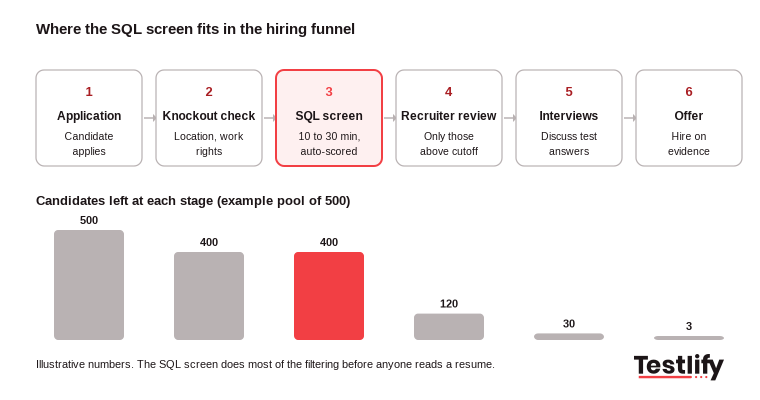
There are three common placements:
- Right after applying: Best for high-volume analyst and graduate roles. Every applicant gets the same chance, and the score sorts the pool before anyone reads a resume.
- After a resume check: Best for senior or niche roles with few applicants. Recruiters remove clear mismatches first, then test the rest.
- After a first interview: Use it only when the pool is small and you need a deeper take-home task. A late test adds little filtering and slows time-to-hire.
Pro tip: Combine the SQL test with one or two knockout questions (work authorization, location, notice period) in the same invite, so candidates complete a single step.
How do you design an SQL screening test that reflects the job?
A good SQL screening test is designed by listing the SQL tasks the role does every week, then selecting questions that mirror those tasks at the right difficulty. The test should mix question types, use realistic data and give clear instructions, so the score reflects job skill rather than test-taking skill.
Follow these design steps:
- Know what you want to test: Write down the three to five SQL skills the job needs most. For a reporting role that is joins, aggregates and date logic; for a data platform role it is window functions and performance.
- Choose the right question types: Use multiple choice for concepts and hands-on query tasks for applied skill (see the table below).
- Make questions like real life: Give candidates a small schema, such as orders, customers and products, and ask business questions like "Which customers ordered in March but not April?"
- Use different difficulty levels: Add easy, medium and hard questions so the score separates basic users from strong ones without making the test feel impossible.
- Include practical tasks: Ask candidates to retrieve specific data, fix a broken query or update records, which shows whether they can solve problems in real time.
- Keep questions clear and consistent: Use plain wording, state the expected output and keep the same format throughout.
- Check questions before using them: Have two or three current team members take the test. Fix any questions they misread or find ambiguous.
Question type | What it shows | Best for | Watch out for |
|---|---|---|---|
Multiple choice | Knowledge of concepts, syntax and database basics | Quick first filter, large pools | Easy to guess; keep to a minority of the score |
Query writing | Whether the candidate can get the right answer from real tables | Every SQL role | Needs a live SQL editor with sample data |
Debugging a query | Reading skill and attention to detail | Mid and senior roles | Make the bug realistic, not a trick |
Scenario or case | Turning a vague business question into a query | Analysts and BI roles | Score the approach, not only the final number |
Fill in the blank | Syntax recall under time limits | Short junior screens | Says little about problem-solving |
Practitioners who run SQL screens say the process matters as much as the answer: whether the candidate looks at the schema first, checks edge cases such as NULLs and duplicates, and verifies the result. Build at least one task where a careless query returns a plausible but wrong number.
How do you run the SQL screen step by step?
Running an SQL screen takes seven steps: pick the stage, choose a platform, set the test details, tell candidates what to expect, send invites through your ATS, monitor progress and review results. Each step is quick once the test exists, and most of the work can be automated.
- Decide when to use it: Pick the funnel stage from the section above and keep it the same for every candidate in the role.
- Choose the right test platform: Look for a live SQL editor, auto-scoring, proctoring and an integration with your ATS, so scores land next to the candidate record.
- Set the test details: Fix the length, the number of questions and the mix of easy and hard items for the role level.
- Tell candidates what to expect: Share the format, time limit, database dialect and what you are looking for. Clear instructions reduce drop-off and make the test fairer.
- Fit the test into the hiring flow: Send invites automatically when a candidate reaches the stage, with a deadline of two to five days.
- Monitor progress: Track who started, who finished and how long they took, and send one reminder to candidates who have not started.
- Review the results: Check correctness, query quality and any proctoring flags, then move candidates above the cutoff to the next round.
To protect the result, turn on integrity checks such as tab monitoring, copy-paste tracking and webcam snapshots. The Testlify anti-cheating and proctoring features cover these checks for remote tests.
How should you score results and set a cutoff?
SQL test results are scored most fairly with automatic scoring for correct output plus a short rubric for query quality, and the cutoff is set by testing people who already do the job well. A cutoff chosen that way reflects the real skill bar, not a guessed number like 70%.
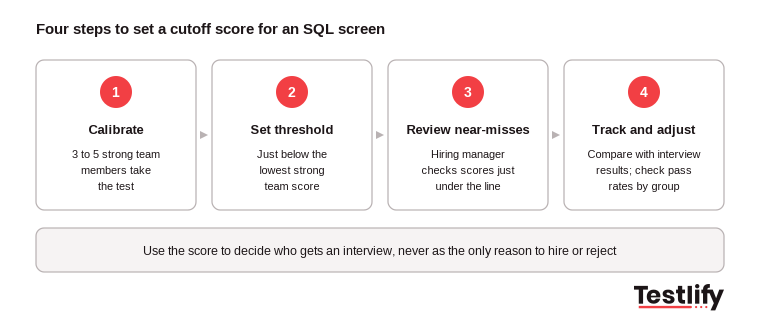
Use this four-step method:
- Calibrate on your team: Ask three to five people who do the role well to take the test. Their scores show what "job ready" looks like.
- Set the threshold: Place the cutoff a little below the calibration group's lowest strong score, so you do not reject people who could do the job.
- Review near-misses: Have a hiring manager look at candidates just under the cutoff. Partial credit on a hard task can reveal a strong candidate.
- Track and adjust: After a few hiring rounds, compare test scores with interview and on-the-job results, and check whether any group passes at a much lower rate.
Use the score along with the resume and interviews, not instead of them. A strong SQL score earns an interview; it does not decide the hire on its own. In the interview, reuse the candidate's own test answers and ask why they chose that approach. Our SQL developer interview questions give follow-up ideas, and this guide on evaluating candidates' skills with an SQL assessment goes deeper on reading reports.
Key takeaway: A cutoff based on your own team's scores, reviewed after every few hires, is easier to defend than a round number copied from a template.
How do you keep SQL screening fair for candidates?
SQL screening stays fair when the test measures only skills the job needs, every candidate gets the same conditions, and people who need accommodations can ask for them. Telling candidates what to expect and giving feedback afterwards also improves the candidate experience and your employer brand.
- Keep it job-related: The EEOC guidance on employment tests says tests should be job-related and consistent with business necessity, and should be updated as job requirements change.
- Offer accommodations: Allow extra time or other adjustments for candidates with disabilities who request them.
- Give candidates resources to prepare: Share the topics covered, the dialect and a sample question, so everyone starts from the same information.
- Keep the length reasonable: A first screen over 45 minutes raises drop-off, especially for in-demand candidates with other offers.
- Give feedback: Tell candidates what they did well and where they could improve. A short automated report is enough at scale.
Can SQL assessments help after the hire?
SQL assessments also help after hiring by showing current employees' skill gaps, which makes training more targeted. Teams use the same test to set a baseline for new hires, plan coaching and check progress before moving someone into a more data-heavy role.
For example, a BI team moving from spreadsheets to a cloud warehouse can test analysts on joins and window functions, then train only the people who need it. Using one test for hiring and development also keeps the skill bar consistent across the team.
How does Testlify simplify SQL screening?
Testlify simplifies SQL screening by giving hiring teams ready-made SQL tests, a live coding environment, automatic scoring and ATS sync in one platform. Teams can start with the SQL test in the test library, a 10-minute, 12-question foundational test that covers table features, server components and subqueries.
- Test library: 3,500+ tests, including SQL, PostgreSQL, MySQL, SQL developer and data analyst tests, so one assessment can mix SQL with Excel or reasoning.
- Coding tasks: Live coding questions in 45+ programming languages for hands-on query writing alongside multiple choice.
- AI test builder: Generate a custom assessment from a job description and edit the questions to match your schema.
- Proctoring: 20+ proctoring checks, including tab monitoring, copy-paste tracking and webcam snapshots.
- ATS sync: 100+ ATS and HRIS integrations, so invites go out and scores come back automatically.
- Reporting: Per-skill breakdowns, benchmarking and shareable reports for hiring managers.
For the full hiring process around the test, see the SQL developer hiring guide and the best practices for hiring data analysts.
Ready to screen SQL candidates faster?
Testlify gives you a ranked shortlist of SQL candidates without reading every resume first. Browse the test library, build an assessment for your role, and start a 7-day free trial with no credit card, or book a demo to see it with your own ATS.
Frequently asked questions (FAQs)

People and Talent Partner
Arushi Shah runs day-to-day talent acquisition and candidate experience at Testlify. She writes on interviewing, structured hiring, and giving candidates a fair, fast process.
LinkedInRelated resources
View all
HR & recruitment
How to simplify candidate screening with resilience test

HR & recruitment
Resilience testing in hiring: what it measures and how to use it

HR & recruitment
How project manager test helps you screen candidates

HR & recruitment
How Management test helps you screen candidates

HR & recruitment
How to incorporate Management test into your recruitment strategy

HR & recruitment
How to incorporate Sales test into your recruitment strategy
Get started.
Hire on proof, not resumes.
Run your first skills-based assessment free — no credit card required.