
How to evaluate SQL skills when hiring
A practical method for hiring teams to test SQL by role and level, with sample tasks, a scoring rubric and follow-up interview questions.

Knowing how to evaluate SQL skills saves hiring teams from the most common data-hiring mistake: trusting a resume line that says "advanced SQL". The reliable method is to test the queries the job really needs, at the right level, on a realistic schema, and score every candidate against the same rubric. Then a short interview confirms the candidate understands what they wrote.
TL;DR:
- To evaluate SQL skills, list the queries the role writes every week, set a level, give a timed task on a realistic schema, score it with a fixed rubric, then have the candidate explain one query in the interview.
- A data analyst needs joins, aggregation and window functions. A SQL developer adds schema design and tuning. A DBA adds backup, security and execution plans.
- Hands-on query tasks beat multiple-choice quizzes. Use a short quiz only as a first filter, then a 30 to 45 minute coding task.
- Score five things: correct result, edge cases such as NULLs and duplicates, readability, performance and the candidate's explanation.
- Let candidates use the SQL dialect of your stack, or test standard SQL. Dialect trivia rejects good people.
- LinkedIn's 2025 data shows 93% of TA professionals say accurate skills assessment is crucial to quality of hire.
- Proctoring, randomized questions and a live walk-through make copied or AI-written answers easy to spot.
 ChatGPT
 Gemini
 Claude
 Grok
 Perplexity
How to evaluate SQL skills: what are the steps?
Evaluating SQL skills takes five steps: define the work, set the level, test with a realistic task, score against a rubric and confirm in the interview. Each step removes a different kind of guesswork, so skipping one usually shows up later as a bad hire or a lost good candidate.
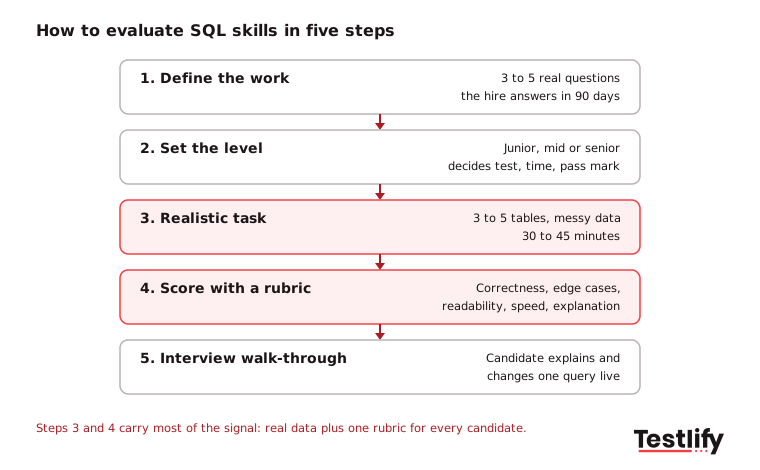
- Define the work: Ask the hiring manager for three to five real questions the new hire will answer with SQL in the first 90 days, such as "monthly revenue by region" or "customers who churned after a price change".
- Set the level: Decide whether the job needs basic querying, intermediate analysis or advanced design and tuning. The level decides the test, the time limit and the pass mark.
- Test with a realistic task: Give a small schema of three to five tables with messy data and ask for queries that answer business questions. Keep it to 30 to 45 minutes.
- Score against a rubric: Rate correctness, edge cases, readability, performance and explanation on the same scale for every candidate.
- Confirm in the interview: Ask the candidate to walk through one of their queries and change it live. People who wrote the query can explain it in plain words.
Skills-based screening is now the default for data roles. LinkedIn's Future of Recruiting 2025 found that 93% of TA professionals say accurately assessing skills is crucial for quality of hire, and companies that run the most skills-based searches are 12% more likely to make a quality hire.

Which SQL skills matter for each role?
SQL skills differ by role: analysts need to read and summarize data, developers need to build and tune it, DBAs need to keep it safe and fast, and data engineers need to move it at scale. Testing every role with the same generic quiz is the fastest way to hire the wrong person.
Role | Must test | Nice to test | Usually not needed |
|---|---|---|---|
Data analyst / BI analyst | SELECT, filters, joins, GROUP BY, HAVING, CASE, window functions, dates | CTEs, basic performance sense | Indexing strategy, backups |
SQL developer | Joins, subqueries, CTEs, stored procedures, schema design, normalization | Query tuning, transactions | Server administration |
Database administrator (DBA) | Execution plans, indexing, backup and recovery, permissions, security | Replication, monitoring | Advanced analytics |
Data engineer | Bulk loads, upserts, incremental models, partitioning, data quality checks | Warehouse-specific SQL | Report formatting |
Product or marketing analyst | Joins, aggregation, funnels, cohorts, date handling | Window functions | Schema design |
Pick the dialect that matches your stack. The Stack Overflow Developer Survey 2025 shows how mixed real stacks are: 55.6% of respondents worked with PostgreSQL in the past year, 40.5% with MySQL, 37.5% with SQLite and 30.1% with Microsoft SQL Server, while 58.6% used SQL as a language.
For a fuller list of topics, see our guide to SQL concepts to include in a SQL programming test, and the SQL glossary entry for plain definitions.
What should you test at junior, mid and senior level?
SQL tests at each level check a different depth: juniors should retrieve and summarize data correctly, mid-level candidates should solve multi-step problems cleanly, and seniors should design, tune and defend their choices. A good test has one or two tasks that stretch slightly above the level, so strong candidates can stand out.
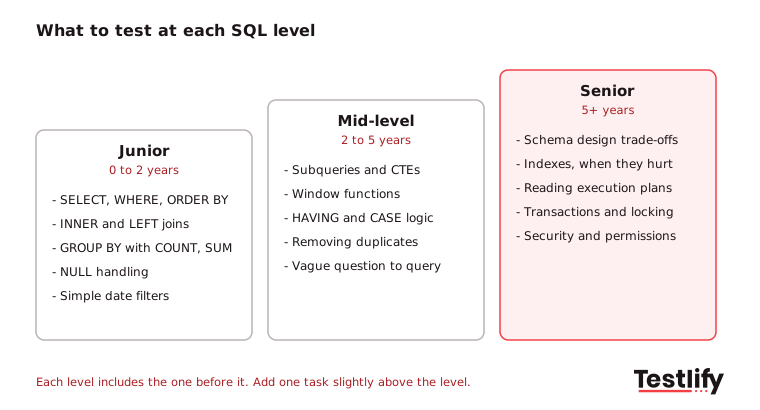
- Junior (0 to 2 years): SELECT with WHERE, ORDER BY and LIMIT; INNER and LEFT joins; COUNT, SUM and AVG with GROUP BY; handling NULLs; simple date filters.
- Mid-level (2 to 5 years): Subqueries and CTEs; window functions such as ROW_NUMBER, RANK and running totals; HAVING; CASE logic; removing duplicates; turning a vague business question into a precise query.
- Senior (5+ years): Schema design and normalization trade-offs; indexes and when they hurt; reading an execution plan; transactions and locking; rewriting a slow query; security and permissions.
For seniors, ask them to read a real plan. Microsoft's guide to displaying an actual execution plan shows what a candidate should be able to open and explain in SQL Server; PostgreSQL and MySQL have the same idea under EXPLAIN.
Pro tip: Set the pass mark before the first candidate takes the test. A threshold chosen after you see the scores tends to drift toward the candidate the team already likes.
Which test formats work best for SQL?
SQL test formats each answer a different question: multiple-choice shows knowledge, coding tasks show ability, take-homes show care, and live sessions show reasoning. Most teams get the best signal from a short knowledge screen followed by one hands-on coding task, then a live walk-through for finalists.
Format | What it shows | Time | Best use | Watch out for |
|---|---|---|---|---|
Multiple-choice quiz | Knows syntax and concepts | 10 to 20 min | First filter at volume | Rewards memory, not ability |
Timed coding task on a schema | Can write correct, working queries | 30 to 45 min | Main signal for every role | Needs realistic data and clear questions |
Take-home exercise | Quality, structure and care | 2 to 4 hours | Senior and analytics roles | Drop-off and outside help |
Live SQL session or pair programming | Reasoning, debugging, communication | 30 to 60 min | Finalists | Interview nerves, interviewer bias |
Subjective written answers | Can explain choices and trade-offs | 10 to 15 min | Senior roles, client-facing analysts | Slower to score |
Testlify's foundational SQL test is a 10-minute, 12-question beginner screen, which suits the first-filter slot. For the main signal, pair it with a coding task.
What do good SQL test tasks look like?
Good SQL test tasks look like real work: a small, slightly messy dataset and a business question with one correct answer. Six tasks cover most data roles, and each one shows something specific about the candidate.
- Top customers by revenue: Join orders and customers, sum revenue, return the top 10. Shows joins, aggregation and ORDER BY with LIMIT.
- Customers with no orders: Return customers who never ordered. Shows LEFT JOIN with an IS NULL check, or NOT EXISTS, and whether the candidate thinks about missing rows.
- Second-highest salary per department: Shows window functions or correlated subqueries, plus how the candidate handles ties.
- Month-over-month growth: Shows date truncation, CTEs and LAG, and whether the candidate checks for months with no data.
- Remove duplicates safely: Keep the latest record per email. Shows ROW_NUMBER and care with data that other systems depend on.
- Speed up a slow query: Give a query with a function on an indexed column and ask why it is slow. Shows indexing and execution plan knowledge for senior roles.
Seed the data with traps a real table has: NULLs, duplicate rows, a customer with no orders, a month with no sales. Strong candidates handle them without being told. That is often the single clearest gap between people who passed a course and people who have done the job.
How should you score a SQL test?
A SQL test should be scored against a fixed rubric with five criteria, so two reviewers reach the same result for the same answer. Correctness matters most, but edge cases, readability and performance separate a good hire from someone who got lucky with the sample data.
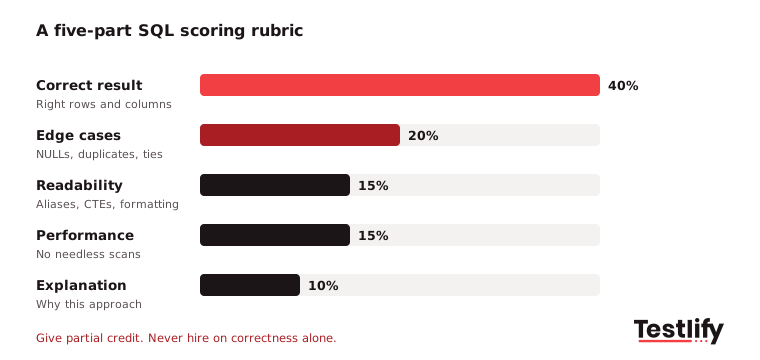
Criterion | Weight | Strong answer | Weak answer |
|---|---|---|---|
Correct result | 40% | Returns exactly the right rows and columns | Right on sample data only |
Edge cases | 20% | Handles NULLs, duplicates, ties and empty groups | Breaks on missing data |
Readability | 15% | Clear aliases, CTEs for steps, consistent formatting | One long nested query |
Performance | 15% | Avoids needless subqueries and SELECT *; uses indexes well | Works, but scans everything |
Explanation | 10% | Can say why this approach, and what they would change at scale | Cannot explain the query |
Give partial credit. A candidate who gets four of five tasks right and leaves a clear note on the fifth is often a better hire than one who rushes all five. Practitioners on the SQLTeam forums give the same advice: let candidates "do what they can" in the time, then judge the work they did.
Key takeaway: Weight correctness heavily, but never hire on correctness alone. Edge cases and explanation are where real database experience shows.
What should you ask in the follow-up interview?
The follow-up interview should ask candidates to explain and change the SQL they already wrote, not to recite definitions. Six questions work for most roles:
- Walk me through this query: Pick their most complex answer and ask what each step does.
- What happens if this table has NULLs or duplicates?: Checks whether edge cases were handled on purpose.
- How would you make this faster on 100 million rows?: Indexes, partitioning, pre-aggregation or rewriting the join.
- When would you use a CTE instead of a subquery?: Readability, reuse and how their database treats each.
- Tell me about a query that gave a wrong number in production: How they found it, fixed it and stopped it happening again.
- How do you check your result is right?: Row counts, reconciling to a known total, spot checks.
For a bigger question bank by topic, see our SQL developer interview questions. The SQL developer hiring guide covers the full process from job description to offer.
How to evaluate SQL skills without a SQL expert on the panel?
Recruiters and hiring managers who do not write SQL can still evaluate SQL skills well by letting an automated, scored test do the first judgment, then bringing one SQL-literate colleague into the final interview. The recruiter's job is to set the bar and run a consistent process, not to grade queries by eye.
- Use auto-scored coding tasks: Tasks that run the candidate's query against test data and compare results remove the need to read code at the screening stage.
- Agree the pass mark with the hiring manager first: Write it down with the rubric before the role opens.
- Borrow a reviewer for finalists: One engineer or analyst for 30 minutes per finalist is enough for the walk-through.
- Read the per-skill breakdown, not just the total: A candidate strong on joins but weak on aggregation may suit one team and not another.
How do you keep a SQL test fair and cheat-resistant?
A SQL test stays fair when every candidate gets the same tasks, the same time and the same rubric, in a dialect that matches the job. A SQL test stays cheat-resistant when answers must run on your data, questions are randomized and the candidate has to explain the work later.
- Match or neutralize the dialect: Test the dialect your stack uses, or stick to standard SQL and accept any working equivalent. A candidate who knows MySQL well should not fail over a PostgreSQL-only function.
- Keep it short: 30 to 45 minutes for the main task. Long unpaid tests raise drop-off among the strongest candidates, who have the most options.
- Decide your AI policy and say it up front: Either ban AI tools and proctor for them, or allow them and test judgment by asking candidates to fix a flawed AI-written query.
- Proctor the screen: Full-screen mode, tab and copy-paste tracking, and webcam snapshots make outside help visible. See how Testlify anti-cheating and proctoring works.
- Randomize: Shuffle question order and draw from a question pool so answers shared online go stale.
What mistakes do teams make when they evaluate SQL skills?
Teams that evaluate SQL skills badly usually make one of five mistakes, and each one filters out the wrong people:
- Testing trivia: Asking candidates to define "third normal form" tests memory. Asking them to fix a badly designed table tests skill.
- One test for every role: A DBA test will reject good analysts, and an analyst test will pass weak DBAs.
- Perfect sample data: Clean data hides the most important skill, which is handling the mess.
- No rubric: Without one, reviewers score style and confidence instead of correctness.
- Skipping the walk-through: A correct answer without an explanation proves the answer exists, not that the candidate wrote it.
We have seen across the teams we work with that fixing the first and third mistakes alone changes who reaches the final round.
How does Testlify help you evaluate SQL skills?
Testlify helps hiring teams evaluate SQL skills with ready-made SQL tests, coding tasks, proctoring and per-skill reports in one workflow, so recruiters can screen at volume and send hiring managers a ranked shortlist with the evidence behind each score.
- Ready-made SQL tests: The Testlify SQL assessment for SQL developers is a 20-minute, 18-question intermediate test covering query optimization, data modeling, database security, stored procedures, backup and recovery, and debugging. The library also has tests for PostgreSQL, MySQL, Microsoft SQL, T-SQL, PL/SQL and hands-on SQLite coding tasks, out of 3,500+ tests overall.
- Role-based combinations: Add a data analyst test or a cognitive ability test to the same assessment, or build a custom one from the job description with the AI test builder.
- 25+ question types: Coding questions, multiple choice, open-ended answers and video responses, so you can test writing SQL and explaining it.
- 20+ proctoring checks: Including full-screen enforcement, tab proctoring, copy-paste tracking, AI assistance detection and webcam snapshots.
- Per-skill reports: Automated scoring, a per-skill breakdown, AI-suggested follow-up questions for the interview and benchmarks against other candidates.
- Fits your stack: Two-way sync with 100+ ATS and HRIS tools, including Workday, Greenhouse and Lever, and tests in 15+ languages.
Ready to evaluate SQL skills with Testlify?
Ready to stop guessing from resumes? Build an SQL screen in minutes from the Testlify test library, invite candidates from your ATS and get a ranked shortlist with per-skill scores. Start a 7-day free trial with no credit card, or book a demo to see an SQL assessment flow for your roles.
Frequently asked questions

Senior SEO Specialist
Soham is a senior SEO specialist specializing in B2B HR tech. He covers search, answer, and generative engine optimization (SEO/AEO/GEO) for talent acquisition, skills-based hiring, and assessment-driven recruiting audiences.
LinkedInRelated resources
View all
Skill assessment
How to evaluate React developer skills: a 2026 guide

Skill assessment
How to evaluate candidate skills with a JavaScript Assessment

Skill assessment
How to evaluate candidates’ skills with a performance marketing test

Skill assessment
Customer success manager test: how to evaluate CSM candidates

Skill assessment
How to evaluate candidates’ skills with an attention to detail visual test

Skill assessment
How to evaluate candidates’ skills with an adaptability test
Get started.
Hire on proof, not resumes.
Run your first skills-based assessment free — no credit card required.