
Modern HR tools: the core HR stack and the top platforms to know
The 8 types of modern HR tools, 7 core HR platforms compared, US record retention rules and a process-first way to choose your stack.

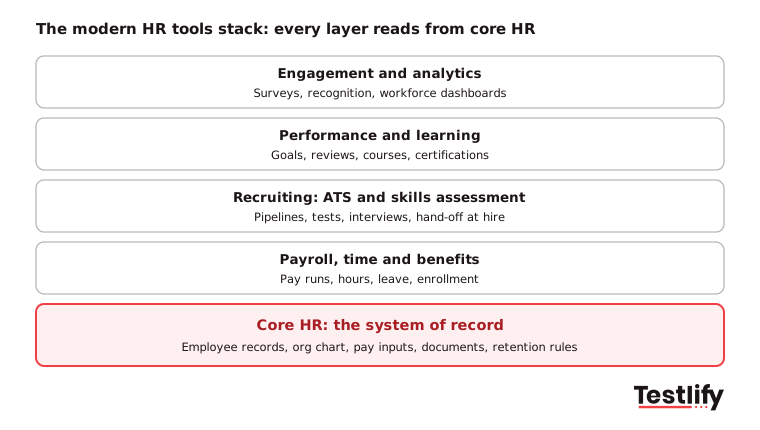
Modern HR tools are the software a people team uses to run the employee lifecycle: a core HR system that holds every employee record, plus connected tools for hiring, pay, time, performance, learning and engagement. The core HR system is the base. Every other tool reads from it, so the stack only works when those records are right.
TL;DR / Key Takeaways
- Modern HR tools are a connected stack, not one product. Core HR (the system of record) sits at the base, and ATS, payroll, performance, learning, engagement and analytics tools read from it.
- BambooHR, HiBob, Personio, Keka, greytHR, Rippling and Workday HCM are seven core HR platforms worth a shortlist. The right one depends on headcount, countries and payroll needs.
- US employers face three record clocks on the same worker: payroll records 3 years (FLSA), personnel records 1 year (EEOC) and employment tax records 4 years (IRS). Set retention to the longest clock.
- Benefits are a third of labor cost. BLS put civilian employer cost at $49.46 per hour worked in June 2026, of which $15.61 was benefits.
- Choose by the processes that hurt most this quarter, not by feature count. A fully configured basic tool beats a half-configured suite.
- Core HR tells you who someone is, not whether they can do the job. Skills evidence comes from the hiring layer and should sync into the record at the point of hire.
 ChatGPT
 Gemini
 Claude
 Grok
 Perplexity
What are modern HR tools?
Modern HR tools are cloud software that automate people work around one shared employee record. Older HR setups ran on spreadsheets, email and separate systems that did not talk to each other. A modern stack keeps one authoritative copy of each fact, lets employees and managers serve themselves, and passes data between tools through integrations instead of copy and paste.
Two meanings get mixed up. Core HR as a function is the administrative work every employer does: who works here, what they are paid, when they worked, what they are owed, and what the law says you must be able to prove. Core HR as a system is the HR software that holds those records. A five-person company does core HR in a spreadsheet. It is still core HR.
A quick test for whether you have a real system of record: can one person answer "how many days of leave does this employee have left, and who approved the last request" in under a minute, without asking anyone? If not, the records are scattered, whatever the software is called.

What types of modern HR tools does a company need?
Most companies need eight types of modern HR tools, added in roughly this order as headcount grows: core HR, payroll, time and leave, benefits administration, applicant tracking and assessment, performance management, learning, and engagement and analytics. Core HR comes first because every other type reads from it.
AI now runs through most of these types rather than sitting in a category of its own: drafting job posts, screening resumes, answering policy questions in self-service, and flagging attrition risk in analytics. Treat AI as a feature to test inside each tool, not as a separate purchase. For the hiring side, see our roundups of the top applicant tracking systems and the top performance management tools.
What are the top core HR tools?
The top core HR tools for most mid-sized companies are BambooHR, HiBob, Personio, Keka, greytHR, Rippling and Workday HCM. Each one holds the employee record and adds payroll, time or talent modules on top. They differ most on company size, payroll countries and how much configuration they need. Product details below come from each vendor's site, checked November 2026.
Tool | Best fit | Payroll | Pricing model |
|---|---|---|---|
BambooHR | Small and mid-sized teams wanting an easy all-in-one | Yes | Quote, by employee count |
HiBob | Mid-market and enterprise, multi-country teams | US and UK payroll | On request |
Personio | European SMEs up to about 2,000 employees | Add-on module | On request |
Keka | Growing companies, strong in India | Yes, India statutory plus global | On request |
greytHR | Indian SMEs needing statutory compliance | Yes, PF, ESI, PT, TDS | Plans and calculator |
Rippling | Fast-growing companies wanting HR, IT and finance in one | Yes, incl. global payroll and EOR | On request |
Workday HCM | Enterprises, typically 1,000+ employees | Yes | On request |
1. Testlify
Testlify is an AI-native skills assessment and interviewing platform that screens candidates on what they can do, not on what their resume claims. Instead of shortlisting by keywords, you send a role-specific assessment, let the platform score every answer and advance only the candidates who show the skills the job needs.
The automation covers the whole screening stage. The AI test builder turns a job description into a custom assessment in under a minute, drawing on 3,500+ tests and 25+ question types. Video AI, voice AI and chat AI interviews run structured first rounds. Score thresholds auto-shortlist candidates, and results sync back to your ATS through 100+ integrations.
2. BambooHR

BambooHR is an HR platform that brings employee, payroll, time and benefits data into one place. The vendor says more than 30,000 businesses use it, and it is built so a one-person HR team can run it.
- Core modules: Employee records and reporting, hiring and onboarding, payroll and time, benefits administration.
- Talent modules: Performance management, compensation and employee experience.
- Pricing: Quote-based, set by employee count and modules.
3. HiBob

HiBob (product name Bob) is an HRIS for mid-market and enterprise companies, often chosen by multi-country teams. The vendor reports more than 5,500 customer companies.
- Core modules: HR system of record, documents, onboarding and offboarding, time.
- Payroll and benefits: US and UK payroll and benefits.
- Talent and planning: Hiring, performance, learning, workforce planning and pay bands.
4. Personio

Personio is an all-in-one HR platform for small and mid-sized European companies, typically up to about 2,000 employees. It covers the lifecycle from recruiting to offboarding.
- Core modules: Employee records, absence management, documents and self-service.
- Add-ons: Payroll, recruiting, performance and compensation.
- Pricing: On request; third-party reviews say it varies by modules and company size.
5. Keka

Keka is a people platform for growing companies with a strong base in India. It runs payroll, hiring, performance, time and attendance on one core.
- Payroll: Payroll processing with Indian statutory compliance (TDS, PF, ESI, PT), plus global payroll.
- HR: HRIS, onboarding, attendance, leave and shift management.
- Talent: Hiring, reviews, OKRs, engagement and learning.
6. greytHR

greytHR is an HRMS and payroll platform built around Indian statutory compliance. The vendor cites more than 34,000 companies across 30+ countries.
- Payroll: Payroll with PF, ESI, PT, LWF and TDS compliance.
- Time and leave: Leave management and attendance (biometric, GPS and face recognition) feeding payroll.
- Lifecycle: Recruitment, onboarding, appraisals, expense claims and exit management.
7. Rippling
Rippling runs HR, IT and finance on one employee record, so a new hire's payroll, laptop and app access can be set up from the same workflow. It suits fast-growing companies that hire across borders.
- HR modules: HRIS, payroll, benefits, time and attendance, scheduling, learning and surveys.
- Global: Global payroll, employer of record and contractor payments.
8. Workday HCM
Workday HCM is an enterprise human capital management suite, aimed mainly at organizations with 1,000+ employees. It runs HR, payroll, talent and workforce management on one core.
- Modules: Human resource management, payroll, talent management, talent acquisition, workforce management, analytics and reporting.
- Fit: Large, multi-country teams with a dedicated HRIS function to configure it.
For more options, see our comparison of human resource management systems.
Which HR processes does core HR cover?
Core HR covers six process families: employee records, time and leave, pay inputs, benefits, onboarding and offboarding, and compliance recordkeeping. Each is dull on its own and expensive in total, because each one produces a record somebody may later have to defend.
Employee records: Names, job titles, reporting lines, pay rates, start and end dates and document copies. The point is not storage, it is that one copy is authoritative. The Department of Labor lists 14 basic records an employer must keep for every non-exempt worker. If your system cannot produce all 14 for a named employee on request, that is a gap, not a preference.
Time, attendance and leave: Hours, overtime, shifts, holiday, sick and parental leave, and the approvals behind each. Most errors start here, because it is the only part of core HR that depends on people remembering to do something every week. A manager approving leave in the system creates the record automatically. A manager approving leave over chat creates work for somebody else.
Pay inputs, not payroll itself: Core HR holds salary, hourly rate, hours, deductions and effective dates. Most core HR tools hand clean numbers to a payroll system that calculates and files taxes. Treating that handoff as one integration rather than a monthly copy and paste is the most valuable plumbing in the stack.
Benefits administration: Enrollment, eligibility, dependents, life events and the feed to each carrier. Data from the US Bureau of Labor Statistics shows employer costs for civilian workers averaged $49.46 per hour worked in June 2026: $33.85 in wages and salaries and $15.61 in benefits. Nearly a third of what you spend on an employee runs through benefits administration.
Onboarding and offboarding: Offer accepted to day one, and last day to final pay. Offboarding is the one teams under-build: access revoked, equipment returned, final pay correct, records kept for the right number of years.
Compliance and recordkeeping: The part core HR exists for and most software marketing skips. The next section covers the rules.
How long must HR records be kept in the US?
US HR records must be kept for one to four years depending on the record and the agency, and six years for some tax credit records. Three federal agencies run three different clocks on the same employee, so the safe policy is to keep each record family for the longest clock that applies.
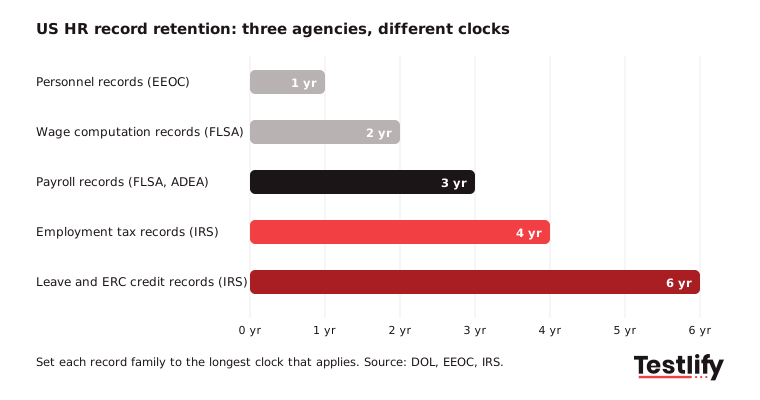
Two details catch people out. Under the EEOC recordkeeping rules, if a discrimination charge is filed, the related records must be kept until the charge or any lawsuit is finally disposed of, appeals included. Separately, according to IRS guidance, the four years count from when you file the fourth quarter return for the year, not from the pay date.
Pro tip: Set retention to the longest applicable clock per record family and configure it in the system, not in a policy document nobody opens. The common failure is deleting at one year because that is the number somebody remembered, while the FLSA and the IRS were still counting.
Core HR vs HRIS vs HCM: what is the difference?
Core HR, HRIS and HCM differ in scope. Core HR is the records layer, an HRIS adds workflows and reporting on top, and an HCM suite adds talent modules such as performance, learning and succession. Payroll is a neighbor that reads from all three rather than a replacement for any of them.
Category | What it covers | Typically a fit when |
|---|---|---|
Core HR | Employee records, time and leave, pay inputs, benefits data, compliance documents | You need the records right and nothing more |
HRIS | Core HR plus reporting, workflows, self-service and basic analytics | You have the records and now need to run processes on them |
HCM | HRIS plus talent modules: performance, learning, succession, sometimes recruiting | Several hundred employees and a dedicated HR team to configure it |
Payroll | Calculating pay, taxes, filings and payslips | Always needed; it reads from core HR rather than replacing it |
Buying HCM does not give you core HR for free. It gives you core HR you still have to configure, with modules you may not be ready for sitting next to it. Teams under a couple of hundred people often buy the suite and use only the records module, which is an expensive way to get a records module.
How do modern HR tools fit together?
Modern HR tools fit together as layers on one system of record. Core HR owns identity and employment facts. Every tool above it borrows those facts and adds its own. The integration question is always the same: which system owns each field, and which ones only read it.
Get that wrong and you land the most common HR tech failure, which is not a missing feature. It is two systems that both think they own job title, and a report nobody trusts. Across the teams we work with, the fix is one owner per field, written down. We have seen the same pattern in hiring data: when the ATS and the HRIS both edit start dates, onboarding slips.
Assessment tools: Core HR tells you who someone is and what they are paid. It says nothing about whether they can do the work. That evidence comes from the hiring layer, before the person becomes an employee record.
Performance tools: Performance software reads the current reporting line, job, level and start date from core HR. Reviews that run off a stale org chart go to the wrong manager. Keep ratings and notes in the performance tool; send back to core HR only the outcomes that change an employment fact, such as a promotion or pay change and its effective date.
Self-service and communication: Employee self-service is the part of core HR employees actually touch: update an address, download a payslip, request leave. Chat and announcement tools sit beside it. Anything that changes a record goes through the self-service form, not a message.
Engagement and analytics: Engagement tools need clean headcount and tenure data to slice results. Gallup's State of the Global Workplace data found only 20% of employees worldwide were engaged in 2025, so survey results matter, but a survey split by a wrong department field tells you nothing. Read more on using HR analytics for decisions.
Key takeaway: Map field ownership before you add a tool. Every new tool should read from core HR, not keep its own copy of the same fact.
What are the benefits of modern HR tools?
The benefits of modern HR tools are less manual admin, fewer data errors, faster answers for employees and records you can defend in an audit. Most of the gain comes from one authoritative record that every other tool reads.
- Less manual work: Onboarding, time tracking, leave and pay inputs run as workflows, so HR stops re-keying the same data into several systems. See where HR automation pays off.
- Time back for employees: Self-service lets people check balances, update details and request leave without opening a ticket.
- Better data accuracy: One record per fact removes the version conflicts between finance, managers and HR.
- Audit readiness: Retention periods, approvals and edit history live in the system, so you can produce records quickly when asked.
- Better decisions: Clean records make headcount, turnover and cost reports trustworthy enough to plan with.
How do you choose the right modern HR tools?
Choose modern HR tools by the processes that hurt most, in order, and ignore feature counts. Rank the six core HR process families by how much manual work each costs this quarter, then shortlist tools that do the top two unusually well. A tool that nails time and leave for a shift workforce beats a broader tool that treats it as a checkbox.
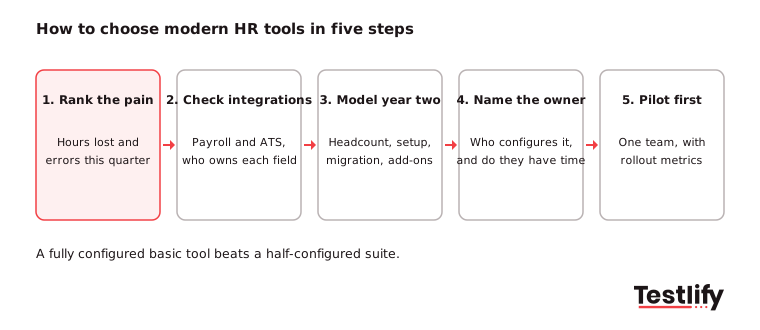
- Rank the pain: List the processes by hours lost and errors made this quarter. The top two set your shortlist.
- Check integrations: Confirm two-way sync with your payroll provider and ATS. Ask which fields each system owns.
- Model year-two cost: Price at your projected headcount, including implementation, migration and the modules not in the quote.
- Name the owner: Decide who configures it and confirm they have time for the next few months.
- Pilot before rollout: Run one department or one country first, with the metrics in the last section as the pass mark.
Four questions vendors tend to answer vaguely, so ask them before the demo:
- Which fields does your system own, and which can another system update through the API?
- Can retention periods be set per record type, and what happens at the end of one?
- What does migrating our existing records involve, and who does the work?
- What does this cost in year two, including the modules not in the quoted price?
Stack by company size: Under about 50 employees, a light core HR tool or your payroll provider's records module is enough. From 50 to 500, add a proper HRIS, an ATS with skills assessment and a performance tool. Above 500, expect an HCM suite or a best-of-type stack with a dedicated HRIS team.
Fast-growing companies: For a company heading from 25 to 200 people, weight time to working over time to signed, a clean export you can run yourself, multi-country support only where you actually hire, and per-employee pricing you can model. Resist performance and engagement modules until the records are clean, because they inherit every error.
Picture a 40-person agency hiring 10 people a quarter, running leave in a spreadsheet and offer letters from a template folder (an illustration, not a customer story). The best change is not an HCM suite. It is one system holding records, time and leave, wired to payroll, plus a consistent way to assess candidates before the offer. That is two tools, configured in weeks.
What breaks when core HR data is wrong?
Wrong core HR data breaks pay, leave, benefits and reporting, and pay errors carry a price. The Department of Labor's Wage and Hour Division recovered more than $259 million in back wages for 176,957 employees in fiscal year 2025, about $1,465 per worker. Back-wage findings are built on hours and pay records, and an employer who cannot produce them argues from a weak position.
The quieter failures cost less per incident and happen all the time:
- Leave balances that disagree between the system and a manager's own tracker.
- A benefits feed that missed a life event, so a dependent is not covered when a claim comes in.
- A termination date entered a week late, pushing final pay and a retention clock out of line.
- Reporting lines months out of date, so approvals go to someone who left.
- Headcount that differs between finance and HR, turning every planning meeting into a reconciliation.
Each of these is a data problem dressed up as a process problem. The fix is the same every time: one owner per field, one place it is edited, and a self-service path so the person closest to the fact updates it.
What should you measure after rolling out modern HR tools?
Measure administrative load after rollout, not whether the project finished. Set a baseline in the month before go-live, because nobody remembers how many payroll corrections they used to run.
- Payroll corrections per cycle: The cleanest signal that records and pay inputs agree. It should fall and stay low.
- Self-service completion rate: The share of address changes, leave requests and payslip downloads done without HR.
- Offer accepted to complete record: Days from accepted offer to a complete employee record. It exposes onboarding gaps.
- Required-field completeness: Check it against the DOL list of 14 pay-record items, not your own shorter list.
- Open HR tickets by category: Categories that do not shrink after go-live are the processes the tool did not fix.
Hire with evidence, not guesswork
Clean core HR records tell you who your people are. They cannot tell you whether the next hire can do the job. That part comes from assessing the skills the role needs before the offer goes out, so the record you create is backed by a decision you can defend. Browse the Testlify test library to see the tests for a role you are hiring now, or book a demo to see how results sync into your HRIS.
Frequently asked questions (FAQs)

Content Writer
Yashika Khandelwal is a Content Writer with 3+ years of experience creating research-backed content on hiring, talent assessment, and HR technology. She is a registered Organizational Psychologist and subject matter expert who combines behavioral science with practical recruitment insights to produce accurate, evidence-based content.
LinkedInRelated resources
View all
HR & recruitment
Best Benefits Administration Tools for HR Teams in 2026

HR & recruitment
Top HR management systems for 2026: 11 tools compared

HR & recruitment
How to conduct effective interviews

HR & recruitment
Reference Checks: Best Practices, Questions and Process

HR & recruitment
How to create a positive work culture

HR & recruitment
How to retain top employees
Get started.
Hire on proof, not resumes.
Run your first skills-based assessment free — no credit card required.