
How to hire UI designers: recruitment trends and assessment guide
UI designer hiring trends: focus on user-centric design, prototyping skills, collaboration, responsive design expertise, and adaptability to emerging tools.

TL;DR
- Start with the role, not the test. Write down the three or four competencies the job actually needs, then decide what evidence proves each one.
- The candidate pool is shifting under you. Graphic design work is shrinking while digital and product design grows, so a lot of polished portfolios belong to people who have never shipped a product screen.
- Judge the portfolio on decisions, not pixels. Ask what the candidate changed, why, and what happened next.
- Keep the work sample short, paid where you can, and scored against the same rubric for everyone. A long unpaid exercise mostly filters for who has free time.
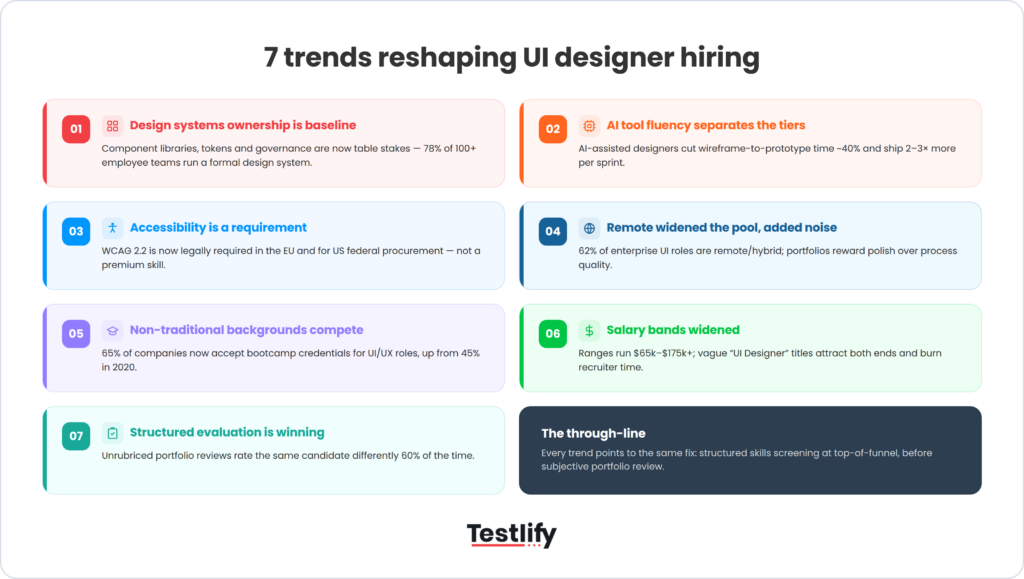
- Accessibility is part of the job now, not a bonus skill. Design roles in the EU and in anything sold into it are covered by real rules.
- Years of experience is the weakest thing on a resume. Stop leading your job description with it.
Hiring a UX or UI designer comes down to five decisions: what the role actually needs, where you look, how you read a portfolio, what you ask candidates to make, and how you interview. Get those right and the rest is scheduling. What follows is written for whoever is really running the search, usually a founder, a design lead, or a one-person talent team at an agency, a marketing team, or a product company under 200 people.
 ChatGPT
 Gemini
 Claude
 Grok
Grok Perplexity
What does a UX/UI designer actually do?
A UX/UI designer decides how a product works and how it looks, then proves those decisions with research and iteration. UX covers the structure: flows, information hierarchy, what happens when something goes wrong. UI covers the surface: layout, type, color, states, and the design system that keeps all of it consistent. Most job postings ask for both.
That combined title is the source of a lot of bad hiring. A team writes "UX/UI designer", interviews on visual craft, then wonders why nobody is doing research. Be honest about which half carries more weight in this role, and say so in the posting.
UX designer vs UI designer
A UX designer is accountable for whether the thing works: can a person finish the task, and how do you know. A UI designer is accountable for whether it reads clearly and holds together across screens and states. One person can carry both on a small product. On a bigger surface, splitting them is usually the better call, because research and systems work pull in different directions day to day.
There is a third title worth naming: product designer. In practice that usually means a UX-weighted designer who also owns some product strategy. If your role involves deciding what to build, not just how it should work, you are hiring a product designer and should write the posting that way.

Where does a UX/UI designer recruitment guide start?
Write the competencies before the posting. Pick three or four things this designer must be able to do in the first six months, name the evidence that would prove each one, and only then decide which assessment or interview question produces that evidence. This is the Testlify Competency-to-Evidence Matrix: map every role to the competencies that matter, then connect each competency to measurable evidence through assessments, simulations, interviews, references, and structured feedback. Do not start with a test. Start with the role.
Here is that matrix filled in for a mid-level UX/UI role on a small product team. Yours will differ, which is the point: a design role at a brand agency and a design role on a logistics dashboard need different evidence.
Competency | What it proves | Evidence source | How to score it |
|---|---|---|---|
Product thinking | Can frame a problem, not just decorate one | Portfolio walkthrough of one project, start to finish | Rubric: problem framing, options considered, decision, outcome |
Interaction and visual craft | Screens hold up across states and sizes | Short work sample on a brief close to your real product | Rubric: hierarchy, states covered, system consistency |
Research literacy | Knows what evidence is worth collecting and what it cost | Structured interview questions on a past study | Same questions, same order, scored per answer |
Accessibility | Can ship something a screen-reader user can finish | One targeted task or question set | Pass or fail against named criteria (contrast, focus order, labels) |
Handoff and collaboration | Engineers can build it without a translation layer | Reference check plus one interview question | Structured notes, not a gut call |
One thing to cut from your posting: the years-of-experience line. Broad experience measures, the "five or more years" kind, turn out to predict job performance poorly. A 2019 meta-analysis of prehire work experience by Van Iddekinge and colleagues in Personnel Psychology found that experience measured the usual broad way had little relationship with later performance. That is not an argument that experience is worthless. Relevant, demonstrated experience assessed directly still matters. It is an argument that the number of years is the wrong proxy for it, and that filtering on it throws away good candidates for no gain.
Where to start recruiting UX designers
Designers are easier to find than most roles, because the work is public. The trade-off is volume: a job board post for a remote design role can pull hundreds of applications in days, most of them unscreened.
- Portfolio communities. Dribbble and Behance are browsable by style and craft. Good for visual roles, weaker for research-heavy ones, because polished case studies are easy to stage.
- Referrals from designers you already trust. Still the highest hit rate, and the one most teams underuse. Ask your best designer who they would work with again.
- Design communities and newsletters. Slack and Discord groups around a tool or a city surface people who are not actively job hunting.
- Your own past applicants. If you hired for a design role in the last 18 months, your silver-medal candidates are the cheapest pipeline you have.
- Job boards. Fine for reach. Pair them with a screening assessment or you will spend the week reading resumes.
A caveat worth saying out loud, because it changes who you should be looking at. Classic graphic design work is contracting while digital design grows. The U.S. Bureau of Labor Statistics projects employment of graphic designers to decline 2 percent from 2025 to 2035, with median pay of $62,960 in May 2025. Over the same decade it projects employment of web developers and digital designers to grow 5 percent, faster than the 3 percent average across all occupations, with median pay of $99,520 in 2025.
So the pool you are sourcing from includes a lot of capable people moving across from print, brand, and marketing design. Many of them are excellent. The risk is specific and easy to test for: a beautiful portfolio built from brand work does not tell you whether someone can handle an empty state, a validation error, or a settings page that nobody will ever praise. Test for the boring screens.
What skills should you look for?
Look for four things, in this order: can they frame a problem, can they make a decision and defend it, can they build something clear and consistent, and can they work with engineers without drama. Tool knowledge sits below all of that. Figma fluency is a week of learning for a strong designer and a permanent ceiling for a weak one.
Specific competencies worth naming in the posting, as opposed to listing every tool you own:
- Flows and information hierarchy. Can they show you a messy flow they simplified, and say what they removed.
- Design systems. Components, tokens, states, and the discipline to use them rather than reinventing a button.
- Research literacy. Not necessarily running studies. Knowing which question a study can answer, and reading someone else's findings without over-claiming.
- Accessibility. Contrast, focus order, labels, keyboard paths. See the section below on why this stopped being optional.
- Writing. Interface copy is design work. A designer who writes a clear error message saves you a support ticket.
- AI tool fluency. Treat it as a competency to assess rather than a box to tick: can they use the tools to explore more options faster, and do they know when the output is wrong.
The Testlify AI-Era Capability Framework is the one to reach for if that last point is central to your role: it evaluates whether candidates can perform in human plus AI workplaces by measuring role skills, problem-solving, communication, judgment, adaptability, and responsible AI fluency.
How should you review a design portfolio?
Read a portfolio for decisions, not for polish. Pick one project, and ask the candidate to walk it from the brief to what shipped and what happened after. You are listening for four things: what problem they thought they were solving, what options they rejected, why they chose what they chose, and how they found out whether it worked.
Polish is the easiest part of a portfolio to fake and the least predictive thing in it. A case study can be rewritten until it reads like a strategy document. What holds up under questioning is the mess: the constraint they could not design around, the thing they got wrong and caught, the handoff argument they lost.
Two process rules make portfolio review much more reliable, and both are about taking the decision out of the room's gut feeling:
- Score against a written rubric, before you discuss. Each reviewer scores independently, then you compare. Research on mechanical versus clinical data combination, a 2013 meta-analysis by Kuncel and colleagues in the Journal of Applied Psychology, found that combining assessment information mechanically generally predicts outcomes as well as or better than experts recombining the same information holistically. The practical reading of that is narrow and useful: do not let a confident voice in the debrief re-rank the scores you already collected.
- Ask the same questions of every candidate. It feels stiff. It is also the only way your comparison means anything.
Pro Tip: Ask for one project the candidate is not proud of, and what they would do differently. Strong designers answer this in detail and without defensiveness, because they have thought about it already. It is the single most useful question in a portfolio review, and almost nobody prepares for it.
Should you give a design work sample?
Yes, with limits. A short, job-relevant work sample tells you more than another conversation. Work sample tests do show meaningful predictive validity, as a 2005 meta-analysis by Roth, Bobko, and McFarland in Personnel Psychology set out, though that same literature revised earlier, more enthusiastic estimates downward.
The part teams skip is that none of this makes a work sample automatically valid. Its value depends on whether the task is genuinely job-relevant, whether it is standardized across candidates, whether the scoring is reliable, whether the difficulty is right, whether it is accessible, and whether the burden on the candidate is proportionate. Get those wrong and you have a long exercise that measures free time.
What a good design work sample looks like in practice:
- 90 minutes, hard cap. If it needs a weekend, you are asking for free consulting and your best candidates will decline.
- A brief close to your real product, with a deliberate constraint. One screen, one flow, or a redesign of something unglamorous.
- Submitted the way designers actually work. A Figma link or a file, not a form.
- Paid, if your budget allows it, and especially if you want more than 90 minutes.
- Scored on a rubric you wrote first, by at least two reviewers.
Testlify ships 25 question types, and the one that fits design work is the practical or hands-on question: candidates submit by file upload, a URL, or both, so a Figma link or an exported file lands in the same place as the rest of their assessment. Weighted scoring lets you set each test's influence from x1 to x5, so a work sample can count for more than a knowledge check without you doing arithmetic by hand. Scores can be compared across candidates and across reviewers, which is what makes an independent-scoring rule enforceable rather than aspirational.
Interview questions that show real design work
Structure the interview and ask everyone the same things. Across every major reanalysis of selection research, the ranking that survives is that structured interviews sit among the strongest predictors of job performance, while years of education and general years of experience sit among the weaker ones (Sackett, Zhang, Berry, and Lievens, 2022, Journal of Applied Psychology). The exact coefficients are still argued over in print. The ordering is not.
Questions that tend to produce real answers:
- Walk through the research on a project you shipped. What did you expect to find, and what surprised you?
- Tell us about a design decision that turned out to be wrong. How did you find out, and what did you do?
- Show a flow you simplified. What did you take out, and what broke when you did?
- How do you hand work to engineers? What goes in the file, and what gets a conversation?
- Describe a time you disagreed with a product decision. What happened?
Keep the panel small and the process short, usually 3 rounds: a portfolio walkthrough, a work sample review, and a team conversation. Designers compare notes about hiring processes more than most candidates do, and a five-round loop for a mid-level role reads as a team that cannot make a decision. For a longer question bank to pull from, there is a list of interview questions for UI/UX designers that pairs with the rubric approach here.
What does it cost to hire a UI/UX designer?
Budget against a real benchmark rather than a number from a salary aggregator. For the occupation that covers digital designers, BLS reported median pay of $99,520 in 2025, against $62,960 for graphic designers. That is a gap of $36,560 between two groups of people who both call themselves designers, which is the clearest signal there is that these are different jobs. Those are national US medians across broad groups, so treat them as a floor and a sanity check, not as your band. A senior product designer in a high-cost market, or anyone who genuinely owns a design system, prices well above the median.
Three cost drivers that move the number more than seniority does:
- Scope. A designer who also does research, writing, and front-end tweaks is three partial roles, and the market prices that.
- Design-system ownership. Building and maintaining one is specialist work and commands a premium.
- Location and contract type. Freelance day rates and in-house salaries are not comparable without adding your overhead.
The cost nobody budgets for is the mis-hire. A design hire who cannot frame a problem does not fail loudly in month one. They produce screens, the team keeps shipping, and the product quietly gets harder to use for a year. That is an expensive, slow failure, and the only cheap defense against it is evidence collected before the offer.
Accessibility and design systems: the new baseline
Accessibility is a job requirement now, not a differentiator you can hope for. The technical standard teams design against is WCAG, and the current stable version is WCAG 2.2, published by the W3C as a Recommendation on 5 October 2023. In the EU, the European Accessibility Act sets shared accessibility requirements across member states for a defined list of products and services (e-commerce, banking services, e-books, transport, and telephony among them). If your product touches any of those in Europe, accessibility competence on your design team is not a nice-to-have.
Most teams test for this badly, by asking "do you know accessibility?" in an interview. Everyone says yes. Ask instead for something concrete: the focus order on a form they built, how they handled an error state for a screen-reader user, or what they did when a brand color failed contrast. The answers separate people fast.
Design systems are the other baseline. A designer who works in components and tokens is faster by their third month and leaves behind work the next person can pick up. One who reinvents every screen leaves you with a product that looks like six products. Ask to see a component they documented, not just used.
Red flags in UX UI recruitment
Most failed design hires are visible in the process, if you are watching for the right things rather than for polish.
- Every case study ends in a win. Real projects get cut, descoped, and shipped half-finished. A portfolio with no scars has been edited into fiction.
- No "why", only "what". A walkthrough that describes screens instead of decisions usually means the decisions were someone else's.
- Cannot say what happened after launch. Not every designer gets good measurement. But total indifference to whether the work succeeded is a bad sign.
- Tool list as skill list. A resume that leads with 11 tools and no outcomes is a resume with nothing to say.
- Defensive about feedback. You are hiring someone who will be critiqued weekly.
And two red flags on the hiring side, because designers judge your process too: an unpaid multi-day exercise, and a loop where nobody who does design work is in the room. Both cost you the candidates you most wanted.
The honest limit on all of this: a structured process does not make hiring certain. It makes it comparable, which is the most any hiring team actually gets. Two reviewers, one rubric, and the same questions in the same order will not find you a genius. They will stop you from mistaking a confident presenter for a strong designer, and that is where most design hiring goes wrong.
Hire your next designer on evidence
Pick the three competencies that matter most for your role, decide what proof each one needs, and build the loop backwards from there. If a skills assessment is the piece you are missing, the UI/UX design assessment covers the interface and usability side, and there is a Figma test for tool-specific screening. For the wider argument behind this approach, see how skills-based hiring changes talent acquisition. Or book a demo and we will set the assessment up against your role.
FAQs
Related resources
View all
HR & recruitment
Top 7 recruitment trends in event planner hiring

HR & recruitment
Top 7 recruitment trends in network administrator hiring

HR & recruitment
How HR can support sales employees: a 2026 guide for HR and sales leaders

HR & recruitment
Top 7 recruitment trends in data analyst hiring

HR & recruitment
Top 7 recruitment trends in marketing manager hiring

HR & recruitment
Top 7 recruitment trends in business analyst hiring
Get started.
Hire on proof, not resumes.
Run your first skills-based assessment free — no credit card required.