
How to prevent impostors in video interviews?
Learn how to stop impostors in video interviews with simple checks, proctoring tools, and AI safeguards to protect hiring integrity.

 ChatGPT
 Gemini
 Claude
 Grok
Grok Perplexity
TL;DR
- By 2028, one in four candidate profiles worldwide will be fake, per Gartner. This number is already showing up in your pipeline right now, not in some distant future.
- Deepfake fraud attempts in hiring jumped 1,300% from 2023 to 2024 alone. A convincing fake video takes as little as 70 minutes to build, per Palo Alto Networks research.
- Human detection on its own has stopped working as a reliable method. Around 17% of hiring managers have met a deepfake candidate on a live call. Most had no idea until it was too late to act.
- The signals most recruiters watch for are the easiest ones for impostors to fake on a call. Camera issues and polished answers are surface-level tells that experienced fakes bypass easily. Real catches come from gesture tests, cross-round checks, and questions that demand specific personal memory.
- Proxy fraud spikes sharply on roles where interviews rely only on pre-submitted work. Crosschq data shows a 50% to 200% rise in proxy candidates concentrated in exactly those roles.
- Background checks do not catch video impostors during the live call itself. They verify past work history but do not confirm who is on screen right now. Live ID checks are a separate and critical layer you must add.
- One detection method alone will not stop a motivated fake candidate in your pipeline. Stack four layers: a pre-call ID check, a monitored skills test, a live structured interview, and a cross-round review.
- One bad proxy hire costs an average of $28,000 in direct incident costs, per Crosschq. That figure does not include data theft or breaches when the impostor had goals beyond collecting a paycheck.
Right now, 31% of hiring managers say they have personally interviewed a candidate using a fake identity. Deepfake fraud and proxy interview attempts in hiring jumped 1,300% from 2023 to 2024, according to Pindrop’s 2025 Voice Intelligence and Security Report.
If you run video interviews as part of your hiring process, impostors are not a future problem. They are your most pressing hiring problem right now.

What does “impostors in video interviews” mean?
An impostor in a video interview is someone pretending to be the real candidate. Instead of showing up as themselves, they resort to tricks or rely on others to pass the interview.
This can happen in different ways:
- Proxy interviews: a stand-in answers questions on behalf of the real applicant.
- Hidden help: the candidate listens to answers fed through a headset or a second device.
- Fake documents: forged IDs or certificates are shown to support a false identity.
- Deepfake or AI filters: candidates use technology to alter an individual’s appearance or voice so the recruiter sees and hears a different person.
The rise of remote-first hiring has made these tactics easier. Organized groups even sell “interview faking services” to job seekers.
The FBI has warned that deepfakes and stolen IDs are being used in job applications, and Gartner predicts that by 2028, one in four candidate profiles could be fake.
HR departments are now on the front lines of filtering out fraudsters during virtual interviews. – Abhishek Shah, Founder, Testlify
What risks do impostors create for employers?
Impostors in video interviews cause more than just inconvenience. They can expose companies to costly and sometimes serious risks.
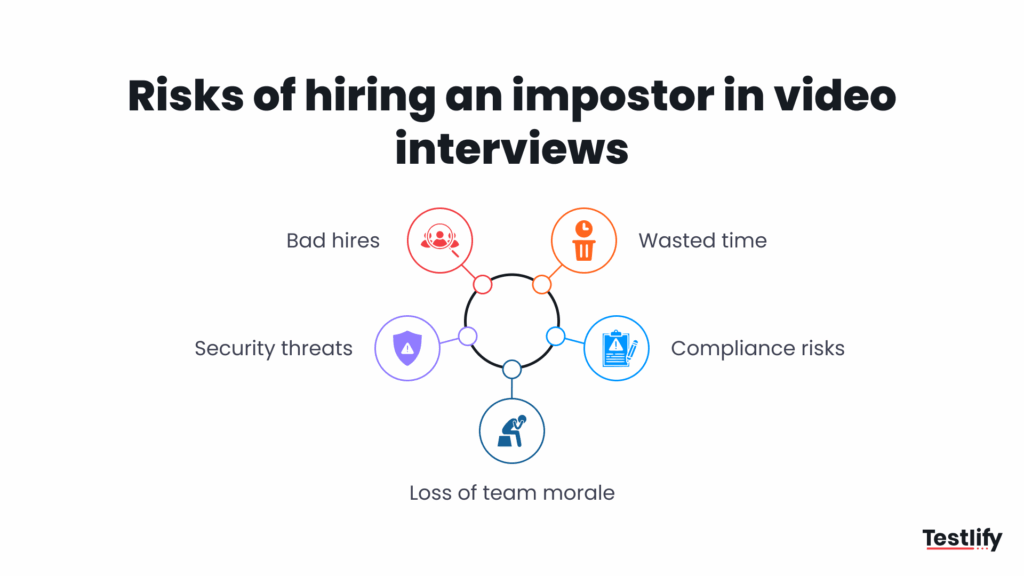
1. Bad hires and wasted resources
If a fake candidate makes it through the online assessment, the employer ends up with someone who lacks the real skills. This leads to poor performance, lower productivity, and the need to restart the hiring process.
2. Security and insider threats
Impostors may gain access to sensitive data, systems, or customer information. The FBI (2022) reported cases where deepfakes and stolen IDs were used to land remote jobs, raising the risk of insider fraud and data leaks.
3. Compliance and legal exposure
In regulated industries like finance, healthcare, or higher education, hiring an impostor can lead to compliance violations.
Employers may breach GDPR or FERPA rules if identity checks are weak, or even face sanctions violations if fake candidates are tied to restricted entities (as seen in the DOJ’s 2023 warning about North Korean IT workers).
4. Team disruption and loss of trust
When an unqualified hire is exposed, it affects team morale and damages trust in the hiring process. Managers and colleagues lose confidence if they feel the screening process is flawed.
What are the red flags of an impostor in a video interview?
Impostor candidates in video interviews follow clear and repeatable behavior patterns across live calls, submitted materials, and cross-round comparison checks. The signals most recruiters watch for are the easiest ones for an experienced fake to bypass.
Real detection comes from layering behavioral cues, live tasks, and consistency reviews against earlier rounds. Around 17% of hiring managers have already met a deepfake candidate on a live call, and 32% of HR professionals report catching deliberate misrepresentation in the hiring process, per SHRM.
Behavioral signals to watch during the live call
Watch closely for these specific signals during any live video interview call.
- Answers sound scripted, with no natural pauses or personal stories attached to them.
- The face shows small glitches around the mouth and hairline edges on screen. Look at the face edges, not the center, to spot deepfake tools.
- A camera that keeps having issues is one of the oldest tricks used in fake interviews.
- Candidates reading from a script rarely hold steady eye contact with the camera.
- Small delays between lip movement and audio are a signal of real-time video editing tools at work.
- A detailed resume paired with an inability to explain basic ideas is a red flag. It is one of the clearest early signals of a fake candidate on screen. Real experts can explain their work clearly and in plain terms without hesitation. Fake candidates stall and give vague answers when pressed for details.
Pro Tip: Ask candidates to walk you through a project decision they regretted making. AI tools and proxy interviewers struggle with specific, emotional, first-person questions that require real memory.
Live work simulation
One of the most effective checks is a simple live work simulation test. Ask the candidate to do something physical and be surprised them on camera right now. Have them hold up their ID card, tilt their head, or write their name on paper.
Deepfake tools are built to handle a still and steady face on screen. They break down fast when asked to track sudden or surprise movements in real time.
What tools and protocols help prevent impersonation?
There’s no single fix for impostors in video interviews. But if you use the right mix of tools and a clear process, it becomes very hard for a fake candidate to get through.
Identity verification tools
Before or during an interview, employers can confirm the candidate’s identity with document checks and liveness detection. These tools compare a photo ID with a live camera feed and ensure the person is real, not a recording or manipulated image.
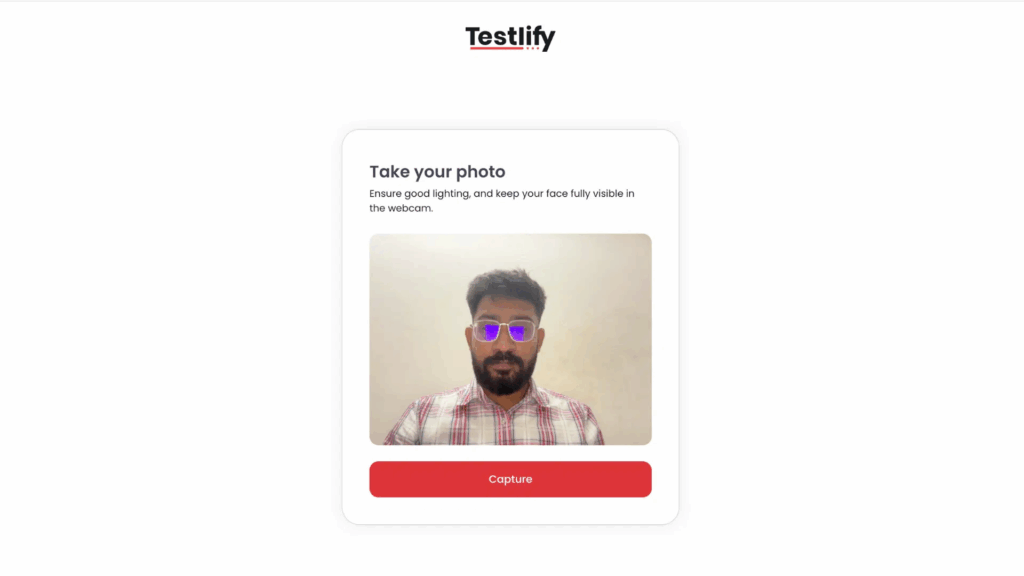
With Testlify, this step is built right into the workflow. Candidates are asked to confirm their identity before they start any test, so there’s no gap between assessment and verification.
Because assessments, proctoring, and ID checks are all centralized, recruiters don’t have to juggle different tools. It keeps the process smooth for both the hiring team and the candidate.
AI-powered monitoring
Modern platforms use AI interviews to flag unusual patterns during interviews. This includes lip-sync mismatches, sudden audio glitches, or signs that someone else is helping off-screen. These checks run in the background so interviewers can focus on the conversation.
Secure proctoring features
Proctoring used to be something people only connected with exams. But in hiring, the risks are very similar.
A candidate might try to use a second device, get answers from someone else, or even run another screen in the background. That’s why proctoring has become just as important in interviews as it is in tests.
Here’s how it works:
- Live environment scans shows both the candidate and their surroundings, making it harder for anyone off-camera to feed answers.
- Full-screen enforcement keeps the focus on the interview window and blocks candidates from opening other apps or browsers.
- Copy-paste blocking stops them from pulling in pre-written answers.
- Optional screen sharing lets interviewers confirm what’s happening on the candidate’s device in real time.
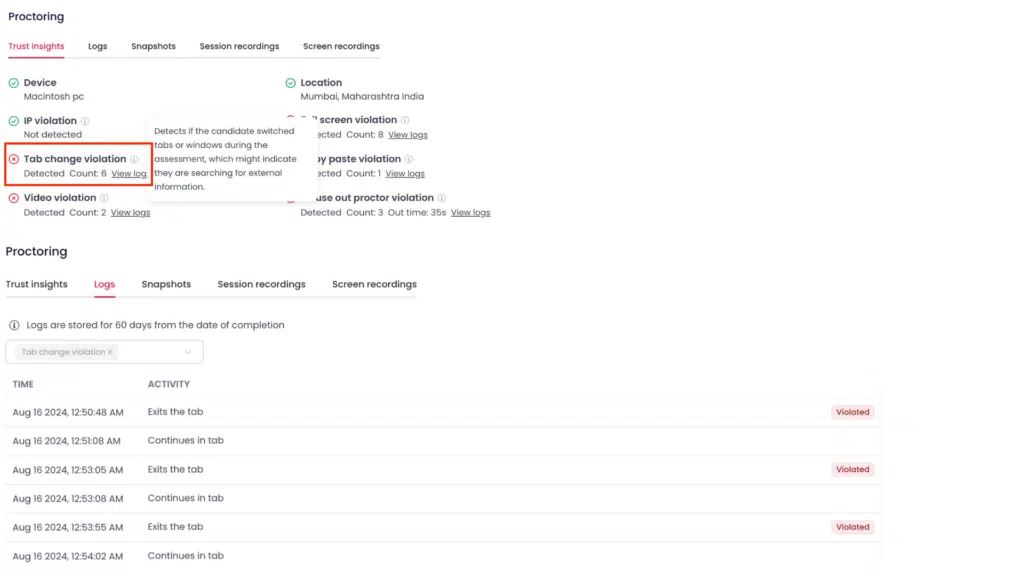
With Testlify, all of this is built into the same workflow as the interview. That means you don’t have to switch between tools or ask candidates to install extra software.
When a candidate joins, the proctoring features run quietly in the background while you conduct the interview.
Explore More: What is AI-powered proctored?
Structured interview protocols
A structured interview makes it harder for impostors to fake their way through. Employers should always include at least one live video round, mix in role-specific or unscripted questions, and ask candidates to perform short skill tasks on camera.
These steps quickly show whether someone has real experience or is just repeating prompts.
With Testlify, you can take this further. Its AI video interview feature lets you add tailored video or audio questions into the assessment flow. This means you will get to see how they explain ideas, how confident they sound, and how clearly they communicate.
This combination of structure, live checks, and AI-powered video responses makes it much harder for impostors to hide and gives hiring teams a more complete view of the candidate.
Testlify brings many of these safeguards into one platform. You can run AI-powered video and audio interviews, backed by built-in proctoring features like dual camera, tab tracking, and screen-share.
With a 3,500+ test library and GDPR/FERPA alignment, it helps teams confirm skills and identity in a secure, fair way.
How do you build a fraud-resistant video interview process?
No single tactic stops a motivated impostor on its own. A fraud-resistant video interview process stacks four distinct layers: a pre-call identity check, a monitored skills test, a structured live interview with physical verification, and a cross-round consistency review comparing behavior, voice, and answers across every stage of the process.
The 4-layer anti-impostor framework
Layer 1 – Pre-screening identity checks Require candidates to submit a clear government photo ID before any interview slot is booked. Check it against LinkedIn, listed documents, and references before the first call takes place.
Layer 2 – Monitored skills check Run a proctored online test before the video interview stage begins. Lock the browser window so candidates cannot search for answers during the test. Watch the webcam feed throughout the test for signs of coaching or a second person nearby. Flag any copy-paste activity or signs of a second device in use. Run a proctored Testlify assessment (https://app.testlify.com/register) before the first interview to build your question foundation from verified evidence.
Layer 3 – Structured live video interview Start with a live identity check at the top of the call. Use real-time tasks and live problem-solving exercises throughout the interview session. Ask questions that require specific personal answers drawn from real experience. Record the full session so your wider hiring team can review the footage afterward.
Layer 4 – Cross-round consistency check Compare the candidate’s voice, face, and answers across every round in the process. Clear differences between rounds are the strongest signal of proxy fraud in action.
Pro Tip: Build a running profile of each candidate that you update across every round of interviews. Note the specific phrases, project names, and personal examples the candidate uses in each round. Ask them to return to one of those examples in the next round. Real candidates remember their own stories and can expand on them with ease when asked. Proxy candidates do not and will stumble when asked to go deeper.
Conclusion
Interview impostor fraud is a problem your team can solve with the right system in place. One bad hire costs an average of $28,000 in direct incident costs alone, and that figure does not include security breaches when the impostor had goals beyond collecting a paycheck.
Start by reviewing your current process against the four-layer framework above. Then run a monitored skills assessment to confirm what candidates can actually deliver beyond what they claim on screen.
Frequently asked questions (FAQs)

B2B SaaS Content Writer
Rishav Kumar is a B2B SaaS content writer with 4 years of experience. He loves crafting engaging content. Always exploring fresh ideas, he's passionate about helping businesses grow through impactful writing.
LinkedInRelated resources
View all
Hiring Risks & Safeguards
Resume Fraud Verification: How to Detect Fake Resumes Before the First Interview (2026)

Hiring Risks & Safeguards
How to stop cheating in online tests?
Hiring Risks & Safeguards
How do platforms handle GDPR compliance for candidate data?

Hiring Risks & Safeguards
The real cost of a slow hiring process
Hiring Risks & Safeguards
Are traditional background checks enough for HR compliance?

Hiring Risks & Safeguards
Post-hire employee monitoring and behavioral analysis
Get started.
Hire on proof, not resumes.
Run your first skills-based assessment free — no credit card required.