
AI in HR: use cases, benefits, risks and how to start
How HR teams use AI from hiring to payroll, what it saves, where it goes wrong, which laws apply and a six-step plan to roll it out safely.
AI in HR is the use of artificial intelligence to handle, speed up or inform human resources work: screening and assessing candidates, answering employee questions, running payroll checks, planning the workforce and spotting attrition risk. The AI drafts, sorts, scores and predicts. People keep the decisions about who gets hired, promoted, paid or let go.
TL;DR:
- AI in HR means software that drafts, sorts, scores and predicts across hiring, onboarding, HR service, payroll, learning and workforce planning, while people keep the final decisions.
- SHRM's 2026 research found 39% of organizations use AI in HR, rising to 60% at companies with 5,000+ employees. Recruiting is the most common use.
- 87% of HR professionals using AI report better efficiency, but about half see no improvement in decision quality, so AI pays off fastest on volume work.
- The main risks are biased scoring, privacy, wrong answers and weak governance. Just under half of organizations have a formal AI policy.
- NYC Local Law 144 already requires bias audits and candidate notice for hiring tools. EU AI Act rules for employment AI apply from 2 December 2027.
- Start with one high-volume, low-risk process, put a human checkpoint before every people decision, pilot it, then measure hours saved and quality before you scale.
 ChatGPT
 Gemini
 Claude
 Grok
 Perplexity
What is AI in HR?
AI in HR is a set of tools that learn from data and language to take repetitive work off HR teams and give them better information for decisions. Typical examples are an assistant that answers leave questions at 2 a.m., a screener that ranks applicants against the job's skills, and a model that flags which teams are at risk of losing people.
AI in HR is not a robot HR manager. A good way to think about it: automation follows fixed rules ("send the offer letter when the contract is signed"), while AI handles work that needs judgment on messy inputs, such as reading a resume, summarizing a service desk call or drafting a job description. Most HR software now mixes both. For the rule-based side, see our guide to HR automation.

What types of AI are used in HR?
AI used in HR falls into six families. Most HR products combine two or three of them, so knowing the family helps you ask vendors the right questions.
Type of AI | What it does in HR | Example |
|---|---|---|
Generative AI | Writes and summarizes text | Job descriptions, policy drafts, interview questions, case summaries |
Conversational AI | Holds a natural-language conversation by chat or voice | HR help desk assistant, AI interviews |
Natural language processing (NLP) | Reads and tags large amounts of text | Resume parsing, survey comment analysis, sentiment detection |
Predictive analytics | Finds patterns in past data to forecast | Attrition risk, hiring demand, skills gaps |
Automation and RPA | Moves data and triggers steps by rule | Payroll inputs, onboarding tasks, record updates |
AI agents | Plan and carry out multi-step tasks with tools | Book interviews, enroll benefits, chase missing documents |
Generative AI in HR gets the headlines, but predictive analytics and NLP have been inside HR software for years. Agentic AI in HR is the newest family: agents act on your systems, so they need the tightest permissions.
How is AI used in HR?
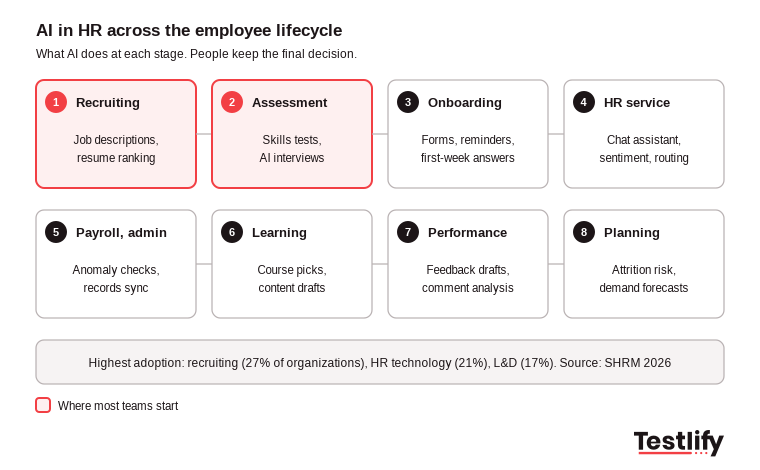
AI is used in HR at every stage of the employee lifecycle, from the first job post to the exit survey. The uses below are the most common ones in 2026, starting with recruiting, where adoption is highest.
Recruiting and candidate screening
Recruiting is where most teams start with AI. AI writes and checks job descriptions, searches for candidates, ranks resumes against the role's skills, schedules interviews and answers candidate questions. SHRM's 2024 Talent Trends survey found that among employers using AI in HR, 64% used it in talent acquisition, and 65% of those used it to write job descriptions. Our guide on AI in recruitment goes deeper on this stage.
Skills assessment and interviews
AI now builds role-specific tests from a job description, runs structured first-round interviews by video, voice or chat, and scores every answer against the same criteria. Skills tests and structured interviews give AI something fair to score, which is safer than letting a model guess at "fit" from a resume. See how to use AI in recruiting without losing control of important hiring decisions.
Onboarding
Onboarding assistants send the right forms, policies and training to each new hire, answer first-week questions and remind managers of their tasks. Generative AI can also nudge people proactively, for example reminding a new hire that a benefits enrollment deadline is three days away.
HR service desk and employee support
The HR service desk is the second big use. An HR chatbot answers routine questions about benefits, payroll, leave and policies around the clock, so HR specialists handle the complex cases. Modern assistants go further:
- Conversational, multi-turn answers: NLP lets the assistant understand questions in plain language, ask follow-ups and handle voice as well as text.
- Sentiment detection: When a message sounds frustrated, for example about a benefits problem, the case is escalated to a person with the history attached.
- Predictive support: If questions about remote work policy spike every January, the assistant can publish the answer before the tickets arrive.
- One history across channels: The same assistant works in the HR portal, chat, email and mobile app, so employees never repeat their details.
- Agent assist: For HR staff, AI surfaces the right policy, summarizes the employee's history, suggests a reply and sorts tickets by urgency.
- Call summaries: Generative AI summarizes service desk calls and pulls out the facts and next steps.
Payroll and HR administration
AI checks payroll inputs for anomalies, calculates deductions, prepares reports and keeps employee records in sync between systems. Payroll errors are expensive and visible, so this is a use case where AI flags issues and a person approves the run.
Learning and development
AI recommends courses based on a person's role and skills gaps, drafts training content and tracks progress. SHRM's 2026 research puts learning and development third among HR areas using AI, at 17% of organizations.
Performance management and engagement
AI helps managers write clearer, more specific feedback, summarizes a year of check-ins and analyzes survey comments, forum posts and chat transcripts for themes. Used well, the analysis shows HR where policies or processes are causing friction.
Workforce planning and people analytics
People analytics models forecast hiring demand, flag teams with rising attrition risk and map current skills against future needs for workforce planning. These forecasts work only as well as the data behind them, so clean, connected HR data comes first.
How widely is AI used in HR in 2026?
AI use in HR has grown fast but is still far from universal. SHRM's State of AI in HR 2026 report, a survey of 1,908 HR professionals, found that 39% of organizations use AI in their HR function, and 60% of organizations with 5,000 or more employees do.
HR area using AI | Share of organizations |
|---|---|
Recruiting | 27% |
HR technology | 21% |
Learning and development | 17% |
Organizational design, inclusion and diversity | 5% or less |
Employees are often ahead of their employers. Gallup's late 2025 survey of 23,068 US workers found that 45% use AI at work at least a few times a year, 23% use it a few times a week or more and 10% daily, yet only 37% say their organization has officially implemented AI. For HR, that gap means people are already using AI tools on employee data, with or without a policy.
What are the benefits of AI in HR?
The benefits of AI in HR come mostly from time saved on repeat work and from more consistent decisions. SHRM's 2026 research reports that 87% of HR professionals using AI see improved efficiency and 75% see improved work quality. Decision-making results are mixed, with about half seeing no improvement.
- Time back for people work: AI takes over screening, scheduling, routine questions and report building, so HR spends more time with managers and employees.
- Lower cost per task: Fewer manual hours per hire, ticket or payroll run, and fewer costly errors to fix later.
- More consistent, fairer decisions: Every candidate or employee is judged on the same criteria, which supports unbiased recruitment when the criteria are job-related.
- Faster answers for employees: Questions get answered in seconds at any hour, and complex cases reach a specialist faster.
- Better use of data: AI turns HR data into trends leaders can act on. Our guide to using data for talent management decisions covers the basics.
- Clear, repeatable rules: The same policy answer and the same process every time builds trust, and every step is logged.
- Personalized employee experience: Learning, onboarding and support adjust to each person's role and needs.
Key takeaway: AI pays off fastest on high-volume, rules-heavy work such as screening, scheduling and HR service. Treat its decision support as a second opinion, not the answer.
Which HR systems does AI work inside?
AI in HR rarely arrives as a separate product. It is usually a layer inside the systems HR already runs, which is why integration matters as much as the AI itself.
HR system | What it does | What AI adds |
|---|---|---|
Tracks applicants and hiring stages | Resume ranking, candidate matching, interview scheduling | |
HRIS or HRMS | Holds employee records | Data quality checks, analytics, attrition prediction |
Lets employees update details, see pay stubs, request leave | Chat assistant that answers and completes requests | |
Calculates pay, deductions and taxes | Anomaly detection, automated reports | |
Tracks goals, reviews and feedback | Feedback drafting, review summaries, comment analysis | |
Delivers and tracks training | Course recommendations, content drafting |
Before buying, check that a new AI tool reads from and writes back to these systems. A tool that cannot sync becomes one more place for data to go stale.
What are the challenges and risks of AI in HR?
The challenges of AI in HR fall into two groups: risks from the AI itself and problems with adoption. SHRM's 2026 research found that just under half of organizations have a formal AI policy, and less than half of HR functions are involved in their company's AI strategy.
- Bias and fairness: Models trained on past decisions can repeat past bias. Audit outcomes by group and keep the scoring criteria job-related.
- Privacy and data security: HR data is among the most sensitive a company holds. Limit what the AI can access, encrypt it and keep audit logs.
- Wrong or outdated answers: An assistant that quotes last year's leave policy damages trust fast. Connect it only to approved, current sources.
- Low transparency: If no one can explain why a candidate was ranked low, the decision is hard to defend. Prefer tools that show their reasons.
- Over-reliance: Empathy and context still matter in performance, conflict and exit conversations.
- Integration effort: New AI has to work with the ATS, HRIS and payroll you already have, which takes planning.
- Learning curve and buy-in: Some people resist new tools. Explain what changes for them and why, and keep training going after launch.
Which laws apply to AI in HR?
Laws on AI in HR focus on hiring and employment decisions, and they are tightening. Three sets matter most for mid-market and enterprise employers:
- New York City Local Law 144: Since 5 July 2023, employers using an automated employment decision tool for NYC roles need a bias audit within one year before use, a public summary of the results and notice to candidates.
- The EU AI Act: AI used for recruitment and worker management, such as CV-sorting software, is classed as high-risk. After the AI Omnibus took effect on 27 July 2026, the high-risk rules for employment apply from 2 December 2027. Emotion recognition in the workplace has been banned since February 2025.
- US state laws: SHRM counted 19 states with AI-related workplace laws at the time of its 2026 research, yet 57% of HR professionals in those states did not know about them.
Ask every vendor for its latest bias audit, how candidates are told about AI and where a person reviews the result. Testlify publishes its NYC bias audit for this reason.
What should HR automate and what should stay human?
HR should automate repetitive, rules-based and high-volume tasks and keep people in charge of decisions that change someone's job, pay or career. A simple test: if the outcome would need explaining to a lawyer or an employee in tears, a person decides.
Let AI do it | AI assists, a person decides | Keep it human |
|---|---|---|
Interview scheduling | Shortlists and candidate rankings | Final hiring decisions |
Routine policy and benefits answers | Performance review summaries | Layoffs and terminations |
Job description first drafts | Promotion and pay recommendations | Grievances and conflict |
Payroll anomaly checks | Attrition risk flags | Sensitive health or family cases |
Onboarding reminders and forms | Learning recommendations | Culture and leadership choices |
Pro tip: Write the human checkpoint into the process, not just the policy. If a person must approve every AI rejection, make the system require that click before the email goes out.
How do you implement AI in HR?
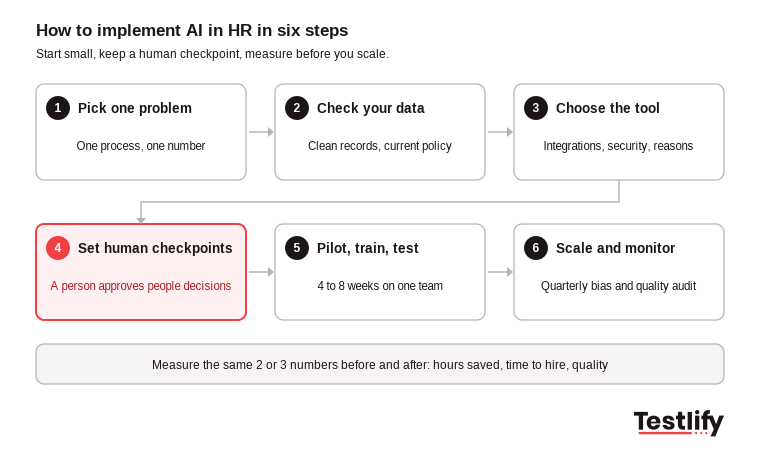
Implementing AI in HR works best as a staged rollout, not a switch-flip. In our work with hiring teams, we have seen pilots succeed when the team agrees on success measures before the tool goes live.
1. Start with one problem
Identify a high-volume, low-risk HR process where AI can make a measurable difference. Start with tasks such as first-round candidate screening or answering employee leave queries, and set one clear performance metric to improve.
2. Prepare your data
Review and clean the employee records, recruitment data and internal policies the AI will rely on. Outdated, incomplete or inconsistent information can lead to inaccurate results and misleading recommendations.
3. Choose the right AI tool
Evaluate tools based on your specific requirements, integration capabilities, security certifications and ability to explain their outputs. Prioritize practical functionality over lengthy feature lists.
4. Establish human checkpoints
Define which decisions require human review and where employees or candidates need human support. Be transparent about where AI is being used and how its outputs influence decisions.
5. Pilot, train and test
Start with one team or job role and run a pilot for four to eight weeks. Train employees to use the tool, compare its performance against the existing process and address any issues before expanding its use.
6. Scale and monitor performance
Expand implementation across other teams once the pilot delivers consistent results. Audit outcomes for potential bias every quarter and update or retrain the AI as business requirements and internal policies evolve.
HR teams also need their own AI skills. Short training on prompting, checking outputs and data privacy helps, and EU employers already have an AI literacy duty under the AI Act.
How do you measure the ROI of AI in HR?
The ROI of AI in HR is measured by comparing time, cost and quality before and after the rollout for the process you changed. Track two or three numbers per use case and report them every month.
Use case | Measure before and after |
|---|---|
Screening and assessment | Time to hire, recruiter hours per hire, quality of hire after 90 days |
AI interviews | Time to shortlist, candidate completion rate, candidate satisfaction |
HR service desk | First response time, first-contact resolution rate, tickets per HR specialist |
Payroll | Error rate, correction hours per run |
Learning | Course completion, time to proficiency |
Retention analytics | Regretted attrition in flagged teams |
Count the costs too: licences, integration work, governance time and training. A tool that saves 10 hours a week but needs 8 hours of checking is not a win yet.
What is the future of AI in HR?
The future of AI in HR is people and AI working as a team, with AI agents taking on more of the steps in between. Agentic AI in HR will guide employees through multi-step processes such as relocation or parental leave, and generative AI will write more of the routine documentation and case summaries.
AI in HR trends for 2026 point the same way: more skills-based hiring scored by AI, AI interviews for high-volume roles, and tighter rules on transparency and human review. Read more on agentic AI in recruitment and generative AI in hiring. HR teams that invest in clean data, clear policies and AI training now will lead that shift instead of reacting to it.
How does Testlify use AI in hiring?
Testlify uses AI to help hiring teams screen, assess and interview candidates on proof of skill, with explainable results and human oversight. The main AI features are:
- AI test builder: Turn a job description into a role-specific assessment in under a minute, drawing on a library of 3,500+ tests.
- AI interviews: Structured first-round interviews by video, voice or chat, with every answer scored against the same criteria. See the AI-powered interviewing tool.
- AI resume screener: An explainable match score with High, Medium or Low fit labels, synced back to your ATS. See the AI resume screener.
- AI insights: Per-skill breakdowns, AI-written pros and cons and suggested follow-up questions for the next round.
- Integrity and compliance: 20+ proctoring checks, including AI assistance detection, plus a third-party NYC Local Law 144 bias audit completed on 16 June 2023.
- Fits your stack: Two-way sync with 100+ ATS and HRIS tools through Testlify's integrations.
Ready to bring AI into your hiring?
Start where AI in HR pays off first: skills-based screening for your highest-volume role. Browse the Testlify test library or start a 7-day free trial, no credit card needed.
Frequently asked questions (FAQs)

Co-Founder and CTO
Jiten Modi is Testlify's CTO and leads a 50-person engineering organization. He writes on technical hiring, evaluating developers with real-world assessments, and building engineering teams.
LinkedInRelated resources
View all
HR & recruitment
Aligning HR strategy with business strategy in 6 steps

HR & recruitment
How to align HR strategies with business objectives
HR & recruitment
How to build and maintain strong HR partnerships with other departments

HR & recruitment
How to promote employee well-being and mental health in the workplace
HR & recruitment
How to handle employee turnover and develop a retention strategy

HR & recruitment
Employee training program development: a 9-step guide for 2026
Get started.
Hire on proof, not resumes.
Run your first skills-based assessment free — no credit card required.