
Screening candidates with QA test results: a guide for hiring teams
A practical guide to QA skills tests: what to measure, which test fits each QA role, where it sits in hiring and how to set a fair cut-off.

Screening candidates with QA test results means asking every applicant for a quality assurance role to complete the same short, role-based skills test before anyone reads a resume in depth or books an interview. The test shows how a person designs test cases, finds and reports bugs and works with tools, so the shortlist rests on proof of skill instead of keywords on a CV.
TL;DR:
- Screening candidates with a QA test works best right after application, before phone screens, so every applicant gets the same fair first step.
- Test six things: testing fundamentals, test case design, bug reporting, automation, SQL and attention to detail. Weight them by role.
- Keep the first test to 30 to 45 minutes, then give only the top band a short practical task, such as writing a bug report.
- Use score bands instead of one hard cutoff, calibrate them on your current QA team, and check pass rates across groups with the four-fifths guideline.
- Track completion rate, pass-through rate, time to shortlist, interview-to-offer ratio and 90-day manager ratings to prove the screen works.
- Software QA analysts and testers earned a median $104,300 in May 2025, so a wrong hire is an expensive mistake.
 ChatGPT
 Gemini
 Claude
 Grok
 Perplexity
What does screening candidates with QA test results mean?
Screening candidates with QA test results is a skills-first first round: applicants who pass basic knockout questions take a timed QA assessment test, and the hiring team reviews scores before resumes and interviews. The goal is a ranked shortlist of people who have shown they can test software, not only described it.
A QA test is usually a mix of formats. Multiple-choice questions check testing knowledge. Scenario questions ask what a tester would do when a release date slips or a defect cannot be reproduced. Practical items ask the candidate to write test cases for a login form, spot defects in a screenshot or write a short automation script.
The screen sits between sourcing and interviews:
- Application and knockouts: Work authorization, location, notice period and must-have experience.
- QA skills test: The same test for every applicant in the role.
- Practical task: A short bug report or test plan for the top scorers only.
- Structured interview: Questions that probe gaps the test revealed.

Why do resumes and phone screens miss QA skill?
Resumes and phone screens miss QA skill because they measure how well someone describes testing, not how well they test. A CV that lists Selenium, Jira and Agile tells you which tools a person has touched. It does not show whether they write clear reproduction steps or think of the edge case that breaks checkout.
Keyword filters make this worse. Strong testers who came from support, operations or development often use different words for the same work and get filtered out. LinkedIn's Economic Graph team found that hiring on skills instead of prior job titles grows the talent pool by a median 6.1x globally, according to its March 2025 skills-based hiring report.
Demand keeps the stakes high. The US Bureau of Labor Statistics reports a median annual wage of $104,300 for software quality assurance analysts and testers in May 2025, with about 187,600 jobs and 6% projected growth from 2025 to 2035. Each mis-hire costs a salary, months of ramp-up and the bugs that slip through in the meantime.
Key takeaway: A resume tells you where a tester has worked. A QA test tells you how they work.
What should a QA assessment test measure?
A QA assessment test should measure the work a tester does every week: understanding requirements, designing test cases, finding and documenting defects, checking data and, for many roles, automating checks. The O*NET profile for software quality assurance analysts and testers lists documenting defects in a bug tracker and designing test plans and scripts among the top tasks.
Skill | What good looks like | Best question format |
|---|---|---|
Testing fundamentals | Knows test types, levels, SDLC and where testing fits in Agile sprints | Multiple choice, scenario |
Test case design | Covers happy paths, error handling, boundaries and negative cases | Written test cases from a short spec |
Bug reporting | Clear title, steps to reproduce, expected vs actual result, severity | Bug report from a broken screen or app |
Automation | Writes a readable Selenium or Cypress check and knows when not to automate | Coding question in a live IDE |
SQL and data checks | Uses joins and filters to confirm the backend matches the UI | SQL query task |
Attention to detail and communication | Spots small mismatches and explains a defect to a developer in plain words | Matching task, short written answer |
For a deeper question bank, see these QA test questions for potential candidates.
Which QA skills test fits each QA role?
The right QA skills test depends on the role's level and how much code it involves. A manual tester needs strong case design and bug reporting. An automation engineer needs coding and framework knowledge. A QA lead needs test planning and risk judgment. Testing everyone on the same mix wastes time and filters out the wrong people.
Role | Test stack for the first screen | Practical task for the top band | Time |
|---|---|---|---|
Junior or manual QA tester | Manual testing test plus attention to detail | Bug report on an app with planted defects | 30 to 40 min |
QA analyst | QA aptitude test plus SQL | Test cases from a feature spec | 40 to 45 min |
QA automation engineer or SDET | Selenium test plus a coding question | Fix or extend a short automation script | 45 min |
QA lead or manager | QA fundamentals plus situational judgment | Regression plan for a release under a deadline | 45 min |
Pro tip: Weight junior roles on bug finding and test writing, and senior roles on regression strategy and test planning. A candidate who finds fewer bugs but writes clearer reports is often the better hire.
How do you start screening candidates with QA test scores, step by step?
Screening candidates with QA test scores takes seven steps: define the skills, build a short test, protect it, invite every qualified applicant, score in bands, verify the top band with a practical task and finish with a structured interview.
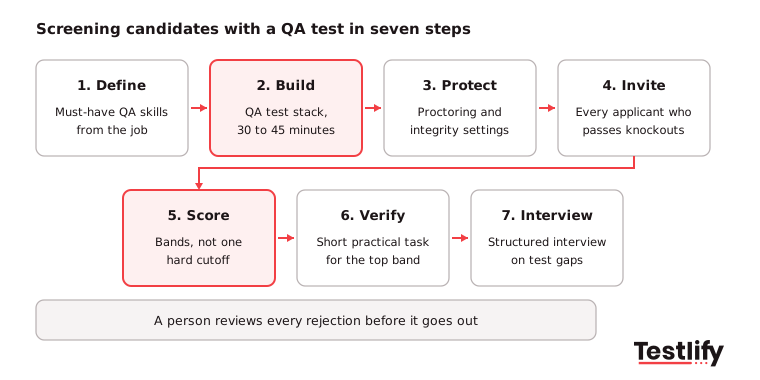
Each of these steps removes guesswork and keeps the process the same for every candidate:
- Define must-have skills: Pull four to six skills from the job description with the hiring manager. Drop nice-to-haves from the first screen.
- Build the test stack: Combine one or two ready-made tests with a few custom questions about your product or stack. Keep it to 30 to 45 minutes.
- Protect the test: Turn on proctoring, question randomization and copy-paste blocking, and tell candidates upfront what is monitored.
- Invite every applicant who passes knockouts: Send the test automatically from the ATS so nobody waits days for a link.
- Score in bands: Group candidates into advance, review and decline bands instead of one hard number.
- Verify the top band: Give a short practical task, such as a bug report or a set of test cases. Time-box it to 45 to 60 minutes and pay for anything longer.
- Run a structured interview: Ask about the weakest test areas and how the candidate works with developers. These QA engineer interview questions are a good start.
How is a QA test different from a general pre-hire screen?
A QA test is role-specific: it checks the exact skills a tester uses, such as test case design and bug reporting. A general screen test checks broad fit before any role-specific step, such as cognitive ability, language or work preferences. Most QA hiring uses both, with the general screen first only for high-volume roles.
If you are still deciding whether a broad first filter makes sense, start with this guide on creating the best pre-screening test for a job. For QA roles with fewer than a few hundred applicants, the QA test alone is usually enough as the first step.
How do you set a fair cut score for a QA test?
A fair cut score for a QA test comes from your own data, not a round number. Ask three to five current testers who do the job well to take the test, note their scores, and set the advance band a little below their range. Then review the first 50 to 100 candidates and adjust.
Use bands instead of a single pass mark. A candidate one point under the line is not meaningfully weaker than one a point above it, so a review band lets a person look at near misses before anyone is declined.
Check fairness at every review. The four-fifths guideline in the US Uniform Guidelines treats a selection rate for any group below 80% of the highest group's rate as a sign of adverse impact. If one group passes much less often, look for questions that test culture or wording instead of QA skill and replace them.
What mistakes weaken QA screening tests?
QA screening tests fail when they test trivia instead of the job, run too long or treat the score as the whole decision. Most problems show up as low completion rates or strong hires who score poorly. The usual mistakes are easy to avoid once you know them:
- Tool trivia over thinking: Questions about menu names in a test tool reward memory, not testing judgment.
- Long take-home projects at the first step: Multi-hour tasks before any contact lose good candidates, especially those already employed.
- One test for every level: A senior lead and a junior tester need different stacks and different cut scores.
- No integrity settings: Without proctoring, a remote test measures who can search fastest.
- Score as a final verdict: The test ranks candidates. A person still reviews every rejection and every offer.
- No feedback loop: If nobody checks how high scorers perform after hiring, the test never improves.
How do you know your QA screening test works?
A QA screening test works when good candidates finish it, the shortlist gets smaller and stronger, and people who score well do well on the job. Track five numbers per role and review them every quarter with the hiring manager.
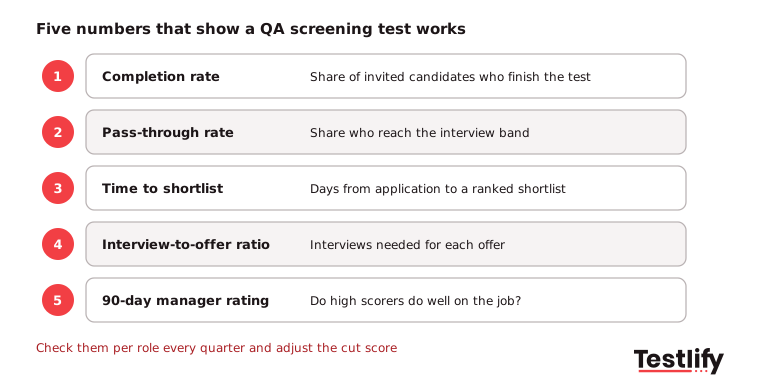
The right recruitment metrics show whether assessments are improving candidate selection, reducing hiring delays and predicting on-the-job performance. Here are five key metrics to monitor:
- Completion rate: A falling or low rate usually means the test is too long or the invite is unclear.
- Pass-through rate: The share of finishers who reach the interview band. Too high and the test filters nothing; too low and the cut score is off.
- Time to shortlist: Days from application to a ranked shortlist. Automated invites should bring this down to a day or two.
- Interview-to-offer ratio: Fewer interviews per offer means the test is sending the right people forward.
- 90-day manager rating: Compare test scores with early performance. If they do not line up, revisit the skills you test.
How does Testlify support QA test screening?
Testlify supports QA test screening with ready-made QA tests, custom questions and automation that sends results straight back to your ATS. Hiring teams can build a role-based QA test from a job description, run it with proctoring and get a ranked shortlist without manual scoring.
- QA tests in the library: The test library has 3,500+ tests, including QA test automation, manual testing, Selenium and QA aptitude tests.
- Practical question types: 25+ question types, including coding in a live IDE, file upload, practical tasks and open-ended answers for bug reports and test cases.
- Integrity: 20+ proctoring checks, including AI assistance detection, copy-paste blocking and webcam snapshots.
- ATS fit: 100+ ATS and HRIS integrations with two-way sync, plus score thresholds that auto-shortlist candidates.
- Scoring and reports: Automated scoring with per-skill breakdowns, benchmarking and AI-written candidate insights.
For the full hiring process, from job description to offer, see the QA engineer hiring guide.
Ready to screen your next QA hire on skill?
Pick a QA test from the Testlify test library, add a few questions about your own product, and send it to your next batch of applicants. You can start a 7-day free trial with no credit card, or book a demo to see a QA screening workflow set up for your team.
Frequently asked questions (FAQs)

Head of Assessments
Usha brings a rare depth of expertise to Testlify’s assessment function, over 40 years of multidisciplinary experience spanning banking, insurance, healthcare, automotive, IT services, manufacturing, pharmaceuticals, and enterprise software. At Testlify, she ensures that every assessment, scoring methodology, and competency structure meets the highest standards of enterprise-grade transparency, fairness, and consistency, the kind that holds up under audit and earns the trust of the world’s most rigorous hiring teams.
LinkedInRelated resources
View all
HR & recruitment
How aptitude assessment helps you screen candidates

HR & recruitment
Big Five personality tests for candidate screening: a 2026 guide

HR & recruitment
How to simplify candidate screening with aptitude assessment
HR & recruitment
Big Five personality traits in recruitment: how to hire top talent

HR & recruitment
How to hire top talent using QA test

HR & recruitment
Pre-employment aptitude assessment: how to hire top talent with one
Get started.
Hire on proof, not resumes.
Run your first skills-based assessment free — no credit card required.