
40 help desk interview questions and answers for 2027
40 help desk interview questions with what to listen for, sample answers, a tier 1 vs tier 2 split and a simple rubric to score candidates.

Help desk interview questions are the questions hiring teams use to check whether a candidate can fix common IT problems, explain them to non-technical users, follow ticket and security processes, and stay calm with frustrated callers. The best interviews mix technical, scenario, security, customer service and behavioral questions, and score every answer against the same rubric.
TL;DR:
- Good help desk interview questions test five things: technical basics, troubleshooting method, security habits, customer communication and ticket discipline.
- Ask every candidate the same core questions and score each answer from 1 to 5, so you compare people on evidence instead of gut feel.
- Scenario questions ("a user cannot print", "the internet is down for one person") reveal more than definitions, because they show the order a candidate checks things in.
- Add at least one identity verification question. CISA warned in July 2025 that attackers call IT help desks to get passwords reset and MFA moved to their own phones.
- Tier 1 interviews should weight communication and basics; tier 2 interviews should push into Active Directory, Group Policy, networking and root cause.
- A short help desk assessment before the interview cuts the shortlist, so interview time goes to the candidates who already know the basics.
The 40 questions below are written for interviewers, not job seekers. Each one has what to listen for and a short sample of a strong answer. Use them as a bank: pick 10 to 15 per interview based on the tier you are hiring for.
 ChatGPT
 Gemini
 Claude
 Grok
 Perplexity
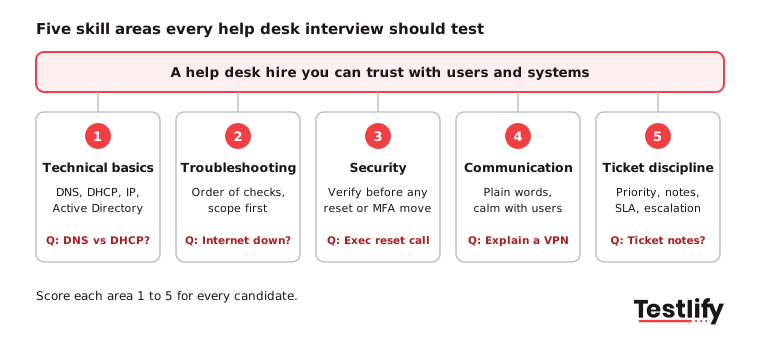
What should help desk interview questions test?
Help desk interview questions should test five skill areas: technical basics, troubleshooting method, security and access habits, customer communication, and ticket and process discipline. A candidate who is strong on technology but weak on communication creates repeat tickets; one who is friendly but has no method escalates everything.
The role is large and turns over steadily. According to the US Bureau of Labor Statistics, there were 903,100 computer support specialist jobs in 2025, with a median pay of $62,890 and about 48,700 openings a year, almost all from people moving on or leaving the field.
Steady replacement hiring means large applicant pools for entry-level roles, so a consistent question set matters more than a clever one. Before the interview, agree on the job scope with the hiring manager and write it down.
The IT help desk technician job description template is a useful starting point for listing the systems, ticket volume and support hours the person will own.

Which help desk technical interview questions test real skill?
Help desk technical interview questions should check the networking, operating system and directory basics that cause most tickets: IP addressing, DNS, DHCP, Active Directory accounts, printers and remote access. Ask candidates to explain each in plain words, as they would to a user, because that is the job.
1. What is the difference between DNS and DHCP?
What to look for: an understanding that DHCP automatically assigns IP settings, while DNS translates domain names into IP addresses. Strong candidates should also explain how failures in either service affect users.
2. Which command-line tools do you use first on a network ticket, and why?
What to look for: familiarity with tools such as ipconfig, ping, nslookup, and tracert, along with a logical explanation of when and why they use each tool.
3. What is a default gateway, and how would a wrong one show up?
What to look for: an understanding that a default gateway directs traffic outside the local network. Candidates should explain that an incorrect gateway can prevent users from accessing the internet while allowing access to local network resources.
4. What is Active Directory, and what tasks have you done in it?
What to look for: practical experience with password resets, account unlocks, adding users to security groups, and managing computer objects within organizational units.
5. What is group policy, and when would you suspect it is the cause of a problem?
What to look for: knowledge of centrally managed settings for users and computers. Strong candidates should recognize issues such as settings repeatedly reverting or different users receiving different configurations.
6. A user's PC shows a blue screen. What do you do?
What to look for: a systematic troubleshooting approach that includes recording the stop code, checking recent changes, reviewing Event Viewer, investigating driver issues, and testing hardware.
7. What is the difference between a hub, a switch and a router?
What to look for: an understanding that hubs broadcast traffic to connected devices, switches forward traffic based on MAC addresses, and routers direct traffic between different networks.
8. How would you change folder permissions for a new team member?
What to look for: an emphasis on obtaining approval, assigning access through the appropriate security group, and following least-privilege principles rather than granting unnecessary individual permissions.
What troubleshooting scenarios should you ask in a help desk interview?
Troubleshooting scenarios show how a candidate thinks, which a definition question cannot. Describe a real ticket from your own queue, then ask the candidate to talk through it out loud. Strong candidates ask clarifying questions first and check the simplest causes before the expensive ones.
9. A user says "the internet is down". Walk me through your first five minutes.
What to look for: a logical troubleshooting sequence that starts by checking whether the issue affects one user or multiple users, followed by network connectivity, IP settings, gateway access, and DNS resolution.
10. A printer prints garbled pages for one user only. What do you check?
What to look for: an ability to isolate user-specific issues by checking print queues, printer drivers, application settings, and corrupted files before assuming the printer itself is faulty.
11. A laptop is very slow. How do you find out why?
What to look for: a structured approach that includes identifying when the issue started, checking CPU and memory usage through Task Manager, reviewing startup applications, checking disk space, and investigating pending updates or malware.
12. A remote employee cannot connect to the VPN. What are the likely causes?
What to look for: knowledge of common VPN issues, including incorrect credentials, MFA failures, outdated clients, unstable internet connections, certificate problems, and account lockouts.
13. A user deleted an important file from a shared drive. What do you do?
What to look for: familiarity with checking recycle bins, previous file versions, and backup systems. Strong candidates should follow the approved recovery process without promising results before verifying that recovery is possible.
14. You suspect a laptop has malware. What are your first steps?
What to look for: awareness of security protocols, including isolating the affected device, reporting the incident to the security team, following escalation procedures, and preserving potential evidence.
15. You cannot fix an issue within your SLA. What do you do?
What to look for: early escalation, detailed ticket documentation, clear communication with the user, and the ability to provide realistic updates without allowing tickets to go unattended.
Which security questions should every help desk interview include?
Every help desk interview should include at least one identity verification question, because the help desk controls password resets and MFA.
The joint CISA and FBI advisory on the Scattered Spider group, updated in July 2025, describes attackers calling IT help desks while posing as employees to get passwords reset and MFA moved to devices they control. A candidate who resets first and asks questions later is a risk.
16. A caller says they are a senior executive, locked out while traveling, and need their password reset and MFA moved to a new phone right now. What do you do?
What to look for: consistent identity verification regardless of the caller's position or urgency. Strong candidates should follow established procedures, use verified contact information, and escalate when verification fails.
17. How do you verify a user's identity before a password reset?
What to look for: knowledge of approved verification procedures, such as callback verification, manager approval, or self-service password reset systems. Candidates should understand why names and job titles alone are insufficient.
18. A user asks why the company no longer forces password changes every 90 days. How do you explain it?
What to look for: awareness of current password security guidance and the ability to explain security policies in simple language without relying on technical jargon.
19. You notice a phishing email has reached several users. What do you do?
What to look for: knowledge of incident reporting procedures, the ability to identify potentially affected users, and an understanding of when credential resets and session sign-outs may be necessary.
20. How do you handle sensitive data you see while working on a user's machine?
What to look for: respect for confidentiality, limited access to information, appropriate communication before remote access, and compliance with company data protection policies.
Which customer service questions reveal how a candidate handles users?
Customer service questions reveal whether a candidate can calm a frustrated user, explain a fix without jargon and confirm the user is actually unblocked. These questions matter most for tier 1 roles, where most of the day is spent on the phone, chat or tickets with non-technical people.
21. How would you explain what a VPN is to a user with no technical background?
What to look for: the ability to simplify technical concepts using relatable examples, avoid unnecessary jargon, and confirm that the user understands the explanation.
22. A user is angry because their ticket has been open for three days. How do you respond?
What to look for: empathy, accountability, patience, and clear communication. Strong candidates should acknowledge the delay, explain the next steps, and provide a realistic time for an update.
23. How do you know a ticket is really resolved?
What to look for: a commitment to testing the solution with the user, confirming that the original issue is fixed, and documenting the resolution before closing the ticket.
24. Do you prefer phone, chat or email support, and why?
What to look for: comfort working across different communication channels and the ability to choose the most appropriate one based on the complexity of the issue and the user's needs.
25. Tell me about a time you had to say no to a user.
What to look for: the ability to communicate restrictions professionally, explain the reasoning behind a decision, and offer suitable alternatives without compromising company policies.
What ticketing and process questions should you ask?
Ticketing and process questions check whether a candidate will keep the queue healthy: prioritizing by impact, writing notes others can use and escalating with enough detail. Candidates who have worked under ITIL-style processes will usually answer these with confidence.
26. How do you prioritize several tickets that arrive at once?
What to look for: an understanding of impact, urgency, the number of affected users, SLA requirements, and business-critical systems. Strong candidates should explain how they balance competing priorities while keeping users informed.
27. What is the difference between an incident, a service request and a problem?
What to look for: an understanding that an incident involves an unplanned disruption, a service request involves a standard user requirement, and a problem refers to the underlying cause of one or more incidents.
28. What makes a good ticket note?
What to look for: clear documentation of reported symptoms, troubleshooting steps, results, and recommended next actions. Notes should be detailed enough for another technician to continue working on the issue.
29. Which ticketing and remote support tools have you used?
What to look for: practical experience with ticket management, assigning and closing tickets, and remote support tools. Candidates unfamiliar with your systems should demonstrate an ability to learn similar platforms quickly.
30. How would you reduce the number of repeat tickets for the same issue?
What to look for: the ability to identify recurring problems, create knowledge base articles, recommend self-service solutions, and investigate root causes rather than repeatedly fixing symptoms.
Which behavioral questions work best for help desk roles?
Behavioral questions ask for real past examples, so they show what a candidate has actually done. Ask candidates to use a situation, action and result structure, then probe for specifics: the tool, the error, the outcome. Vague stories with no detail are a warning sign. A structured interview keeps these comparable across candidates.
31. Tell me about the hardest technical problem you solved.
What to look for: a structured troubleshooting approach, the ability to explain how they identified the root cause, collaboration when necessary, and lessons learned from the experience.
32. Describe a time you made a mistake on a ticket. What happened next?
What to look for: accountability, transparency, willingness to correct mistakes, and steps taken to prevent similar issues from happening again.
33. Tell me about a time you taught a user or colleague how to use new software.
What to look for: patience, clear explanations, the ability to break complex instructions into manageable steps, and efforts to confirm the other person's understanding.
34. Describe a time you worked with another IT team to fix an issue.
What to look for: cross-functional collaboration, clear communication, detailed handovers, and the ability to work toward a shared resolution without blaming other teams.
35. Tell me about a time you had more tickets than you could handle.
What to look for: prioritization, time management, early communication with managers, and the ability to keep users updated while managing a heavy workload.
36. Describe a change you suggested that improved how your help desk worked.
What to look for: initiative, problem-solving abilities, and evidence of measurable improvements, such as fewer repeat tickets, faster resolution times, or better customer satisfaction.
37. How do you keep your technical skills current?
What to look for: consistent learning habits, such as completing certifications, experimenting in a home lab, following vendor documentation, and learning from previous support cases.
38. Why do you want to work on a help desk?
What to look for: genuine interest in troubleshooting, helping users, developing technical expertise, and building a career in IT support.
39. How do you stay calm on a busy day with back-to-back calls?
What to look for: practical stress management techniques, organized ticket handling, concise documentation, and the ability to maintain patience and professionalism during demanding periods.
40. What questions do you have for us?
What to look for: genuine curiosity about ticket volumes, support tools, escalation procedures, team structure, training opportunities, and career progression. Strong candidates usually ask questions that demonstrate an interest in understanding the role and its expectations.
Key takeaway: The questions are only half the interview. The other half is asking the same core set to every candidate and scoring the answers the same way.
Which help desk interview questions fit tier 1 vs tier 2 roles?
Tier 1 help desk interview questions focus on communication, basic troubleshooting and following process, while tier 2 questions go deeper into directory services, networking and root cause. Use the table to pick 10 to 15 questions for each interview.
Area | Tier 1 (first contact) | Tier 2 (escalations) |
|---|---|---|
Technical | 1, 2, 3, 7 | 4, 5, 6, 8 |
Troubleshooting | 9, 10, 11 | 12, 13, 14 |
Security | 16, 17 | 18, 19, 20 |
Customer service | 21, 22, 23, 24 | 22, 25 |
Process | 26, 28, 29 | 27, 30 |
Behavioral | 33, 35, 38, 39 | 31, 32, 34, 36 |
Interview length | 30 to 40 minutes | 45 to 60 minutes |
For entry-level hiring, weight communication and verification questions as heavily as technical ones. A new tier 1 hire can learn your tools in weeks; patience with users and discipline on security are much harder to teach. For more senior support roles, compare these with our IT support analyst interview questions.
How should you score help desk interview answers?
Help desk interview answers should be scored from 1 to 5 against the same short rubric for every candidate, written down before you compare notes with other interviewers. Scoring each answer on its own stops one confident story from coloring the whole interview.
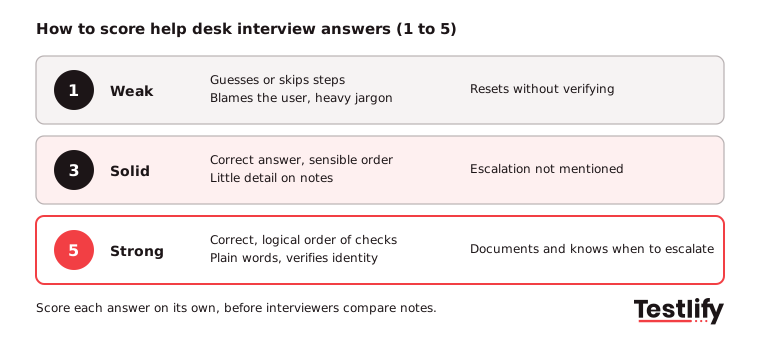
- 1, weak: Guesses, skips steps, blames the user or cannot explain the answer simply.
- 3, solid: Correct answer with a sensible order of checks, but little detail or no mention of documentation and escalation.
- 5, strong: Correct and in a logical order, explained in plain words, with verification, documentation and a clear point to escalate.
Red flags to note in any answer:
- Resetting a password or moving MFA without verifying the caller.
- Reinstalling or reimaging as the first step for every problem.
- No questions to the user before starting to fix.
- Talking down to non-technical users, or heavy jargon with no explanation.
- Closing tickets without confirming the fix with the user.
Pro tip: Ask one scenario from your own queue that is not on any public list. Candidates can rehearse common interview questions for help desk technician roles from online lists, but they cannot rehearse your last week of tickets.
Where does a help desk assessment fit in the hiring process?
A help desk assessment fits before the interview, as a short skills test that checks technical basics, troubleshooting judgment and typing or ticket-writing speed. Candidates who pass go to the interview, which can then focus on scenarios, security and communication instead of re-checking definitions.
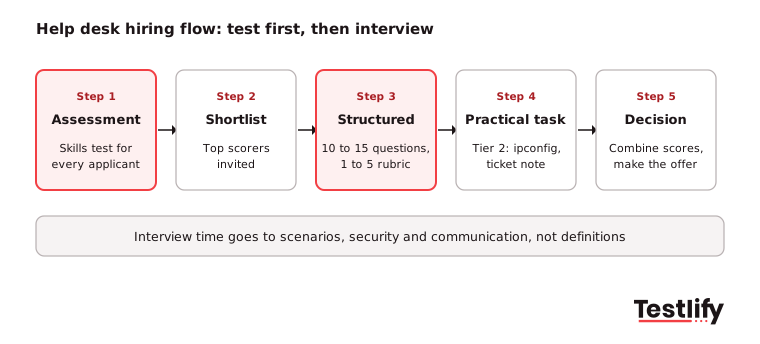
A simple flow for most teams:
- Assessment: Send a role-specific test such as the IT help desk test to every applicant who meets the basic requirements.
- Shortlist: Invite the top scorers to interview; keep the scores so every interviewer sees them.
- Structured interview: Use 10 to 15 questions from this list for the tier you are hiring, scored on the 1 to 5 rubric.
- Practical task: For tier 2, add a short live task, such as reading an ipconfig output or writing a ticket note for a scenario.
- Decision: Combine assessment and interview scores, then make the offer.
Testlify has 3,500+ tests, including a technical support help desk representative test and customer service tests, and you can combine several into one assessment. Testlify can also run structured first-round interviews by video, voice or chat with AI, so every candidate answers the same questions and every answer is scored the same way. Assessments include 20+ proctoring checks to keep results honest.
If you are also hiring for general support roles, our list of help desk technician interview questions covers the help desk support side in more depth.
Ready to hire your next help desk analyst?
Start with a short skills test, then spend interview time on the questions that matter. Browse the Testlify test library for help desk, IT support, networking and customer service tests, or start a 7-day free trial, no credit card needed. For a walkthrough with your own roles, book a demo today to get started.
Frequently asked questions (FAQs)

Human Resources Lead
Snehi Parmar leads People at Testlify, owning hiring, culture, performance, and retention for a 90-person team. She writes on practical HR strategy and building people processes that scale.
Related resources
View all
HR & recruitment
60 Systems Analyst interview questions to ask job applicants

HR & recruitment
60 IT Support Analyst interview questions to ask job applicants

HR & recruitment
60 Billing Analyst interview questions to ask job applicants

HR & recruitment
60 Claims Administrator interview questions to ask job applicants

HR & recruitment
60 Records Management Coordinator interview questions to ask job applicants

HR & recruitment
60 Regulatory Affairs Coordinator interview questions to ask job applicants
Get started.
Hire on proof, not resumes.
Run your first skills-based assessment free — no credit card required.