
How to get started with workforce planning in 90 days
A practical 90-day plan to start planning your workforce: choose critical roles, gather data, forecast demand and close the skills gaps.

The fastest way to get started with workforce planning is to start small: pick one business goal and two or three roles that matter most to it, build an honest picture of the people and skills you have today, forecast what you will need in 12 to 18 months, and agree how to close the gap. A first plan can be ready in 90 days with data most HR teams already hold.
TL;DR:
- Start with one business goal and 2 to 3 critical roles, not the whole company. A narrow first plan gets finished and used.
- The minimum data set is headcount by role, attrition, open roles, time to fill and a skills baseline. Most of it is already in your HRIS and ATS.
- Forecast demand for 12 to 18 months with two or three scenarios, then subtract expected supply after attrition to size each gap.
- Close every gap with one of four moves: build (train), buy (hire), borrow (contract) or redeploy (move people internally).
- Measure skills with assessments rather than job titles. Titles hide gaps, and tested skills show who can be trained or moved.
- SHRM's 2025 Talent Trends survey found 69% of organizations still struggle to fill full-time roles, so a plan that starts hiring early pays off.
- Review the plan every quarter. A first plan is a working draft, not a finished document.
 ChatGPT
 Gemini
 Claude
 Grok
 Perplexity
What does it mean to get started with workforce planning?
Getting started with workforce planning means building your first, simple plan that links the people you have to the work the business needs next. In practice that is a short document for a few critical roles: today's headcount and skills, the demand you expect, the gap between the two, and the actions, owners and dates that will close it.
The plan answers four questions that leaders ask all the time but rarely answer with data:
- Supply: Who do we have today, with which skills, and how many will we lose this year?
- Demand: How many people, with which skills, does the business plan need in 12 to 18 months?
- Gap: Where does demand exceed supply, and where do we have more people than work?
- Action: Will we train, hire, contract or move people to close each gap, and who owns it?
A first plan does not need special software, a full skills taxonomy or every team on board. It needs one sponsor, clean basic data and a decision on which roles come first.

Why should hiring teams start now?
Hiring teams should start now because the cost of reacting late keeps rising: roles stay open longer, skill needs change faster and budgets get set without a people view. A first plan turns hiring from a stream of urgent requests into a pipeline you can see months ahead.
The numbers support starting early. SHRM's 2025 Talent Trends survey of 2,040 HR professionals found that 69% of organizations still struggle to fill full-time roles. It also found that 28% of organizations now require new skills for full-time roles, and 47% are updating existing roles to include them. When job requirements move that quickly, the skills you hired for two years ago may not be the skills you need next year.
Growth in the labor supply is slowing too. According to the US Bureau of Labor Statistics' 2025 to 2035 projections, total US employment is expected to grow by 3.5% over the decade, far below the 10.9% growth of 2015 to 2025. Fewer new workers entering the market means more competition for the same people, and more value in growing and moving the people you already employ.
For TA leaders, a plan also changes the conversation with Finance. Instead of defending each requisition, you agree the year's hiring and training budget once, against a shared forecast.
What do you need before you start?
Before you start, you need three things: a sponsor in HR and one in Finance, a short list of critical roles, and a basic data set. Critical roles are the jobs where a vacancy hurts revenue, customers or compliance, or where hiring takes the longest.
Pull this data for the critical roles first. Most of it sits in systems you already run.
Data | Where it usually lives | Who owns it |
|---|---|---|
Headcount by role, team and location | HRIS | People Ops |
Attrition and regretted attrition, last 12 to 24 months | HRIS, exit data | People Ops, HRBPs |
Open roles, time to fill, offer acceptance | ATS | Talent acquisition |
Skills and proficiency by person | Assessments, skills inventory, manager input | HRBPs, L&D |
Retirement eligibility and internal moves | HRIS | People Ops |
Business plan: revenue, product launches, new markets | Finance, leadership | Finance |
Salary, contractor and hiring cost | Payroll, Finance | Finance |
Two inputs are often missing. The first is skills data: many teams only know job titles, not what people can actually do. A skills inventory or a skills matrix fills that hole. The second is a clean attrition number; the free attrition rate calculator gives you a consistent figure per team.
Pro tip: Do not wait for perfect data. Use what you have, mark the weak inputs, and improve them in the next quarterly review.
How do you get started with workforce planning in six steps?
You get started with workforce planning in six steps: pick the focus, baseline your supply, forecast demand, size the gaps, choose actions, then assign owners and review on a schedule. The steps follow the same logic as the five-step model the US Office of Personnel Management publishes for federal agencies, cut down for a first plan.
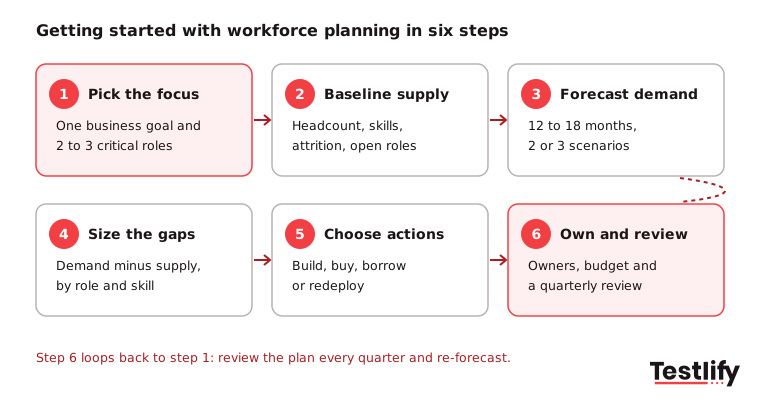
1. Pick the focus
Choose one business goal for the next 12 to 18 months, such as opening a new region or launching a product, and the two or three roles that decide whether it succeeds. A narrow scope keeps the first plan small enough to finish.
2. Baseline your supply
Count the people in each critical role today and record their skills and proficiency. Then estimate how many will leave over the plan period, using your own attrition rate, and add known retirements and internal moves.
3. Forecast demand
Agree with business leaders what drives demand for each role: customers per support agent, projects per engineer, sales targets per account executive. Build two or three scenarios (base, growth and slowdown) rather than one number.
4. Size the gaps
Subtract expected supply from forecast demand for each role and skill. A positive number is a shortage to close; a negative number is a surplus you may redeploy.
5. Choose actions
For every gap, decide whether to build, buy, borrow or redeploy, and attach a cost and a date. The section on the four options below shows when each one fits.
6. Assign owners and review
Give every action an owner and a budget line, choose a handful of metrics, and book a quarterly review. OPM's workforce planning model ends with the same step: monitor, evaluate and revise.
What does a 90-day starter plan look like?
A 90-day starter plan splits the first plan into three months: scope and data in month one, forecast and gaps in month two, and actions, owners and metrics in month three. By day 90 you have a working plan for your critical roles and a review date in the calendar.
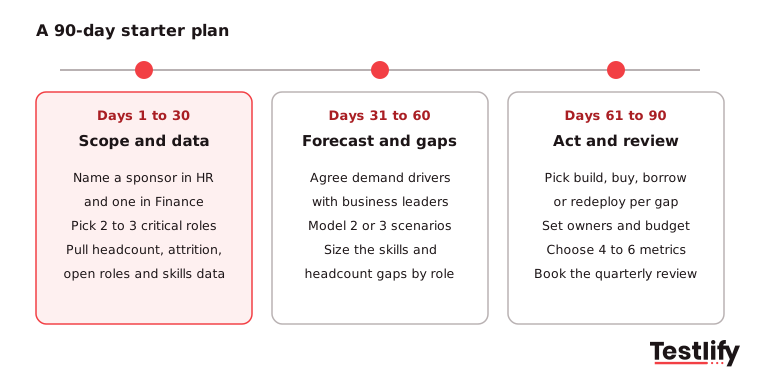
- Days 1 to 30, scope and data: Name the HR and Finance sponsors, agree the business goal and the critical roles, and pull the data set from the table above. Run skills assessments for the critical roles if you have no skills data.
- Days 31 to 60, forecast and gaps: Meet each business leader for an hour to agree demand drivers. Model the base, growth and slowdown scenarios and size the gap per role and skill.
- Days 61 to 90, act and review: Choose build, buy, borrow or redeploy for each gap, cost it, and assign owners. Pick four to six metrics and present the plan to leadership with the next review date.
Keep the output short. A good first plan fits on a few slides or a single spreadsheet tab per role: supply, demand, gap, action, owner, date.
How do you work out the size of a gap?
You work out the size of a gap by taking forecast demand for a role, then subtracting the people you expect to still have at the end of the period after attrition and internal moves. The result is the number of people you need to hire, train or move.
Here is a simple worked example for a customer support team:
Input | Value |
|---|---|
Support agents today | 200 |
Growth plan for next year | +15% customers, so demand of 230 agents |
Monthly quits rate (example) | 2.1% |
Expected leavers in 12 months | about 50 (200 x 2.1% x 12) |
Expected supply at year end, before hiring | about 150 |
Gap to close | about 80 agents |
The 2.1% figure is the US monthly quits rate across all industries in September 2026, from the BLS Job Openings and Labor Turnover Survey. Use your own rate for real planning, because contact centers, retail and tech teams often run well above or below the national figure. The point of the example is the shape of the calculation: a team that "only" needs 30 more people for growth may in fact need 80 hires once attrition is counted.
Run the same sum for skills, not just headcount. If 40 of those 150 remaining agents also need a new skill, such as handling a new product line, that is a training gap on top of the hiring gap.
How do you choose between build, buy, borrow and redeploy?
You choose between build, buy, borrow and redeploy by looking at how soon you need the skill, whether it already exists nearby in your workforce, and whether the need is lasting or temporary. Most plans use a mix of all four.
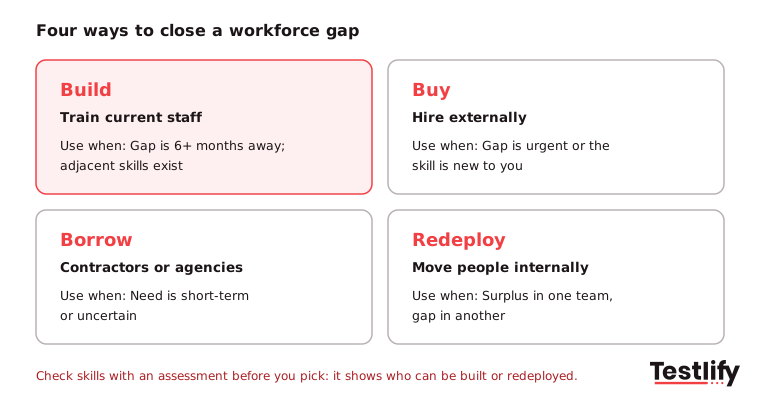
Option | What it means | Use it when | Watch out for |
|---|---|---|---|
Build | Train or upskill current employees | The gap is 6+ months away and people have adjacent skills | Training without a skills baseline wastes budget |
Buy | Hire from outside | The need is urgent or the skill is new to the company | Long time to fill for scarce skills |
Borrow | Contractors, agencies, freelancers | The need is short-term or uncertain | Knowledge leaves when the contract ends |
Redeploy | Move people between teams | One team has a surplus and another has a gap | Moves without skills checks set people up to fail |
Build and redeploy depend on knowing what your people can do today. Skills tests give you that evidence for each person, so you can see who is one course away from a new role and who is not. Our guide to internal mobility vs external hiring goes deeper on when to promote from within.
Key takeaway: Decide the option per gap, not per plan. The same plan can hire senior engineers, train support agents and contract a short project team.
Which metrics show the first plan is working?
The metrics that show a first plan is working are the ones tied to the critical roles you chose: time to fill, the share of roles filled internally, regretted attrition, skills coverage and forecast accuracy. Pick four to six and report them every quarter.
Metric | What it tells you | Good direction |
|---|---|---|
Time to fill for critical roles | Whether hiring starts early enough | Down |
Internal fill rate | How much of demand you meet by building or redeploying | Up |
Regretted attrition | Whether you keep the people the plan depends on | Down |
Skills coverage | Share of required skills met at the target level | Up |
Forecast accuracy | Planned headcount vs actual at quarter end | Gap shrinks |
Cost per hire for critical roles | Whether planned hiring costs less than rushed hiring | Down |
Regretted attrition matters more than total attrition in a first plan, because losing a top performer in a critical role can undo a quarter of hiring. For a fuller list and how to report it, see how to measure the success of a workforce plan, and use workforce analytics to build the dashboard.
What mistakes slow down a first plan?
The mistakes that slow down a first plan are trying to cover the whole company, waiting for perfect data, planning in HR without Finance and business leaders, counting heads instead of skills, and writing a plan nobody reviews. Each one turns a 90-day project into a year-long one.
- Scope too wide: Planning every role at once stalls in data cleanup. Start with the critical roles and add teams each quarter.
- Waiting for perfect data: Rough data with clear assumptions beats a perfect model that arrives after budgets are set.
- HR working alone: Without Finance and business leaders, the demand forecast is a guess and the budget will not follow.
- Heads, not skills: A team can have the right headcount and still miss the skills a new product needs.
- No review date: Plans age fast. Without a quarterly review, the plan is out of date by the second quarter.
Grant Thornton's guide to strategic planning in seven practical steps makes the same point about ownership: business leaders own the plan for their areas, and HR provides the framework and the combined view. Read these workforce planning case studies to see how other companies set up their plans.
Ready to build a skills baseline for your first plan?
A first plan is only as good as its supply data, and skills are the hardest part to measure. Testlify gives you that baseline: pick role-specific and skills tests from a library of 3,500+ tests, or build a custom assessment from a job description, and send it to current employees and candidates alike. Results show each person's skill level, so you can see who can be trained or redeployed and where you need to hire.
Testlify connects with 100+ ATS and HRIS tools, so results sit next to the rest of your workforce data. Start a 7-day free trial, no credit card needed, and test the skills of one critical team before your first planning meeting.
FAQs






Get started.
Hire on proof, not resumes.
Run your first skills-based assessment free — no credit card required.