
Candidate screening tools: 7 types and how to choose them
The 7 types of candidate screening tools, what each one tells you, the order to use them in and how to pick the right mix for your team.

Candidate screening tools are software that help hiring teams sort applicants by evidence, not gut feel, before anyone books an interview. The main types are knockout questions, AI resume screeners, skills tests, cognitive and personality tests, one-way video interviews, AI chat and voice interviews, and background checks. Most teams combine three or four of them into one screening stack.
TL;DR:
- Candidate screening tools filter applicants on evidence before interviews. The 7 main types are knockout questions, AI resume screeners, skills tests, cognitive and personality tests, one-way video, AI interviews and background checks.
- Skills tests give the strongest early signal for most roles because they show what a candidate can do, not what their resume claims.
- Run cheap, objective checks first: knockout questions, then a resume screen, then a skills test, then a structured interview, then a human shortlist.
- Choose tools on 6 checks: signal, candidate time, ATS fit, fairness, integrity and pricing model.
- AI screening is regulated. NYC Local Law 144 requires a yearly bias audit and 10 business days of candidate notice, and the EU treats CV-sorting software as high risk.
- Pilot any new tool on one role for 2 weeks and compare time to shortlist, completion rate and hiring manager acceptance before you roll it out.
 ChatGPT
 Gemini
 Claude
 Grok
 Perplexity
What are candidate screening tools?
Candidate screening tools are the software a hiring team uses between "application received" and "interview booked" to decide who moves forward. Each tool collects one kind of evidence, such as a resume match score, a test result or a recorded answer, and turns it into a score you can compare across every applicant.
The goal is simple: spend recruiter and hiring manager time only on people who can do the job. That matters because skills are now the main hiring signal. LinkedIn's Future of Recruiting 2025 report found that 93% of talent acquisition professionals say accurately assessing a candidate's skills is crucial for improving quality of hire, and companies running the most skills-based searches are 12% more likely to make a quality hire.
Screening tools are related to, but not the same as, an applicant tracking system (ATS). The ATS stores applications and moves candidates through stages. Screening tools produce the evidence that decides which stage each candidate should reach. For a wider look at the process itself, see our guide to candidate screening.

What are the 7 types of candidate screening tools?
The 7 types of candidate screening tools are knockout questions, AI resume screeners, skills tests, cognitive and personality tests, one-way video interviews, AI chat and voice interviews, and background and reference checks. Each answers a different question, so the best screening tools for recruitment work as a set, not alone. If you want named vendors instead of tool types, our roundup of talent assessment tools for sourcing and screening compares specific platforms.
1. Knockout and pre-screening questions
What it screens: Hard requirements such as right to work, location, shift availability, licences or minimum years with a tool.
Best for: Every role, as the very first filter. Most ATS platforms and assessment tools include them.
Limits: Candidates self-report, so knockout questions confirm eligibility, not ability. Keep them to true must-haves, or you will reject good people on technicalities.
2. AI resume screeners
What it screens: How closely a resume matches the job description, usually as a match score and a fit label.
Best for: Roles with hundreds of applicants, where nobody can read every resume. An AI resume screener can pull resumes from your ATS, score them and push the result back.
Limits: A resume is a claim, not proof. Resume screening also inherits the bias in past hiring data, so it needs explainable scores and human review.
3. Skills tests
What it screens: Whether the candidate can do the core tasks of the role: coding, Excel, accounting principles, customer email writing, language level and so on.
Best for: Almost every role from entry level to senior specialist. Skills tests are the core of most recruitment screening tools because they replace "says they can" with "showed they can". See how skills assessments improve the recruitment process.
Limits: A test must match the job. A generic test gives a generic score.
4. Cognitive ability and personality tests
What it screens: Problem solving, numerical and verbal reasoning, learning speed, and work style traits such as conscientiousness.
Best for: Graduate and high-volume roles where experience is thin, and roles where judgment under pressure matters.
Limits: Personality results describe style, not skill. Use them to guide interview questions, never as a sole pass or fail rule.
5. One-way video interviews
What it screens: Communication, structured answers to the same role-specific questions, and presence on camera for customer-facing roles.
Best for: Replacing the first phone screen across time zones. A one-way video interviewing tool lets candidates record when it suits them and reviewers score against one rubric.
Limits: Some candidates find recording awkward. Keep it short and explain how answers are scored.
6. AI chat and voice interviews
What it screens: Role knowledge and reasoning through a two-way conversation that adapts follow-up questions to each answer.
Best for: High-volume roles such as contact centre, sales and support, where you need a structured first round at scale. Read more on AI interviews for candidate screening.
Limits: Regulators treat AI scoring of candidates as high risk. You need notice, audit evidence and a human who reviews the result.
7. Background and reference checks
What it screens: Identity, employment history, education, criminal records where lawful, and how past managers rate the candidate.
Best for: The final stage, once you have one or two finalists.
Limits: These checks are slow and costly per person, and many rules restrict when you can run them. They confirm a decision; they do not make it.
How do candidate screening tools compare?
Candidate screening tools differ most in the question they answer and in what they cannot tell you. Use the table to see which type fits each stage and where each one needs backup.
Tool type | Question it answers | Best stage | What it cannot tell you |
|---|---|---|---|
Knockout questions | Is the applicant eligible? | Application | Whether they can do the job |
AI resume screener | Does the resume match the role? | First filter | Whether the claims are true |
Skills test | Can they do the core tasks? | After resume screen | Culture or team fit |
Cognitive and personality tests | How do they think and work? | With the skills test | Job-specific skill |
One-way video interview | How do they communicate and reason? | Before live interviews | Hands-on ability |
AI chat or voice interview | How well do they handle role questions at scale? | First round for volume roles | Final hiring decision without human review |
Background and reference checks | Is their history accurate? | Offer stage | Future performance |
Key takeaway: No single tool answers every question. The strongest screening stacks pair one claim-based tool (resume or knockout) with one proof-based tool (skills test or structured interview).
In what order should you use screening tools?
Screening tools work best in order from cheapest and most objective to most expensive and most personal. Each step should cut the pool so that costly human time goes only to candidates with proof.
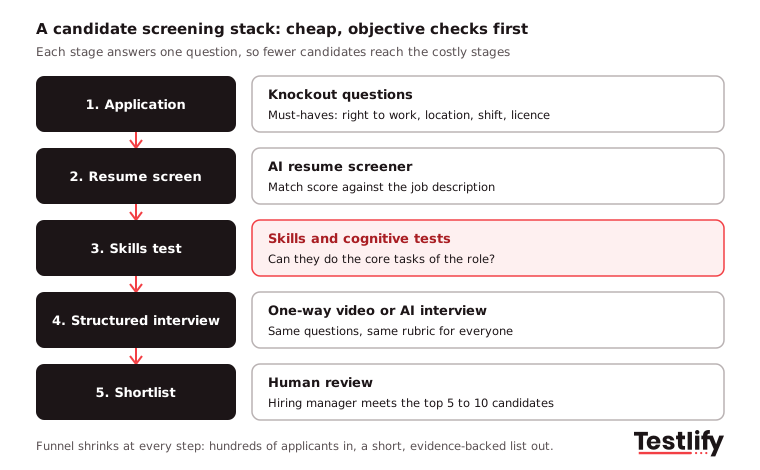
- Knockout questions at application: Remove applicants who do not meet legal or shift requirements. This takes seconds per candidate.
- Resume screen: Rank the remaining applicants by match. Set a generous threshold so you do not drop strong people with unusual resumes.
- Skills test: Send a short, role-specific test to everyone above the threshold. This is where most of the real filtering should happen.
- Structured interview: Use one-way video or an AI interview with the same questions for everyone, scored against one rubric.
- Human shortlist: The hiring manager reviews the top 5 to 10 candidates with all their evidence in one report.
For high-volume roles some teams skip the resume screen and send a skills test to every eligible applicant. Across the teams we work with, that swap tends to surface strong candidates whose resumes would have been filtered out.
Pro tip: Put the skills test before the live interview, not after. Hiring managers who see test results first ask sharper questions and spend less time on candidates who would have failed anyway.
How do you choose candidate screening tools?
Choosing candidate screening tools starts with your bottleneck: too many applicants, weak shortlists, slow hiring managers or worries about fairness. Then score every option on the same six checks.
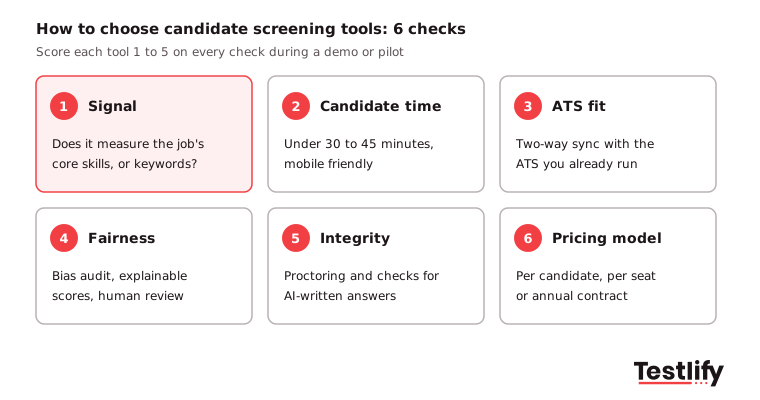
- Signal: Does the tool measure the skills the job needs, or only keywords and job titles? Ask to see sample questions for your exact role.
- Candidate time: Keep the full screening step under 30 to 45 minutes and make sure it works on a phone. Long, desktop-only tests lose good applicants.
- ATS fit: Look for two-way sync with the ATS you already use, so scores land on the candidate record without manual exports.
- Fairness: Ask for a bias audit, explainable scores and a clear way for a human to override the tool.
- Integrity: Check for proctoring and for detection of AI-written or copied answers. Candidates use AI too, so this matters more every year.
- Pricing model: Compare per-candidate credits, per-seat licences and annual contracts against your real hiring volume.
Also check that the vendor covers all your roles. A team that hires engineers, sales reps and finance staff needs one platform with tests for all three, not three separate tools. For a feature-by-feature checklist, read what to look for in candidate screening software.
What legal and fairness checks apply to AI screening tools?
AI screening tools carry legal duties for the employer, not only the vendor. If a tool scores or ranks candidates, you are responsible for showing it treats groups fairly and that people know it is being used.
- New York City: Under Local Law 144, an automated employment decision tool needs a bias audit within one year before use, a public summary of that audit, and notice to candidates 10 business days before use, according to the NYC Department of Consumer and Worker Protection. Enforcement began on 5 July 2023.
- European Union: The European Commission lists CV-sorting software for recruitment as a high-risk AI use. Those obligations now apply from 2 December 2027.
- Everywhere: Keep a human in the loop for every reject decision, record why each candidate moved on or stopped, and check pass rates by group at every stage.
Ask each vendor for its audit report before you sign. Testlify publishes its NYC Local Law 144 bias audit, completed by a third party on 16 June 2023.
How do you pilot a screening tool before rolling it out?
Piloting a screening tool means running it on one real role for about 2 weeks and comparing the results with your current process. A short pilot shows whether the tool improves decisions, not just whether the demo looked good.
Metric | What to compare | Good sign |
|---|---|---|
Time to shortlist | Days from job posted to shortlist, before vs during pilot | Falls clearly |
Completion rate | Share of invited candidates who finish the screening step | Stays high, little drop-off |
Pass-through rate | Share of screened candidates the hiring manager agrees to interview | Rises |
Pass rates by group | Pass rate of each group at the screening step | No group far below the others |
Recruiter hours | Hours spent on manual screening per role | Falls |
Pick a role you hire for often, agree the metrics with the hiring manager up front, and run the old and new process side by side if volume allows. Then decide with data.
Where does Testlify fit in a screening stack?
Testlify covers the skills test, interview and resume stages of a screening stack in one platform. Its test library has 3,500+ tests, including role-specific, coding, cognitive, situational judgment, language and personality tests, and an AI test builder can create an assessment from a job description in under a minute.
- Resume screening: The AI resume screener gives each applicant an explainable match score with High, Medium or Low fit labels and can auto-advance candidates above your threshold.
- Skills tests: Choose from the Testlify test library or mix several tests into one assessment with 25+ question types.
- Interviews: One-way video and audio interviews, plus two-way AI interviews by video, voice or chat.
- Integrity: 20+ proctoring checks, including tab tracking, copy and paste blocking and AI assistance detection, are included. See anti-cheating and proctoring.
- Stack fit: 100+ ATS and HRIS integrations with two-way sync, and tests in 15+ languages.
Ready to build your candidate screening stack?
Testlify brings skills tests, AI interviews, resume screening and proctoring together, so your team gets a ranked, evidence-backed shortlist without juggling separate tools. Start a 7-day free trial with no credit card, or book a demo to see a screening stack built for your roles.
Frequently asked questions (FAQs)

Content Writer
Yashika Khandelwal is a Content Writer with 3+ years of experience creating research-backed content on hiring, talent assessment, and HR technology. She is a registered Organizational Psychologist and subject matter expert who combines behavioral science with practical recruitment insights to produce accurate, evidence-based content.
LinkedInRelated resources
View all
HR & recruitment
How to improve employer brand: 10 steps that hold up in 2026

HR & recruitment
How to handle employee conflicts with a proactive approach

HR & recruitment
How to simplify candidate screening with talent assessment tools
HR & recruitment
Marketing test: what to assess and 10 questions to ask

HR & recruitment
Why do you need Microsoft Office test in your hiring process

HR & recruitment
How to simplify candidate screening with Microsoft Office test
Get started.
Hire on proof, not resumes.
Run your first skills-based assessment free — no credit card required.