
Technical Screening: Process, Types and Best Practices
Technical screening is crucial in tech hiring, it ensures candidates have the right skills to excel. Discover its importance and how to screen.
 ChatGPT
 Gemini
 Claude
 Grok
Grok Perplexity
TL;DR
- Technical screening is the early, structured check of whether a candidate can actually do the technical work a role needs, run before anyone spends an hour in a full interview.
- It is not the technical interview. The screen is short, standardised and mostly automated; the interview is long, conversational and reserved for the shortlist.
- Run it in six steps: map the role to competencies, pick a format, send a scored assessment, confirm with a 20-minute phone screen, watch the shortlist code live, decide on a shared scorecard.
- Pick the test type by role level, not by habit: a sub-hour coding test for volume junior roles, a capped take-home or live pairing session for senior and specialist hires.
- Fake profiles and AI-written applications are now common enough that identity checks and AI-assistance detection belong inside the screen, not after it.
- Buy screening software when you need scale and consistency; buy a screening service when you have no engineers to spare for interviewing.
Technical screening is the step where you find out whether a candidate can really do the technical work, before the hiring manager spends an hour finding out the hard way. It sits between the application and the technical interview, it is short, and it is scored the same way for everyone. Done well, it means the only people who reach a live interview are the ones worth interviewing.
This guide covers what technical screening is, how it differs from a technical interview, the six-step process, the five test formats and how long each takes, the questions worth asking, and when to buy software versus a screening service. It also covers the part most guides skip: keeping the screen honest now that most developers write code with an AI assistant open.

What is technical screening?
Technical screening is a short, structured evaluation of a candidate's job-relevant technical skills, run early in the hiring process and scored against the same criteria for every applicant. It usually combines an automated skills assessment with a brief phone or video screen, and its only job is to decide who earns a full technical interview.
That definition has three parts worth holding onto. Early: the screen happens before interview time is spent, not instead of it. Structured: every candidate gets the same tasks, the same time limit and the same scoring rubric, which is what makes results comparable. Job-relevant: the tasks look like the work. A backend engineer writes and debugs an endpoint, a data analyst cleans a messy table, a support engineer reads a log and finds the fault.
What it is not: a resume keyword scan, a personality quiz, or a trivia round on the difference between an abstract class and an interface. Those tell you what someone remembers, not what they can build.
Most hiring flows run the screen right after the application review, move the top 10 to 20% into interviews, and save the team and culture conversations for the finalists. The hiring process flowchart shows where it sits in a full funnel.
What separates a tech screening from a technical interview?
A tech screening is a short, standardised filter that checks baseline skills early, usually with an automated coding test and a 20-minute call. A technical interview is a longer, interactive session held later with the shortlist, where candidates design systems, code live and explain their reasoning to engineers. The screen decides who gets the interview. The interview decides who gets the offer.
Teams blur the two in one predictable way: they turn the screen into a mini interview. An engineer joins every 30-minute call, asks whatever comes to mind, and the "screen" ends up costing as much as the interview it was meant to protect. If your engineers spend more than an hour per applicant before a shortlist exists, the screen is not doing its job.
Dimension | Technical screening | Technical interview |
|---|---|---|
When it happens | First or second stage, before engineers are involved | Later stage, with the shortlist |
Purpose | Filter out candidates below the baseline | Choose between candidates above it |
Format | Automated coding or knowledge test plus a short phone screen | Live coding, system design, deep-dive conversation |
Time per candidate | 30 to 60 minutes of candidate time, minutes of recruiter time | 1 to 4 hours per candidate, including engineer time |
Scoring | Quantitative, one rubric for everyone | Qualitative notes plus a scorecard |
Who runs it | Recruiter or platform; engineers review edge cases only | Senior engineers and the hiring manager |
Volume | Hundreds of applicants | 3 to 8 finalists |
Output | A scored shortlist | A hire or no-hire decision |
There is overlap. A technical interview often opens with a small coding warm-up that looks like a screen, and a senior-level screen might include a 45-minute pairing session. The line to hold is cost: the screen is cheap per candidate, the interview is not. How technical interview questions fit into screening is covered in its own guide.
Why does technical screening matter in 2026?
Technical screening matters because the resume has stopped being a usable filter. Applications arrive in volume, most claim seniority, a growing share are partly or wholly AI-written, and the skills a role needs change faster than a CV can track. A scored screen is the only step that measures what the candidate can do rather than what they say.
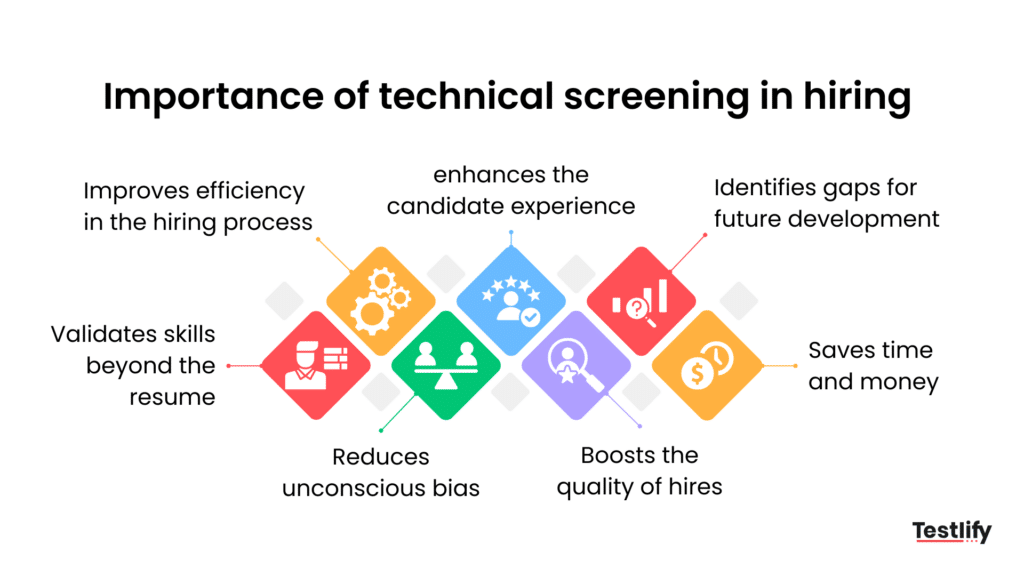
The applicant pool is bigger, more senior on paper and harder to trust
Demand for the roles has not gone anywhere. The U.S. Bureau of Labor Statistics projects employment of software developers, quality assurance analysts and testers to grow 10 percent from 2025 to 2035, with about 106,100 openings a year over the decade. But the postings have shifted up-market. Indeed Hiring Lab found that senior-level positions made up 69.3% of software development postings in Q1 2026, against about 14% of postings across all occupations. When every posting asks for a senior, every applicant claims to be one. The screen is where that claim gets tested.
The trust problem is now measurable. Gartner predicts that by 2028 one in four candidate profiles worldwide will be fake, and in its 2Q25 survey of 3,000 candidates, 6% admitted to interview fraud, either posing as someone else or having someone else pose as them. Four in ten said they use AI during the application itself. None of that makes candidates villains. It makes the resume a weak signal, and a proctored, identity-checked screen a necessary one.
Skills move faster than job titles
The World Economic Forum's Future of Jobs Report 2025 has employers expecting 39% of key skills to change by 2030, with AI and big data at the top of the fastest-growing list. A "five years of Java" line on a resume tells you about 2021. A 40-minute test on the stack you run today tells you about now. The benefits of technical assessments come down to closing that gap.
Structure beats experience as a predictor
The selection research points the same way. Sackett and colleagues' 2022 reanalysis of validity estimates in the Journal of Applied Psychology places structured interviews among the strongest predictors of job performance, and years of education or general experience among the weaker ones. The lesson for screening is not "interview more". It is that consistent, job-related tasks with a fixed rubric predict better than a reading of the CV, and a technical screen is the cheapest place to add that structure.
The fairness argument follows from the same fact. When every candidate gets the same task and the same scoring, the unconscious bias that creeps into "did they sound confident on the call" has fewer places to hide. Structure does not remove bias. It removes the variation between interviewers that lets bias in.
How do you conduct a technical screening?
To conduct a technical screening, define the competencies the role needs, choose a format that matches the level, send a timed and scored assessment, confirm the top scorers in a short phone screen, put the shortlist in front of an engineer for a live session, and decide on a shared scorecard. Six steps, in that order, with the expensive human time last.
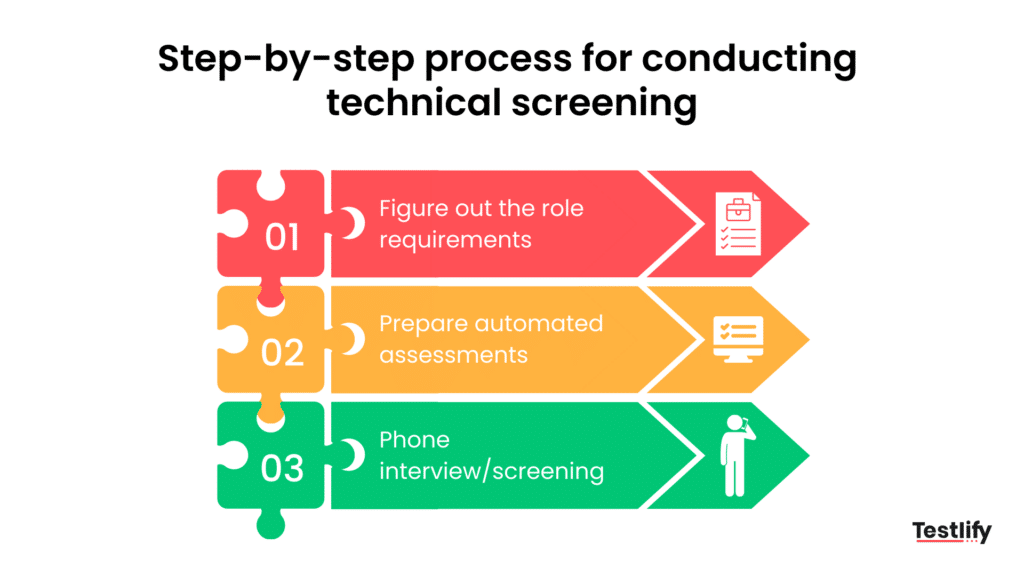
Step 1: Map the role to competencies, then to evidence
Start with the work, not the test. Sit with the hiring manager, list the four to six things the person will do in a normal week, then translate each one into a competency and the evidence that would prove it. This is the Testlify Competency-to-Evidence Matrix in practice: map every role to the competencies that matter, then connect each competency to measurable evidence through assessments, simulations, interviews, references and structured feedback. A backend role might come out as: writes correct SQL (coding test), reasons about failure modes (scenario question), reads other people's code (code review task), explains trade-offs (phone screen).
Write the must-haves into the job description as concrete tasks. "Strong Python" attracts everyone. "You will maintain a Django service with 200 endpoints and a Postgres database" tells the wrong people to self-select out before they cost you a screen.
Step 2: Pick the format that matches the level and the volume
Volume junior hiring wants a 30-to-45-minute automated test with a hard pass mark. Senior and specialist hiring wants a smaller pool and a richer signal: a take-home or a live pairing session. The formats are compared in the next section. The rule of thumb is that the cost of the screen should scale with the cost of a wrong hire, not with the size of the applicant pile.
Step 3: Send a timed, scored assessment
Send the assessment to every applicant who meets the hard requirements, on the same day, with the same time limit. Auto-score what can be auto-scored (multiple choice, unit-tested code) and route the rest to a rubric. Platforms handle automated scoring for custom questions so an engineer only reads the borderline submissions. Set the pass mark before results arrive, then leave it alone. Moving it afterwards is how bias gets back in.
Step 4: Confirm the top scorers in a 20-minute phone screen
The call has three jobs: confirm the person on the call is the person who took the test, hear them explain one decision they made in it, and check the basics a test cannot (notice period, location, salary range). Keep it to 20 minutes and a fixed set of questions. Ask "walk me through why you chose that approach in question 3" and listen for fluency. Someone who wrote the code can talk about it without notes.
Step 5: Watch the shortlist work
Only now does an engineer spend real time. A 45-to-60-minute live session, pairing on a small problem or reviewing a pull request together, shows how the candidate thinks, takes feedback and communicates. Run it against the same rubric for every finalist, and keep the problem the same across candidates so the scores mean something.
Step 6: Decide on a shared scorecard
Put the test score, the phone-screen notes and the live-session rubric side by side, weight them the way the competency map says, and let the hiring team decide. Then close the loop with the people who did not make it. Candidates who get constructive feedback after a screen reapply, refer friends and leave better reviews than the ones who hear nothing.
How to run an online technical screening
An online technical screening follows the same six steps with three additions. Verify identity at the start (photo ID plus a webcam snapshot), use a browser-based coding environment rather than an emailed file so the work is timestamped and recorded, and turn on proctoring signals sized to the role: tab-switch detection and copy-paste monitoring for a junior coding test, a recorded session with AI-assistance detection for a senior take-home. Tell candidates exactly what is monitored and why. Transparency keeps completion rates up. Surprise monitoring tanks them.
Pro tip: run the assessment past three of your current engineers before any candidate sees it. If your own team cannot finish it inside the time limit, the pass mark is measuring speed, not skill, and you will filter out the careful people.
Which technical screening test fits the role?
The right technical screening test depends on the level, the volume and how much the role rewards collaboration. Knowledge tests and short coding tests screen high volumes fast. Take-home projects and live pairing give a richer signal for senior roles at a higher cost per candidate. Most teams run two: an automated test first, then a live session for the shortlist.
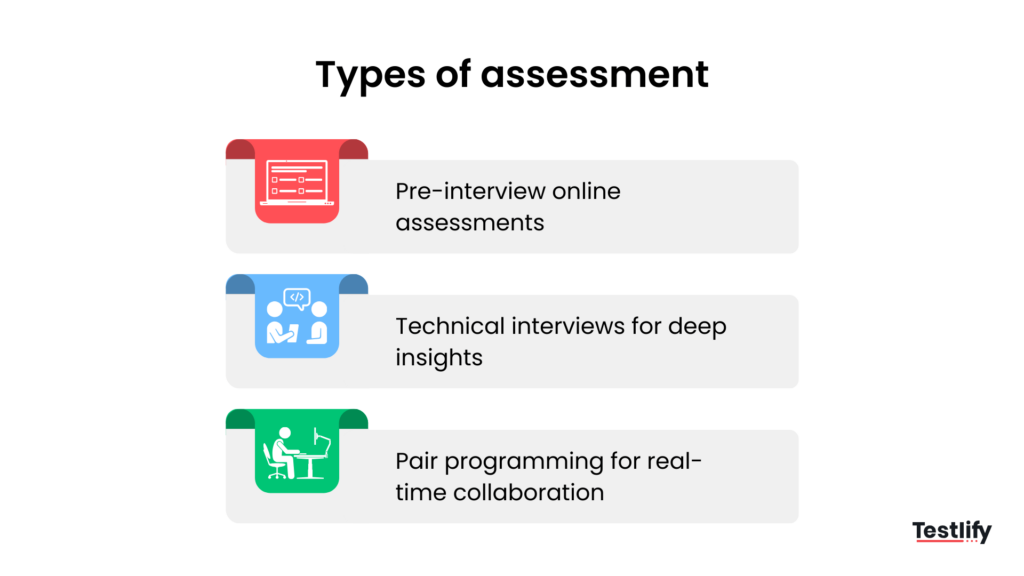
Format | Candidate time | Best for | Cheating risk | Watch out for |
|---|---|---|---|---|
Knowledge test (multiple choice, short answer) | 15 to 30 minutes | Volume screens, tooling and platform knowledge | High without proctoring | Measures recall, not building |
Auto-graded coding test | 30 to 60 minutes | Developers at every level, first-stage filter | Medium; AI assistance is the main risk | Puzzle questions that do not look like the job |
Take-home project | 2 to 6 hours over several days | Senior and specialist roles, small pools | High; no way to know who did it without a follow-up | Drop-off once unpaid work passes about 4 hours |
Live coding or pair programming | 45 to 90 minutes | Shortlist stage, roles that pair daily | Low | Interviewer inconsistency; scripts and rubrics fix it |
Code review or debugging task | 30 to 45 minutes | Mid to senior engineers, maintainers | Low to medium | Needs a realistic codebase, not a toy |
A note on take-homes: they produce the most job-like signal and the most drop-off. Cap them at four hours, say so in the brief, and pay for anything longer. And always pair a take-home with a short conversation about it, because an unsupervised project is the format where a helper (human or AI) is easiest to hide.
Match the coding test to the stack the person will use. A React developer screened on C++ pointers learns that you do not know what the job is. Role-specific skills tests exist for most stacks, and the notes on screening machine learning engineers show how the format shifts for a specialist role.
Technical screening tools, software, or services?
Technical screening software is the right buy when you screen more than a handful of candidates a month and need every result scored the same way. A technical screening service, where an outside team runs the interviews for you, makes sense when your engineers cannot give up the hours. Tools that only wrap a single test type usually get replaced within a year.
What to look for in technical screening software
- A test library that covers your actual stack, plus a builder for custom questions, so the screen looks like the job.
- Auto-grading with a human review path for the borderline 10 to 20% of submissions.
- Proctoring you can dial up or down by role: identity checks, browser control, AI-assistance detection, session recording.
- Shared scorecards, so the phone screen and the live session land in the same place as the test score.
- An ATS integration that pushes scores back to the record you already use. A screen nobody can see in the ATS is a screen nobody acts on.
- A candidate experience that does not require an install, a login or a two-hour block on a weekday.
The comparison of technical assessment platforms with live proctoring goes deeper on the security side.
When does a technical screening service make sense?
A technical screening service (often sold as interview-as-a-service) puts outside engineers on the phone screens and live sessions. It fits three situations: a hiring spike where 200 applicants land in a week, a team with two engineers who both need to ship, and a specialist stack nobody in-house can assess. The trade-off is consistency and signal. An outside interviewer does not know your codebase or your team, so keep the final live session in-house and use the service for the middle of the funnel.
Online technical screening services and software are not either-or. The common pattern at a 1,000-person company is software for the first two stages, then a service or a rotating panel of in-house engineers for the third.
What questions should a technical screening ask?
A technical screening should ask questions that produce evidence for the competencies on your map: one task per competency, each scored on a rubric. The best screening questions look like a Tuesday in the role. Trivia, brainteasers and "reverse a linked list" tell you who has been practising interview questions, not who can do the job.
Questions for the automated test
- Given this function and this failing test, find and fix the bug. (Debugging, about 10 minutes.)
- Write a query that returns the five customers with the highest refund rate last quarter, given these two tables. (Data handling, about 10 minutes.)
- This endpoint times out under load. Here is the code and a log excerpt. What are the two most likely causes? (Reasoning, short answer.)
- Implement an input validator to this spec; the hidden tests cover the edge cases. (Correctness, 15 to 20 minutes.)
Questions for the phone screen
- Walk me through the approach you chose for the validator task. What would you change with another hour?
- Describe a production incident you handled. What did you check first, and what did you change afterwards?
- Which parts of our stack have you not used? How would you get productive in them?
- When did you last disagree with a code review comment, and what happened?
Questions for the live session
- Here is a 200-line pull request from our codebase. Review it out loud.
- Design the data model for a notification system that has to fan out to 100,000 users.
- Pair with me on extending this service to support a second payment provider.
Score every answer against the rubric written in step 1, not against a gut feel. If a role needs language-specific depth, the JavaScript developer interview questions set shows how to build a stack-specific bank.
How do you keep a technical screen honest and fair?
A technical screen stays honest when the identity of the test-taker is verified, the task is hard to outsource, and the scoring is fixed before results arrive. It stays fair when every candidate gets the same task, the same time and the same rubric, and when the test measures the job rather than the ability to practise tests.
AI assistance and outsourced answers
Stack Overflow's 2025 Developer Survey found 84% of developers using or planning to use AI tools in their development process, up from 76% the year before. So assume an unsupervised take-home was written with an assistant, and design for it. Either allow AI openly and score the judgment (ask the candidate to explain and critique what the tool produced), or run the test in a proctored browser with AI-assistance detection and a follow-up call. The same survey found more developers distrust the accuracy of AI output (46%) than trust it (33%), which is exactly the judgment a live follow-up can test: can this person tell when the tool is wrong?
Speed versus depth
A screen that takes candidates two hours loses the employed ones first, and those are usually the ones you want. Keep first-stage candidate time under an hour, move depth to the live session, and measure drop-off per stage. If more than a third of invited candidates never start the test, the invite, the length or the timing is wrong.
Difficulty that measures the wrong thing
Too easy and 80% pass, so the screen filters nothing. Too hard and you keep the fast and the lucky. Calibrate on your own engineers (the pro tip above), aim for a first-stage pass rate around 20 to 30%, and review the questions where strong hires struggled. A platform with question-level analytics shows which items separate candidates and which just add time.
Inconsistency across interviewers
The single biggest fairness fix is boring: a written rubric, the same questions for everyone, and interviewers who score independently before they talk. It costs an afternoon to set up and removes most of the interviewer-to-interviewer variance that the structured-interview research keeps flagging.
Soft skills nobody screened for
Communication and collaboration are part of the technical job, so screen them technically: a code review out loud, a pairing session, a written explanation of a design decision. Do not bolt a personality quiz onto a coding test and call it a soft-skills screen.
How does Testlify speed up technical screening?
Testlify runs the first two stages of the process above so your engineers only see the shortlist. Role-specific coding and skills tests cover the major stacks, custom questions are auto-scored, and proctoring (identity checks, browser control, AI-assistance detection, session recording) is configurable per role, so a junior screen and a senior take-home each get the right level of scrutiny. Multiple reviewers score on one shared scorecard, results sync to your ATS, and reports show where candidates struggled so you can tune the test.
Picture a 400-person fintech hiring 12 backend engineers a quarter. It could send every qualified applicant a 40-minute proctored coding test on day one, phone-screen the top 25% on day three, and put six candidates in front of an engineer for a paired session in week two. The engineers spend about six hours per hire instead of an hour per applicant. (An illustrative scenario, not a customer result; your numbers will depend on the role and the funnel.)
See how it works on your own stack: book a demo and run your first screen this week.
Key takeaways
- Technical screening is a filter, not an interview. It earns its keep by keeping engineers out of the funnel until a shortlist exists. If your engineers touch every applicant, the screen has failed at its one job.
- Start from the role, not the test. Mapping competencies to evidence before you pick a format is what makes the screen job-relevant, and job-relevant screens are the ones candidates finish and hiring managers trust.
- Structure is the predictor. Fixed tasks, fixed time and a fixed rubric outperform a resume read, and they are also the cheapest bias control you can add this quarter.
- Match the format to the level. Volume junior hiring gets a sub-hour auto-graded test. Senior and specialist hiring gets a capped take-home or a live pairing session, always with a conversation attached.
- Assume AI is in the room. Most developers now work with an assistant open, so either allow it and score judgment, or proctor it and verify identity. Doing neither means scoring the tool, not the person.
- Software for scale, a service for capacity. Buy screening software when consistency across hundreds of candidates matters. Buy a screening service when engineer hours are the constraint, and keep the last session in-house either way.
- Measure the funnel. Track start rate, pass rate and drop-off per stage. A pass rate near 80% or a start rate under two-thirds tells you the screen, not the candidates, needs fixing.
Frequently asked questions (FAQs)

B2B SaaS Content Writer
Rishav Kumar is a B2B SaaS content writer with 4 years of experience. He loves crafting engaging content. Always exploring fresh ideas, he's passionate about helping businesses grow through impactful writing.
LinkedInRelated resources
View all
HR & recruitment
Structured vs. Unstructured Interviews: Key Differences, Pros and Cons
HR & recruitment
Proactive Recruitment: Definition, Strategies & Examples
HR & recruitment
Blind hiring: What is it, process, and benefits

HR & recruitment
HR trends in higher education in 2026
HR & recruitment
Raven’s Progressive Matrices Test: A Recruiter’s Guide 2026

HR & recruitment
Headhunting in recruitment: Your ultimate 2026 guide
Get started.
Hire on proof, not resumes.
Run your first skills-based assessment free — no credit card required.