
Customized talent assessments: how to build and score them
How to build customized talent assessments for hiring, which custom question types score automatically, and how to weight and review scores.

Customized talent assessments are pre-employment tests built around the exact skills one role needs, using your own questions alongside ready-made tests. The hard part is not writing the questions. It is scoring hundreds of answers the same way every time, which is where automated scoring for custom questions comes in.
 ChatGPT
 Gemini
 Claude
 Grok
 Perplexity
TL;DR
- A customized talent assessment mixes validated library tests with your own role-specific questions, so candidates are judged on the work they will actually do.
- Closed questions (single select, multi-select, dropdown, number, date, fill in the blank) score instantly against an answer key. Coding questions score against test cases.
- Open answers (video, audio, text, Chat AI and Voice AI) can be scored automatically by AI against criteria you write, with a reviewer able to adjust the score.
- File uploads and practical tasks are best scored by a reviewer with a short rubric.
- Weight sections by how much they matter for the job. In the example below, weighting moves a candidate from 75 to 77 because the job-critical task counts most.
- Before you rely on automated assessments, pilot them on current staff, keep a person in the loop for rejections and check local rules such as NYC Local Law 144.

What are customized talent assessments?
Customized talent assessments are hiring tests you assemble for a specific role instead of buying one generic test for everyone. A typical custom candidate assessment combines two or three validated skills tests from a library with five to ten questions your team writes about real tasks, tools and scenarios from the job.
The difference from an off-the-shelf test is fit. A generic customer support test checks general communication. A customized version adds your refund policy, a real ticket from your help desk and a chat with an angry customer about your product. Candidates see the job as it is, and the hiring team sees how each person handles it.
Customization usually covers four things:
- Content: your own questions, tasks, files and scenarios next to library tests.
- Format: the question type that fits each skill, from multiple choice to video answers and coding tasks.
- Scoring: answer keys, rubrics and weights that reflect what good looks like in your team.
- Experience: length, time limits, instructions, language and branding.
Why do teams build custom assessments for hiring?
Teams build custom assessments for hiring because generic tests miss the skills that separate a good hire from an average one in their own context. A role-specific test measures the work itself, which gives recruiters and hiring managers the same evidence to compare candidates on.
The need is real. SHRM's 2025 Talent Trends survey found that 69% of organizations still struggle to fill full-time roles, and 28% now require new skills for those roles. When the skills a job needs keep changing, a fixed test from three years ago falls behind quickly.
Custom tests help in three places:
- Volume hiring: a short custom screen removes candidates who cannot do the core task before anyone spends time on an interview.
- Specialist roles: your own scenarios test knowledge no library test covers, such as an internal tool, a regulated process or a niche stack.
- Fair comparison: every candidate answers the same questions and is scored on the same criteria, so decisions rest on evidence rather than on who interviewed well.
Which custom question types can be scored automatically?
Most custom question types can be scored automatically, but not all in the same way. Closed questions are scored against an answer key in seconds. Coding questions run against test cases. Open answers such as video, audio and written responses need AI scoring against criteria you define, and work samples like file uploads are usually best reviewed by a person.
Question type | How it is scored | Best for | Reviewer needed? |
|---|---|---|---|
Single select, multi-select, dropdown, yes/no | Answer key, instant | Product, policy and process knowledge | No |
Number, date, fill in the blank | Exact or accepted answers, instant | Calculations, precise facts, terminology | Rarely, for edge cases |
Coding | Hidden test cases | Developers, data roles | Optional, for code quality |
Typing | Speed and accuracy, instant | Data entry, support, admin | No |
Open-ended text | AI against your scoring criteria | Writing, reasoning, customer replies | Spot check and override |
Video and audio answers | AI against your scoring criteria | Communication, sales, support | Spot check and override |
Chat AI and Voice AI | AI scores the conversation | Live customer or sales scenarios | Spot check and override |
File upload, practical task, Docs, Sheets or Excel | Reviewer with a rubric | Projects, reports, spreadsheets | Yes |
Testlify lists 25+ question types on its custom question types page, including qualifier questions that screen out candidates who miss a hard requirement before scoring even starts.
How does automated scoring work for custom questions?
Automated scoring for custom questions works by checking each answer against the standard you set before candidates start. For closed questions that standard is an answer key. For code it is a set of test cases. For open answers it is written scoring criteria that an AI model applies to every response in the same way, with the evidence shown to a reviewer.
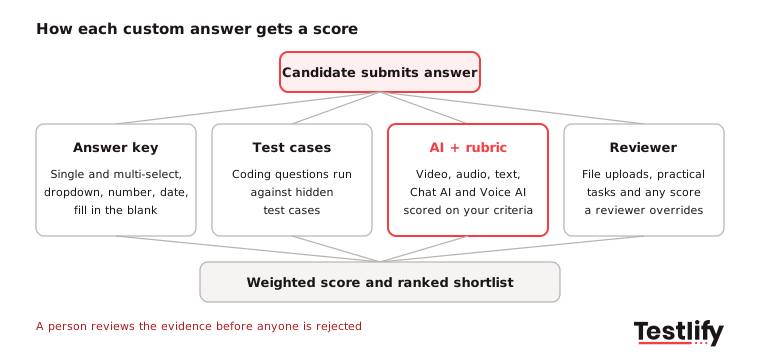
The quality of automated assessments depends almost entirely on the criteria. A video question scored on "communicates well" will produce scores that look precise but mean little. The same question scored on "names the customer's problem, offers one clear next step and stays under two minutes" gives the AI, and any reviewer, something concrete to check.
Pro tip: Write scoring criteria as three to five observable behaviors per open question, with a short example of a strong answer. If two people on your team would score the same answer differently using your criteria, the AI will not do better.
Automated scores are then rolled up per section and per assessment, so candidates can be ranked. For more on how that ranking speeds up the shortlist, see our guide to automated candidate scoring, and for the mechanics behind AI scores, read how Testlify AI scoring works.
How do you build customized talent assessments?
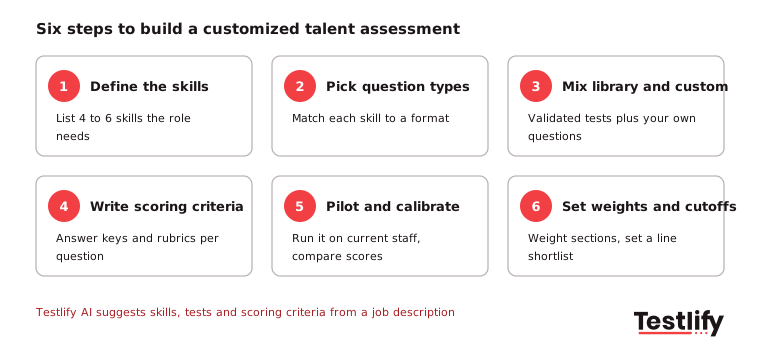
Customized talent assessments are built in six steps: define the skills, pick a question type for each skill, mix library tests with your own questions, write the scoring criteria, pilot the test, then set weights and a shortlist line. Most teams can build a first version in an afternoon and refine it after the first round of candidates.
Skills come first for a reason. LinkedIn's Future of Recruiting 2025 found that 93% of talent acquisition professionals say accurately assessing skills is crucial to improving quality of hire, yet only 25% feel highly confident they can measure quality of hire at all.
- Define the skills: List four to six skills the role cannot do without. Use the job description and ask the hiring manager what top performers do differently.
- Pick question types: Match each skill to a format. Knowledge fits multiple choice, writing fits open text, customer handling fits Chat AI or video, and tool skills fit a practical task.
- Mix library and custom: Start with validated tests from the Testlify test library for general skills, then add your own questions for what is unique to the role.
- Write scoring criteria: Add an answer key for closed questions and three to five criteria for open ones. Decide upfront which questions are knockouts.
- Pilot and calibrate: Ask two or three strong current employees to take it. If they struggle on a question, the question is probably unclear or too hard.
- Set weights and cutoffs: Weight sections by importance and set a shortlist threshold you can explain to a hiring manager.
Keep the whole assessment to about 30 to 45 minutes for most roles. Longer tests raise drop-off, especially for candidates who already have a job. For role-by-role examples, see how to create skills assessment tests for different roles.
How should you weight and review the scores?
Scores should be weighted by how much each skill matters on the job, then reviewed by a person before anyone is rejected. Weighting stops an easy knowledge section from hiding a weak result on the task that matters most, and review catches the cases where an automated score misread an answer.
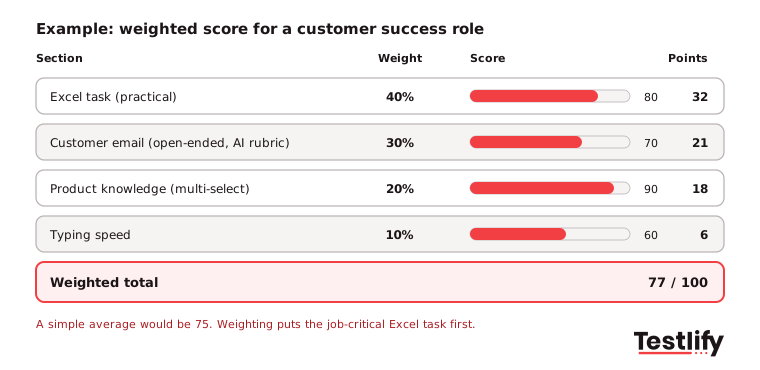
In the example above, a customer success candidate scores 80 on an Excel task, 70 on a written customer email, 90 on product knowledge and 60 on typing. A simple average gives 75. Weighting the Excel task at 40% and the email at 30% gives 77, because the candidate is strongest where the job needs it most. Another candidate with 95 on knowledge but 50 on the Excel task would drop below them, which is the point.
Three review habits keep automated scores honest:
- Check the evidence, not just the number: Open the answer behind any score near your cutoff before you decide.
- Override with a reason: When a reviewer changes an AI score, note why. Patterns in overrides show which criteria need rewriting.
- Compare score bands over time: After a few months, check whether high scorers became strong hires. If not, the weights or criteria need work.
The Testlify reporting and analytics view shows the scoring breakdown for every question, which makes this kind of review quick.
What should you check before using automated assessments?
Automated assessments need three checks before they go live: that the scoring is fair across groups, that candidates are told how they are assessed, and that a person reviews decisions. Some of this is now law, not just good practice.
- New York City: Under Local Law 144, employers cannot use an automated employment decision tool unless it had a bias audit within one year before use, a summary of the results is public, and candidates get notice at least 10 business days before it is used. Enforcement started on July 5, 2023.
- European Union: The EU AI Act classes AI used to select or evaluate job candidates as high-risk, which brings duties on human oversight, record-keeping and risk management.
- Candidate experience: Tell candidates which parts are scored automatically, how long the test takes and how to ask for an accommodation.
- Cheating and AI help: Custom questions are harder to look up than public tests, but proctoring still matters. Testlify includes 20+ proctoring checks, from tab tracking to AI assistance detection, covered on the anti-cheating and proctoring page.
Key takeaway: Automated scoring removes repeat grading work and keeps scoring consistent. It does not remove responsibility. Keep a reviewer on every rejection and treat the score as evidence, not the decision.
How does Testlify support customized talent assessments?
Testlify supports customized talent assessments by putting the library, your own questions, automated scoring and review in one place. Hiring teams can start from a job description, add custom questions in 25+ formats and get a ranked, explainable shortlist.
- AI test builder: generates a role-specific assessment from a job description in under a minute, with AI-suggested competencies and scoring criteria you can edit.
- Library plus custom: 3,500+ validated tests to combine with your own questions. Custom tests built by subject matter experts are also available on request.
- Automated and AI scoring: closed questions and coding tasks are scored automatically, while video, audio, text and Chat AI answers are auto-evaluated with an option for manual review and adjustment.
- Weighted scoring and thresholds: weight what matters most and set score thresholds to auto-shortlist candidates in multi-stage workflows.
- AI candidate insights: a per-skill breakdown, AI-written strengths and gaps, and suggested follow-up questions for the interview.
- Fit with your stack: 100+ ATS and HRIS integrations, 15+ languages and a third-party NYC bias audit of Testlify's matching model completed on June 16, 2023.
For rollout advice beyond scoring, read our best practices for implementing hiring assessments.
Ready to build your first custom assessment?
Turn your next job description into a customized talent assessment and see how your own questions score. Start a 7-day free trial of Testlify, no credit card required, or book a demo to walk through scoring and weighting with the team.
Frequently asked questions (FAQs)

Content Writer
Yashika Khandelwal is a Content Writer with 3+ years of experience creating research-backed content on hiring, talent assessment, and HR technology. She is a registered Organizational Psychologist and subject matter expert who combines behavioral science with practical recruitment insights to produce accurate, evidence-based content.
LinkedInRelated resources
View all
HR & recruitment
Application assessment checklist: 30 checks for fair, fast hiring

HR & recruitment
How to incorporate AWS test into your recruitment strategy

HR & recruitment
How to simplify candidate screening with AWS test

HR & recruitment
How to hire top talent using AWS test

HR & recruitment
How to incorporate Kotlin test into your recruitment strategy

HR & recruitment
How to simplify candidate screening with kotlin test
Get started.
Hire on proof, not resumes.
Run your first skills-based assessment free — no credit card required.