
Assessment tools for recruitment and selection: types and how to use them
The main hiring assessment types, what each one measures, where it fits in your selection process and how to combine them fairly in 2026.

Assessment tools for recruitment and selection are structured methods, such as skills tests, work samples, cognitive tests, personality questionnaires and structured interviews, that measure whether a candidate can do the job. They replace guesswork from resumes with comparable evidence, so every applicant is judged on the same job-related criteria and every decision can be explained.
TL;DR:
- The main assessment tools for recruitment and selection are skills tests, work samples, cognitive tests, SJTs, personality questionnaires and structured interviews.
- Work samples, skills tests and structured interviews tie most directly to the job.
- Use personality results as interview prompts, never as pass or fail filters.
- Two or three tools per role is enough: a screen, a task, then an interview.
- NACE found 70% of employers now use skill-based hiring, up from 65%.
- Every test must be job-related and offer accommodations.
 ChatGPT
 Gemini
 Claude
 Grok
 Perplexity
What are assessment tools for recruitment and selection?
Assessment tools for recruitment and selection are the tests, tasks and structured conversations an employer uses to measure job-related ability before making an offer. Recruitment builds the applicant pool. Selection narrows it, and assessment tools give that narrowing a consistent, evidence-based method instead of resume impressions and unstructured chats.
Skills-based selection is now the norm rather than the exception. According to the NACE Job Outlook 2026 survey, 70% of employers use skill-based hiring for entry-level hires, up from 65% the year before, and 71% of them use it at least half the time. The SHRM Foundation's Skills-First Movement research, released in February 2026, found that about two-thirds of HR professionals using skills-first strategies receive more qualified applicants.
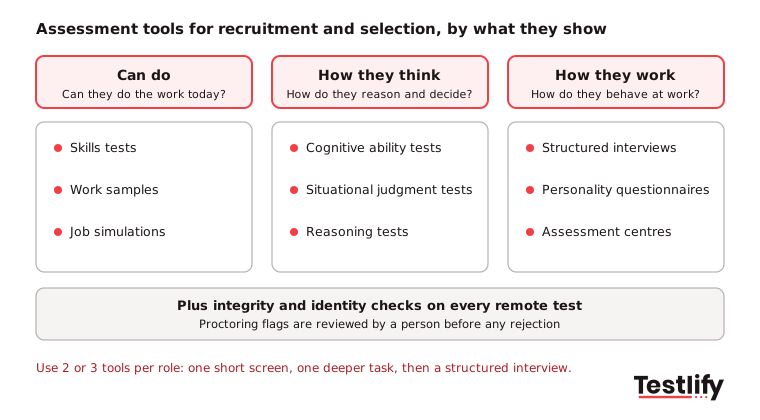
Assessment tools fall into three groups, based on what they tell you about a candidate:
- Can do: skills tests, work samples and job simulations show whether the person can perform the tasks today.
- How they think: cognitive ability and situational judgment tests show how a person reasons, learns and makes decisions.
- How they work: personality and behavioral questionnaires and structured interviews show working style, motivation and past behavior.

What types of assessment tools are used in recruitment and selection?
The main types of assessment tools used in recruitment and selection are skills tests, work samples and simulations, cognitive ability tests, situational judgment tests, personality questionnaires, structured interviews, assessment centres and integrity checks. Each one measures something different, fits a different stage and carries its own limits, so the table below is the quickest way to compare them.
Assessment tool | What it measures | Best stage | Main limit |
|---|---|---|---|
Skills test | Job knowledge and software, coding or language skills | Early screen | Shows current skill, not potential |
Work sample or job simulation | Performance on a real task from the role | Shortlist | Takes candidates longer, so keep it under an hour |
Cognitive ability test | Reasoning, numeracy, problem solving, learning speed | Early screen | Can cause adverse impact if used alone with a high cut score |
Situational judgment test (SJT) | Choices in realistic work scenarios | Early screen or shortlist | Must be written for the role to mean much |
Personality or behavioral questionnaire | Working style, preferences, motivation | Shortlist, as interview input | Easy to fake; weak as a pass or fail filter |
Structured interview (human or AI) | Past behavior and job competencies, scored on a rubric | After screening | Only as good as its questions and rubric |
Assessment centre | Several exercises observed by trained assessors | Final stage, senior or graduate roles | Costly and slow to run |
Integrity and identity checks | Honest test-taking, identity, AI-assisted answers | Every remote test | Flags need human review before any rejection |
A few notes that most guides skip:
- Skills tests: cover job knowledge (accounting rules, SQL, Excel) and language level. Short, objective and easy to score at volume, which makes them the default first filter.
- Work samples and simulations: ask the candidate to do a slice of the actual job, such as a support ticket, a code review or a spreadsheet model. Read more on hiring with job simulations.
- Cognitive ability tests: measure general reasoning. Useful for roles with a lot of new learning, but pair them with job-specific tools. See the cognitive ability test definition.
- Situational judgment tests: show how someone would handle a customer complaint or a missed deadline. Testlify's situational judgment tests are built around role scenarios.
- Personality questionnaires: tools such as a Big Five personality test work best for shaping interview questions, not for rejecting people.
- References and background checks: verify history rather than measure ability, so treat them as final checks, not assessment tools.
The EEOC guidance on employment tests lists cognitive tests, personality tests, work samples, simulations and physical ability tests as selection procedures covered by US anti-discrimination law, which is why every tool above needs a clear link to the job.
Where does each assessment tool fit in the selection process?
Each assessment tool fits the stage where its cost to the candidate matches how serious the candidate is. Short, objective tools such as skills tests and SJTs belong early, when you have hundreds of applicants. Longer tools such as work samples, structured interviews and assessment centres belong later, when only a shortlist remains.
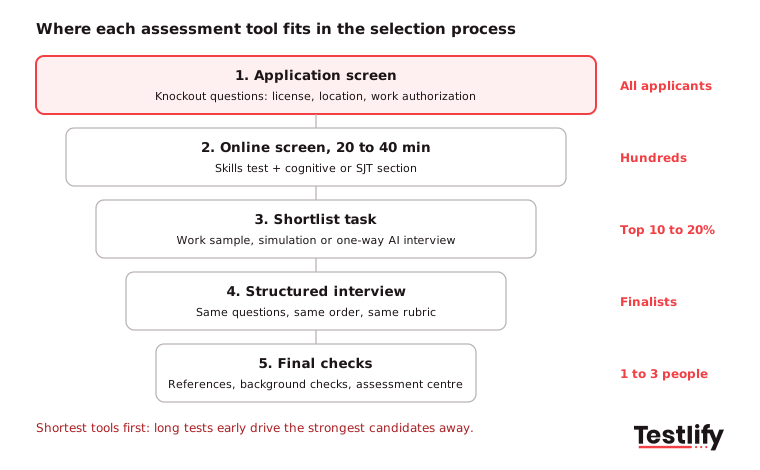
- Application screen: knockout questions for must-haves such as work authorization, shift availability or a required license.
- Online screen (20 to 40 minutes): one skills test plus a cognitive or SJT section. This is where tools remove most of the manual resume review.
- Shortlist task: a work sample or simulation, or a one-way AI interview with role-based questions, for the top group.
- Structured interview: the same questions, in the same order, scored against the same rubric for every finalist. Use the screen results to choose follow-up questions.
- Final checks: references, background checks and, for senior or graduate roles, an assessment centre.
Pro tip: Put the shortest tool first. Long tests at the top of the funnel cause drop-off among the strongest candidates, who usually have other offers.
How do you choose assessment tools for recruitment and selection?
Choosing assessment tools for recruitment and selection starts with a job analysis: list the 4 to 6 skills and behaviors that separate strong performers from weak ones in this role, then pick the tool that measures each one most directly. A job analysis keeps every test tied to the job, which also protects you legally.
Then ask one question per tool: what decision will this result change? If a score will not move a candidate forward or out, or change what you ask in the interview, drop the tool. Recruiters agree on the stakes: the LinkedIn Future of Recruiting 2025 report found 93% of talent acquisition professionals say accurately assessing skills is crucial to improving quality of hire.
Most roles need 2 or 3 tools. These combinations work well as starting points:
Role type | Early screen | Shortlist | Final |
|---|---|---|---|
High-volume (support, sales, BPO, retail) | SJT plus language or typing test | One-way video or chat AI interview | Short structured interview |
Technical (engineering, data, IT) | Role-specific skills test | Coding task or work sample | Technical structured interview |
Professional (finance, HR, marketing) | Skills test plus cognitive section | Work sample from the role | Structured interview with panel |
Leadership and senior | Cognitive or reasoning test | Personality questionnaire as interview input | Assessment centre or case presentation |
Graduate and early careers | Cognitive test plus SJT | Group or virtual exercise | Structured interview |
For a side-by-side look at vendors, see our guide to candidate assessment tools for technical hiring.
How do you use assessment tools in hiring, step by step?
Using assessment tools well comes down to six steps: define the skills, build the assessment, pilot it, set scoring rules, run it the same way for everyone, and review the results. Skipping the pilot and the scoring rules is the most common reason assessments frustrate hiring managers.
- Define the skills: turn the job analysis into a short list of skills, each with what "good" looks like.
- Build the assessment: pick the tools from the table above and keep the total candidate time under about 60 minutes before the interview stage.
- Pilot it: have 5 to 10 current employees in the role take it. If strong performers score low, the test measures the wrong thing.
- Set scoring rules before you see candidates: decide the weight of each section, the score that moves someone forward and what happens near the line.
- Run it the same way for everyone: same instructions, same time limits, the same integrity checks and an easy way to request accommodations.
- Bring results into the interview: use low section scores to choose follow-up questions instead of re-testing what the assessment already showed.
Structured interviews are the step most teams leave unstructured. The US Office of Personnel Management defines a structured interview as asking every candidate the same questions in the same order and rating every answer on the same scale. A shared structured interview rubric is what makes scores from different interviewers comparable.
What legal rules apply to assessment tools in hiring?
Legal rules for assessment tools center on three ideas: every test must relate to the job, it must not screen out protected groups without good reason, and candidates with disabilities must get reasonable accommodations. Where AI scores candidates, newer laws add bias audits, candidate notice and human oversight.
- United States: EEOC guidance says a test that disproportionately excludes a protected group must be job-related and consistent with business necessity. The employer stays responsible even when a vendor supplied the test. Track adverse impact by group at each stage.
- New York City: Local Law 144 requires a bias audit within one year before using an automated employment decision tool, a public summary of the results, and notice to candidates. The NYC Department of Consumer and Worker Protection has enforced it since July 5, 2023, and its guidance sets the notice at 10 business days before use.
- European Union: the European Commission lists AI used for recruitment, such as CV sorting, as high-risk under the AI Act. Obligations such as risk management, logging and human oversight apply from 2 December 2027.
- Accommodations everywhere: offer extra time, screen-reader-friendly formats or alternative tasks on request, and say so in the invite.
Keep a person in the loop for every rejection that an automated score drives, and keep records of why each tool is used for each role.
How do you measure whether your assessment tools work?
Measuring assessment tools means comparing scores with what happens after the hire, and checking the process itself for fairness and drop-off. Five numbers cover most of it: quality of hire, pass-through rate by group, completion rate, time to hire and hiring manager satisfaction.
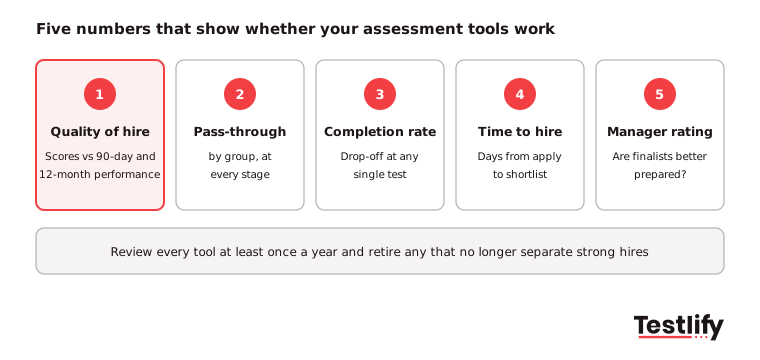
- Quality of hire: compare assessment scores with 90-day and 12-month performance ratings and retention.
- Pass-through rate by group: check each stage for adverse impact, especially any cognitive or automated cut score.
- Completion rate: a sharp drop at one test usually means it is too long or too early.
- Time to hire: assessments should shorten the path to a shortlist, not add a week.
- Hiring manager satisfaction: ask whether finalists arrive better prepared and more comparable.
Many teams struggle with the first metric. LinkedIn's same report found 89% of recruiting professionals expect measuring quality of hire to grow in importance, yet only 25% feel highly confident they can do it well. Our guide to KPIs for measuring assessment impact shows how to set these up.
Key takeaway: Assessment tools earn their place only when scores line up with performance on the job. Review each tool at least once a year and retire any that no longer separate strong hires from weak ones.
What mistakes should you avoid with assessment tools?
The most common assessment mistakes are testing too much, using personality results as filters, setting cut scores without a pilot and ignoring the candidate's time. Each one either drives good candidates away or lets weak signals make strong decisions.
- Stacking tests: five tests in a row tire candidates and add little. Two or three well-chosen tools cover most roles.
- Filtering on personality: use personality results to plan interview questions, not to reject people.
- Guessing the cut score: set the pass mark from your pilot group, then check pass rates by group after the first hiring round.
- Ignoring integrity: in remote tests, AI-assisted answers and proxy test-takers are real risks. Use proctoring, and have a person review every flag.
- Not closing the loop: candidates who invest an hour deserve a decision and, where possible, short feedback.
How does Testlify support assessment in recruitment and selection?
Testlify supports assessment in recruitment and selection by putting skills tests, AI interviews, integrity checks and scoring in one platform, so each candidate reaches the human interview with comparable evidence already attached. Hiring teams can turn a job description into a role-specific assessment and rank candidates on the results.
- Test library: 3,500+ tests across role-specific skills, coding, cognitive ability, situational judgment, language and personality, plus 25+ question types for custom tasks. Browse the Testlify test library.
- AI interviews: Video AI, Voice AI and Chat AI interviews ask role-based questions and score each answer, which suits the shortlist stage. See AI interviews for candidate screening.
- Integrity checks: 20+ proctoring checks, including AI assistance detection, copy and paste tracking and webcam snapshots. Details on anti-cheating and proctoring.
- Fit with your stack: 100+ ATS and HRIS integrations, assessments in 15+ languages, and a third-party bias audit of Testlify's matching model under NYC Local Law 144, completed June 16, 2023 (NYC bias audit).
Ready to build your first assessment?
Pick one open role, choose two tools from the table above and see how the shortlist compares with your usual process. Start a 7-day free trial of Testlify, no credit card required, and build your first assessment from your own job description.
Frequently asked questions (FAQs)

People and Talent Partner
Arushi Shah runs day-to-day talent acquisition and candidate experience at Testlify. She writes on interviewing, structured hiring, and giving candidates a fair, fast process.
LinkedInRelated resources
View all
Candidate assessment
How to hire big data engineers: a step-by-step guide

Candidate assessment
The Ultimate Guide to Hiring a Top-Notch Network Engineer

Candidate assessment
How to hire a system administrator: steps, skills and costs

Candidate assessment
How Testlify helps companies reduce bias in hiring

Candidate assessment
Advanced Excel Assessment: How to Test Candidate Skills (2026)

Candidate assessment
Project management skills assessment guide
Get started.
Hire on proof, not resumes.
Run your first skills-based assessment free — no credit card required.