
How to design and integrate technical assessments into recruiting processes
Technical assessments streamline hiring by evaluating skills accurately. Learn best practices for integrating these tools into your recruitment for fair & effective candidate selection.

Most hiring teams bolt a technical test onto the front of the funnel, watch the pass rate, and call it done. Then the first hire still washes out in month three. The test was never the problem. Where it sat in the process, and what the team did with the score, was.
Integrating a technical assessment well means deciding four things before you buy anything: which competencies the role actually needs, which stage the assessment gates, what score moves someone forward, and which system holds the record of that decision.
 ChatGPT
 Gemini
 Claude
 Grok
Grok Perplexity
TL;DR
- Put the assessment after the application and before the first human interview. That is the stage where it saves the most recruiter hours per candidate.
- Job-specific measures predict performance better than general ability tests. Structured interviews now carry the highest mean validity at 0.42, job knowledge tests 0.40, work samples 0.33, and general cognitive tests 0.31.
- The assessment narrows the shortlist. The structured interview still makes the call. Teams that let a score auto-reject tend to lose good candidates and gain legal exposure.
- Define the cut-off score, the reviewers, and the appeal path in writing before the first invite goes out, not after the first argument.
- If the tool scores candidates automatically, check your local rules. New York City has required a bias audit within one year of use since 5 July 2023.

How do we integrate talent assessments into our recruitment workflow?
Map each role to the competencies that matter, pick one assessment that measures those competencies, place it between application and first interview, set the passing score in advance, and sync the result into whichever system your team already treats as the record. The assessment filters. People decide.
That sequence is the Testlify Hiring Workflow Method: run evidence-based hiring at scale through assessments, automation, ATS integrations, reviewer collaboration, reporting, and structured decision workflows. The point of the method is that a good assessment on its own changes very little. What changes outcomes is a repeatable path from requisition to decision where every candidate meets the same bar in the same order.
A small caution before the steps. Adding an assessment stage adds friction for candidates, and friction costs you applicants. That trade is worth it when the role is hard to screen from a resume and expensive to get wrong. It is a poor trade for a high-volume role with a shallow talent pool, where the bottleneck is supply, not selection.
Where in the funnel should a technical assessment sit?
Between application and the first live interview, in almost every case. At that point you have enough applicants for the filter to pay for itself, and you have not yet spent interviewer time on people who cannot do the work. Later placement wastes panel hours. Earlier placement, before anyone has read the application, tends to annoy good candidates.
Stage | What the assessment does here | When this placement is right |
|---|---|---|
Before application | Acts as a qualifier or self-selection gate | Rarely. Only for licensed or safety-critical work where a hard requirement is non-negotiable |
After application, before first interview | Replaces resume guesswork with a measured shortlist | The default. Highest saved recruiter hours per candidate |
After first interview | Confirms a specific doubt raised in conversation | Senior or scarce roles where you cannot afford to lose candidates to friction |
Final stage | Deep work sample or paid project | When the output itself is the hiring evidence, such as a staff-level design task |
How do IT recruiters evaluate technical skills in candidates efficiently?
By scoring the work, not the claim. A recruiter without a coding background cannot judge a candidate's description of their architecture choices, but they can read a per-test-case result, a percentile rank against other candidates for the same role, and a flag from the hiring manager on the two questions that mattered. The recruiter's job becomes triage against an agreed bar rather than technical judgement.
Practically that means three things. Keep the assessment to the two or three competencies the role lives on. Ask the hiring manager to sign off on the question set once, so it holds for the whole requisition. And make the report readable by someone who is not an engineer.
Technical talent vetting without slowing the funnel
Time-box it. A 45 to 60 minute assessment gets finished; a three-hour take-home gets abandoned by the candidates who have other offers, which is exactly the group you wanted. Send the invite automatically when the application lands, set a reminder cadence, and give the assessment an expiry so your pipeline does not fill with half-finished attempts.
One more thing worth saying plainly, because vendors rarely do: a shorter assessment measures less. Cutting a test from 60 minutes to 20 buys completion rates and costs you reliability. Pick the trade deliberately for each role instead of defaulting to the shortest option. Done well, this is also how teams shortlist without running long interview loops.
A technical assessment guide for HR teams
Eight steps, in order. The first three are the ones teams skip, and skipping them is why so many assessment rollouts quietly stop getting used.
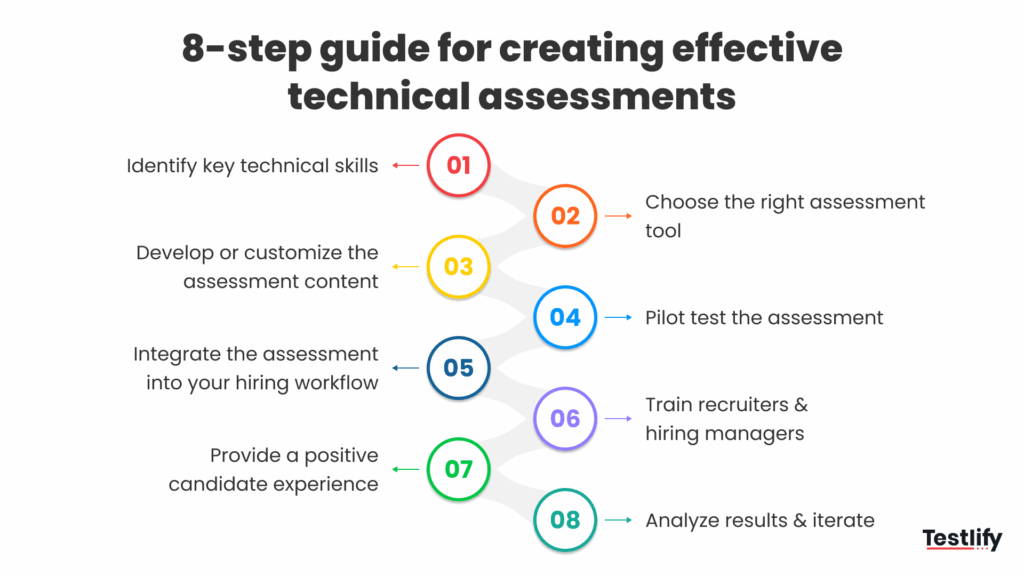
- Name the competencies. Sit with the hiring manager and write down the two or three things a new hire must be able to do in week one. Not a wish list. If the list runs past five, the role is really two roles.
- Decide what counts as evidence. For a back-end role that might be a multi-file project with hidden test cases. For a data role, a SQL task against a real schema. For a support engineer, a written-response scenario.
- Set the bar before you see anyone. Agree the cut-off score, who reviews borderline results, and what happens on a tie. Deciding this after the first candidate scores 68 is how bias gets in.
- Build or pick the assessment. Use a library test where the competency is standard, and author your own where the work is specific to your stack.
- Pilot it on people you already trust. Give it to three current employees in the role. If your strong performers score badly, the test is wrong, not them. This single step catches most broken assessments.
- Wire it into the workflow. Trigger the invite on application, push the score back to the system of record, and let the stage change follow the score rather than a manual copy-paste.
- Train the people reading the reports. A score with no context gets used badly. Show recruiters what the percentile means and what it does not.
- Review the data every quarter. Compare assessment scores against how those hires are actually performing, then adjust the bar or the questions.
How do I evaluate the ease of use of a recruiting platform for hiring managers?
Watch one do it without help. Give a hiring manager a real requisition and ask them to review three candidate reports and leave a score. If they need a walkthrough, the tool has failed the test regardless of its feature list. Hiring managers use these systems a few times a quarter, so anything that needs re-learning each time will not get used.
Three questions that separate tools quickly. Can a manager leave structured feedback without an admin seat? Does the candidate report make sense to someone who has never seen the product? And can they compare two candidates side by side without exporting anything?
How can recruiters improve hiring outcomes with assessment tools?
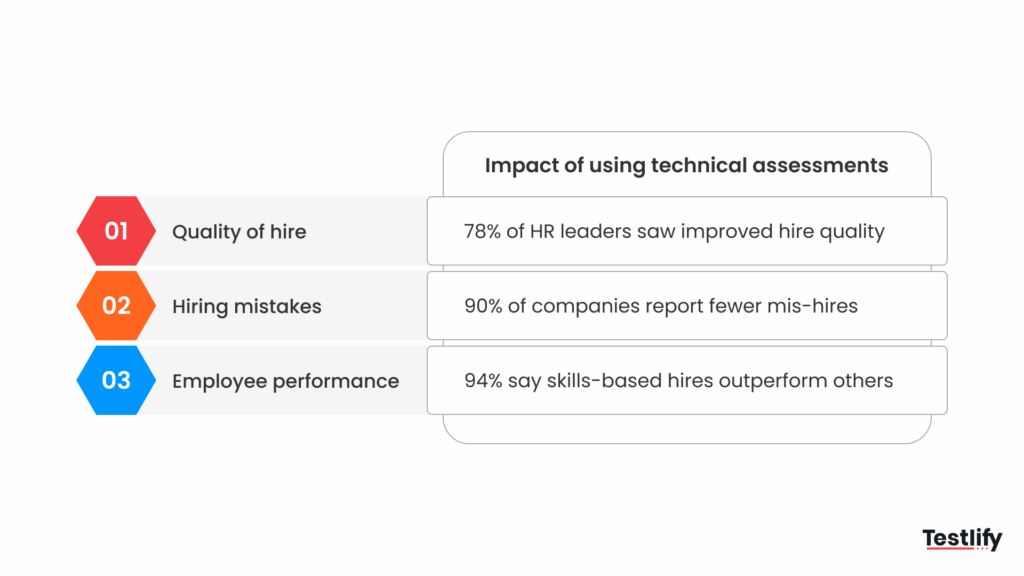
By choosing job-specific measures over general ones, and by keeping a human decision at the end. This is the practical core of hiring on demonstrated skill rather than on credentials. The strongest predictors of job performance are the ones built around the actual job. General measures of ability and personality predict less well than the industry believed for two decades.
That correction matters, because the number most assessment marketing still quotes is out of date. A re-analysis by Sackett and colleagues showed the long-accepted estimates had been systematically overcorrected for range restriction. Work sample tests dropped by 0.21, cognitive ability by 0.20, and unstructured interviews by 0.19. The revised validity estimates for selection procedures reorder the whole league table.
Selection procedure | Older 1998 estimate | Revised estimate | White-Black mean difference |
|---|---|---|---|
Structured interviews | 0.51 | 0.42 | 0.23 |
Job knowledge tests | 0.48 | 0.40 | 0.54 |
Empirically keyed biodata | 0.35 | 0.38 | 0.33 |
Work sample tests | 0.54 | 0.33 | 0.67 |
General cognitive ability tests | 0.51 | 0.31 | 0.79 |
Integrity tests | 0.41 | 0.31 | 0.10 |
Read that last column too. The general cognitive test carries both the lowest validity in the group and the largest subgroup difference at 0.79, while the structured interview carries the highest validity and the smallest at 0.23. For a technical funnel that is a straightforward conclusion: lead with job-relevant work and a structured conversation, and treat a generic aptitude screen as the weakest tool in the kit.
There is a real limit on work samples worth knowing before you standardise on them. The same authors note that job knowledge tests and work samples are not generally suited to entry-level hiring where the skills get developed after the hire, through training or on the job. For a graduate pipeline, testing knowledge the candidate was never given a chance to acquire measures their background, not their potential.
Which are the best tools for technical assessment candidate tracking?
The one your team will actually keep using, which almost always means the one that writes back into the system where your pipeline already lives. Tracking breaks when the score sits in one tool and the candidate stage sits in another, and someone has to move it by hand. If you are still choosing that system, start from a shortlist of applicant tracking systems and check which ones support write-back.
So judge candidate tracking on four things rather than feature counts:
- Write-back, not just read. Can the integration advance a candidate to the next stage automatically when they clear the cut-off score, or does it only pull names in?
- Event coverage. Webhooks for assessment, candidate, score and interview events let you build the reporting your team asks for later.
- Reviewer trail. Multiple reviewers, scores recorded per reviewer, and a log of who changed what.
- Honest sync boundaries. Ask which actions do not sync back. In Testlify, for example, a candidate who clears the cut-off can auto-advance to the next ATS stage, but a rejection happens inside Testlify and does not update the ATS. Knowing that in advance saves a quarter of confused status reports.
Testlify integrates with more than 100 applicant tracking systems and leaves that system as the record for teams that already run one, which is most teams. On the self-serve plans those ATS integrations are a paid add-on rather than part of the base tier, so price it in. For a team with no tracking system at all, Testlify also ships a simple built-in hiring pipeline: post the job, collect applications, screen with evidence, and move people through applied, reviewed, shortlisted and rejected stages. It is deliberately basic, and it is not a substitute for a dedicated system of record.
How do you set up a technical assessment in Testlify?
Five steps, about ten minutes for a standard role.
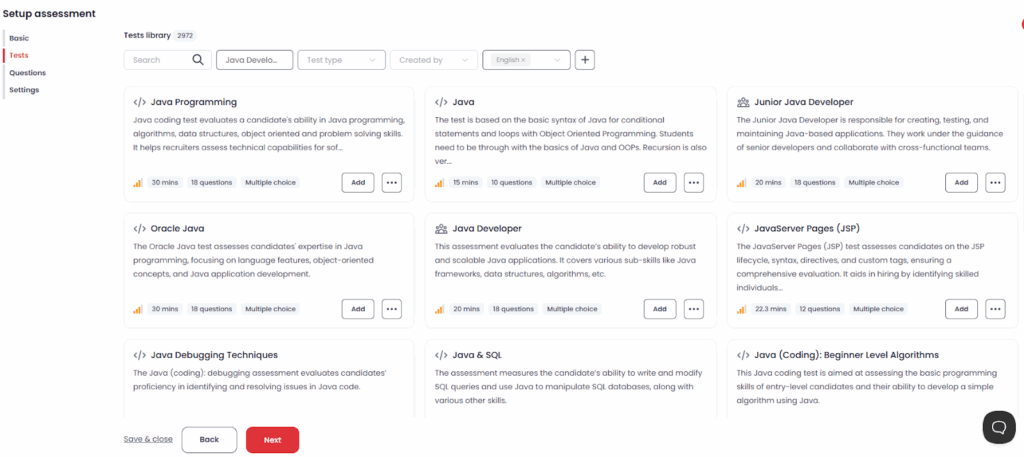
Create the assessment. Start a new assessment from the dashboard and give it the requisition name your team will recognise later.
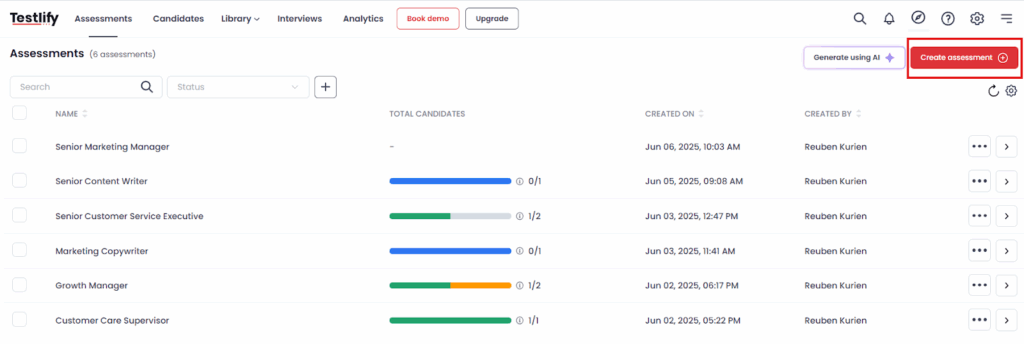
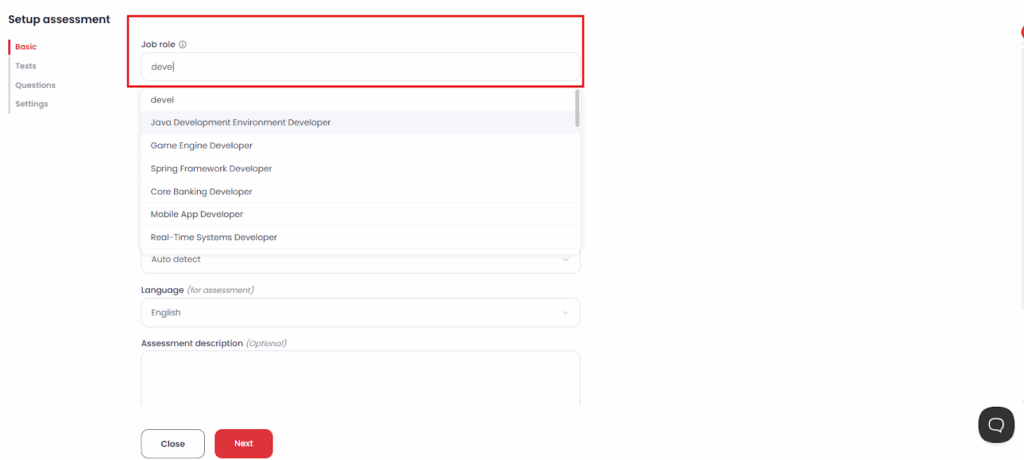
Enter the job details. Role, seniority and the skills you named in step one of the guide above. These drive the test recommendations you get next.
Add tests and questions. Pull from the library across coding, programming skills, engineering skills, cognitive ability and role-specific categories, or write your own. Coding questions can be single-file or multi-file projects, run in an embedded VS Code editor, and carry up to 20 visible or hidden test cases with per-test-case scoring, including SQLite database cases. Budget one to three minutes for that editor to load on the candidate's first question.
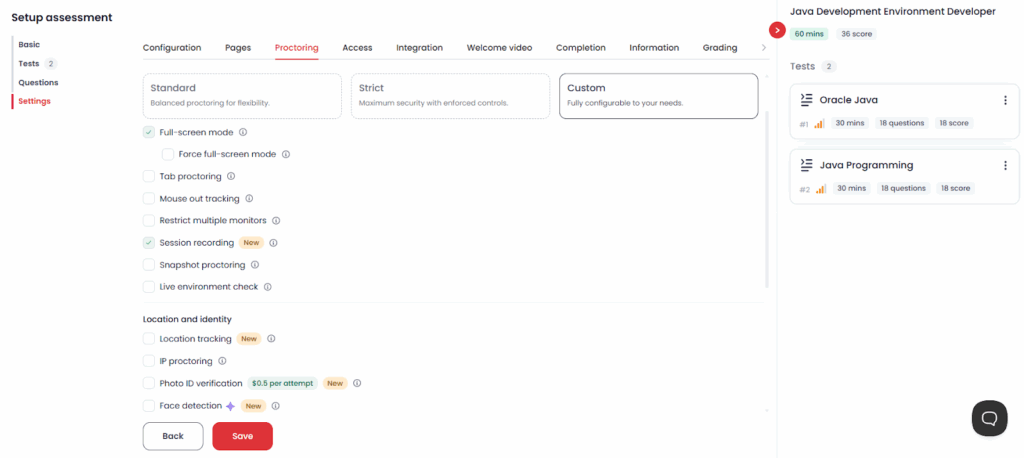
Configure the settings. Set per-question time limits, shuffle questions, choose your weighting (each test can be weighted from x0 to x5, so a test at x5 counts five times more than one at x1), turn on the proctoring level the role justifies, and add your branding. One constraint to plan around: assessments run on Chromium desktop browsers, and the mobile app is a capture fallback rather than a way to sit a whole test on a phone.
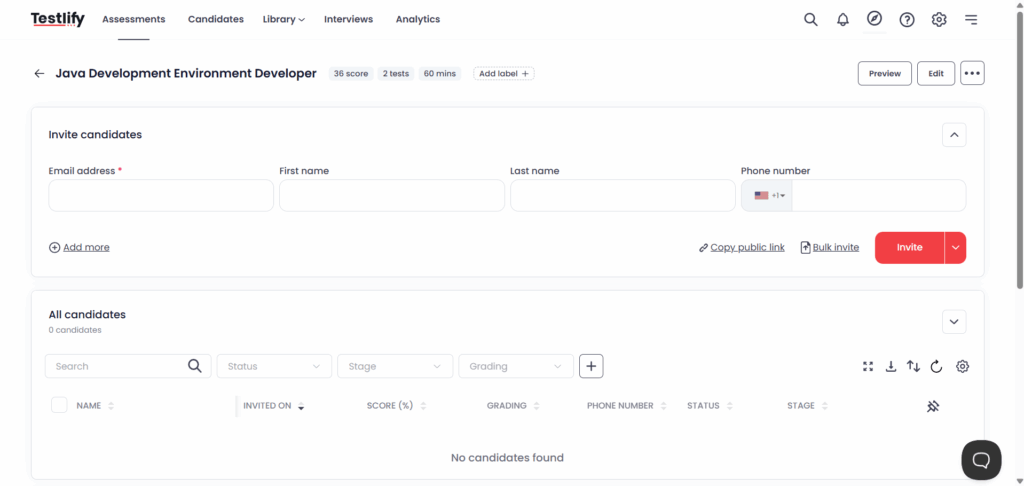
Launch and invite. Publish the assessment, trigger invites from your tracking system or send them directly, and set the reminder cadence and link expiry.
How do you keep technical assessments fair and defensible?
Test what the job requires, score every candidate the same way, keep the records, and check your results for adverse impact before someone else does. A test that screens out a protected group disproportionately is lawful only if the employer can show it is job-related and consistent with business necessity.
The federal guidance on employment tests and selection procedures is blunter than most vendors admit on two points. First, the test should measure skills tied to the specific job rather than general ability. Second, the employer stays responsible for the validity of the test even when the vendor supplies the validity documentation. Buying a validated test does not transfer the liability; it only gives you evidence to work with.
The same guidance sets out what that costs when it goes wrong. In one matter it describes, women made up 46 percent of hires before a strength test was introduced and 15 percent after. In another, a cognitive test validated back in 1991 still produced a statistically significant disparate impact, and the employer paid 8.55 million dollars in monetary relief.
Two practical guardrails follow. Keep a human reviewer on every rejection near the cut-off line, and run your own pass-rate comparison by group each quarter. The Testlify Hiring Workflow Method keeps the final decision with the team for exactly this reason: scoring can be automated, accountability cannot.
Automated scoring also brings its own rules now. New York City requires that an automated employment decision tool has had a bias audit within one year of its use, that a summary of that audit is published, and that candidates get 10 business days' notice before it is used. Enforcement of the city's automated employment decision tool rules began on 5 July 2023. Other jurisdictions are drafting similar duties, so check the rules where your candidates sit, not just where your office is.
How do leading agencies validate technical talent before client submission?
They standardise the evidence so every submission looks the same to the client. An agency that sends a candidate with a scored assessment, a percentile against other candidates for the same role, and a short reviewer note is making the client's decision easier than one sending a reformatted CV. That is the whole pitch.
The operational trick is reuse. Build one assessment per role family rather than one per client, keep the scores in a talent pool, and submit with evidence attached. White-label settings matter here too, since the report carries the agency's branding rather than a vendor's when it reaches the client.
How to use feedback to improve your technical recruiting
Feedback here means two different streams, and most teams only collect the first. Candidate feedback tells you whether the assessment was fair, clear and the right length. Hiring-manager feedback tells you whether the people who passed could actually do the job.
The second stream is where the improvement comes from. Pull the item-level data your assessment produces, difficulty index, discrimination index and a quality-risk flag on questions with very low accuracy or high skip rates, and cut the questions that are not separating strong candidates from weak ones. A question everybody gets right tells you nothing. A question everybody skips is probably broken.
Then close the loop on the hires themselves. Compare assessment scores with performance reviews at six months, and move the cut-off where the data says it should be. This is slow work and it is the only way to know whether the assessment predicts anything at your company rather than in a study.
Pro Tip: Before you change a question set, re-score your last 20 hires against the new version. If your best performers would have failed the new assessment, the problem is the new assessment.
A structured interview is the other half of this. The federal definition is usefully strict: all candidates get the same predetermined questions in the same order, and every answer is scored on the same rating scale against the same standards for acceptable answers. The public-sector guidance on structured interviews is a reasonable template if your team has never written one. Pair that with your assessment and you are using the two highest-validity tools available, in the right order.
Hire technical talent on proof, not promises
Start with one role. Name the competencies, build one assessment, pilot it on three current employees, and place it between application and first interview. Measure the recruiter hours you save and the pass-through rate at the interview stage, then roll it to the next role family.
Testlify covers the assessment half of that: role-specific and coding tests, structured scoring with multiple reviewers, proctoring options, item-level reporting, and write-back into the tracking system your team already uses. Book a demo and bring a live requisition, or read how technical assessments measure job-relevant skill before you design one.
FAQs

Related resources
View all
Talent assessment
Can technology prevent cheating in online tests?
Talent assessment
Online proctors in test fairness and integrity

Talent assessment
How to build a successful sales team

Talent assessment
How to build a successful marketing team

Talent assessment
How to choose the right technical assessment tool

Talent assessment
Types of technical assessment while hiring candidates
Get started.
Hire on proof, not resumes.
Run your first skills-based assessment free — no credit card required.