
What Is a Job Simulation? Types, Benefits & How to Create One (2026 Guide)
A job simulation tests real job tasks before you hire. See the 5 types, when to use each, and how enterprise teams run it at scale.

A job simulation is a short, hands-on exercise that asks a candidate to do the real tasks of a role, so you can hire on proof of skill instead of a polished resume. Think of it as a test drive: a support candidate handles a sample angry customer, a developer fixes a broken function, a manager clears a crowded inbox.
That shift matters because hiring on the wrong signals is costly. SHRM puts the average cost-per-hire near 4,700 dollars, and the full cost of a mis-hire at three to four times the role’s salary once you count lost time and rework. A simulation catches the gap a resume hides, before it lands on your payroll.
TL;DR
- A job simulation measures what a candidate can actually do by recreating real job tasks, not what they claim on paper.
- The five formats you will use most are role-plays, work samples, in-basket exercises, situational judgment tasks, and take-home assignments. A work sample is itself a type of simulation.
- Simulations make hiring fairer and more accurate: every candidate faces the same task and is scored on the same evidence, which cuts the guesswork that resume screening leaves behind.
- The real cost is build time. A platform with a ready test library removes most of it, so a small team can add a role-relevant simulation in minutes.
- Use simulations early to screen at volume, or late to confirm a shortlist. Match the format and length to the role, and keep AI for scoring while people make the call.
- Simulations pay off most once they connect to the systems recruiters already use: an ATS-linked test library turns a one-off exercise into a repeatable step that scales past a handful of hires.
- A job simulation and an internship solve different problems. One confirms readiness before an offer, the other builds skill after one, so picking the wrong tool for the goal wastes months, not minutes.
 ChatGPT
 Gemini
 Claude
 Grok
Grok Perplexity
What is a job simulation?
A job simulation is a pre-hire exercise where a candidate completes tasks that mirror the actual job, so a hiring team can judge real performance rather than interview polish. For a customer service role, that might mean replying to a sample complaint. For an analyst, reading a dataset and recommending a next step. You watch the work, not the wording.
The point is evidence. A resume tells you what someone says they have done, and an interview rewards people who interview well. A simulation shows how a person actually thinks, prioritizes, and handles pressure in a setting close to the day job. That is the same gap good skills tests are built to close.
Hiring signal | What it really shows | What it can miss |
|---|---|---|
Resume | Claimed history and credentials | Whether the skills are real and current |
Unstructured interview | Communication and rapport | On-the-job execution under pressure |
Job simulation | Actual task performance on a like-for-like task | Long-term fit and growth over months |

Types of job simulations
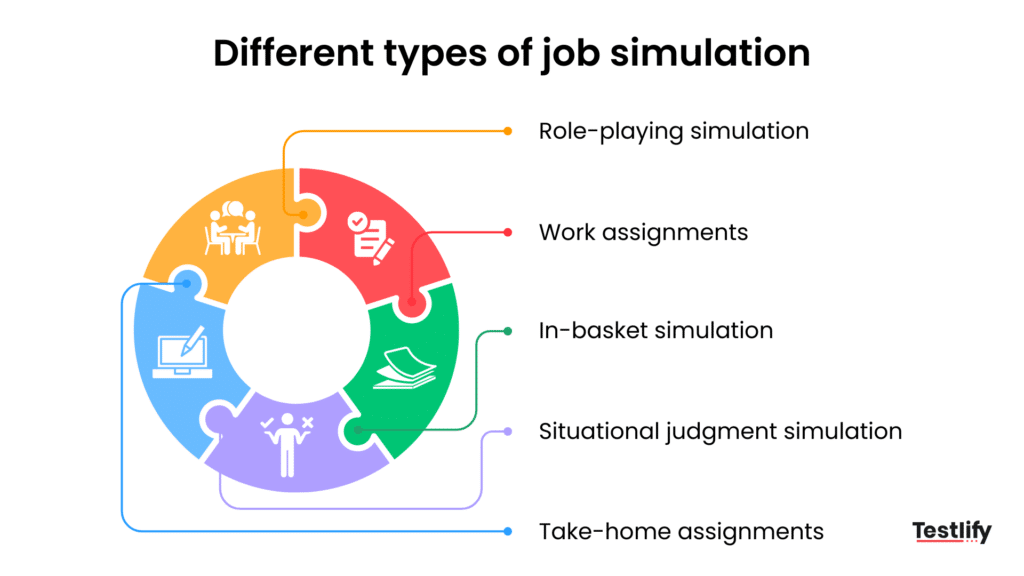
There are five formats you will reach for most: role-plays, work samples, in-basket exercises, situational judgment tasks, and take-home assignments. They differ in how much time they take and which skills they expose, so pick the one that matches the role rather than defaulting to whichever is easiest to set up.
Type | What the candidate does | Best for | Typical length |
|---|---|---|---|
Role-play | Acts out a live scenario, like a tough customer call | Communication, leadership, soft skills | 20 to 45 minutes |
Work sample | Completes a real task from the role | Technical and craft roles | 30 to 90 minutes |
In-basket | Clears a timed inbox of competing requests | Managers, operations, admin | 30 to 60 minutes |
Situational judgment | Picks the best response to work dilemmas | High-volume and frontline roles | 15 to 30 minutes |
Take-home | Submits a deeper task on their own time | Remote and senior roles | A few hours |
Role-playing simulation
Role-plays put a candidate into a live scenario and let you watch how they handle people in real time: a group exercise, a mock crisis, a presentation to a skeptical room. It is the clearest read on interpersonal skills, because you see leadership, listening, and how someone recovers when a plan slips, not just how they describe those things.
Work sample
A work sample asks the candidate to complete an actual task from the role, such as a coding fix, a writing piece, or a sample support reply. Work samples are among the most trusted formats because the task and the job are nearly the same thing, which leaves little room to bluff.
In-basket simulation
An in-basket exercise hands the candidate a timed pile of emails, calls, and requests and asks them to sort, decide, and respond. It is built for roles where prioritizing under pressure is the job, like operations and management, and it shows who stays organized when everything looks urgent.
Situational judgment simulation
A situational judgment task presents realistic work dilemmas and asks the candidate to choose or rank responses, which surfaces problem-solving and judgment fast. It works well for customer-facing roles. Testlify’s chat simulation test mirrors real customer conversations, so you can see how a candidate de-escalates and responds before day one.
Take-home assignment
A take-home gives the candidate a task to finish on their own time by a deadline. It suits remote and senior roles and rewards depth and quality over speed. The trade-off versus an in-basket exercise is real: take-homes show considered work, while timed tasks show composure under pressure, so choose based on which the role demands.
Benefits of job simulations in hiring
Resumes are easy to inflate: SHRM reports that about 56 percent of candidates admit to lying on them. A simulation replaces that leap of faith with something you can see and score. Job simulations go beyond resumes and interviews by showing how candidates perform in realistic workplace situations.
They provide objective evidence of job readiness, helping employers make more informed hiring decisions while creating a fairer and more engaging recruitment process.
Measure real job performance
Job simulations evaluate the skills candidates need to succeed in the role rather than relying on claims made in resumes or interviews. Whether it is coding, writing, selling, or managing projects, recruiters can assess demonstrated ability instead of assumptions.
Reveal how candidates solve problems
A strong interview performance does not always translate into workplace success. Job simulations show how candidates think, make decisions, communicate, and respond to real challenges, providing a more accurate picture of their on-the-job performance.
Improve hiring fairness
Every candidate completes the same task under the same evaluation criteria, creating a standardized hiring process. This consistency reduces unconscious bias and ensures hiring decisions are based on measurable performance rather than personal impressions.
Identify skill gaps before hiring
Simulations highlight strengths as well as areas where candidates may need additional training. Understanding these skills gaps before hiring allows organizations to build targeted onboarding and development plans that help new employees become productive faster.
Give candidates a realistic job preview
Candidates experience the type of work they will perform before accepting an offer. This sets clear expectations, improves role fit, and reduces the likelihood of early turnover caused by mismatched expectations.
The trend backs this up. The World Economic Forum estimates that 39 percent of workers’ core skills will change by 2030, which makes a fixed credential a weaker bet every year and live proof of skill a stronger one. Skills-first hiring also widens the field: LinkedIn finds that talent pools expand nearly 10 times when employers screen on skills instead of pedigree.
Pro tip: Build each simulation backwards from the role. List the three to five skills that decide success in the job, then design one task that forces a candidate to use them. A simulation that tests skills the role does not need just adds friction and drop-off.
Disadvantages of job simulations
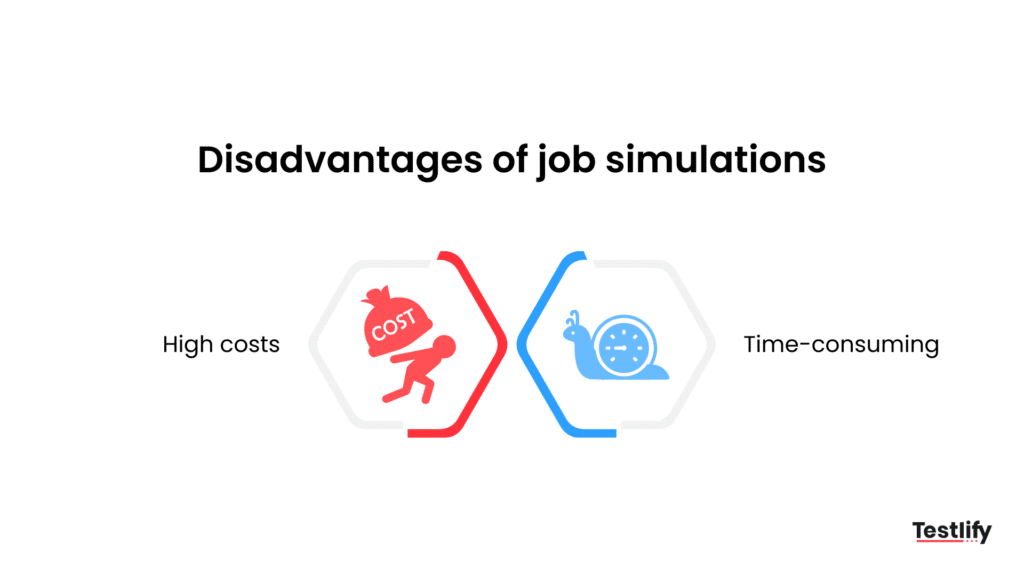
The honest downsides are cost and time. A well-built simulation takes effort to design, run, and score, and a custom-built portal can get expensive fast. Done by hand, it is slow enough that some teams skip it for urgent roles, which is exactly when a bad hire hurts most.
A platform removes most of that drag. Instead of writing tasks from scratch, you start from a ready library, invite candidates, and let AI score and rank the results while your team makes the final call.
With Testlify’s test library you can create a role-relevant simulation in minutes rather than days. The catch to watch: a simulation is only as good as its design, so a sloppy task gives you confident-looking but useless data.
Common job simulation examples
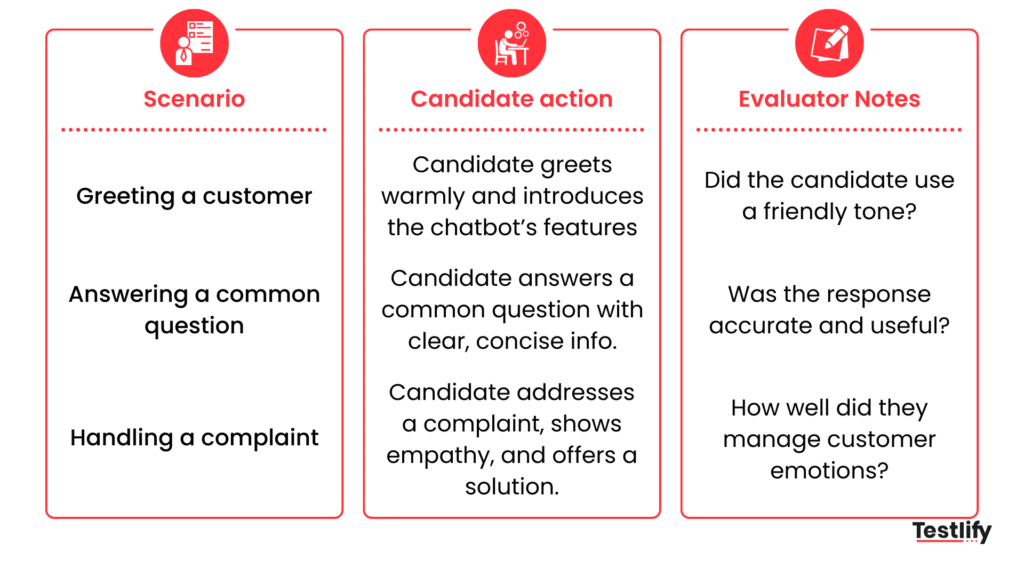
Simulations look different in every function, but the pattern holds: give a candidate a real task, then score how they handle it. Three examples show the range.
Technical hiring: a real debugging task
Hiring a backend developer? Skip the trivia and hand them a broken API endpoint to fix and speed up inside a set time. You score code quality, problem-solving, and how clearly they explain their choices. It works because the task is the job in miniature, so strong test-takers cannot fake their way through.
High-volume hiring: a customer support role-play
When you are screening hundreds of support applicants, a mock customer message sorts them fast. Candidates reply to a tough complaint, and you read tone, empathy, clarity, and how they solve the problem. It scales, and it filters on the exact skill the job lives or dies on.
Soft skills: a team collaboration exercise
For a project coordinator, run a short group exercise where three or four candidates solve a problem together while you watch. Who leads, who listens, who pulls the group toward a decision? That read on collaboration rarely shows up on a resume, and it predicts how someone will actually work on your team.
When should you use job simulations?
A job simulation is part of pre-employment testing, and it earns its place at one of three points in the funnel. Where you put it depends on how skill-heavy the role is and how many applicants you are sorting.
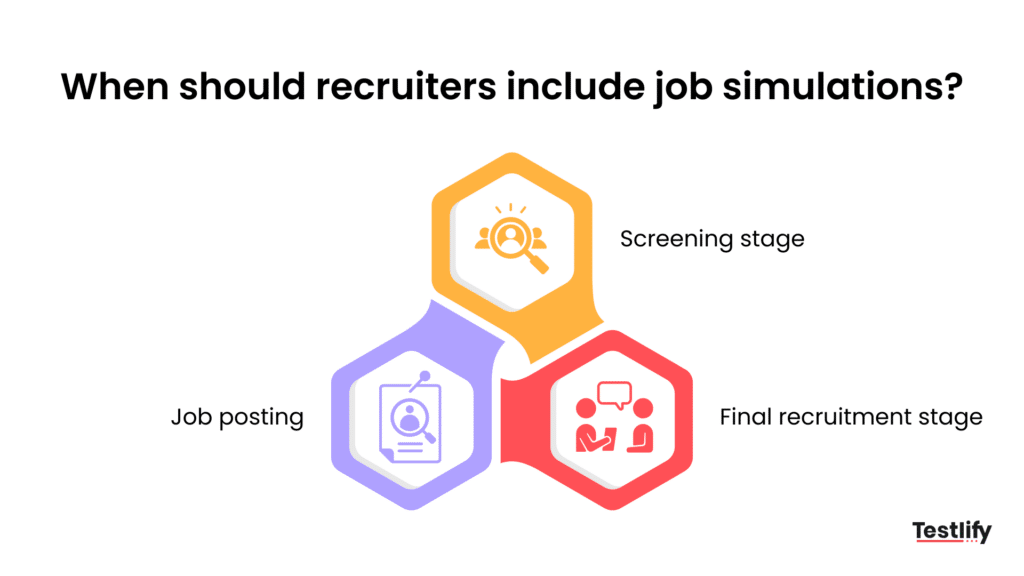
During the screening stage
Use short job simulations at the beginning of the hiring process to identify candidates with the required technical skills. This approach quickly filters out unqualified applicants while allowing recruiters to focus their interview time on the strongest talent.
During the final interview stage
A comprehensive job simulation is most effective after you have shortlisted the best candidates. It validates role-specific expertise while giving hiring managers a chance to assess communication, collaboration, problem-solving, and other workplace behaviors that interviews alone may not reveal.
During the application stage
Adding a brief 10-minute job simulation to the application process helps reduce the number of unqualified applicants entering your pipeline. While it should remain simple and directly related to the role, it improves candidate quality and makes the screening process more efficient.
How do you create and run a job simulation?
An effective job simulation should mirror the work candidates will perform after they are hired. By following a structured process, hiring teams can evaluate skills consistently, improve hiring accuracy, and deliver a better candidate experience.
Identify the critical skills
Start by defining the technical and behavioral skills that directly impact success in the role. Focus only on competencies that influence job performance, such as coding, communication, problem-solving, leadership, or customer service, to keep the simulation relevant and focused.
Design a realistic job scenario
Create a task that reflects an actual challenge employees face in the role. Whether it is resolving a customer complaint, analyzing business data, writing code, or preparing a presentation, the exercise should allow candidates to demonstrate how they apply their knowledge in real situations.
Create a standardized scoring rubric
Develop clear evaluation criteria before candidates begin the assessment. Define what excellent, satisfactory, and poor performance looks like for each competency so every candidate is measured fairly, and reviewers remain consistent throughout the hiring process.
Automate the assessment process
Use an assessment platform to streamline invitations, scoring, proctoring, and candidate ranking. Automation reduces manual effort, speeds up hiring, and gives recruiters more time to evaluate candidate performance instead of managing administrative tasks.
How do enterprise hiring teams run job simulations at scale?
Enterprise teams run the simulation inside the applicant tracking system, score it automatically, and route only candidates who clear a bar to a recruiter’s queue, so headcount stops deciding how many candidates get a fair look.
Once a role’s competencies are mapped to evidence one time, that same mapping runs across every requisition for that role, so a hundred applicants get scored on the same rubric as ten.
That consistency is what an unstructured interview loop cannot deliver at volume, which is why HBR’s research on hiring quality keeps pointing back to structured, evidence-based evaluation over ad hoc judgment.
In practice, that looks like Testlify’s 3,500-plus test library across 4,500-plus job roles, connected to 100-plus ATS integrations, so a simulation triggers the moment a candidate applies.
Teams running this setup report a 55 percent drop in time-to-hire and a 6x gain in recruiter efficiency, because reviewers spend their time on the shortlist AI already scored instead of screening every application by hand.
See job simulations work for your roles
Build a role-relevant simulation from a ready test library, send it in minutes, and let AI score and rank candidates while your team makes the call. Start for free or book a demo to see it on your own hiring workflow.
Key takeaways
- Hire on evidence, not adjectives. A simulation shows real task performance, which matters because resumes inflate and interviews reward polish. The practical move is to make a task, not a claim, your strongest hiring signal.
- Match the format to the role. Role-plays read soft skills, work samples read craft, in-basket exercises read prioritization. Picking the wrong format wastes everyone’s time, so choose by the skill the job depends on.
- Fairness is a built-in benefit. Same task, same rubric, same scoring for every candidate reduces the gut-feel bias of unstructured interviews, which means a more defensible and more diverse shortlist.
- Cost and time are the real barriers, and they are solvable. Building simulations by hand is slow, so a ready library and automated scoring are what make the method practical for a normal-sized team.
- Place the simulation where it pays off. Early to screen volume, late to confirm a shortlist. Timing, not just the test, decides how much value you get.
- Keep humans in the decision. Use AI to score and rank so reviewers move faster, but the hiring call stays with people who own the outcome.
- Scale comes from integration, not more headcount. Connecting simulations to your ATS and test library turns a manual exercise into a repeatable step, which is what makes the method work for high-volume enterprise hiring, not just single roles.
Frequently asked questions (FAQs)

Content Writer
Yashika Khandelwal is a Content Writer with 3+ years of experience creating research-backed content on hiring, talent assessment, and HR technology. She is a registered Organizational Psychologist and subject matter expert who combines behavioral science with practical recruitment insights to produce accurate, evidence-based content.
LinkedInRelated resources
View all
Talent assessment
How to build a hiring process with talent assessment tools

Talent assessment
Best Talent Assessment Software in 2026: How to Evaluate and Choose

Talent assessment
Top coding assessment software for recruiters

Talent assessment
The latest trends in technical assessments

Talent assessment
How to design and integrate technical assessments into recruiting processes

Talent assessment
Can technology prevent cheating in online tests?
Get started.
Hire on proof, not resumes.
Run your first skills-based assessment free — no credit card required.