
Why legacy ATS tools fail enterprise hiring teams?
ATS tools fail when scale, speed, and data matter. Discover why legacy systems cripple enterprise hiring—and how skills-first tech like Testlify fixes it fast.

Legacy ATS tools fail enterprise hiring teams because they were built to store resumes and satisfy compliance, not to move hundreds of candidates through a fast, multi-stakeholder, data-driven pipeline. The result is slow hiring, blind spots in the data, and strong candidates who drop out before the first interview.
The pressure is real. U.S. job openings still run in the millions every month, so most roles compete for a thin pool of skilled people (BLS JOLTS). At the same time, SHRM’s ongoing talent-trends research shows required skills are shifting faster than most screening criteria get updated, which means a system that screens on last year’s keywords is already behind (SHRM 2026 Talent Trends). When the tooling cannot keep up, good talent leaks out of the funnel.
 ChatGPT
 Gemini
 Claude
 Grok
Grok Perplexity
TL;DR
- Legacy applicant tracking systems were designed as resume filing cabinets, so they struggle with real-time data, open APIs, skills-based search, and a mobile-first candidate experience.
- The cost of a slow, records-first ATS is hidden: empty seats, wasted recruiter hours, brand damage, and compliance risk that never shows up on the license invoice.
- A modern hiring stack adds live analytics, skills-first scoring, collaborative review, and open integrations on top of tracking.
- You do not have to rip and replace. Most teams add an evidence layer that plugs into the ATS they already run.
- Migration is mostly project management: back up, clean the data, pilot on one unit, then roll out in waves.

How were traditional ATS systems built, and for whom?
Before “data-driven hiring” was a phrase anyone used, applicant tracking systems were digital filing cabinets. The first versions appeared in the late 1990s to store resumes in one place and keep employers on the right side of compliance. They were good at turning paper CVs into records. That 1990s blueprint still shapes the slow screens recruiters fight today.
- Storage over search. The databases were designed to keep records, not surface patterns, so they choke on skills that did not exist five years ago.
- Workflow rigidity. The architecture locked recruiters into a linear, form-heavy path built for once-a-week hiring, not the multi-stakeholder sprints enterprise teams run now.
- Compliance first, experience last. Keeping auditors happy mattered more than keeping candidates engaged, which is why one application can still take ten minutes and four logins.
- Closed ecosystems. Built before open APIs were normal, many traditional systems resist every attempt to bolt on modern assessments, video interviews, or dashboards.
These systems were built for HR clerks and record-keeping, not for data-savvy hiring managers who need insight. That origin story explains why, two decades later, top talent still slips through the cracks.
Why do legacy ATS tools fail large teams?
Old applicant-tracking software was never meant to juggle dozens of stakeholders, a global talent pool, and real-time data. Here are the nine pressure points where these systems break first.
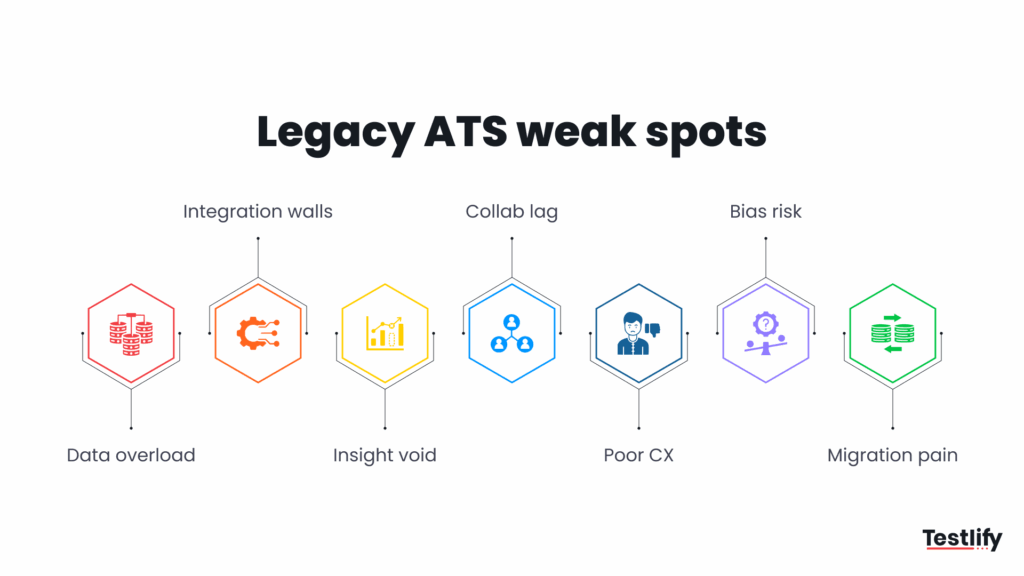
1. They suffocate under their own data
Enterprise databases swell fast, and a large share of candidate records go stale within a couple of years. The search engine inside cannot tell yesterday’s Java from today’s Kotlin, so recruiters start from scratch instead of re-engaging warm leads they already paid to source.
2. Integrations feel like brick walls
Modern recruiting runs on assessments, video interviews, and CRM touchpoints, yet most traditional systems offer plug-ins that behave more like workarounds. Weak integration is one of the top reasons enterprises abandon an old vendor. You can route around the roadblock by wiring assessments straight into your funnel with an open API.
3. There is no real-time insight
Because legacy tools were not built for analytics, teams export data into spreadsheets and rebuild reports by hand before they can spot a single trend. That is time no one gets to spend talking to candidates or briefing hiring managers, and by the time a report lands, the pipeline has already moved.
4. Collaboration turns into phone tag
When feedback lives in clunky portals, recruiters chase hiring-manager comments through email, chat, and voicemail. Decisions stall, candidates wait, and the reason a strong applicant was passed over gets lost in a thread nobody can find two weeks later.
5. Candidate experience takes the hit
A ten-minute form, no mobile option, and weeks of silence add up. A poor process pushes applicants to accept a faster offer elsewhere, and the reputation damage follows the employer around long after the role is filled. In a tight market, the candidate experience is the funnel.
6. Hidden bias and compliance risk
Keyword-filter logic in older software can amplify bias rather than reduce it, screening out qualified people whose resumes use different words. That puts diversity goals and audit readiness at risk, since regulators expect a defensible, consistent basis for every screening decision.
7. Data migration keeps teams stuck
Even when everyone agrees the old system is broken, the fear of losing data or facing weeks of downtime stalls the switch. Industry migration guides warn that skipping cleanup and testing can double a project timeline and cripple recruiting during the cut-over, so the pain of staying feels safer than the risk of moving.
8. Internal mobility gets ignored
Legacy systems treat every req as an external search, so they rarely surface the person two floors up who already has the skills. That blind spot is expensive: internal moves are faster and cheaper than external hires, and the data to spot them often sits unused in the same database. A modern stack reads skills across the org, not just the inbox.
9. Vendor innovation stalls
Many older platforms have slowed their release pace to a crawl, so the roadmap never catches up to skills-based hiring, AI-assisted screening, or open integrations. When the vendor stops shipping, the buyer inherits the gap. That stagnation, not any single missing feature, is what quietly turns a once-useful ATS into a liability.
These nine cracks explain why legacy ATS tools fall short for enterprise-scale hiring. They drain efficiency, frustrate hiring managers, and push qualified candidates elsewhere, all before the interview ever starts.
What does a failing ATS cost your business?
Most leaders see the license fee and assume their legacy ATS is cheap. The real bill arrives elsewhere, quietly eroding revenue, reputation, and recruiter time. Time-to-hire is already long, and SHRM’s talent-acquisition research shows a records-first system that adds manual screening friction only stretches it further (SHRM talent-acquisition research). The biggest line item is turnover: SHRM’s workforce research puts the cost of replacing an employee at one-half to two times their annual salary, so every role a slow system fails to fill well compounds fast (SHRM workforce research).
- Revenue lost from slow fills. Legacy workflows stall search, scheduling, and approvals. Every extra day a revenue-producing seat sits empty is money the business does not earn back.
- Brand damage from clunky UX. Outdated forms, duplicate logins, and application black holes frustrate candidates, and many of them tell their network about it in public.
- Manual work drains payroll. Recruiters hand-key data and rebuild reports that a modern platform would automate. Automating scoring and shortlist creation with skills assessments claws back hundreds of hours a year.
- Compliance is a ticking clock. Employers must retain hiring records for defined periods, and misfiled or missing data can trigger penalties and derail an audit.
- Talent walks to rivals. Slow, opaque processes push top candidates to faster offers, lengthening time-to-fill and forcing teams to run below headcount.
Add these invisible charges together, and a “free” legacy system can cost more than the upgrade you keep postponing. The table below turns the pattern into concrete categories.
Hidden cost category | Legacy-ATS symptom | Enterprise consequence |
|---|---|---|
Revenue lost from vacancies | Slow, manual workflows keep roles open far longer than planned. | Revenue-producing seats stay empty, so output and pipeline slip while the role is open. |
Brand damage from poor experience | Long forms, no updates, generic rejection emails. | Candidates share a bad experience publicly, eroding employer and consumer trust. |
Payroll wasted on manual admin | Recruiters hand-key data, chase feedback, and rebuild reports outside the system. | Skilled recruiter hours go to clerical work a modern platform automates. |
Compliance and audit exposure | Disorganized records and no clear audit trail. | Retention gaps can invite fines and legal headaches during a review. |
Top-talent leakage | Slow pipelines and poor communication push candidates to faster offers. | High performers accept rival offers, forcing teams to operate below headcount. |
Pro Tip: Before you shop for a new platform, put a number on the current one. Multiply your open reqs by the average days they stay open, add the recruiter hours spent on manual admin each week, and price both against salary. That single figure moves a “someday” upgrade onto this quarter’s roadmap faster than any feature demo.
What does a modern hiring platform look like?
A modern recruitment stack is not an upgraded resume vault. It works more like a live command center where data, collaboration, and candidate experience move together. Use the checklist below to test whether any platform you evaluate is genuinely modern.
- Real-time analytics you do not have to beg for. Dashboards should show time-to-hire, drop-off points, and quality of hire the moment they happen, not a quarter later.
- Skills-first search and AI-assisted screening. Instead of keyword matching, the engine ranks people on verified competencies, which matters when skill names change faster than job titles.
- Consumer-grade candidate experience. Mobile-friendly applications, one-click status updates, and self-scheduling lift completion rates and cut ghosting.
- Open APIs and real integrations. Your stack should connect cleanly to assessment suites, HRIS, payroll, and messaging, not fight every handoff.
- Multi-channel job posting. Modern platforms publish roles across job boards and internal mobility sites at once, then track source of hire automatically.
- Collaboration built in. Live comment threads, mentions, and reminders keep hiring managers engaged without email ping-pong.
- Governed data migration. Look for encrypted bulk import, sandbox testing, and automated retention rules that keep compliance in the background.
If a platform cannot tick every box above, it is not built for the scale of enterprise hiring. The tools that do meet the checklist turn recruiting from a paperwork exercise into a real advantage.
When should you replace your ATS?
Replace your ATS when the team spends more time managing the tool than hiring. The clearest signal is not a single missing feature, it is a pattern of workarounds that has quietly become the real process. Watch for these five triggers.
- Time-to-fill keeps climbing while the pipeline volume stays flat.
- Recruiters live in spreadsheets because the system cannot report what leaders ask for.
- Candidates drop off at the application step, especially on mobile.
- Integrations break every time you add an assessment, a job board, or an HRIS.
- Hiring managers stop logging in and route feedback around the tool.
If three or more of these are true, the system has stopped being an asset. The next question is not whether to change, but how to move without losing a decade of candidate history.
How do you switch ATS tools without losing data?
A clean migration is mostly project management. Follow this three-step blueprint and you keep every candidate record intact while the business keeps hiring.
1. Audit and clean before you move
Legacy databases collect duplicates and dead resumes. Export a full backup, archive any record you have not touched in 24 months, and fix field inconsistencies. Clean data cuts storage cost and downtime on go-live.
2. Run old and new in parallel
Map every field in a sandbox, import a subset of jobs and candidates, and let one high-volume business unit work in the new platform while everyone else stays put. This two-speed approach surfaces mapping glitches before you flip the global switch.
3. Phase the rollout, then review
Go live in waves, from HQ to regions to subsidiaries. Plan daily syncs until the final cut-over, and schedule a post-migration audit after the first week to confirm every interview, note, and tag made the move. Well-planned projects of this size wrap in weeks, not months, when the vendor provides bulk-import tools and clear ownership.
How does Testlify strengthen hiring beyond a legacy ATS?
Testlify is not another ATS. It is the skills-assessment and evidence layer that plugs into the stack you already run, through the Testlify Hiring Workflow Method: run evidence-based hiring at scale by combining validated assessments, structured scoring, reviewer collaboration, and open integrations so decisions rest on proof, not keyword matches. AI assists the screening; people still make the call.
In practice that means a legacy ATS can keep tracking applications while Testlify tests, scores, and ranks candidates on real ability, then passes those signals back to your ATS or HRIS. With real-time reporting, recruiters and hiring managers watch assessment funnel health live, without a single export.
Legacy pain point | What the Testlify layer adds | Why it helps |
|---|---|---|
Keyword filters miss emerging skills | Skills-first assessments across 300-plus technical and non-technical domains. | You screen on demonstrated ability, so strong people are not filtered out over wording. |
Interview bottlenecks across time zones | Asynchronous responses candidates complete on their schedule. | Hiring managers review when it suits them, with no calendar gymnastics. |
Spreadsheet reporting | Live dashboards for assessment scores and pass-through rates. | Funnel health is visible without manual exports. |
Integration headaches | Open REST APIs that slot into major ATS and HRIS stacks. | You keep existing workflows and data lineage instead of rebuilding them. |
Fear of losing candidates in a change | Bulk invitations and staged rollouts on a pilot cohort. | You prove value on one team before scaling, with no big-bang disruption. |
Picture a 4,000-person company hiring 300 people a quarter. If every candidate takes a short skills assessment before the first call, the shortlist is scored before a recruiter picks up the phone, and hiring managers spend their time on people who can already do the work. That is the difference between a records-first tool and an evidence-first workflow.
Ready to move beyond legacy ATS limits?
Enterprise hiring is too high-stakes to run on software built for another era. If your team still fights spreadsheet exports, email reminders, and candidates ghosting mid-process, the gap is not effort, it is infrastructure. Start by auditing where your current ATS slows you down, then add a skills-first evidence layer like Testlify to prove the case on one team.
Next step:book a demo to see how skills assessments, structured scoring, and real-time dashboards fit onto the ATS you already run. You can also explore the analytics that put “ATS tools fail” in the rear-view mirror.
Key takeaways
- The failure is architectural, not cosmetic. Legacy systems were built to store records, so no amount of retraining fixes the missing analytics, APIs, and skills search. That is why a real upgrade beats another workaround, and why the decision belongs on the roadmap, not the backlog.
- The cost is hidden but large. Empty seats, wasted recruiter hours, and brand damage never appear on the license invoice, yet turnover alone can cost up to two times a salary. Pricing the current system is the fastest way to justify change to finance.
- Skills-first beats keyword-first. With core skills changing fast, screening on last year’s keywords buries good candidates. Ranking on verified ability widens the funnel and improves who reaches the interview, which is where quality of hire is actually won.
- You can augment before you replace. Adding an evidence layer that plugs into your ATS delivers most of the upside without a rip-and-replace, so you can prove ROI on one business unit before committing the whole org.
- Migration risk is manageable. Back up, clean, pilot in parallel, then roll out in waves. Treating the move as project management, not magic, is what keeps a decade of candidate history intact during the switch.
- Watch the replacement signals early. Rising time-to-fill, spreadsheet reporting, mobile drop-off, broken integrations, and managers who stop logging in are the five triggers that say the tool has stopped being an asset.
Frequently asked questions (FAQs)

Content Writer
Yashika Khandelwal is a Content Writer with 3+ years of experience creating research-backed content on hiring, talent assessment, and HR technology. She is a registered Organizational Psychologist and subject matter expert who combines behavioral science with practical recruitment insights to produce accurate, evidence-based content.
LinkedInRelated resources
View all
HR & recruitment
What’s hot in HR lingo: 2026’s HR buzzwords explained

HR & recruitment
Enterprise guide: Centralized vs decentralized recruitment

HR & recruitment
How image-to-video AI is transforming HR communication

HR & recruitment
How to build a recruitment tech stack that works at enterprise scale

HR & recruitment
How to hire startup web app development company

HR & recruitment
Key hiring metrics every large organization should monitor
Get started.
Hire on proof, not resumes.
Run your first skills-based assessment free — no credit card required.