
How to use AI to tailor assessments to job descriptions
Learn how to use AI to tailor assessments to job descriptions enabling recruiters to reduce accurately identify top talent.

Your best hire last year probably would have failed your assessment. That’s not a hypothetical; it’s the math of how most screening tools are built, and it’s the reason your hiring manager keeps overriding your shortlist.
Somewhere between writing job descriptions and building assessments, the signal gets lost. This is because recruiters tend to write job descriptions for a specific role, then evaluate candidates against a generic test bank that has no idea what the job actually requires.
AI changes the equation by collapsing that gap, generating assessments that mirror the real work of the role rather than approximating it. The recruiters who can master the use of AI to tailor assessments will be able to fill roles faster with hires that can perform from day one.
Why generic assessments are quietly killing your funnel
Walk into any talent review, and you’ll hear the same complaint: “The assessment isn’t telling us anything new.” Hiring managers stop trusting assessment scores, recruiters stop defending them, and the entire process quietly reverts to gut-feel interviews.
The root cause is that generic assessments are structurally incapable of predicting performance in a specific role, and every stakeholder in the funnel pays the price.
Here’s where the damage actually shows up:
- False positives slip through: Professional test-takers, consultants who’ve seen every case format, and candidates who prep on Glassdoor dumps score well and interview poorly. You celebrate the shortlist, then watch the HM reject four of five finalists.
- False negatives walk away: Strong operators who learn by doing, career switchers, and non-traditional candidates get filtered out on questions that have nothing to do with the job. These are often the exact hires your DEI goals depend on.
- Candidate experience becomes a liability: Every irrelevant question is a signal to the candidate that you don’t understand the role you’re hiring for. Drop-off rates above 60% on misaligned assessments are common.
- Hiring manager trust erodes. When HMs see a “92nd percentile” score attached to a candidate who can’t answer a basic scoping question, they stop reading the reports. Once that trust is gone, you’re back to running a referral-and-vibes process with extra steps.
The KPIs that expose all of this are ones that most recruiting teams don’t track: predictive validity, which is the correlation between assessment score and actual 12-month performance.
Put plainly, your assessment is working hard to tell you something, but it’s answering a question nobody on your hiring team actually asked.
The fix isn’t a better test bank. It’s an assessment built for the job in front of you, and that’s where AI changes what’s possible.
 ChatGPT
 Gemini
 Claude
 Grok
Grok Perplexity
The seven-step playbook to tailor an assessment using AI
Recruiters should follow this seven-step playbook to tailor assessments to job descriptions, using AI as the engine and human judgment as the steering wheel. It works for every role you are hiring for because the steps remain the same, only the inputs change.
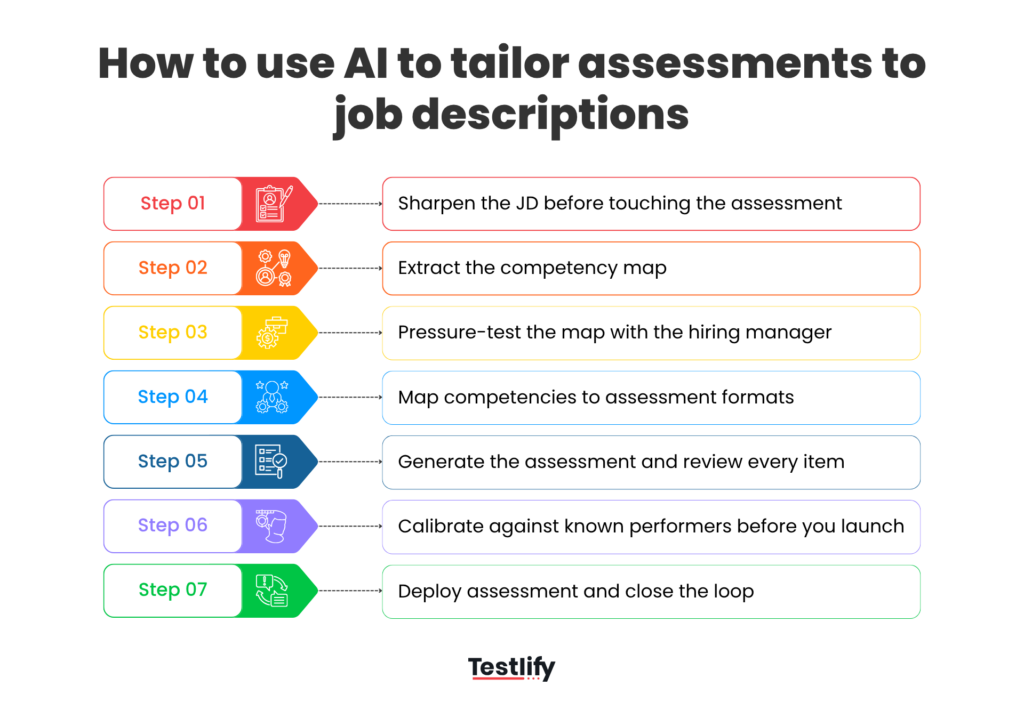
Step 1: Sharpen the job description before you touch the assessment
Most job descriptions are written in 20 minutes by a hiring manager who’s already mentally hired someone. They’re full of filler (“wear many hats”), missing context (“who does this person report to, what does success look like at 90 days”), and heavy on generic responsibilities but light on outcomes.
So before you touch any assessment tool, spend 15 minutes rewriting the JD with AI assistance. Paste the existing JD into a tool like ChatGPT or Claude, and ask it to sharpen four specific things:
- Replace vague adjectives with observable behaviors: “Strong communicator” becomes “can explain technical tradeoffs to non-technical stakeholders in writing.” “Self-starter” becomes “operates without a defined playbook in the first 90 days.” If you can’t observe it in an assessment or interview, it shouldn’t be in the job description (JD).
- Rewrite responsibilities as outcomes: “Manages the sales pipeline” tells you nothing. “Owns pipeline coverage ratio of 3x and moves deals through five defined stages” tells you exactly what success looks like. Outcomes are testable. Responsibilities aren’t.
- Make seniority and context explicit: Spell out team size, reporting line, stage of company, and scope of ownership so the AI can calibrate the assessment difficulty correctly.
- Split every skill into must-haves and nice-to-haves: Most JDs list 15 skills as if they’re all equal. They’re not. Force a ranking, because the AI will weight the assessment based on what you tell it matters most.
Output: a tightened JD of 300 to 500 words where every line is either an outcome, an observable behavior, or a clearly tagged skill requirement. This is the input your assessment will be built from, so it’s worth getting right before you move to Step 2.
On a side note, if you don’t have a job description, you can use Testlify’s AI job description generator to quickly build one from scratch
Step 2: Extract the competency map
Now feed the cleaned JD to an AI tool and ask it to decompose the role into discrete competencies. For a Senior PM, that map might look like: product strategy, stakeholder management, data fluency, technical literacy, customer discovery, prioritization, and written communication.
Don’t accept the first output. Push the AI with follow-ups:
- “Which of these are table stakes vs. differentiators for this specific role?”
- “What competencies are implied but not stated in the JD?”
- “What would a strong candidate do in the first 90 days that requires each of these?”
Output: You get a ranked competency map with 6 to 10 skills, each tagged as critical, important, or supporting.
Related resources: What is competency mapping and how can organizations implement it?
Step 3: Pressure-test the map with the hiring manager
This is the 20-minute intake call you were going to have anyway, except now you’re not asking the HM to generate requirements from a blank page. You’re handing them a draft and asking them to react.
Ask three questions only:
- “What’s missing from this map that would make someone succeed in this role?”
- “What’s on here that actually doesn’t matter as much as the JD implies?”
- “If you could only test three of these, which three?”
HMs are terrible at generating requirements and excellent at reacting to them. This step is the difference between an assessment the HM trusts and one they’ll override.
Output: You get a validated competency map with the top 3 to 5 skills clearly prioritized and weighted based on what drives success in the role.
Step 4: Map competencies to assessment formats
Each competency should be tested in the format that best reflects how it shows up on the job. When everything is forced into one format, assessments become generic and lose predictive value.
The goal is not to test more, but to test smarter by choosing methods that capture real performance.
- Technical skills like coding, SQL, or Excel modeling are best measured through role-specific tests or job simulations. These show how candidates solve real problems, not how well they recognize the right answer
- Communication and soft skills are better evaluated through conversational AI interviews. This helps assess clarity of thought, structure, and how candidates articulate ideas under light pressure
- Cognitive fundamentals like logical reasoning or critical thinking can be measured through short adaptive MCQs. These should be used to establish baseline ability, not dominate the assessment
- Role fit and motivation should come from structured behavioral questions that focus on past actions and decisions
A strong assessment does not try to cover everything. It focuses on the few competencies that matter most and uses three to four formats to measure them well. Adding more formats increases fatigue and reduces completion rates without improving the signal.
Keep the candidate experience tight and relevant. Aim to stay within 20 to 30 minutes. Each section should feel purposeful and clearly connected to the role. When candidates see the relevance, they are more likely to stay engaged and perform at their best.
The result should feel less like a test and more like a structured preview of the job. That is what improves both the quality of hire and the candidate experience.
Output: A structured assessment plan that maps each competency to a specific format, with clear time allocation for each section and a total duration that stays within 30 minutes.
Step 5: Generate the assessment and review every item
Feed the competency map, the format plan, and the cleaned JD into an AI-powered assessment builder and let it produce the full assessment.
Then, and this is the step most teams skip: review every single item. AI-generated questions can be technically correct but contextually off. Look for:
- Questions that test recall when they should test judgment
- Scenarios that don’t match your industry or company stage
- Cultural or regional assumptions that could create an adverse impact
- Items that leak the answer in the question stem
Reject, regenerate, or edit. Expect to cut 20 to 30% of the first draft. That’s normal, and it’s where your expertise as a recruiter actually compounds.
Output: A hiring manager-approved assessment that is role aligned, bias checked, and can be completed within 25 to 30 minutes.
Step 6: Calibrate against known performers before you launch
Before you send the assessment to candidates, run it past two or three current employees who are strong performers in the same role, along with one or two average performers.
Focus on two signals:
- Strong performers should consistently score higher than average ones. If they do not, the assessment is not measuring the right competencies
- Watch for questions that everyone gets right or everyone gets wrong. These do not help you differentiate and should be removed or reworked
Pay attention to patterns, not outliers. If multiple strong performers struggle with the same question, it is likely flawed. If average performers breeze through sections meant to be challenging, the bar is too low.
This takes about 20 minutes but gives you early proof that your assessment can identify real talent. Skipping this step often leads to weeks of poor hiring decisions and rework.
Refine the assessment based on what you see. Adjust scoring, remove weak questions, and tighten sections that are meant to help you identify top performers.
Output: You get a validated assessment with clear performance benchmarks and a defined score range that indicates a strong candidate.
Step 7: Deploy assessment and close the loop
Launch the assessment into your live funnel, but don’t set and forget. Instrument four metrics from day one:
- Completion rate (target: 80%+)
- HM agreement with shortlist (target: 70%+)
- Offer acceptance among assessed candidates (benchmark against your baseline)
- 90-day performance rating of hires correlated with assessment score
After 30 days, review the data with the HM. After 90 days, tune the assessment based on what predicted performance and what didn’t. After 12 months, you have something most recruiting functions never get: proof that your assessment forecasts performance, with the numbers to back it up.
Output: You get a living assessment that gets sharper every quarter, and a hiring function that operates on evidence instead of instinct
The whole loop, from JD cleanup to launching the assessment, is roughly 90 minutes of recruiter time per role the first time you run it, and under 30 minutes once you’ve done it three times.
Compare that to the hours lost re-interviewing candidates who shouldn’t have made the shortlist, and the ROI is obvious.

The trade-offs nobody’s talking about
Every AI pitch ends with a hockey-stick chart. What it leaves out is the reality of implementation, the trade-offs, and the lessons you will pay for if you don’t plan ahead.
Bias relocates, it doesn’t disappear
AI trained on your past hires will faithfully reproduce the patterns buried in that data, including the ones that got you sued last time. The fix isn’t trusting the algorithm; it’s auditing assessments for bias before launch and subsequently every quarter.
Over-tailoring narrows the funnel
An assessment built perfectly for today’s JD screens out the candidate who would have redefined the role. Build in at least one competency that measures range or learning velocity, not just role-specific fit.
Explainability is now a legal requirement
NYC Local Law 144, the EU AI Act, Illinois’s Video Interview Act, and updated EEOC guidance all land in the same place: “the algorithm said so” is not a defense.
Before buying, confirm the vendor publishes unbiased audits, lets you show candidates their competency scores, and allows opt-outs without penalty. Testlify’s AI ethics and compliance framework is the reference point for what good looks like here.
Hiring manager adoption is the real bottleneck
The tech is easy. Getting HMs to trust the score instead of their gut is the work. Involve them in Step 3 (competency map) and Step 6 (calibration) from day one, or the assessment becomes a rubber stamp that everyone ignores by Q2.
Candidate gaming is getting smarter
Assessment misuse is evolving rapidly, driven by ChatGPT running alongside tests, communities circulating question patterns, and the increasing use of proxy interviews. Layered defense is the answer: proctoring where it matters, sustained work samples over quick MCQs, and anti-cheating safeguards built into the assessment itself.
Final thoughts
The last decade of recruiting rewarded volume: faster sourcing, bigger funnels, shorter time-to-fill. The next decade rewards proof, and the recruiters who can show their hires actually perform will be the ones shaping strategy instead of defending metrics.
Tailoring assessments to job descriptions with AI is the highest-leverage move in that shift. Run the playbook on one role this quarter, measure what predicts performance, and you’ll have something most recruiting functions never build: evidence.
Ready to create assessments to help you surface top talent?
Testlify’s AI assessment builder lets you create role-specific assessments that match the exact skills and competencies a job demands.
Book a demo to see how Testlify can sharpen your shortlists and turn every assessment into a reliable signal of on-the-job performance.
Frequently asked questions (FAQs)

Related resources
View all
Candidate assessment
Aptitude Tests in Hiring: The Complete 2026 Guide for Recruiters

Candidate assessment
AI features transforming HR support and leadership

Candidate assessment
Conversational Video AI interviews for sales hiring

Candidate assessment
Chat AI interviews for customer support hiring

Candidate assessment
How to use the picOCEAN personality test in hiring?

Candidate assessment
Proxy Interview: How to Detect and Prevent Hiring Fraud
Get started.
Hire on proof, not resumes.
Run your first skills-based assessment free — no credit card required.