
What to look for in candidate screening software
Learn what to look for in candidate screening software, including filtering, assessments, scoring, and candidate experience.

Most candidate screening software vendors will pitch you the same thing: faster shortlisting. But that is not the whole story. If your team is moving faster without making better decisions, you are not really solving the problem.
The real value of the right candidate screening software is clarity and consistency at the earliest. It should help your team filter applicants more intelligently, ask sharper screening questions, assess genuine fit, and move qualified candidates forward. And just as importantly, the experience should feel straightforward for candidates too, not like an obstacle course.
Here is where most teams hit a wall: a tool looks polished in a demo, but falls apart when it meets your actual hiring process. Some platforms save time but do nothing to improve the quality of your screening. Others add complexity that slows everyone down.
In this guide, we break down what candidate screening software actually does, which features genuinely move the needle, and how to find a tool that fits your team, your roles, and your real-world hiring goals
 ChatGPT
 Gemini
 Claude
 Grok
Grok Perplexity
TL;DR – Key takeaways
- Candidate screening software helps recruiters filter, assess, and shortlist applicants earlier instead of relying only on resume review.
- The best tools combine speed with structure, so teams can screen candidates faster without lowering quality.
- Look for features such as job-relevant questions, assessments, structured interviews, clear scoring, and role-based workflows.
- Candidate experience matters too, so the screening process should be simple, clear, and easy to complete across devices.
- Testlify helps teams bring assessments, structured screening, scoring, and candidate insights into one screening workflow.

What is candidate screening software?
Candidate screening software helps recruiters review applicants before the full interview stage. It is used to sort, filter, and evaluate candidates early, so teams can quickly see who should move forward and who should not. This can include screening questions, resume checks, short assessments, structured interviews, and candidate scoring.
A good tool should help teams answer a few basic questions at the start of hiring. Does this person meet the must-have requirements? Do they show signs of role fit? Should they move to the next stage?
Where it fits in the hiring process
Candidate screening software sits between the application stage and the main interview rounds. A simple hiring flow looks like this:
- Application received
- Screening
- Shortlist
- Interviews
- Final decision
This screening stage helps recruiters narrow the applicants pool before hiring managers spend time on deeper interviews. Depending on the role, it may include knockout questions, role-relevant questions (3500+ Test library), a short skills test, or a structured interview.
Candidate screening software vs ATS
Candidate screening software and an ATS are related, but they do different jobs. An ATS helps manage the hiring pipeline. It keeps candidate records, tracks stages, and organizes the process from application to offer. Candidate screening software focuses on evaluating candidates early and helping recruiters decide who should move forward.
Here’s the difference in a simple way:
Area | Candidate screening software | ATS |
|---|---|---|
Main purpose | Helps evaluate and shortlist candidates early | Helps manage the overall hiring workflow |
Used for | Filtering, screening questions, assessments, interviews, scoring | Storing applications, tracking stages, managing records |
Focus | Candidate quality and screening decisions | Process management and pipeline tracking |
Best at | Improving early screening and shortlist quality | Keeping hiring organized from start to finish |
Typical users | Recruiters and hiring teams doing early evaluation | Recruiters, coordinators, hiring managers, HR teams |
Works with | Often connects with ATS tools to pass shortlisted candidates forward | Often works as the system of record for hiring |
In many teams, both tools work together. The ATS manages the process, while candidate screening software improves the quality of early decisions.
Some platforms, including Testlify, support screening through assessments, structured interviews, and scoring while also fitting into the broader hiring workflow through seamless ATS integrations. That is often more useful than trying to force one tool to do everything.
Why companies use candidate screening software
Most teams start looking for candidate screening software when manual screening stops working well due to high volume application.
One reason companies use it is to save time at the top of the funnel. Instead of opening every application one by one, recruiters can filter applicants based on must-have criteria, role-specific questions, or short assessments.
It also helps make screening more consistent. When different recruiters review applications in different ways, shortlist quality can vary a lot. A structured screening process gives teams a clearer way to judge candidates against the same role requirements.
Another reason is better candidate quality. Screening software helps teams look beyond surface-level signals by adding job-relevant questions, skills checks, or structured interview steps where needed.
That is where platforms like Testlify can quietly add value, especially when teams want to assess skills early instead of relying only on CV screening.
Recommended watch: How to create an assessment on Testlify
What to look for in candidate screening software
Not every candidate screening tool solves the same problem. Some help you move faster, but do very little to improve who gets shortlisted. Others add too many steps and create more work for recruiters. Below are the features worth paying attention to:
Easy applicant filtering
The first thing to look for is simple filtering. Recruiters should be able to narrow the pool fast and focus on people who meet the basic role requirements.
That is where screening software starts proving its value. If a tool cannot help you remove obvious mismatches early, recruiters still end up doing manual review at the top of the funnel. Testlify officially supports Qualifying questions, and its candidate management view also shows practical filters like Status, Stage, and Grading in the workflow you shared. That is useful when a team needs to review candidates in a more structured way instead of scanning applications one by one.
Job-relevant screening questions
Good screening starts with better questions, not longer forms. Look for a tool that lets you build questions around the role, not just collect general applicant data.
With Testlify, recruiters can build assessments around the role instead of relying only on resume review. The platform includes a test library of 3,500+ tests, unlimited custom questions per assessment, qualifying questions, assessment templates based on job role, and test recommendations based on job roles.
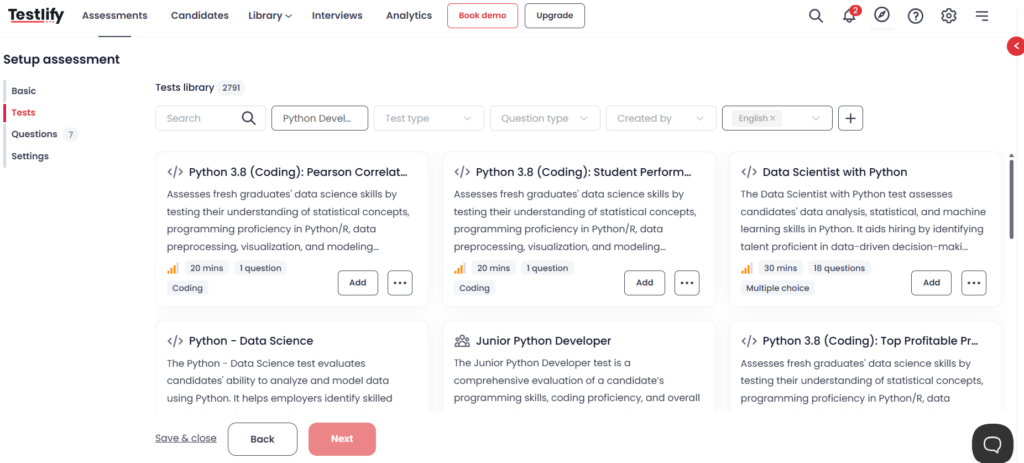
Skills tests or assessments
For many roles, resumes tell you where someone has worked, but not always how well they can do the work. That is why skills testing matters. A stronger platform should let you bring skill checks into early screening instead of waiting until later rounds.
For teams that need deeper screening, Testlify also supports role-specific skill tests, software skills tests, programming tests, situational judgment tests, cognitive ability tests, language proficiency tests, engineering skills tests, blue-collar tests, personality and culture tests, and typing tests.
Structured interview support
Not every role needs a live interview early. But many roles do need a more structured screening step than a resume and a few knockout questions. This is where interview support becomes important.
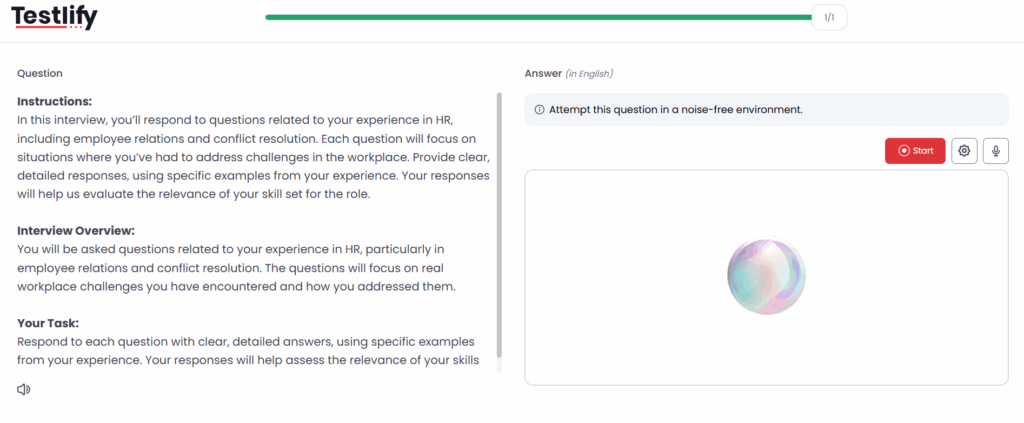
With Testlify, teams can use one-way video and audio interviews, two-way video, audio, and chat interviews, and conversational AI interviews as part of the screening process. That gives recruiters more than one way to assess communication, judgment, and role fit early, depending on the role and the stage.
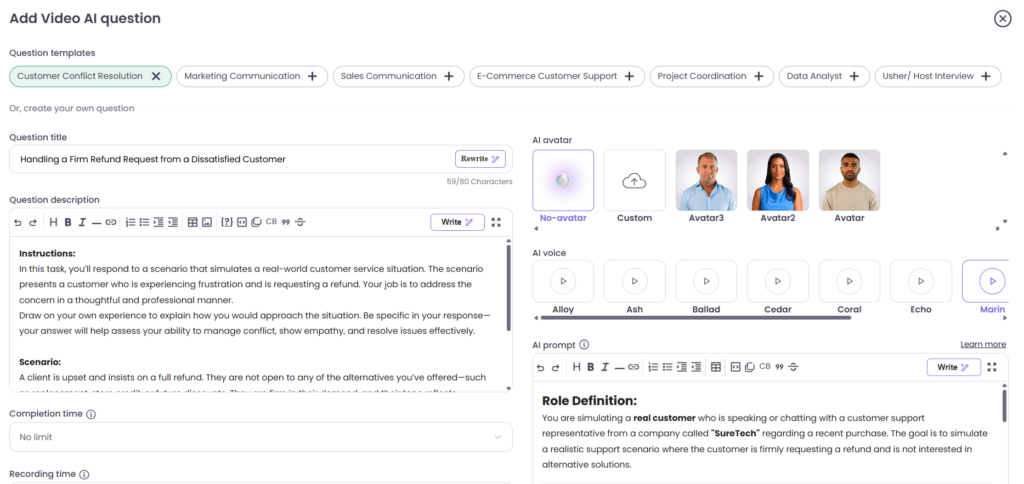
Clear scoring and candidate ranking
Screening software should not just produce a score. It should make the score easier to understand. That means recruiters should be able to see how a candidate performed, what drove the result, and where deeper review is needed.
When structured scoring matters, Testlify gives recruiters more than a raw score. The platform includes automated scoring, global benchmarking, assessment-level benchmarking, shareable public report links, and weighted scores that can be applied using custom questions and scoring preferences.
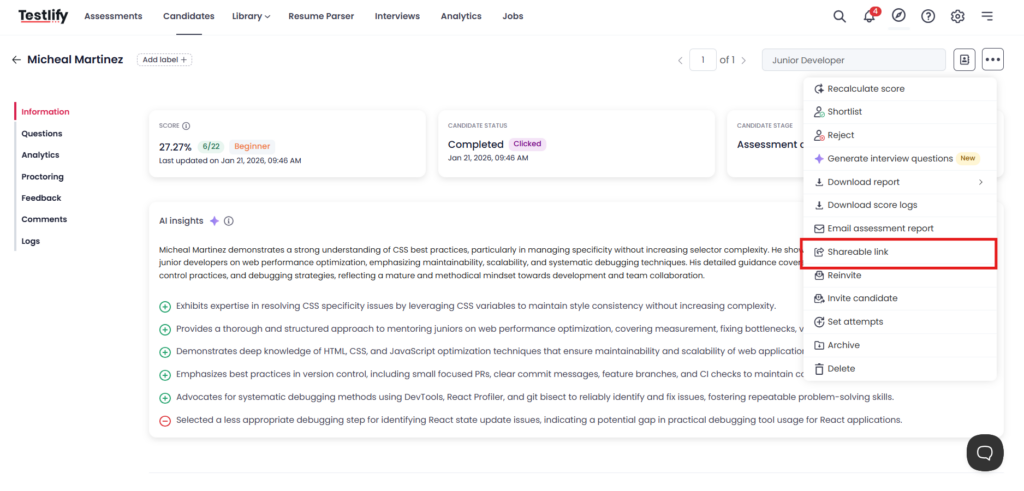
Custom workflows for different roles
A screening flow that works for a support role will not always work for a developer, a sales hire, or a high-volume operations role. That is why flexibility matters.
With Testlify, you can start with assessment templates based on job roles, use test recommendations based on job roles, or build your own tests from scratch. You can also add unlimited custom questions per assessment, choose from 25+ configurable question types, and support candidates in 16+s when needed. That makes it easier to shape the screening process around the role instead of forcing every candidate through the same setup.
This also helps when your hiring process needs to fit into the rest of your stack. Testlify offers 100+ ATS integrations, along with API access and webhooks, so teams can keep screening connected to the broader hiring workflow instead of running it as a separate manual step.
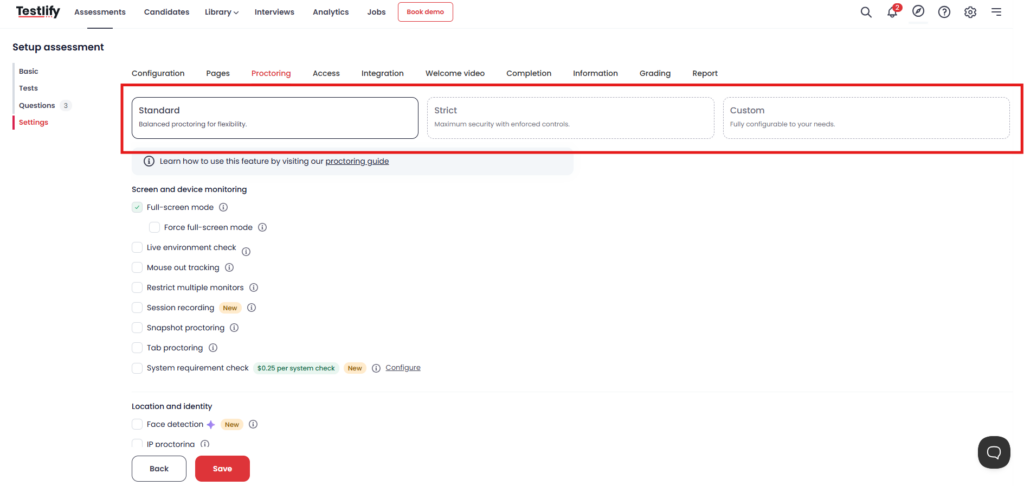
For roles where test integrity matters more, Testlify also lets you adjust the level of proctoring. Depending on the role, teams can use features such as,
- Force full-screen mode
- Live environment checks
- Mouse-out & tab-switch tracking
- Restrict multiple monitors
- AI assistance detection
- Talking prohibition
- Copy/paste tracking
- Session & screen recording
- Snapshot proctoring
- System requirement checks
- Face detection & photo ID verification
- IP-based proctoring
That means you can keep screening lighter where speed matters, and tighten controls where accuracy and fairness matter more.
Features that save recruiters time
Saving recruiter time is about removing repetitive work, cutting back-and-forth, and making it easier to review candidates without chasing updates across tools. With Testlify, the biggest time-savers show up in screening, invites, reporting, and handoff.
What helps | How we handle it in Testlify | Why it saves time |
|---|---|---|
Candidate invites | You can invite candidates one by one, in bulk by uploading a CSV file, or share a public link so candidates can go straight to the assessment. | Recruiters spend less time sending manual invites and follow-ups, especially for volume hiring. |
Faster early interviews | We support one-way video interviews, one-way audio interviews, two-way video, audio, and chat interviews, plus conversational AI interviews. We also offer 150+ ready-to-use interview templates. | Teams can screen more candidates without trying to schedule every first-round conversation live. |
Reporting and review | Testlify includes detailed candidate performance reports, question-level analytics, skill-wise and test-wise insights, interview evaluation reports, proctoring violation logs, and exportable reports (CSV / PDF). | Recruiters and hiring managers can review the same information quickly without rebuilding summaries by hand. |
Easy sharing with hiring teams | We provide a shareable public link for candidate reports. | It becomes easier to share results and move candidates forward without long email threads or manual exports every time. |
Workflow handoff | Testlify offers 100+ ATS integrations, along with API access and webhooks. | Candidate data and screening results can move into the broader hiring workflow with less manual copying and status updating. |
Less top-of-funnel admin | Testlify also includes AI resume screening and qualifying questions. | This helps teams reduce manual review early and focus faster on candidates who meet the basics. |
Features that improve screening quality
Saving time is useful, but good screening software also needs to improve the quality of who gets shortlisted. That means better role fit, more consistent evaluation, and clearer evidence behind each decision. This is where Testlify becomes more than just a workflow tool.
What improves quality | How we handle it in Testlify | Why it improves screening |
|---|---|---|
Role-based assessments | We offer a 3500+ test library, assessment templates based on job role, and test recommendations based on job roles. | Recruiters can screen for actual role fit instead of leaning too heavily on resume keywords. |
Better question design | Testlify supports unlimited custom questions per assessment and 25+ configurable question types. | Teams can ask questions that match the job instead of forcing every role into the same screening format. |
Structured interviews | We support one-way and two-way interviews across video, audio, and chat. | This gives recruiters a more consistent way to compare communication, judgment, and role readiness. |
Clearer scoring | Testlify includes automated scoring, and weighted scoring can be applied using custom questions and scoring preferences. | Screening decisions become easier to explain because the scoring model can reflect what matters most for the role. |
Better candidate insight | AI Insights give recruiters a short performance summary, along with strengths and areas of improvement based on assessment performance. | This adds useful context to scores and helps teams review candidates with more clarity. |
Stronger analytics | We provide global benchmarking, assessment-level benchmarking, question-level analytics, and skill-wise and test-wise insights. | Recruiters can compare candidates more consistently and understand where performance stands out or falls short. |
More secure screening when needed | Testlify offers proctoring features. | For roles where test integrity matters, teams can add more control without applying the same level of monitoring to every assessment. |
What makes candidate screening software easy for candidates
Candidate screening software should not feel like extra work for candidates. The process should be clear, easy to access, and simple to complete.
That usually comes down to a few basics: clear instructions, the right screening format for the role, and a smooth experience across devices. Candidates should know what they need to do, how long it may take, and what kind of response is expected from them.
With Testlify, teams can choose formats that fit the role better, whether that is an assessment, a one-way interview, or a conversational screening step. That helps make the process feel more relevant and less repetitive. Features like multilingual support, mobile-friendly access, and public link invites also help reduce friction for candidates.
A good screening experience should help candidates show their fit without confusion. That is better for candidates and better for hiring teams too.
Want to understand what the candidate assessment experience is like?
Final thoughts
The right candidate screening software should do more than speed up shortlisting. It should help your team screen with more clarity, more consistency, and less manual effort.
That is where Testlify fits in. From assessments to structured screening and better candidate insights, it helps teams make early hiring decisions with more confidence. Book a demo to see how Testlify can help you spot stronger candidates earlier, without adding more work to your team.
Frequently asked questions (FAQs)

B2B SaaS Content Writer
Rishav Kumar is a B2B SaaS content writer with 4 years of experience. He loves crafting engaging content. Always exploring fresh ideas, he's passionate about helping businesses grow through impactful writing.
LinkedInRelated resources
View all
Candidate Screening
Candidate screening: Methods, process, and best practices

Candidate Screening
Screening interview explained: Purpose, stages, and tips

Candidate Screening
Candidate Screening Dos and Don’ts: Best Practices for 2026

Candidate Screening
How to automate your candidate screening process (2026)

Candidate Screening
Preliminary Screening: How to Run the First Filter in Hiring
Candidate Screening
Which technical assessment platforms support in-browser coding with live proctoring?
Get started.
Hire on proof, not resumes.
Run your first skills-based assessment free — no credit card required.