
What is skills mapping: Frameworks and tools
Learn about skills mapping and 11 practical tips for HR to implement it to close skills gaps in your organization effectively
Modern organizations are experiencing rapid shifts in technology, job roles, and business models. Traditional job descriptions and static competency frameworks are no longer sufficient to understand workforce capabilities. To stay competitive, organizations must know what skills exist inside the company, what skills are missing, and what skills will be required in the future.
This is where skills mapping becomes critical.
Skills mapping is a structured process that identifies, categorizes, evaluates, and tracks the skills of employees across an organization. When implemented correctly, it helps HR teams align talent with business goals, do skills gap analysis, guide learning investments, and make smarter workforce decisions.
This guide provides a practical, step-by-step framework for HR leaders to design and implement skills mapping effectively.
 ChatGPT
 Gemini
 Claude
 Grok
Grok Perplexity
What is skills mapping?
Skills mapping is the process of identifying the skills required for roles and comparing them with the skills employees actually possess.
The output of skills mapping is usually a skills matrix or skills database that shows:
- Skills required for each role
- Current skill level of employees
- Skill gaps
- Critical skill shortages
- Workforce capability trends
Skills mapping answers key strategic questions:
- What capabilities exist within the workforce?
- Which teams lack critical expertise?
- Which employees are ready for promotion or role transition?
- What skills must be developed for future business needs?
Instead of relying on assumptions or outdated job descriptions, HR teams gain data-driven visibility into organizational capability.

Why is skills mapping important?
Many HR teams struggle with challenges such as ineffective training, internal mobility issues, and poor workforce planning. Skills mapping directly addresses these problems.
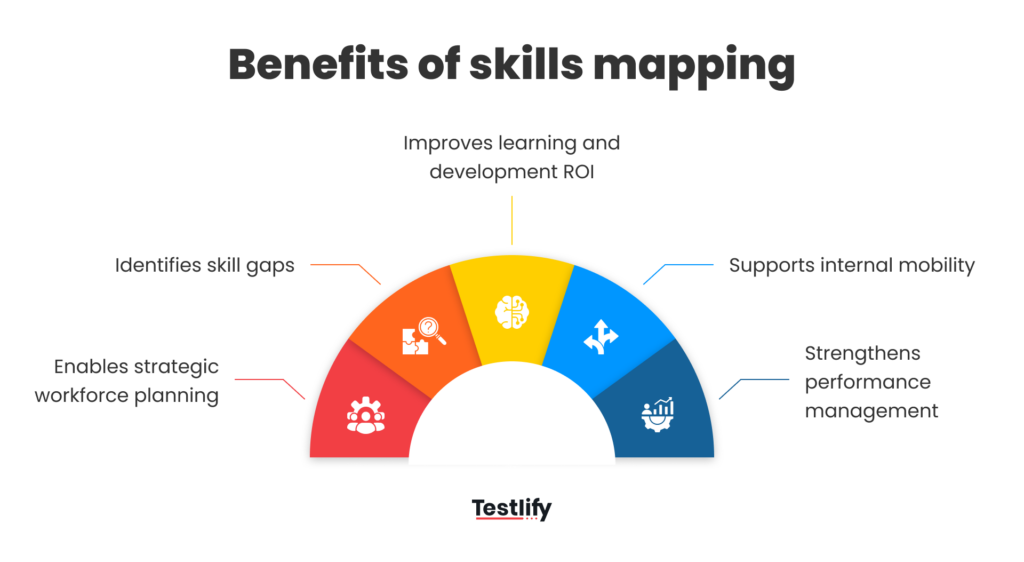
Enables strategic workforce planning
Organizations must anticipate future skill requirements. Skills mapping allows HR to compare:
Current workforce capability vs. future capability needs.
This insight supports:
- Succession planning
- Hiring strategies
- Talent pipeline development
Without skills data, workforce planning becomes guesswork.
Identifies skill gaps
Skill gaps occur when employees lack the capabilities required to perform roles effectively.
Skills mapping helps HR identify:
- Department-level skill shortages
- Leadership capability gaps
- Critical expertise risks
- Areas requiring urgent training
Instead of generic training programs, organizations can invest in targeted development initiatives.
Improves learning and development ROI
Many organizations waste training budgets on courses employees do not actually need.
Skills mapping ensures training programs address specific capability gaps, improving:
- Learning effectiveness
- Employee engagement
- Training ROI
Supports internal mobility
Employees often leave organizations because they see limited career growth.
Skills mapping helps HR:
- Identify employees ready for new roles
- Recommend internal career paths
- Enable lateral moves based on skills
Organizations with strong internal mobility retain talent longer.
Strengthens performance management
Traditional performance reviews focus heavily on outcomes. Skills mapping introduces a capability-based approach, evaluating:
- Technical expertise
- leadership capabilities
- behavioral competencies
This leads to more objective development conversations.
Improves talent allocation and project staffing
Skills mapping also helps HR and project leads match the right people to the right work. Knowing who has which skills, and at what level, lets organizations staff projects and assignments more efficiently instead of relying on guesswork or informal knowledge of "who might be good at this." For example, a software development company can use skills data to see which developers have expertise in specific languages or frameworks and staff projects accordingly, reducing errors and improving timelines. This also cuts down the time HR and managers spend searching for suitable team members and increases the odds that people are staffed on work that suits their strengths.
Strengthens succession planning
Beyond feeding into general workforce planning, skills mapping gives HR a clear view of leadership potential across the organization. By assessing skills across the workforce, HR can identify employees with the right mix of technical skills, leadership capability, and organizational knowledge to step into key positions, for example when a senior manager is nearing retirement, and can tailor training and mentorship to prepare them for the transition. This reduces the risk associated with unexpected departures and supports proactive career development for high-potential employees.
Facilitates diversity and inclusion
Skills mapping can also support diversity and inclusion (D&I) initiatives. By analyzing how skills are distributed across demographics, HR can spot where opportunities for growth, training, or leadership development are not reaching all groups equally, and use that data to design targeted mentorship programs or unbiased training opportunities that promote equitable advancement.
Enhances organizational agility
A detailed, up-to-date view of workforce skills also makes it easier for organizations to redeploy talent quickly as market conditions, technology, or customer needs shift. If a new product line requires specialized knowledge, HR can identify employees who already have relevant skills, or who can be upskilled quickly, instead of defaulting to external hiring. This reduces dependency on outside talent for specialized needs and increases overall organizational resilience.
Increases employee engagement and retention
When employees are placed in roles that use their strengths and are given visibility into development opportunities, job satisfaction tends to rise. Skills mapping supports this by giving HR the data to design personalized engagement strategies, connect people to meaningful opportunities, and build a sense of purpose and recognition, which reduces turnover and encourages a culture of continuous learning.
Types of skills to include in skills mapping
An effective skills mapping framework categorizes skills into clear groups. Most organizations map four types of skills.
Technical skills
Technical skills are role-specific capabilities employees need to perform their jobs effectively. These skills are usually measurable and tied directly to tools, systems, or domain expertise. For example, software developers require programming languages, system architecture knowledge, and API development skills.
In marketing, technical skills include SEO, marketing automation, and data analytics, while finance roles require financial modeling, compliance knowledge, and risk analysis capabilities. Because technology evolves rapidly, organizations must regularly update technical skill requirements to remain competitive and ensure employees stay relevant.
Functional skills
Functional skills are capabilities specific to a business department or operational function. They reflect the expertise needed to perform specialized work within areas like HR, sales, finance, or operations.
For instance, HR professionals require talent acquisition, compensation planning, and HR analytics skills. Sales teams rely on pipeline management, negotiation, and account strategy. Operations teams depend on process optimization, supply chain planning, and vendor management to drive efficiency and performance.
Behavioral skills
Behavioral skills, often referred to as soft skills, influence how employees interact, collaborate, and perform within the workplace. These skills affect team dynamics, communication quality, and overall organizational culture.
Common behavioral skills include communication, collaboration, problem solving, emotional intelligence, and conflict resolution. Strong behavioral capabilities help employees work effectively across teams and are essential for leadership readiness and long-term career development.
Leadership skills
Leadership skills become increasingly important as employees move into managerial or strategic roles. These skills enable individuals to guide teams, make informed decisions, and drive organizational goals.
Key leadership capabilities include strategic thinking, decision making, team leadership, stakeholder management, and change management. Mapping leadership skills helps organizations identify future leaders and build strong succession pipelines for critical leadership positions.
Digital and emerging skills
Digital and emerging skills cover capabilities tied to new technologies and evolving business models, such as data analytics, AI literacy, and automation expertise. As digital transformation accelerates, treating these as a distinct category, alongside technical, functional, behavioral, and leadership skills, helps organizations track readiness for automation, AI adoption, and other emerging shifts instead of folding them into generic technical skills.
Key components of a skills mapping framework
Before implementing skills mapping, HR teams must design a structured framework. A strong framework includes five components.
Skills taxonomy
A skills taxonomy is a standardized and structured library of skills used across the organization to ensure consistency in evaluating employee capabilities. It organizes skills into clear categories, specific skills, and defined proficiency levels.
This structure eliminates duplication, enables accurate comparisons across teams, and simplifies reporting, making workforce capability analysis more efficient and scalable.
Role skill profiles
Role skill profiles define the specific skills and proficiency levels required for each job within the organization. These profiles act as benchmarks for evaluating employee capabilities and performance.
By clearly outlining required and desired skills for roles, organizations can ensure alignment between talent and job expectations, while also supporting hiring, development, and internal mobility decisions.
Skill proficiency levels
Skill proficiency levels provide a standardized way to measure how well an employee performs a particular skill. Typically using a five-level scale from basic awareness to expert, this system helps HR assess depth of expertise rather than just skill presence. It enables more accurate evaluation, clearer development pathways, and better comparison of capabilities across individuals and teams.
Skills assessment method
A skills assessment method defines how employee capabilities are evaluated within the organization. Common approaches include self-assessments, manager evaluations, formal tests, project-based evidence, and certifications. Some organizations also incorporate peer feedback to get a more rounded view of an employee's capabilities.
Using a hybrid approach improves accuracy by combining multiple perspectives, reducing bias, and ensuring that skill data reflects actual performance and demonstrated expertise rather than assumptions. Clear, specific definitions matter as much as the number of levels: rather than describing an employee as having "good analytical skills," define what that looks like in practice, for example the ability to interpret data, identify trends, and make recommendations independently, so a given proficiency rating means roughly the same thing across the organization even when the underlying skills differ.
Skills data repository
A skills data repository is a centralized system where all employee skill information is stored, updated, and analyzed. This may include HRIS platforms, learning management systems, or specialized skills intelligence tools.
Centralizing data ensures accessibility, supports continuous updates, and enables advanced analytics, helping organizations make informed decisions about workforce planning and development.
Step-by-step skills mapping process
Implementing skills mapping requires a structured approach.
Below is a practical implementation framework.
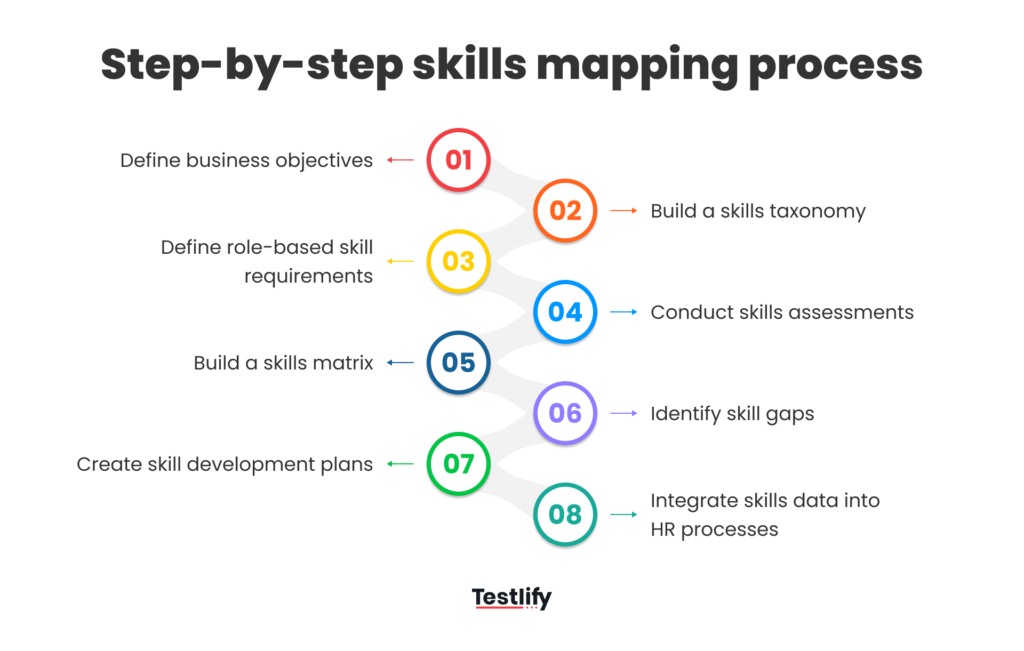
Step 1: Define business objectives
Skills mapping should start with business strategy, not HR processes. You should ask:
- What capabilities will the company need in the next 3–5 years?
- Which roles are critical for growth?
- Where do current capability risks exist?
This ensures skills mapping supports real organizational needs.
Step 2: Build a skills taxonomy
Create a structured list of skills relevant to the organization. Sources for building a taxonomy include:
- Industry competency frameworks
- Job descriptions
- Subject matter experts
- department leaders
Avoid creating overly complex taxonomies. Most organizations perform well with 200–500 well-defined skills.
Step 3: Define role-based skill requirements
This step involves identifying the specific skills and proficiency levels required for each role. Both required and desired skills should be clearly defined to create a complete capability profile.
These role-based requirements act as benchmarks for evaluation, helping organizations align talent with expectations and establish clear standards for hiring, performance, and development.
Step 4: Conduct skills assessments
Organizations must evaluate employee skills using a structured and multi-source approach. This typically includes self-assessments, manager validation, and evidence-based reviews such as projects or certifications.
Combining multiple perspectives improves accuracy, reduces bias, and ensures that skill data reflects actual capabilities, enabling more reliable workforce insights and better decision-making.
Step 5: Build a skills matrix
A skills matrix organizes collected data into a clear format showing employees, skills, and proficiency levels. This visual representation helps HR and managers quickly understand team capabilities, identify strengths, and spot weaknesses. It provides an immediate overview of workforce skills, making it easier to analyze gaps and plan targeted development initiatives.
Step 6: Identify skill gaps
Skill gap analysis involves comparing role requirements with current employee capabilities to identify deficiencies. These gaps may include critical shortages, emerging skill needs, or leadership pipeline weaknesses.
Understanding these gaps enables HR teams to prioritize interventions, allocate resources effectively, and ensure the organization is prepared to meet current and future demands. Look for patterns, not just individual gaps: if multiple teams are struggling with the same skill, it may point to a need for organization-wide training, while roles that consistently show gaps could signal deeper issues in hiring or onboarding rather than a training problem.
Step 7: Create skill development plans
Once gaps are identified, organizations must design targeted development plans to address them. These may include training programs, mentorship, stretch assignments, or cross-functional projects.
The focus should be on building real capabilities rather than simply completing training, ensuring employees gain practical skills that directly contribute to business performance and growth.
Step 8: Integrate skills data into HR processes
To maximize impact, skills data must be integrated into core HR processes such as recruitment, performance management, succession planning, and learning strategies. Embedding skills insights into everyday decision-making transforms them into a strategic asset, enabling organizations to build a dynamic, data-driven talent management approach that continuously adapts to changing business needs.
Tools for skills mapping
Skills mapping can be implemented using various tools depending on organizational maturity.
Skills intelligence platforms
Skills intelligence platforms are advanced tools designed specifically for managing skills-based organizations. They use AI to infer skills, analyze gaps, and recommend career paths or learning opportunities.
These platforms often include talent marketplaces and real-time analytics, enabling continuous visibility into workforce capabilities and helping organizations make faster, data-driven talent decisions at scale.
HRIS platforms
HRIS platforms like Workday, SAP SuccessFactors, and Oracle HCM provide built-in skills tracking capabilities integrated with broader talent management processes. These systems enable organizations to connect skills data with recruitment, performance management, and learning initiatives. They offer better scalability and structure than spreadsheets, making them suitable for organizations seeking more centralized and efficient workforce management.
Spreadsheets
Spreadsheets such as Microsoft Excel or Google Sheets are often the starting point for skills mapping in smaller organizations. They offer a low-cost and quick-to-implement solution for tracking skills data. However, they require manual updates, lack advanced analytics, and become difficult to scale as the organization grows, limiting long-term effectiveness.
Common challenges in skills mapping
Even well-designed skills mapping initiatives face challenges. Understanding them helps HR teams avoid mistakes.
Inaccurate self-assessments
Employees often misjudge their own skill levels, either overestimating or underestimating their capabilities. This can lead to unreliable data and poor decision-making.
To improve accuracy, organizations should combine self-assessments with manager validation, standardized tests, and evidence from real projects or certifications, ensuring a more balanced and objective evaluation of employee skills.
Overly complex skill libraries
Some organizations create overly detailed skill taxonomies with thousands of entries, making them difficult to manage and use effectively. This complexity leads to administrative burden, low adoption, and poor data quality.
To avoid this, companies should focus on a concise, relevant set of skills that are aligned with business priorities and easy for stakeholders to understand.
Lack of manager engagement
Skills mapping cannot succeed as an HR-only initiative; active manager involvement is essential. Managers play a critical role in defining role requirements, validating employee assessments, and supporting development plans. Without their participation and ownership, skills data quickly becomes outdated or inaccurate, reducing its usefulness for decision-making and limiting the overall impact of the initiative.
Static skills frameworks
Skills frameworks can quickly become outdated as technologies and business needs evolve. Organizations that fail to update their frameworks risk relying on irrelevant or incomplete data. To remain effective, skills mapping must be treated as a continuous process, with regular updates to reflect emerging skills, changing roles, and new strategic priorities.
Best practices for successful skills mapping
HR leaders who successfully implement skills mapping follow several key practices.
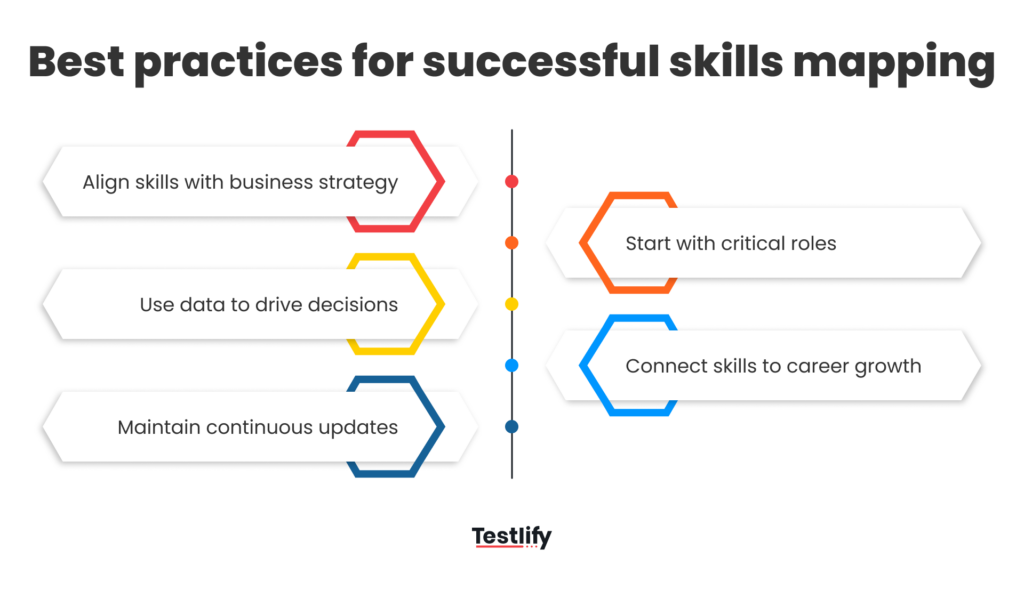
Align skills with business strategy
Skills mapping must be closely aligned with the organization’s long-term business strategy and future priorities. For example, digital transformation initiatives may require capabilities such as data analytics, AI literacy, and automation expertise.
Ensuring the skills framework reflects these priorities helps organizations build the capabilities needed to stay competitive and achieve strategic goals.
Start with critical roles
Rather than attempting to map all roles at once, organizations should begin with critical functions, hard-to-fill positions, or leadership pipelines. This focused approach allows HR teams to demonstrate quick wins, prove value, and refine the process before scaling.
Starting small ensures better adoption, clearer insights, and more manageable implementation in the early stages.
Use data to drive decisions
Skills mapping is only valuable if the data is actively used to inform decisions. Organizations should leverage skills insights to guide hiring versus reskilling choices, assess promotion readiness, and plan team capabilities.
Data-driven decision-making ensures that workforce strategies are aligned with actual needs, improving efficiency, effectiveness, and overall talent management outcomes.
Connect skills to career growth
Employees should see clear benefits from skills mapping in terms of career development. By providing visibility into required skills for promotions, personalized learning paths, and internal job opportunities, organizations can increase engagement and motivation.
When employees understand how to grow within the company, they are more likely to stay and actively develop their capabilities.
Maintain continuous updates
Skills mapping should be treated as an ongoing process rather than a one-time exercise. Skills data must be continuously updated through performance reviews, learning activities, project work, and manager feedback.
This dynamic approach ensures that the organization maintains an accurate and current view of workforce capabilities, enabling timely and informed talent decisions.
Conclusion
Skills mapping has evolved from an HR administrative activity into a strategic capability management tool. Organizations that systematically map and manage skills gain a powerful advantage:
They understand their workforce capabilities in real time and can adapt quickly to changing business demands.
Skills mapping enables:
- data-driven workforce planning
- targeted learning investments
- stronger leadership pipelines
- improved employee career mobility
However, successful implementation requires more than collecting skill data. It requires a structured framework, manager involvement, continuous updates, and integration with core talent processes.
As businesses increasingly move toward skills-based workforce models, organizations that invest in robust skills mapping today will be significantly better positioned to compete in the future.
Frequently asked questions (FAQs)

Related resources
View all
HR & recruitment
Assessing SEO & digital marketing skills for content strategy
HR & recruitment
Halo and Horn Effect: How to Stop Hiring Bias in 2026
HR & recruitment
What Is Employee Profiling? A Recruiter’s Complete 2026 Guide
HR & recruitment
Reverse Recruiting: How It Works and When to Use It in 2026
HR & recruitment
Technical Screening: Process, Types and Best Practices
HR & recruitment
Tech Recruitment Strategies: How to Win Tech Talent in 2026
Get started.
Hire on proof, not resumes.
Run your first skills-based assessment free — no credit card required.