
How to conduct system diagnostics for remote work?
Learn how HR leaders can run system diagnostics to ensure remote work readiness and seamless onboarding with Testlify’s automated tool.
Remote and hybrid work are no longer temporary arrangements, they’re part of the modern work DNA. But as teams spread across cities, countries, and even continents, ensuring that every employee’s system setup is capable of supporting secure, high-performance remote work has become a major operational challenge.
That’s where system diagnostics come in.
For large organizations, especially those managing hundreds or thousands of remote employees, a structured system diagnostic process helps maintain productivity, protect data, and deliver a seamless employee experience.
This guide explains how to conduct effective system diagnostics for remote work, why it matters, and how Testlify’s System Diagnostic helps organizations make it effortless and scalable.
 ChatGPT
 Gemini
 Claude
 Grok
Grok Perplexity
Why is system diagnostics important?
Remote work depends on reliable systems. Remote work success doesn’t just depend on communication or culture, it hinges on whether employees have the right system setup. If their devices, software, or networks don’t meet minimum standards, performance and employee engagement drop quickly.
Common issues include:
- Slow or outdated computers
- Weak or unstable internet connections
- Missing software updates or security patches
- Incompatible browsers or OS versions
- Poor-quality audio or video setups
These problems disrupt meetings, delay onboarding, and hurt productivity. Worse, they can cause security vulnerabilities that expose company data.
While system diagnostics may sound like an IT problem, they have a direct impact on HR’s goals:
- Ensuring new hires are remote-ready on day one
- Reducing onboarding delays and helpdesk tickets
- Maintaining compliance and data security
- Improving employee experience and retention
With tools like Testlify’s system compatibility check, you can proactively ensure every remote employee’s setup is compliant, capable, and ready before they start work.

What is a system diagnostic?
A system diagnostic is a technical assessment that verifies whether a user’s computer and network meet the organization’s requirements for remote work. It evaluates hardware, software, connectivity, and security elements, all automatically.
What does a system diagnostic feature typically check?
A comprehensive system diagnostic covers:
- Hardware performance CPU, RAM, storage, GPU, and peripheral devices (camera, mic, headset)
- Operating system and software OS version, updates, browser compatibility, and installed applications
- Network and connectivity Internet speed, latency, packet loss, VPN availability, and stability
- Security and compliance Antivirus status, encryption, patch level, and firewall configuration
- Peripheral and access readiness Webcam, audio devices, display settings, and access to company tools
Manual checks are time-consuming and inconsistent. Automated diagnostics, like those provided by Testlify, ensure consistent, objective results at scale, saving countless hours for HR and IT teams.
How does Testlify simplify system diagnostics?
Testlify’s system diagnostic for remote work is automated, simple, and scalable. It allows organizations to automatically evaluate a candidate’s or employee’s system setup in minutes.
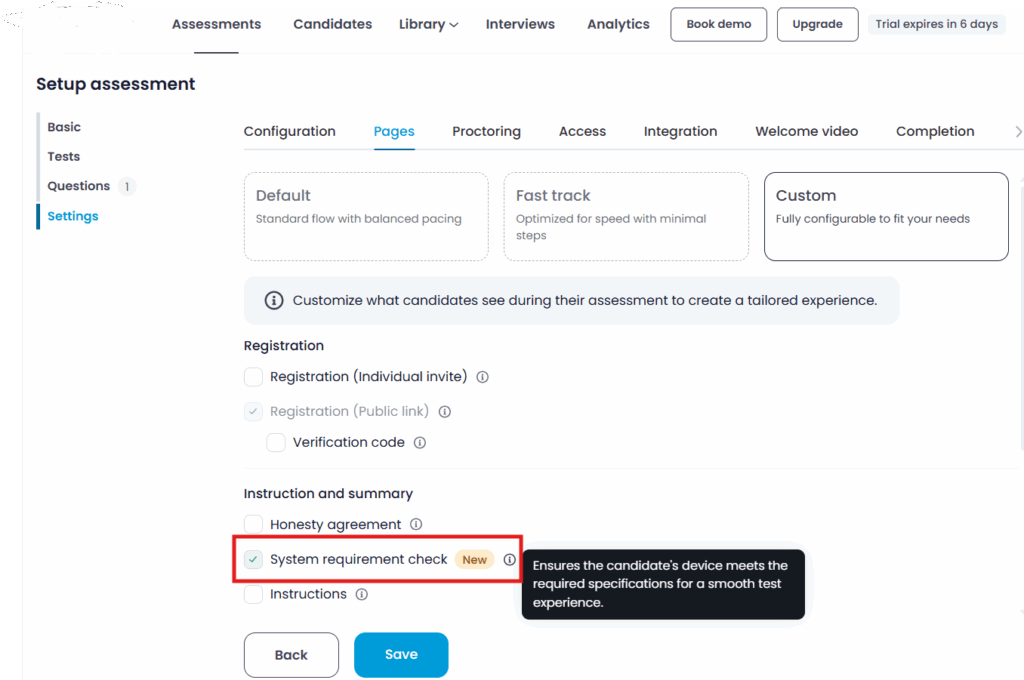
No manual intervention, no complicated instructions, just a quick, seamless check that validates everything from hardware specs to internet performance.
What makes Testlify’s approach unique is its HR-first design philosophy. It’s built for people leaders, not only engineers. HR teams can:
- Send diagnostic invites directly through the Testlify platform
- Get instant reports on system readiness
- Review pass/fail statuses with detailed recommendations
- Ensure candidates or employees meet remote work requirements before onboarding
This empowers you to make data-driven decisions about remote readiness, without waiting for IT intervention.
Key benefits of using the system diagnostic feature
This feature helps in,
- Reduced onboarding friction: Employees are remote-ready from day one.
- Lower IT load: Automated checks minimize support requests.
- Data-backed decisions: HR gains clear visibility into readiness gaps.
- Improved productivity: Teams start strong, with minimal tech issues.
- Compliance & security assurance: Every system meets corporate standards.
The pillars of a strong system diagnostic program
Let’s break down the key components your organization should include in its remote work diagnostics process, whether automated through Testlify or custom built.
1. Hardware and device readiness
The performance of a remote worker starts with their machine. Check for:
- Minimum CPU (multi-core, 2.5GHz or higher)
- At least 8 GB of RAM (16 GB recommended)
- SSD storage (for speed and reliability)
- Working webcam, mic, and headset
- Stable power supply and battery health for laptops
Employees with underpowered devices often experience lag during video meetings and multitasking, which hurts collaboration.
2. Software and operating system compliance
Ensure all employees are using:
- Supported operating systems (Windows 11, macOS Monterey or later)
- Latest updates and patches installed
- Approved browsers (latest versions of Chrome, Edge, or Firefox)
- Required productivity and communication apps pre-installed (Teams, Slack, Zoom, etc.)
Testlify’s diagnostic can automatically check these parameters and alert HR if an employee’s setup doesn’t meet policy standards.
3. Network quality and stability
Remote work depends on strong connectivity. The diagnostic should test:
- Download and upload speed (minimum 10 Mbps recommended)
- Ping latency (<100 ms)
- Packet loss and jitter
- VPN compatibility
With Testlify, these results are clearly presented to both HR and the user, helping identify if network issues might affect their remote experience.
4. Security compliance
A secure remote setup is non-negotiable. Check:
- Antivirus and endpoint protection status
- Disk encryption and password policy
- Latest OS and software patches
- Firewall status
- No unauthorized remote-access tools
Testlify’s automated checks give HR leaders peace of mind that remote hires are compliant from day one, reducing cybersecurity exposure.
5. Peripheral checks and accessibility
From webcams to microphones, the little things matter. Ensure:
- Devices are properly detected and functional
- Audio and video meet minimum clarity standards
- Users have access to the company systems or VPN
With remote interviews, assessments, and meetings being routine, these checks prevent embarrassing “Can you hear me now?” moments.
How to conduct system diagnostics step-by-step?
Let’s turn theory into action. Here’s how large organizations can operationalize remote diagnostics effectively.
Step 1: Define your standards
Start by establishing clear technical requirements for remote work. Collaborate between HR, IT, and security teams to define:
- Minimum hardware specifications
- Approved operating systems and browsers
- Network and VPN performance standards
- Security software requirements
These benchmarks will form the basis of your diagnostic criteria in Testlify.
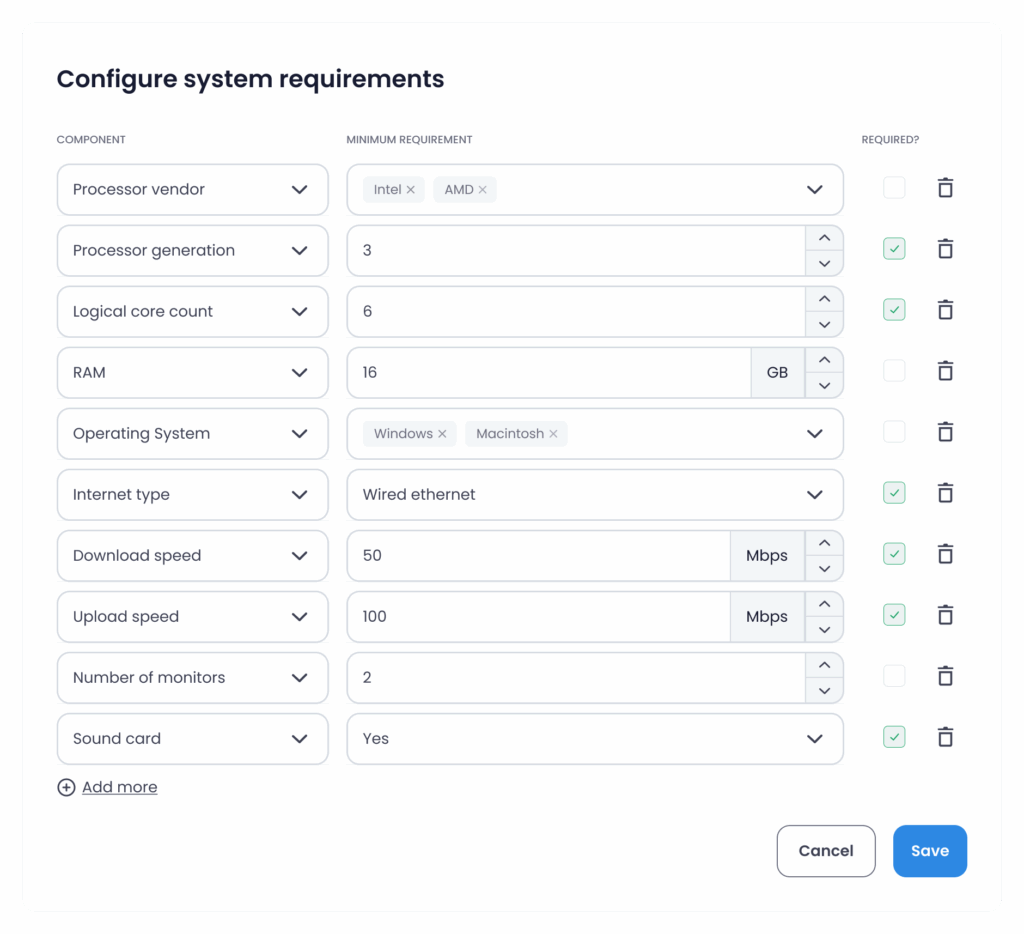
Step 2: Configure diagnostics in Testlify
Once your standards are ready, configure Testlify’s System Diagnostic module:
- Input your minimum system thresholds
- Choose which parameters to test
- Customize the instructions employees will see
You can even brand the diagnostic experience with your organization’s logo and tone.
Step 3: Invite users or candidates
Send diagnostic invitations directly from the Testlify dashboard. Candidates can run a one-click system diagnosis before starting the assessment. They run the diagnostic in minutes, and results are automatically synced back to your dashboard.
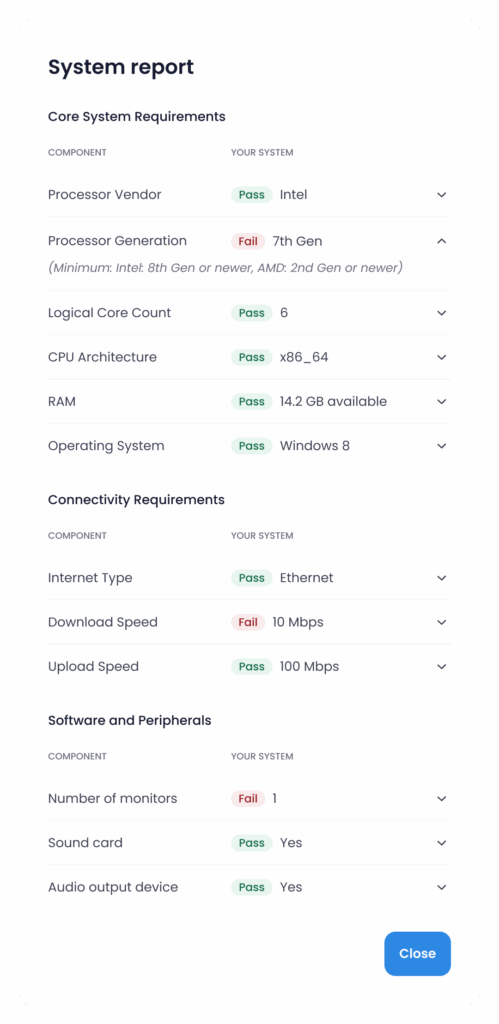
Step 4: Review results and identify gaps
You’ll see whether users:
- Pass (fully compliant)
- Fail (critical gaps)
Each result comes with a clear explanation, e.g., “Internet speed below threshold” or “Antivirus not active.” This allows HR and IT to respond proactively.
Step 5: Remediate and retest
Encourage users who fail diagnostics to fix issues and retest. Testlify makes this easy by allowing retests without manual reconfiguration. Once retested, results update automatically, giving you a clean, audit-ready record.
Step 6: Monitor trends over time
For large enterprises, diagnostics shouldn’t be a one-time task. Use Testlify’s analytics dashboard to monitor:
- Overall compliance rates
- Common recurring issues
- Departmental readiness
- Geographic performance trends
This helps HR teams continuously improve their remote readiness strategy.
Governance, privacy, and transparency
Diagnostics involve gathering system and network data from users’ machines. That brings in privacy, trust, and governance issues.
Respect employee privacy
System diagnostics collect technical data, so transparency is key. Communicate openly:
- What data is collected (system and network, not personal files)
- How it’s used (to ensure readiness, not surveillance)
- Who can access it (restricted to authorized HR/IT personnel)
- How long it’s stored (define a retention policy)
Testlify ensures compliance with global data privacy standards like GDPR, giving both organizations and employees confidence in data handling.
Common mistakes to avoid while using system diagnostics
Even the best organizations can slip up when introducing diagnostics. Avoid these pitfalls:
- Treating it as a one-time check, It should be part of an ongoing readiness strategy.
- Ignoring network issues, They’re the most common cause of poor remote experience.
- Overcomplicating the process, Keep instructions simple and user-friendly.
- Not closing the loop, Follow up on failed diagnostics and retest after fixes.
- Lack of transparency, Always explain the why and how behind the checks.
Why should system diagnostics be an HR priority?
System diagnostics are not just a technical safeguard, they’re a people enabler.
When systems work smoothly:
- Onboarding feels seamless
- Collaboration improves
- Downtime drops
- Employee satisfaction rises
This translates to a stronger employer brand, happier teams, and measurable ROI from remote work initiatives.
By adopting Testlify’s automated approach, organizations can turn what was once a manual, fragmented process into a strategic HR capability that ensures readiness, compliance, and confidence at scale.
Conclusion
Conducting system diagnostics for remote work isn’t just about tech, it’s about empowering people to perform at their best, no matter where they are.
By embedding diagnostics into your HR workflow through Testlify, you create a culture of readiness, reduce operational friction, and protect your organization from productivity and security pitfalls.
Ready to make your workforce remote-ready?
Explore how Testlify’s system diagnostic for remote work can help your teams stay connected, compliant, and productive, right from day one.
Frequently asked questions (FAQs)

Content Writer
Yashika Khandelwal is a Content Writer with 3+ years of experience creating research-backed content on hiring, talent assessment, and HR technology. She is a registered Organizational Psychologist and subject matter expert who combines behavioral science with practical recruitment insights to produce accurate, evidence-based content.
LinkedInRelated resources
View all
System compatibility & setup
How to run a candidate system check before online assessment?

HR & recruitment
AI across all stages of the hiring process in 2026

AI in recruitment
Best practices for hiring data analysts using assessments?
Candidate assessment
What tools support voice responses for language proficiency testing?
Candidate assessment
How do ATS-integrated assessments streamline hiring workflows?
Candidate assessment
How to assess financial modeling and accounting skills pre-hire?
Get started.
Hire on proof, not resumes.
Run your first skills-based assessment free — no credit card required.