
Virtual hiring process: 7 steps, tools and best practices
The 7 steps of a virtual hiring process, the tools each stage needs, how to run fair video interviews and how to keep remote hiring honest.

A virtual hiring process is a way of recruiting where every step happens online instead of in an office. Sourcing, screening, interviews, offers and onboarding all run through digital tools. Done well, it lets a hiring team reach candidates anywhere, judge everyone on the same criteria and make offers faster than an in-person process allows.
This guide sets out the 7 steps, the tools each stage needs and how to run fair video interviews.
It also covers how to spot interview fraud and which metrics show whether your remote hiring is working for recruiters and candidates.
TL;DR / Key Takeaways
- A virtual hiring process runs every hiring step online: define the role, post and source, screen, interview, decide, offer and onboard.
- Put skills assessments and one-way or AI interviews early, then save live video panels for the shortlist. That order cuts interview hours without cutting quality.
- Use the same questions, scorecard and pass mark for every candidate. Consistency is what makes remote hiring fair and comparable.
- Plan for fraud: Gartner found 6% of candidates admit to interview fraud and predicts 1 in 4 candidate profiles worldwide will be fake by 2028.
- Add identity and integrity checks at each stage, and keep a person in charge of every rejection.
- Track time to hire, completion rate, candidate satisfaction and offer acceptance to know whether the process works.
 ChatGPT
 Gemini
 Claude
 Grok
 Perplexity
What is a virtual hiring process?
A virtual hiring process is a recruitment workflow in which sourcing, screening, assessment, interviews, offers and onboarding all take place through digital tools, so neither the candidate nor the hiring team has to meet in person. It usually combines an applicant tracking system, online skills tests, video interviews and e-signature.
The term covers more than a video call. A virtual recruitment process can include online job fairs and information sessions, one-way recorded interviews, AI interviews, live panel interviews over video and a fully remote first week. Some companies run the whole thing online. Others run everything online except a final in-person meeting. Both count as virtual hiring, and both need the same structure to work.
If you are hiring people who will also work remotely, see our guide to remote hiring for the employment side, such as contracts, equipment and time zones.

Why do companies use a virtual hiring process?
Companies use a virtual hiring process because it widens the talent pool, speeds up scheduling and lowers the cost of each hire. Recruiters no longer pay for travel or rooms, and candidates can interview without taking a day off.
The main benefits:
- Access to a wider talent pool: You can hire from other cities and countries, which matters when local supply for a skill is thin.
- Faster scheduling: A 30-minute video interview fits into a calendar far more easily than a half-day visit, and one-way interviews remove scheduling altogether.
- Lower cost per hire: No travel, no hotel bills and fewer interviewer hours per candidate.
- More consistent evaluation: Recorded answers and digital scorecards make it easier to compare candidates on the same criteria.
- A more inclusive process: Candidates with caring duties, disabilities or long commutes can take part on equal terms when you offer flexibility.
Virtual hiring is not free of trade-offs. Gartner research reported in 2025 found that 62% of candidates said they were more likely to apply when an employer required in-person interviews, mostly because they see it as more genuine. Many teams therefore keep one in-person or live final step for senior roles, while running the high-volume early stages online.
What are the steps in a virtual hiring process?
The steps in a virtual hiring process are: define the role, post and source, screen, interview, decide, offer and onboard. Each step has a clear owner and tool, and candidates move to the next step only when they meet a pass mark agreed before hiring starts.
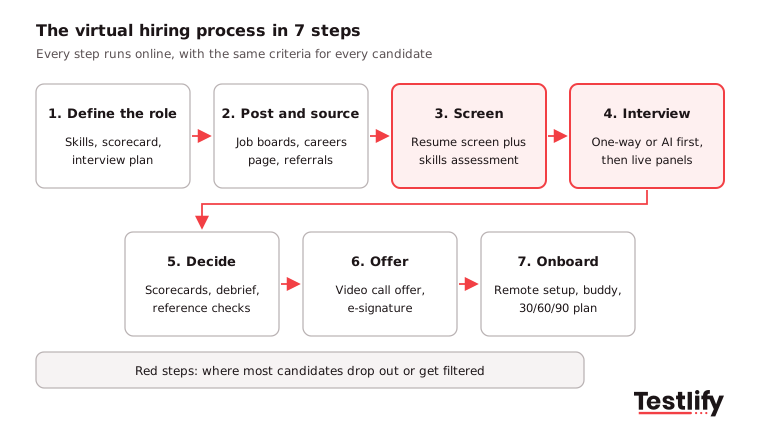
- Define the role: Agree the 4 to 6 skills that matter most, the questions that test each one and an interview scorecard. Write a job description that says the process is virtual and lists every stage.
- Post and source: Publish on job boards, your careers page and social channels. Keep the application short; every extra field costs applicants, especially on mobile.
- Screen: Replace or support resume screening with a short, role-specific skills assessment. This is where you remove most unqualified applicants fairly and quickly.
- Interview: Run a one-way or AI first-round interview for the shortlist, then live video interviews with the hiring manager and team.
- Decide: Each interviewer completes a scorecard before the debrief, then the panel meets on video to agree. Run reference checks online.
- Offer: Make the offer on a video call, then send the written offer for e-signature the same day.
- Onboard: Ship equipment before day one, assign a buddy and share a 30/60/90-day plan.
Speed matters at every step. SHRM's recruiting benchmarking data, drawn from more than 4,600 organizations, puts the median time to fill for nonexecutive roles at 39 calendar days. A well-run virtual process removes most of the waiting between stages, which is where those days go.
Key takeaway: Write down the steps, owners and pass marks before the first job post. A virtual process without a written plan turns into scattered video calls.
Which tools does a virtual hiring process need?
A virtual hiring process needs five types of tools: an applicant tracking system, a skills assessment platform, a video interviewing tool, a scheduling tool and e-signature. Choose tools that connect to your ATS so candidate data, scores and notes stay in one record.
Stage | Tool | What to look for |
|---|---|---|
Sourcing and tracking | Applicant tracking system (ATS) | Pipeline view, interview kits, scorecards, integrations |
Screening | Skills assessment platform | Role-specific tests, auto-scoring, proctoring, ATS sync |
First-round interviews | One-way or AI interview tool | Same questions for all, scored answers, mobile friendly |
Live interviews | Video conferencing (Zoom, Microsoft Teams, Google Meet) | Screen sharing, waiting room, captions, recording with consent |
Scheduling | Interview scheduling tool | Self-booking links, time zone handling, reminders |
Offer and onboarding | E-signature and onboarding software | Templates, checklists, IT setup tasks |
Look for screen sharing, chat and recording in any video platform, because these let you share documents, review sessions with consent and keep your team in touch during a panel. Check security too: candidate data, recordings and test results are personal data, so pick vendors with recognized security certifications and clear data retention settings.
Integration saves the most time. When your assessment and interview tools sync with the ATS, recruiters stop copying scores between systems. Testlify connects with 100+ ATS and HRIS tools through its integrations, including Greenhouse, Lever, Workday and SmartRecruiters.
What types of virtual interviews are there?
Virtual interviews come in five main types: live video interviews, one-way recorded interviews, AI interviews, panel interviews and task-based interviews. Most virtual hiring processes use two or three of them at different stages.
Type | How it works | Best stage | Best for |
|---|---|---|---|
Live video interview | Real-time call between candidate and interviewer | Mid and final rounds | Rapport, follow-up questions, senior roles |
One-way (asynchronous) interview | Candidate records answers to set questions in their own time | First round | High-volume roles, candidates across time zones |
AI interview | An AI interviewer asks role-based questions by video, voice or chat and scores answers | First round | Volume hiring, consistent screening |
Panel interview | Several interviewers on one video call | Final round | Team fit, cross-functional roles |
Task-based interview | Candidate solves a work task live, such as coding or a case | Mid round | Technical and analytical roles |
One-way interviews and AI interviews save the most interviewer time, because nobody has to be on the call. Live interviews still matter for judging how someone thinks on their feet and for selling the role. A common pattern for volume roles is a skills test, then an AI or one-way interview, then one live round.
How do you run a good virtual interview?
A good virtual interview follows the same structure as a good in-person interview, with extra care for technology and communication. Prepare a structured interview plan, test the setup, and give candidates everything they need to show their best.
Before the interview:
- Train every interviewer on the platform, including screen sharing, recording and what to do when a call drops. Run a mock interview with new interviewers.
- Send candidates the link, the names and roles of interviewers, the length, the format and a phone number to use if the connection fails.
- Ask about adjustments. The ADA requires employers to provide reasonable accommodations, and the US Department of Justice has published guidance on AI and disability in hiring that applies to online assessments too.
- Review the resume, assessment results and scorecard so you do not spend the first minutes catching up.
During the interview:
- Start with two minutes of small talk to settle nerves, then explain how the interview will run.
- Pause after each answer before you move on. Video lag makes it hard to tell when someone has finished.
- Ask every candidate the same core questions in the same order, and score as you go.
- Mute notifications, look at the camera when you speak and tell the candidate if a colleague is taking notes.
- Leave at least 5 minutes for the candidate's questions.
After the interview:
- Complete the scorecard within the hour, with an example for each rating.
- Debrief with the panel only after everyone has submitted scores, so the loudest voice does not set the result.
- Tell the candidate the next step and when they will hear back.
Pro tip: Keep a phone-interview fallback for every live slot. A candidate with a poor connection should not lose a job because their video froze.
How do you assess soft skills and culture fit virtually?
Soft skills and culture fit are assessed virtually with behavioral questions, work samples and structured scoring, not with gut feel from a video call. Decide which behaviors matter for the role, such as communication, collaboration or adaptability, and ask for specific past examples of each.
- Behavioral questions: Ask "Tell me about a time you..." and score the answer on what the candidate did, not on how confident they looked on camera.
- Situational tests: Short situational judgment or personality assessments give you a consistent view of work style before the interview.
- Interactive tasks: A short role play, a written reply to a customer or a team exercise on video shows communication under realistic conditions.
- Show the culture: Give candidates a virtual office tour, introduce them to future teammates and describe real situations they will face. Culture fit runs both ways, and candidates judge you on this too.
Be careful with "culture fit" as a score. Define it as values and ways of working written into the scorecard, otherwise it becomes a polite word for "people like us".
How do you stop cheating and impersonation in virtual hiring?
Cheating and impersonation in virtual hiring are stopped by layering identity checks, test proctoring and live follow-up questions across the process, so no single stage carries the whole risk. Candidate fraud is growing as AI tools make it easier.
The numbers are worth knowing. According to Gartner survey data reported by Personnel Today in August 2025, 6% of 3,000 candidates admitted to interview fraud, either posing as someone else or having someone else pose as them. In a separate Gartner survey of 3,290 candidates, 39% said they had used AI during the application process. Gartner predicts that by 2028, 1 in 4 candidate profiles worldwide will be fake.
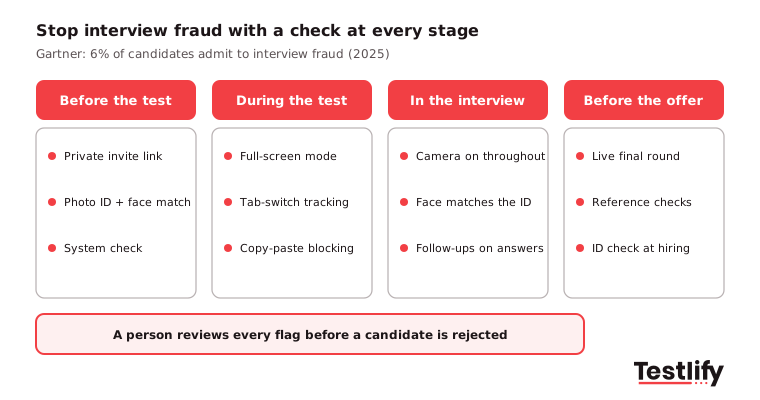
- Before the test: Send private, single-use invites and verify identity with a photo ID and face match for sensitive roles.
- During the test: Use anti-cheating and proctoring features such as full-screen mode, tab-switch tracking, webcam snapshots and copy-paste blocking.
- During the interview: Keep cameras on, compare the face with the ID, and ask follow-up questions about the candidate's own test answers. Someone who did not do the work struggles to explain it.
- Before the offer: Hold the final round live with the hiring manager and run reference and identity checks.
For more warning signs, read how to prevent impostors in video interviews. Whatever you use, treat proctoring flags as a reason to look closer, not as an automatic rejection.
How do you keep a virtual hiring process fair and compliant?
A virtual hiring process stays fair and compliant when every candidate gets the same questions and scoring, adjustments are offered up front, AI tools are checked for bias and candidate data is protected. Structure is your best defense against both bias and legal risk.
- Same process for everyone: Use one question set, one scorecard and one pass mark per role. Unstructured video chats invite bias based on accent, background or home setup.
- Score skills, not settings: Train interviewers to ignore lighting, background, camera quality and internet speed.
- Check AI tools: If you use AI to screen or score candidates in New York City, Local Law 144 requires an annual independent bias audit and candidate notice. The NYC rules on automated employment decision tools set out what to publish. The EU AI Act also treats AI used in hiring as high risk.
- Keep a person in charge: A human should review every AI-assisted rejection and be able to explain the decision.
- Protect candidate data: Tell candidates what you record and why, ask consent before recording, limit who can view recordings and delete data on a set schedule in line with GDPR or local privacy law.
How do you create a good candidate experience in a virtual hiring process?
A good candidate experience in a virtual hiring process comes from clear communication, flexible formats, fast feedback and a human touch at the right moments. Candidates cannot read the room online, so they rely on what you tell them.
Candidate trust is fragile. Gartner found that only 26% of job candidates believe AI will evaluate them fairly, and 25% said they trust an employer less when it uses AI to evaluate them. The same research found only 51% of candidates accepted their most recent offer, down from 74% in 2023. Experience shapes those decisions.
- Explain the process up front: List every stage, how long each takes and when candidates will hear back.
- Give step-by-step technical help: Share how to join each platform, a test link and a short FAQ or video guide. A central help page for candidates and interviewers saves many emails.
- Offer flexibility: Provide a phone or one-way option for candidates with limited bandwidth, and allow time zone friendly slots.
- Be on time and prepared: Punctual, well-briefed interviewers signal a professional company as clearly as a tidy office does.
- Close the loop: Update candidates at every stage, give short feedback where you can and send rejections promptly.
- Ask for feedback: A two-question survey after the interview stage shows what to fix.
Read more on the candidate experience and how it affects offer acceptance.
How do you onboard new hires virtually?
New hires are onboarded virtually with a planned first week that covers equipment, accounts, people and goals before day one. The virtual hiring process does not end at the signed offer; most early leavers decide in the first weeks.
- Before day one: Ship the laptop, create accounts and send a welcome email with the first-week schedule.
- Day one: Start with a live welcome from the manager and team, not a stack of documents.
- First week: Assign a buddy, book short check-ins and give digital training materials people can revisit.
- First 90 days: Share a 30/60/90-day plan with clear goals and hold virtual team activities so new hires build relationships.
Our guide to an effective onboarding process for new hires has more ideas for the first weeks.
Which metrics show your virtual hiring process works?
The metrics that show a virtual hiring process works are time to hire, stage completion rate, candidate satisfaction, offer acceptance rate and quality of hire. Track them per role and compare them with your in-person or older process.
Metric | What it tells you | Warning sign |
|---|---|---|
How fast you move from application to accepted offer | Long gaps between stages | |
Stage completion rate | Share of invited candidates who finish each step | Big drop at one stage, often a long test or hard setup |
Candidate satisfaction | How candidates rate the process | Complaints about tech, silence or repeated questions |
Offer acceptance rate | Whether finalists say yes | Falling rate after moving online |
Quality of hire | Manager rating and retention after 6 to 12 months | New hires who do not match their scores |
Interviewer score spread | Whether interviewers rate consistently | One interviewer far harsher or softer than peers |
Review these every quarter, and gather feedback from hiring managers as well as candidates. Small fixes, such as a shorter test or a better invite email, often move completion rates more than new tools do.
How does Testlify support a virtual hiring process?
Testlify supports a virtual hiring process at the screening and interview stages, where most time is lost. Teams can turn a job description into a role-specific assessment with the AI test builder or choose from 3,500+ tests in the test library, covering technical, cognitive, language and personality skills.
For interviews, Testlify offers one-way video and audio interviews through its video interviewing tool, plus AI interviews by video, voice or chat that score every answer against the same criteria. 20+ proctoring checks help keep results honest, candidates can take assessments in 15+ languages, and scores sync to 100+ ATS and HRIS tools.
Browse the test library or start a 7-day free trial, no credit card needed, to set up your first virtual hiring workflow.
Frequently asked questions (FAQs)
Related resources
View all
HR & recruitment
Using recruitment technology to assess candidates

HR & recruitment
How to use recruitment tech to source top talent

HR & recruitment
Employee engagement strategies for different generations

HR & recruitment
Employee Experience Tools: The 2026 Guide for HR Leaders

HR & recruitment
10 workplace trends shaping 2027 and what HR teams should do

HR & recruitment
How to measure and improve employee experience in 2026?
Get started.
Hire on proof, not resumes.
Run your first skills-based assessment free — no credit card required.