
How enterprises save 80% of screening time and cut resume fatigue?
Save 80% screening time and beat resume fatigue with Testlify’s smart hiring features for faster, fairer, and more accurate enterprise hiring.

Thousands of resumes pour in for every open role. Recruiters are expected to screen, shortlist, coordinate interviews, and ensure a top-notch candidate experience all under intense time pressure.
The result? Resume fatigue, slow hiring, and missed opportunities.
But what if you could save 80% of your screening time and never feel buried in resumes again?
That’s exactly what we do at Testlify: help HR teams like yours automate, assess, and accelerate hiring using skills-based screening and seamless interviews. In this blog, we’ll show you how.
 ChatGPT
 Gemini
 Claude
 Grok
Grok Perplexity
Understanding the resume fatigue problem
Let’s start with the elephant in the room: resume fatigue. It’s real, and it’s damaging.
Every time your recruiters sift through a mountain of resumes, their mental focus gets drained. Fatigue sets in. And with it comes a higher risk of:
- Overlooking great candidates
- Bias creeping into decisions
- Inconsistent screening
- Slower time-to-hire
Resume fatigue doesn’t just affect recruiters; it impacts your entire hiring process. When top talent falls through the cracks, it’s your teams, projects, and customers that suffer.

Why don’t traditional screening methods scale?
Most enterprise HR departments still rely on some form of manual screening, even if it’s partially automated. This might include:
- Keyword filtering
- Manual resume reads
- Structured scoring systems
- Spreadsheet tracking
The problem? These systems don’t scale.
For every additional 100 candidates, your screening time increases linearly. It’s not just inefficient, it’s unsustainable.
Moreover, many traditional tools still miss the context that matters: how a candidate’s experience translates into your business needs.
The hidden costs of resume overload
Wasting time is one thing. But resume overload carries other less obvious (but critical) costs:
1. Lost talent
Top candidates don’t wait around. When your screening process is slow, the best talent often gets hired elsewhere. By the time you’re ready to make contact, they’ve already moved on, leaving you with a weaker talent pool and the costly mistake of missing out on someone who could’ve made a huge impact.
2. Recruiter burnout
Manually reviewing hundreds of resumes takes a toll on your HR team. Over time, constant pressure, repetitive tasks, and tight deadlines lead to burnout. You risk losing experienced recruiters, along with their institutional knowledge, resulting in lower team performance and costly turnover just when you need them operating at their best.
3. Hiring delays
The longer it takes to screen and shortlist candidates, the longer your roles remain unfilled. These delays disrupt team productivity, stretch existing employees too thin, and push back key projects. It’s not just a hiring issue it’s a business issue that impacts revenue, customer satisfaction, and organizational momentum.
4. Bias and inconsistency
When recruiters are fatigued, decisions become less consistent. Unconscious bias can creep in leading to unfair evaluations based on resumes alone. This undermines your DEI goals and can even expose your organization to compliance risks. Plus, inconsistent screening creates confusion for hiring managers and hurts overall candidate quality.
What does “80% time saved” look like in real terms?
Let’s translate that 80% into actual hours.
Imagine you’re screening for a role that gets 500 applicants. On average, it takes about 6 seconds to skim a resume. That’s 3,000 seconds, or 50 minutes, just to skim, not analyze, 500 resumes.
Now multiply that by 10 open roles. That’s 500 minutes (over 8 hours).
With modern tools, that entire process can be automated, prioritized, and summarized in under 90 minutes total. That’s your 80% savings.
Now imagine reallocating that time to:
- Interview prep
- DEI strategy
- Employer branding
- Candidate experience improvements
Suddenly, your HR function starts looking more like a strategic powerhouse than an overwhelmed sorting machine.
Modern screening solutions that actually work
There’s no silver bullet, but several modern solutions can deliver real results.
1. Pre-screening assessments
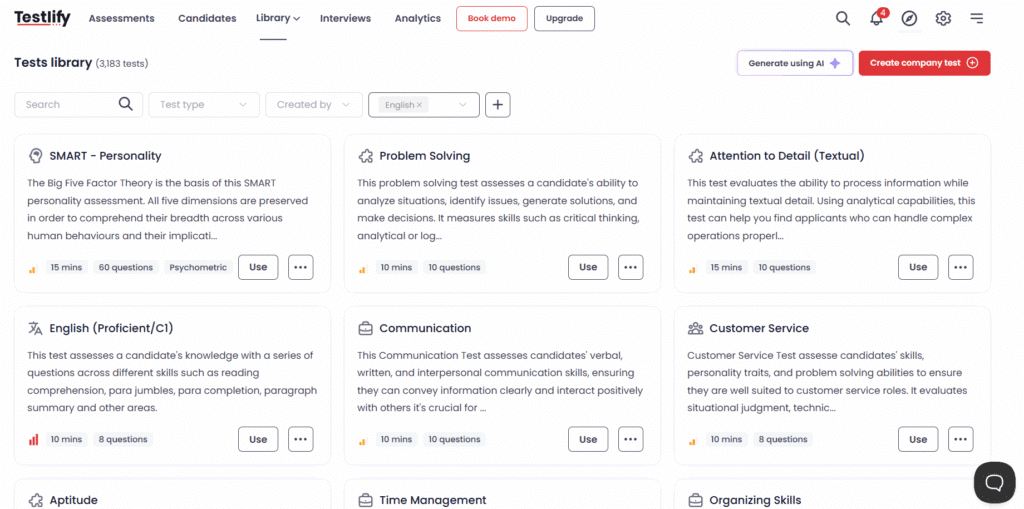
Pre-screening tools like Testlify let you evaluate real-world skills before even looking at a resume. This filters out unqualified candidates early and ensures you’re only investing time in those who meet your technical or cognitive benchmarks. It’s a smarter, fairer way to prioritize substance over self-presentation.
2. ATS integrations with smart filters
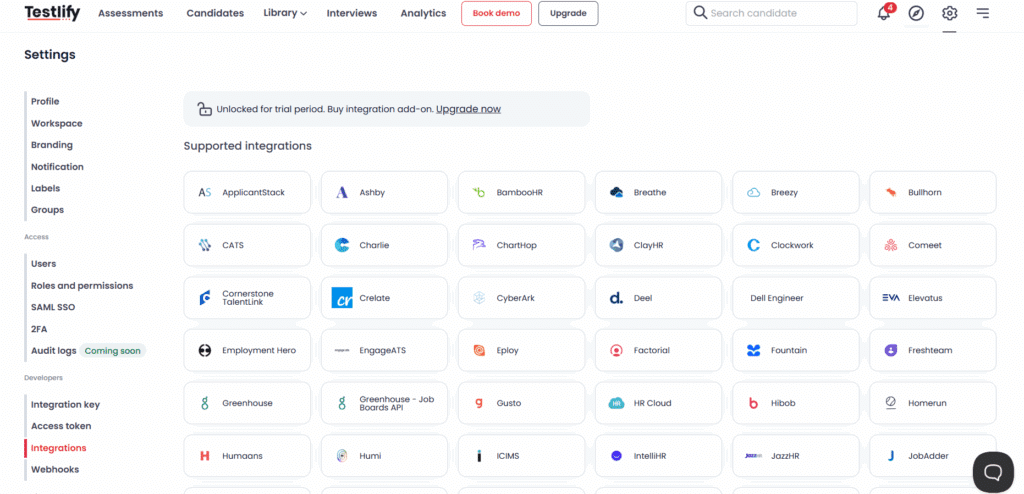
Modern Applicant Tracking Systems (ATS) with smart filtering capabilities streamline your hiring process. These integrations enable you to establish automated rules, conduct keyword searches, and set candidate rankings, thereby reducing manual work and enhancing accuracy. They eliminate the need to switch between tools and give recruiters one powerful dashboard for managing the talent pipeline efficiently.
3. Skills-based matching engines
Forget job titles and past employers’ skills-based engines, focus on what truly matters: whether someone can do the job. These tools match candidates to roles based on technical and soft skill alignment, enabling fairer evaluations and building more diverse pipelines. Ideal for forward-thinking enterprises prioritizing capability over credentials.
How to evaluate a screening tool for your enterprise
Choosing the right solution isn’t about who has the flashiest dashboard. Here’s a quick checklist:
1. Scalability
Your screening solution should grow with you. Whether you’re hiring for 10 roles or 1,000, the platform must handle large volumes of applicants without lag or crashes. Enterprise hiring is high-stakes so your tool should be built for speed, stability, and scale across departments, regions, and job families.
2. ATS integration
A screening tool is only as efficient as its ability to fit into your existing workflow. It should integrate smoothly with your Applicant Tracking System (ATS) like Workday, Greenhouse, or Lever. This ensures seamless data syncing, reduces manual work, and gives recruiters a single source of truth for managing candidate pipelines.
3. Transparency
Recruiters and hiring managers need to understand why a candidate was scored the way they were. Choose a platform that offers clear, explainable scoring especially if it uses AI. Transparent decision-making builds trust across your team, improves candidate communication, and helps ensure your hiring decisions are fair and defensible.
4. DEI controls
Look for tools that actively help reduce hiring bias. The best platforms offer features like blind screening, inclusive scoring criteria, and audit trails for fairness. This isn’t just about ethics it’s about building a workforce that reflects diverse perspectives and meets evolving DEI goals without compromising on candidate quality.
5. Customization
Your roles, teams, and company culture are unique; your screening tool should be too. The right solution lets you tailor assessments and scoring models to match your success metrics, job structures, and hiring preferences. Customization ensures the platform aligns with your specific talent strategy, not just a one-size-fits-all model.
How does Testlify transform screening?
Here’s a quick look at how Testlify, skills assessment and interview platform, changes the game for enterprise hiring teams:
1. Smart assessments
Testlify offers a rich library of validated assessments across technical, cognitive, and soft skills or you can build your own. Tailor tests to specific roles and competencies to ensure you’re evaluating candidates on what really matters. It’s a flexible, skills-first approach that gives you confidence in every shortlist.
2. Automated screening
Testlify handles the heavy lifting by automatically screening candidates and ranking them based on how well their skills match the role. No more resume scanning or manual filtering. This automation drastically reduces time-to-screen and ensures only the most qualified candidates move forward in the process.
3. One-click video interviews
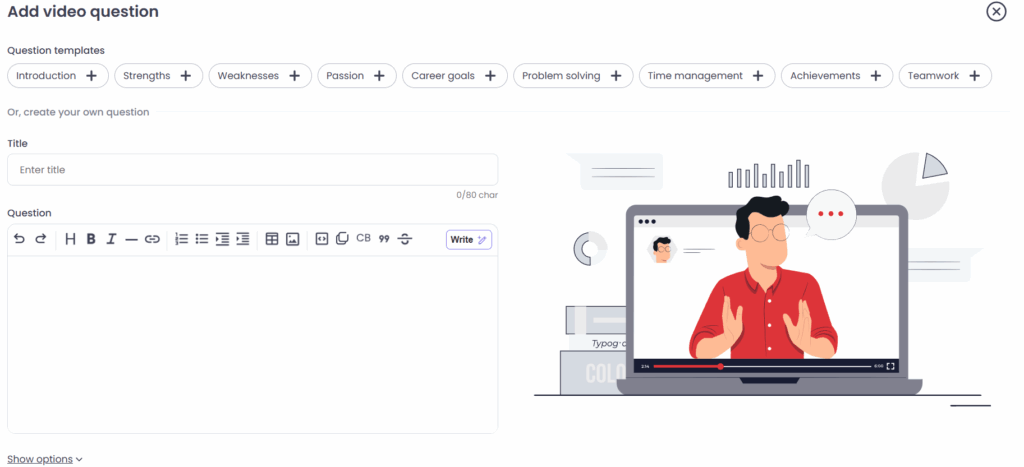
Testlify combines assessments with asynchronous video interviews to give you deeper insights without endless scheduling. Candidates can record responses on their own time, and recruiters can review them when convenient. It’s a more flexible, scalable way to assess communication, problem-solving, and culture fit early in the funnel.
4. ATS integration
Testlify integrates seamlessly with top Applicant Tracking Systems like Greenhouse, Lever, Workable, and more. This ensures a smooth, unified workflow so recruiters can manage assessments, results, and candidate stages without ever leaving their core platform. It eliminates friction and keeps your hiring pipeline efficient and centralized.
5. Instant reporting
With Testlify’s real-time dashboards and easy-to-read reports, hiring teams get immediate, actionable insights. You can compare candidates, review individual performance, and share results with hiring managers making collaboration faster and decisions more data-driven. It’s visibility and clarity at every step of the hiring process.
What enterprise teams gain with Testlify?
Let’s talk outcomes. Here’s what enterprise clients experience when they adopt Testlify:
1. Faster time-to-hire
With Testlify’s automated assessments and streamlined screening, enterprise teams can reduce hiring timelines by 55%. Instead of spending days on resume reviews, recruiters move quickly from application to shortlist accelerating interviews, offers, and onboarding. Faster hires mean less disruption for your teams and more momentum for your business.
2. Better hiring accuracy
Testlify helps you go beyond resumes and gut feeling. By evaluating real-world skills, you can pinpoint candidates who not only look good on paper but can actually perform. This leads to more reliable hires, better job fit, and reduced early attrition, ultimately boosting productivity and team performance across the board.
3. Improved DEI outcomes
Skills-based hiring removes the noise of names, degrees, or past employers, focusing purely on ability. With Testlify, you can screen candidates fairly and objectively, opening the door to more diverse backgrounds. It’s a practical way to drive DEI goals while still prioritizing quality and competence in every hire.
4. Recruiter efficiency
Testlify eliminates time-consuming manual screening, allowing your HR team to focus on high-value tasks like interviewing, strategic planning, and stakeholder alignment. With less time spent on resume triage, recruiters can invest more energy in building relationships and creating a better overall candidate experience.
5. Higher candidate satisfaction
Candidates appreciate a fair and transparent process. Testlify gives them an opportunity to demonstrate their skills, not just their resume formatting. This levels the playing field and enhances your employer brand because when candidates feel respected and evaluated on merit, they’re more likely to engage and advocate for your company.
Building a seamless, time-saving workflow
Time saved is only valuable if the workflow makes sense. Here’s what an optimized screening process could look like:
Step 1: Accept the job
Start by collaborating closely with hiring managers to define the role’s true essentials what skills and experiences are absolute must-haves versus nice-to-haves. This clarity ensures your screening focuses on what really matters and prevents time wasted on irrelevant candidates.
Step 2: Set up the AI engine
Configure your AI-powered screening tool with these agreed-upon criteria. Tailor the system to evaluate relevant skills, experience levels, and job context, so it can accurately score candidates from the moment applications arrive. Proper setup here makes all the difference.
Step 3: Automate first-pass screening
Let the AI engine handle the initial candidate sorting by scoring and ranking everyone against your defined criteria. This automation quickly narrows thousands of applicants to a manageable, high-quality shortlist, freeing recruiters from manual resume triage.
Step 4: Human touch on top 10%
Recruiters focus their time and expertise on the top 10% of candidates identified by AI. This allows human judgment and intuition to add depth, assessing fit, motivation, and cultural alignment elements AI can’t fully capture.
Step 5: Share with hiring manager
Send curated, data-backed shortlists to hiring managers, complete with explanations of why each candidate was chosen. This transparency builds trust, accelerates decision-making, and helps managers prepare for more focused interviews.
Step 6: Schedule interviews automatically
Use scheduling tools integrated with your ATS or calendar system to arrange interviews without the usual back-and-forth emails. Candidates pick times that work for them, and recruiters save hours making the process smoother for everyone involved.
Measuring ROI: How to know it’s working?
HR loves data but only if it’s useful. Here’s how to know your time-saving efforts are paying off:
Key metrics to track:
- Time-to-fill
- Time spent screening
- Quality of hire
- Offer acceptance rate
- Recruiter satisfaction score
If these numbers improve after adopting new screening tools, you’re on the right track.
Bonus: Calculate the cost savings from reduced labor hours or agency fees.
Future-proofing your hiring process
The hiring landscape is changing fast. Roles evolve. Skills shift. Candidate expectations rise.
To future-proof your process:
- Regularly retrain your AI tools on successful hires
- Emphasize continuous recruiter training
- Keep a strong feedback loop with hiring managers
- Stay up to date on compliance (especially with AI in hiring)
Being proactive today saves major headaches tomorrow.
Conclusion: Time to rethink screening
The days of manually reading every resume are over and good riddance. With smart screening tools, you can:
- Cut your screening time by 80%
- Eliminate resume fatigue
- Improve candidate quality
- Reduce bias
- Free your recruiters to do what they do best: build relationships and make great hires
For big organizations, the stakes are too high to settle for inefficiency.
It’s time to let machines do the screening so your people can do the hiring.
Ready to reduce screening time and hire better, faster, smarter? Schedule a demo with Testlify today
Frequently asked questions (FAQs)

Content Writer
Yashika Khandelwal is a Content Writer with 3+ years of experience creating research-backed content on hiring, talent assessment, and HR technology. She is a registered Organizational Psychologist and subject matter expert who combines behavioral science with practical recruitment insights to produce accurate, evidence-based content.
LinkedInRelated resources
View all
HR & recruitment
Why legacy ATS tools fail enterprise hiring teams?

HR & recruitment
The evolving role of enterprise recruiters

HR & recruitment
What’s hot in HR lingo: 2026’s HR buzzwords explained

HR & recruitment
Enterprise guide: Centralized vs decentralized recruitment

HR & recruitment
How to stand out in a competitive talent market

HR & recruitment
How image-to-video AI is transforming HR communication
Get started.
Hire on proof, not resumes.
Run your first skills-based assessment free — no credit card required.