
ATS integration meaning: what it is, how it works and examples
What ATS integration means, how an ATS shares data with job boards, assessments and HRIS, the main methods and what to check first.

The ATS integration meaning is simple: an applicant tracking system is connected to another hiring or HR tool so candidate, job and hiring data moves between them on its own, with no copying and pasting. A job board sends applicants in, an assessment sends scores back, and the HRIS receives the new hire.
TL;DR:
- ATS integration means connecting your applicant tracking system to other hiring tools so data moves automatically, usually through an API or webhook that fires when a candidate changes stage.
- The most common ATS integrations are job boards, sourcing, assessments, interview scheduling, background checks, e-signature, HRIS and team chat.
- Two-way sync is the line between a real integration and a data dump: the connected tool must write its results back into the candidate record.
- HR.com's 2025 survey found only 39% of HR teams say their tools are usefully integrated, and most of the rest say poor integration holds back their goals.
- Native connectors are fastest to set up, middleware is the most flexible, and a custom API build gives the most control but needs engineers to maintain it.
- Before you buy, test the integration in a sandbox with one real job: check write-back, duplicates, custom fields and who can see the data.
 ChatGPT
 Gemini
 Claude
 Grok
 Perplexity
What is the ATS integration meaning?
ATS integration means a working connection between an applicant tracking system and another piece of software, so the two share data and trigger each other's actions without manual work. The ATS stays the system of record for candidates, and every connected tool reads from it or writes back to it.
Think of the ATS as the hub of the hiring stack. On its own, it stores applications, tracks stages and keeps notes. Integrations add what it does not do natively: posting jobs to boards, testing skills, booking interviews, running checks, sending offers and handing new hires to the HRIS.
When people search "what is ATS integration", they usually mean one of two things. The first is the general idea of linking an ATS to other tools. The second is a specific list of ATS integrations a product supports, such as "this assessment tool integrates with Greenhouse and Workday". Both are the same idea at different zoom levels.

How does an ATS connect to other hiring tools?
An ATS connects to other hiring tools through an API (a set of rules that lets software ask for or send data), usually combined with webhooks that announce events as they happen. A stage change in the ATS fires the trigger, the connected tool acts, and the result is written back to the candidate record.
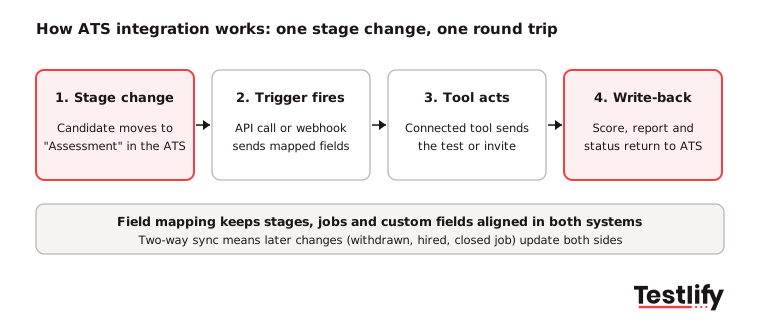
Connecting an ATS with other recruitment tools involves more than simply linking two platforms. It requires configuring how data moves, which actions are triggered, and how updates are shared between systems
A well-configured integration ensures that recruiters spend less time on manual tasks and can manage the entire hiring workflow from one place. Here is how the process typically works:
- Authorize the connection: An admin links the two systems, usually with an API key or a sign-in to the ATS. This decides what the tool can read and change.
- Map the fields: Job titles, departments, stages and custom fields are matched between both systems, so "Phone screen" in one is the same stage in the other.
- Set the trigger: The team picks the event that starts the action, for example "candidate moves to Assessment stage" or "offer accepted".
- Let the tool act: The connected tool does its job: sends an invite, books a slot, runs a check or creates an employee record.
- Write the result back: Scores, reports, status and files return to the candidate profile in the ATS, where recruiters already work.
- Keep it in sync: The tool watches for later changes, such as a withdrawn candidate or a closed job, and updates both sides.
Pro tip: Ask which direction each field moves. A one-way push that never writes back leaves recruiters logging in to a second tool, which is exactly the problem an integration should remove.
What are the main types of integrations an ATS supports?
ATS integrations fall into about eight groups, each defined by the job it takes off the recruiter's plate. Job boards and sourcing tools fill the top of the funnel, assessments and interview tools help pick the right people, and e-signature and HRIS tools close the hire.
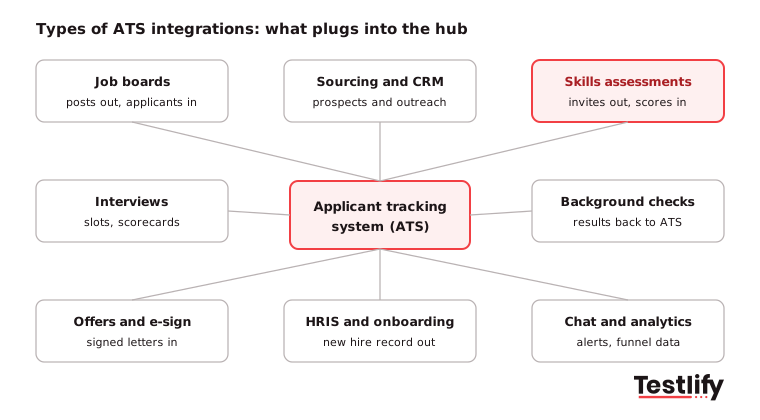
Integration type | What moves | Typical trigger | Example |
|---|---|---|---|
Job boards and career sites | Job posts out, applications in | Job opened or closed | Indeed, LinkedIn Jobs |
Sourcing and CRM | Prospect profiles, outreach status | Prospect added to a job | LinkedIn Recruiter |
Skills assessments | Invites out, scores and reports in | Candidate reaches Assessment stage | Testlify |
Interviews and scheduling | Calendar slots, recordings, scorecards | Candidate reaches Interview stage | Video or AI interview tools |
Background and reference checks | Candidate details out, results in | Offer stage | Background check providers |
Offers and e-signature | Offer letter out, signed copy in | Offer approved | E-signature tools |
HRIS and onboarding | New hire record, start date, pay data | Offer accepted | Workday, BambooHR |
Communication and analytics | Alerts, approvals, funnel data | Any stage change | Slack, reporting tools |
Job board links are the most familiar. LinkedIn's ATS integrations, for example, let candidates start an application on LinkedIn and finish it in the ATS, and push open roles from the ATS to LinkedIn Jobs. Indeed says its ATS sync works with more than 350 ATS platforms, which shows how standard this layer has become.
If you are deciding whether your ATS or a separate CRM should own sourcing, our guide to ATS and CRM integration covers the split.
What data moves between an ATS and connected tools?
The data that moves between an ATS and connected tools is the candidate's hiring record: who applied, for which job, at what stage, and what each step found. Most integrations work with the same small set of objects, even when each vendor names them differently.
- Candidates: name, contact details, resume and other attachments.
- Applications: the link between one candidate and one job, with its current stage.
- Jobs and requisitions: title, department, location, hiring manager and status.
- Stages: the pipeline steps that act as triggers for connected tools.
- Scorecards and results: interview feedback, assessment scores and report links.
- Offers: salary, start date and approval status.
- Activity and compliance data: notes, audit logs, consent records and voluntary EEO answers.
Vendors model these objects differently. One ATS treats a candidate and an application as separate records, while another folds them into a single "opportunity". Good integrations hide that difference from recruiters. Weak ones create duplicates or drop data at the seams.
Which integration methods are there?
ATS integration methods range from a ready-made native connector to a fully custom API build. The right choice depends on how deep the connection needs to be, how many systems you run, and whether you have engineers to maintain it.
Method | How it works | Setup effort | Depth | Best for |
|---|---|---|---|---|
Native connector | Built and maintained by one of the two vendors | Minutes to hours | Good for standard fields | Most teams on a common ATS |
Middleware (Zapier, Make) | No-code workflows between apps | Hours to days | Limited, trigger-based | Simple, low-volume tasks |
Unified API platform | One API that covers many ATSs | Days to weeks | Wide, but shallower per ATS | Software vendors serving many customers |
Custom API build | Your engineers use the ATS and tool APIs | Weeks per system | Deepest, fully custom | Enterprises with unique workflows |
File export (CSV, SFTP) | Scheduled file transfers | Low | No real-time sync | Legacy systems, last resort |
For most hiring teams, a native connector is the default: it is supported by the vendor, updated when either system changes, and switched on by an admin rather than a developer. Middleware fills gaps between tools that do not talk directly. A custom build makes sense when your process is unusual enough that no connector fits, and when you can budget for upkeep every time an ATS changes its API.
Why do connected hiring tools matter for TA teams?
Connected hiring tools matter because recruiters lose time and data every time they re-type information between systems. Integrations cut that work, keep one accurate candidate record, and let hiring decisions move at the speed of the pipeline instead of the speed of manual updates.
The gap is still wide. HR.com's State of Today's HR Technology and Integrations 2025 report found that 62% of organizations run two to four HR solutions, yet only 39% say those solutions are usefully integrated.
Among teams that rate their integration as poor, 81% say it keeps the organization from reaching important HR goals. SHRM's 2025 look at HR tech stacks adds that, according to a 2024 Gartner survey, only 35% of HR leaders believe their current HR technology approach helps them hit business objectives.
The main benefits for TA and recruiting ops teams:
- Less manual entry: Data is entered once in the ATS and reused everywhere, so recruiters stop copying names, emails and scores.
- Fewer errors: Mapped fields and automatic updates remove typos and stale records.
- Faster time to hire: Stage changes trigger the next step at once, so candidates are not waiting on someone to send an invite.
- Better candidate experience: Candidates get quicker responses and fewer duplicate emails or forms.
- Clean reporting: Funnel, source and quality-of-hire data sit in one place, which makes ROI easier to prove. See how to approach measuring the ROI of ATS integrations.
- Easier compliance: Consent, audit logs and data deletion requests are handled from one system of record.
For assessment tools in particular, the benefit is that skills scores sit next to the resume when a hiring manager reviews a candidate. Our post on the benefits of ATS integration for job assessments goes deeper on that use case.
What problems should you expect, and how do you avoid them?
Integration problems usually come from data that does not match, sync that only runs one way, and connections nobody owns after launch. Most can be prevented with clear field mapping, a test in a sandbox and a named owner on both the HR and IT side.
- Duplicate candidates: A tool creates a new record instead of updating the existing one. Ask how the integration matches candidates (email, ATS ID) before you switch it on.
- Mismatched fields: Custom fields, stage names or job codes do not map, so data lands in the wrong place or is cut short. Map every field you report on.
- One-way sync: Results stay in the connected tool, so recruiters work in two places. Confirm write-back for scores, reports and status.
- Silent failures: An expired token or a changed API stops the sync without warning. Ask for error alerts and a sync log you can check.
- Vendor changes: ATS vendors retire old API versions, which can break custom builds. Native connectors are updated by the vendor; custom builds need a budget for this.
- Security gaps: Candidate data now lives in more places. Check certifications such as ISO 27001, role-based access and where data is stored.
Key takeaway: Most broken integrations are not broken on day one. They break months later when a field, stage or API changes, so plan who owns the connection after go-live.
How do you judge an integration before you buy?
You judge an integration by testing it with your own ATS, your own job and your own data before signing. A logo on an integrations page only proves that some connection exists, not that it carries the fields, triggers and write-back your process needs.
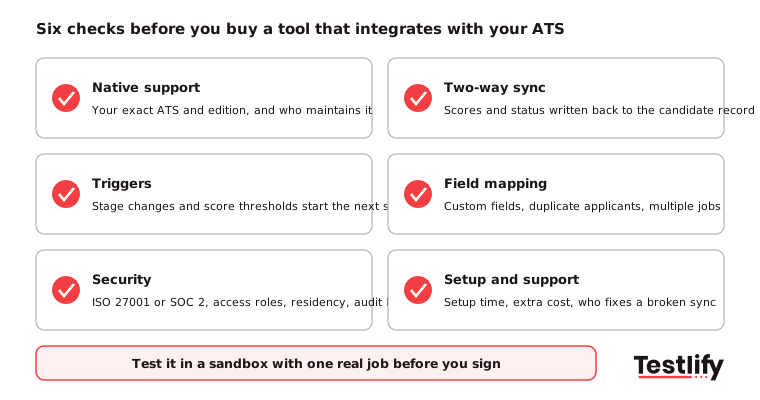
Not all ATS integrations offer the same level of functionality. Some only transfer basic candidate information, while others support two-way data sync, automated workflows and deeper customisation. Before choosing a recruitment tool, evaluate the following factors to ensure the integration supports your hiring workflows, security requirements and long-term needs.
- Native support for your ATS: Confirm the exact ATS and edition you run, including enterprise systems such as Workday or SAP SuccessFactors, and who maintains the connector.
- Two-way sync and write-back depth: Check that scores, reports and status land in the candidate record, not only a link back to the vendor.
- Triggers and automation: See whether a stage change can send invites, and whether a score threshold can move a candidate forward or flag them for review.
- Field mapping and duplicates: Test custom fields, multiple open jobs and a candidate who applies twice.
- Security and compliance: Ask for certifications, data residency options, audit logs and how deletion requests flow back to the ATS. If AI scores sync into hiring decisions in New York City, Local Law 144 requires a bias audit within one year before use and notice to candidates.
- Setup time and cost: Ask how long setup takes, whether the integration costs extra, and who supports it when something breaks.
The fastest way to run these checks is a sandbox test: create one dummy job, move a test candidate through every stage, and confirm what appears in the ATS at each step. Teams that are also planning their next ATS should read where ATS integration is heading, including AI screening and wider two-way sync.
How does Testlify connect assessments to your ATS?
Testlify connects to more than 100 ATS and HRIS platforms, including Workday, SAP SuccessFactors, Oracle HCM, Greenhouse, Lever, SmartRecruiters, BambooHR, Workable and Ashby. The integrations are two-way, and most connect in under five minutes, so assessment invites and results run from inside the ATS your recruiters already use.
- Assessments without switching tools: Recruiters pick role-specific tests from a library of 3,500+ tests and invite candidates through the connected ATS. The exact triggers available depend on the ATS.
- Results in one place: Two-way sync keeps candidate status and assessment results aligned between Testlify and the ATS, so hiring managers review skills next to the resume.
- AI resume screening: The AI resume screener pulls resumes from the ATS, gives each an explainable match score with High, Medium or Low fit, and syncs the result back. It is free with Greenhouse; other ATSs on request.
- API and webhooks: For custom workflows, the Testlify API offers a versioned REST API and webhooks.
- Security: Testlify holds ISO 27001 and SOC 2 Type II, supports GDPR and CCPA, and offers regional data residency. Details are on the security page.
Ready to add skills data to your ATS?
If your team already runs an ATS, the quickest win is to connect skills assessments to it, so every shortlist comes with proof of skill inside the candidate record. Browse the Testlify test library, start a 7-day free trial with no credit card, or book a demo to see the integration with your own ATS.
Frequently asked questions (FAQs)

People and Talent Partner
Arushi Shah runs day-to-day talent acquisition and candidate experience at Testlify. She writes on interviewing, structured hiring, and giving candidates a fair, fast process.
LinkedInRelated resources
View all
HR & recruitment
Avoiding common pitfalls in ATS integration

HR & recruitment
Measuring the ROI of ATS integrations: Formula, metrics, & example

HR & recruitment
Mastering the art of pre-employment assessment methods

HR & recruitment
Elevate your hiring process with pre-employment testing

HR & recruitment
ATS integration trends: 9 shifts to plan for in 2026

HR & recruitment
Best practices for designing and implementing employment assessments
Get started.
Hire on proof, not resumes.
Run your first skills-based assessment free — no credit card required.