
How to screen iOS developers: a 2026 guide for hiring teams
A step-by-step way to screen iOS developers: skills to test, first-call questions, a timed skills test, a scorecard and the red flags.

Knowing how to screen iOS developers comes down to six steps: define the skills the role needs, check resumes and shipped apps, run a short first call, send a timed skills test, hold a scored technical interview, then check references. Score every candidate on the same weighted skills, so the shortlist rests on evidence rather than on who interviewed best.
 ChatGPT
 Gemini
 Claude
 Grok
 Perplexity
TL;DR
- Screen iOS developers in six steps: role definition, resume and app review, a 20-minute first call, a 45 to 75 minute skills test, a scored technical interview and reference checks.
- Test 8 skill areas: modern Swift, SwiftUI, UIKit, the iOS SDK, architecture, testing, performance and memory, and Git with CI/CD.
- Swift is used by only 5.7% of professional developers (Stack Overflow 2025), so the pool is thin and a skills test is the fastest fair filter.
- Swift 6 strict concurrency and Xcode 26 are the 2026 baseline. A candidate still writing completion handlers everywhere has not shipped recently.
- Weight architecture and testing above Swift syntax. The compiler catches syntax errors the same day; weak architecture shows up months later.
- Ask for an app you can download today and a story about an App Store rejection. Release ownership is the clearest sign of real experience.
- Keep the skills test under 90 minutes, and use its results to plan the technical interview instead of asking the same questions twice.

What does an iOS developer do?
An iOS developer designs, builds and maintains apps for Apple's iPhone and iPad, from the user interface to networking, data storage, testing and the App Store release. In most teams, the same person also fixes crashes on the live app and keeps it working with each new iOS version that Apple ships every September.
Write down what your role needs before you screen anyone. Start from an iOS developer job description or a Swift developer job description, then add the specifics: a new SwiftUI app or a large UIKit codebase, consumer or enterprise users, and the seniority you can support. A good description lists duties, required and preferred skills, how the team works and how to apply.
Demand for software developers stays high. The US Bureau of Labor Statistics puts their median pay at $135,980 (May 2025) and projects employment to grow 10% from 2025 to 2035, so a slow or vague screening process loses candidates to faster teams.
Why is screening iOS developers harder than it looks?
Screening iOS developers is harder than screening most engineers because the pool is small and the platform changes every year. Swift is used by 5.7% of professional developers and Xcode is the main IDE for 10.6%, according to the Stack Overflow Developer Survey 2025. The share with recent production iOS experience is smaller still.
iOS has also moved fast. SwiftUI became Apple's main UI framework for new work, Swift Concurrency replaced Grand Central Dispatch for most concurrent code, and Swift 6 made strict concurrency checking the default. A developer who has not shipped an iOS app in two or three years can have real gaps, even with a strong resume.
The stakes are high too. Apple reported in May 2025 that the US App Store ecosystem facilitated $406 billion in developer billings and sales in 2024, based on a study it commissioned. When an app carries that kind of revenue, a weak hire costs more than one salary: it costs release dates and ratings.
What skills should you screen iOS developers for?
iOS developers should be screened on 8 skill areas: modern Swift, SwiftUI, UIKit, iOS SDK frameworks, architecture, testing, performance and memory, and Git with CI/CD. Swift and SwiftUI are critical for almost every role; the weight of the rest depends on seniority and on how much legacy code your app carries.
Skill area | Why it matters in 2026 | How to assess it | Priority |
|---|---|---|---|
Swift (modern) | Swift 6 strict concurrency is the standard for new code | Coding task with async/await, an actor and error handling | Critical |
SwiftUI | Apple's main framework for new interfaces | Build a screen from a design spec | Critical |
UIKit | Still runs most large, older apps | Layout, navigation or view controller task | High |
iOS SDK and frameworks | Foundation, URLSession, Core Data, SwiftData and Combine power real features | API call, decode JSON, store the result | High |
Architecture (MVVM, coordinators, TCA) | Decides how easy the code is to change and test | Design discussion plus a code review | High |
Testing (XCTest, XCUITest) | Keeps releases safe and CI green | Write unit tests for a given function | High |
Performance and memory | Leaks and dropped frames cause crashes and bad reviews | Find a retain cycle, fix a slow list | Medium |
Git and CI/CD | Moves code from laptop to App Store safely | Branching, merge conflict and release pipeline scenario | Medium |
Soft skills sit on top of these: explaining a technical choice in plain words, working with designers and product managers, and keeping up with Apple's yearly changes. Objective-C still matters for older codebases, so add it as a preferred skill when your app has it.
How to screen iOS developers: what are the six steps?
Screening iOS developers works best as six short stages, each one cutting the pool before the next, more expensive stage. Recruiters run the first three; an iOS engineer reviews only candidates who pass the skills test, which keeps engineering time for the people most likely to be hired.
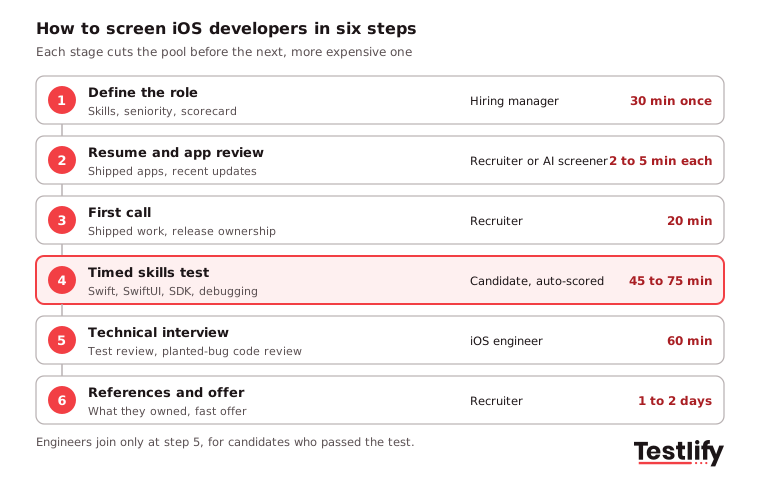
- Define the role: List must-have and nice-to-have skills, the seniority and the codebase (SwiftUI, UIKit or both). Agree on the scorecard now, not after the interviews.
- Review resumes and shipped apps: Look for iOS roles with real duration, apps you can download and recent updates. An AI resume screener can rank applicants against the role before a person reads them.
- Run a 20-minute first call: Use the script below to check shipped work, release ownership and communication. No coding knowledge is needed.
- Send a timed skills test: Use a role-based test such as the Testlify iOS developer test for location permissions, plus Swift coding tasks, before any engineer gets involved.
- Hold a scored technical interview: Review the candidate's test answers with them, add a planted-bug code review and score against the same criteria. This is the core of technical screening.
- Check references and decide: Confirm what the candidate owned, then compare finalists on the scorecard and make the offer fast.
Key takeaway: Put the skills test before the technical interview, not after it. The interview then becomes a review of real work instead of a quiz.
What should you look for in an iOS resume and portfolio?
An iOS resume and portfolio should show shipped apps, the candidate's own part in them and recent work on current tools. Look for live App Store links or TestFlight builds, a clear role on each app, and updates within the last year that show the developer keeps the app working on new iOS versions.
- Experience: iOS roles with real duration, and the scope of each one: a feature, a module or the whole app.
- Shipped apps: Install one and spend ten minutes on it. Check transitions, keyboard handling, dark mode, text size and how it behaves offline.
- Project range: Simple apps show a solid base; apps with an API, sign-in, data storage, real-time chat or location show production depth.
- Code samples: Public repos with readable names, small functions and unit tests say more than a list of frameworks.
- Current skills: Swift (not only Objective-C), SwiftUI and Swift Concurrency. A short Swift test confirms what the resume claims. A degree or certificate is a plus, not a filter.
How to screen iOS developers on the first call if you cannot code?
Recruiters can screen iOS developers on a first call without writing code by asking about shipped work and the release process. Experienced developers answer these questions with specific apps, tools and dates. Candidates who only built tutorial apps tend to stay general, which is the signal you need.
- "Name an app you shipped that I can download today. What did you own on it?"
- "Walk me through everything between finishing the code and the app reaching my phone."
- "Tell me about an App Store rejection. What was it and what did you change?"
- "Which iOS versions and devices would you support for a product like ours, and why?"
- "What did you change in your app for the latest iOS release?"
- "How do you find out that a release went badly?"
- "Tell me about a technical choice you made and explain it as you would to a designer."
Listen for named tools (TestFlight, Xcode Cloud, Fastlane, Crashlytics), a clear account of their own role and curiosity about your users. Ask about salary range, work model and notice period on the same call so nobody wastes a test slot.
Pro tip: Score the call right after it ends, on a 1 to 5 scale per question, with one line of evidence beside each score. Scores written a day later drift toward how much you liked the person.
How do you test Swift, SwiftUI and UIKit?
Swift, SwiftUI and UIKit are tested best with short practical tasks, not trivia. The real question in 2026 is not whether candidates know Swift but how current their Swift is: async/await, actors and Swift 6 strict concurrency are the baseline for new code, and Apple has required apps to be built with Xcode 26 and the iOS 26 SDK since April 28, 2026, per Apple's upcoming requirements page.
- Swift: Give a task that needs an async function, typed error handling and at least one actor. Then probe optionals, generics, protocol-oriented code and ARC. A candidate who can explain when to use a protocol with an associated type instead of a generic is thinking at production level.
- SwiftUI: Check @State, @Binding, the @Observable macro from iOS 17, NavigationStack and how they debug views that redraw too often. A good task: build one screen from a design.
- UIKit: Ask them to embed a SwiftUI view in a UIKit navigation stack, or to build a custom transition. Most companies run mixed codebases, so a candidate who knows only one framework is limited from day one.
- iOS SDK: Ask for an API call with URLSession and async/await, Codable decoding and clear error cases. Then ask: "When would you choose Core Data, SwiftData, UserDefaults or the Keychain?" Good answers weigh data size, security and query needs; "I always use Core Data" is a warning sign.
Testlify's iOS Swift test covers Swift basics, UIKit, Foundation, Core Data, Auto Layout, SwiftUI and memory management in about 10 minutes. For older apps, add the iOS Objective-C test.
How do you test architecture, testing and performance?
Architecture, testing and performance are tested through design discussion, a code review and a debugging task, because these skills only show when candidates work with real code. Most iOS hiring mistakes start here: syntax errors fail the build the same day, but architecture mistakes surface six months later in a refactor that ties up several engineers.
- Architecture: MVC, MVVM and the coordinator pattern are table stakes for mid and senior roles; TCA and VIPER appear in larger teams. Ask candidates how they would organize a new feature: where business logic lives, how views talk to view models, how navigation works and how they would test it. "I put everything in the view controller" is a red flag.
- Testing: Ask for XCTest unit tests on a given function and one XCUITest flow. Then ask about their testing approach. "I test what is most likely to break, like state changes and async code" with examples is a good answer; "I write tests when I have time" tells you how they behave under deadline pressure.
- Debugging: Can they use Xcode Instruments to find a memory leak, spot a main-thread hang or trace battery drain? For senior roles, hand over a symbolicated crash report and ask for the cause.
- Performance and memory: Ask about strong, weak and unowned references and retain cycles in closures. Then ask what causes dropped frames while scrolling a list and two or three fixes (cell reuse, diffable data sources, lazy image loading).
- Git and CI/CD: Ask for their branching strategy and "what happens between git push and an App Store release?" Knowing Xcode Cloud, Fastlane or GitHub Actions for iOS builds sets mid and senior candidates apart.
Across the teams we work with, developers who can say why an architecture fits a problem are easier to onboard than those who learned a pattern without knowing what it solves. A planted-bug code review shows this in 15 minutes: hand over a short Swift file with a retain cycle in a closure, view state in the wrong place and a network call on the main actor, then ask which one they would fix first and why.
How long should an iOS skills assessment take?
An iOS skills assessment should take 45 to 75 minutes and never more than 90, because longer tests raise drop-off without adding much signal. Start with a coding task (Swift plus one async operation) to filter out candidates who cannot write working code, move to architecture questions, and finish with a debugging or performance scenario.
For senior roles, a paid take-home project of 2 to 4 hours shows depth better than one long timed session: use the timed test to shortlist, then the take-home to separate finalists. Lead roles can add the lead iOS developer assessment, a 20-minute check of Swift, object-oriented design, UIKit, Core Animation, memory management and debugging.
Keep the test fair and hard to game. Testlify runs coding questions in a live IDE that supports 45+ programming languages and includes 20+ proctoring checks such as tab tracking, copy and paste blocking and AI assistance detection, so the score reflects the candidate's own work.
How do you score and compare iOS candidates?
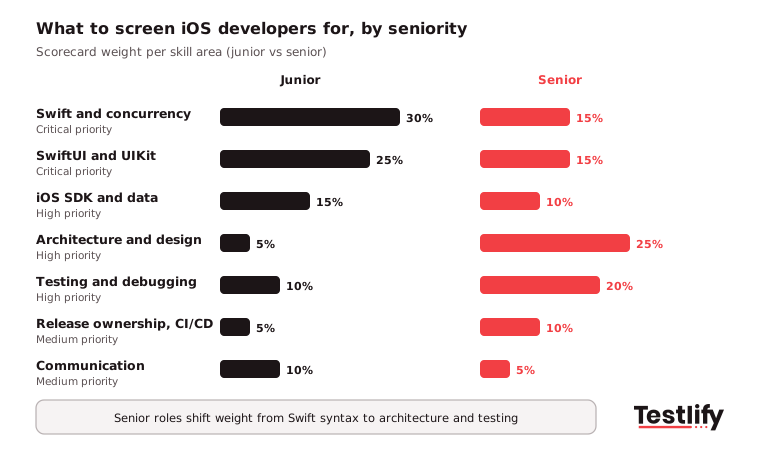
iOS candidates are compared fairly when every interviewer scores the same skills on the same scale, with weights set by seniority before the first interview. Use a 1 to 5 scale per skill, write the evidence beside each number, and let each interviewer score alone before the debrief so one strong voice does not set the result.
Skill area | Junior weight | Mid weight | Senior weight |
|---|---|---|---|
Swift and concurrency | 30% | 20% | 15% |
SwiftUI and UIKit | 25% | 20% | 15% |
iOS SDK and data | 15% | 15% | 10% |
Architecture and design | 5% | 15% | 25% |
Testing and debugging | 10% | 15% | 20% |
Release ownership and CI/CD | 5% | 10% | 10% |
Communication and teamwork | 10% | 5% | 5% |
Junior candidates should show Swift syntax, basic SwiftUI and UIKit, and core data structures. Senior candidates should show architecture judgment, testing discipline, Instruments profiling and the ability to design a feature from scratch; for principals, add a mobile system design question such as an offline-first app. An interview scorecard keeps all of this in one place, and Testlify's weighted scoring and per-skill breakdowns let you rank candidates on the same weights.
What behavioral and reference questions work for iOS roles?
Behavioral and reference questions for iOS roles should check teamwork, ownership and how candidates handle pressure, using past examples rather than hypotheticals. Run them as a structured interview: the same questions, in the same order, scored on the same scale for every finalist.
- "Tell me about a hard iOS project. What got in the way and how did you get past it?"
- "Describe working with designers or product managers to ship a feature users liked."
- "Tell me about a tight deadline. What did you cut, and how did you decide?"
- "Describe a time you pushed back on a feature that would have hurt performance or quality."
- "How do you keep up with iOS changes after each WWDC?"
For team fit, ask how they like to work, how they give and take code review feedback, and how they would handle a scenario your team faced last quarter. For references, ask what the candidate owned, how they met deadlines and handled changing priorities, and whether the reference would hire them again. References are chosen by the candidate, so treat them as one input, not the deciding one.
What are the red flags when screening iOS developers?
The main red flags when screening iOS developers are no app you can install, no experience owning a release, and answers that stay general when you ask for specifics. One flag is a reason to probe; two or three across the process usually predict a poor fit.
- No shipped app to show, and no plain reason why (an NDA is a fine reason).
- Has written iOS code but never owned an App Store submission or release.
- Casual about developer accounts, signing certificates or who owns the code.
- Still defaults to callbacks and DispatchQueue everywhere, with no Swift Concurrency.
- Dismisses testing, or promises to test everything without priorities.
- Cannot explain a technical choice without jargon.
- Blames others for every past failure.
Treat candidates fairly at the end too: send a prompt, specific note to those you reject, and extend the offer quickly to the one you pick, with salary, benefits and start date in writing.
Ready to screen your next iOS developer with Testlify?
Testlify turns this process into one workflow. Pick from 3,500+ tests, including the iOS, Swift and lead iOS tests above, or build a custom assessment from your job description, add coding and video questions, and get ranked results with per-skill scores. Tests connect to 100+ ATS and HRIS tools such as Greenhouse, Lever and Workable, so results land where your team already works.
Start a 7-day free trial with no credit card, or book a demo to see the iOS screening flow on one of your open roles.
Frequently asked questions (FAQs)

Content Writer
Yashika Khandelwal is a Content Writer with 3+ years of experience creating research-backed content on hiring, talent assessment, and HR technology. She is a registered Organizational Psychologist and subject matter expert who combines behavioral science with practical recruitment insights to produce accurate, evidence-based content.
LinkedInRelated resources
View all
Candidate assessment
How to screen candidates for frontend developer

Candidate assessment
How to screen candidates for backend developer

Candidate assessment
How to improve candidate assessment beyond traditional tests

Candidate assessment
Typing Speed and Accuracy in the Workplace: What Good Looks Like

Candidate assessment
How psychometric tests reduce employee turnover
Candidate assessment
How to use psychometric tests to improve employee performance
Get started.
Hire on proof, not resumes.
Run your first skills-based assessment free — no credit card required.