
Types of recruitment technology shaping the future of recruitment
A simple guide to the types of recruitment technology, where each tool fits, and how hiring teams can use them better.

Recruitment gets messy when job postings, resumes, interviews, follow-ups, and feedback are handled across too many disconnected places. Recruiters lose time, hiring managers miss context, and candidates are left waiting.
The candidate side shows the same problem. A 2025 survey found that 57% of job seekers have abandoned an application midway because the process was too complicated or time-consuming.
Recruitment technology helps reduce these gaps. It includes tools for posting jobs, tracking applicants, sourcing candidates, screening resumes, assessing skills, running interviews, communicating with candidates, and measuring hiring performance.
In this guide, we’ll look at the main types of recruitment technology, where each one fits in the hiring process, and how teams can use them without making hiring more complicated.
 ChatGPT
 Gemini
 Claude
 Grok
Grok Perplexity
TL;DR – Key takeaways
- Recruitment technology includes tools that help teams attract, track, screen, assess, interview, communicate with, and hire candidates.
- The main types include job boards, ATS, recruitment CRM, sourcing tools, AI screening tools, assessments, video interviews, scheduling tools, and analytics.
- Each tool works best at a specific hiring stage, so teams should match the tool to the problem they need to solve.
- AI is becoming more common in recruitment technology, but it should support recruiters, not replace human review.
- The right recruitment tech stack should reduce manual work, improve candidate experience, and give hiring teams clearer data.

What does recruitment technology mean in hiring?
Recruitment technology means the tools hiring teams use to manage different parts of the hiring process. This can include posting jobs, collecting applications, tracking candidates, screening resumes, assessing skills, scheduling interviews, sending updates, and reviewing hiring data.
Try Our New: AI Resume Screener
The main purpose is to make hiring more organized. Instead of managing candidate data across emails, spreadsheets, and separate notes, recruiters can use recruitment software to keep the process clearer for everyone involved.
It also helps hiring teams move faster without losing structure. For example, an applicant tracking system can show where each candidate is in the process, while assessment tools can help recruiters compare candidates based on job-relevant skills before interviews.
What are the main types of recruitment technology?
Recruitment technology covers different tools across the hiring process. Some tools help teams reach more candidates, some keep applications organized, and others help recruiters screen, assess, interview, and communicate better. The easiest way to understand recruitment is to group these tools by the job they do.
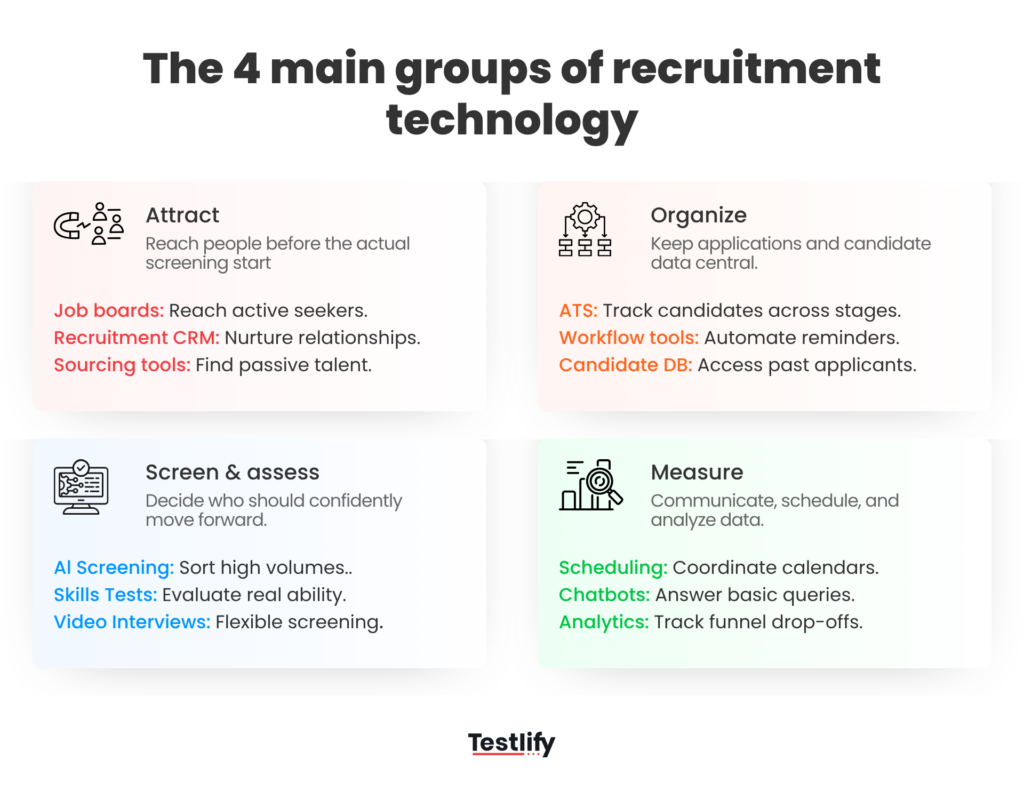
1. Tools that help hiring teams attract and find candidates
These tools help companies reach people before the actual screening starts. They are useful when the hiring team needs more applicants, better-fit applicants, or access to passive candidates.
Tool type | What it does | Use it when |
|---|---|---|
Job boards | Publish job openings where candidates can apply | You want to reach active job seekers |
Recruitment marketing tools | Promote roles, company culture, and employer brand | You want to attract better-fit candidates |
Sourcing tools | Help recruiters find candidates across platforms and databases | You need passive or hard-to-find talent |
Recruitment CRM | Stores and nurtures candidate relationships over time | You want to build a long-term talent pool |
Job boards are usually the starting point. They help companies put open roles in front of people who are already looking for jobs. Recruitment marketing tools go one step earlier. They help build interest in the company before a candidate applies.
Sourcing tools and recruitment CRM are more useful for long-term hiring. For example, if a recruiter speaks to a strong candidate today but does not have the right role open, a CRM helps keep that relationship warm for future openings.
2. Tools that keep applications and candidate data organized
Once applications start coming in, hiring can get messy quickly. Candidate details, resumes, interview notes, feedback, and emails can get scattered across different places. This is where tracking and workflow tools help.
Tool type | What it does | Use it when |
|---|---|---|
Applicant tracking system | Tracks candidates across hiring stages | You need one place to manage applications |
Workflow automation tools | Move candidates, send reminders, and reduce manual tasks | Your team spends too much time on admin work |
Candidate database | Stores candidate profiles and history | You want better access to past applicants |
An applicant tracking system is one of the most common types of recruitment technology. It helps recruiters see where each candidate is in the hiring process, who has reviewed them, and what the next step should be.
This is especially useful when more than one person is involved in hiring. Recruiters, hiring managers, and interviewers can work from the same candidate information instead of relying on separate notes or long email threads.
3. Tools that help hiring teams screen, assess, and interview candidates
These tools help hiring teams decide who should move forward. They are useful when recruiters are dealing with too many resumes, unclear candidate fit, or inconsistent interview feedback.
Tool type | What it does | Use it when |
|---|---|---|
AI screening tools | Sort or highlight candidates based on role criteria | You have high application volume |
Skills assessment tools | Test job-relevant skills before interviews | You want to evaluate ability, not just resumes |
Video interview tools | Run live or recorded interviews | You want a more flexible interview process |
Interview scorecards | Help interviewers rate candidates on the same criteria | You want more consistent feedback |
AI screening tools can help recruiters manage large applicant pools, but they should not be treated as a final decision-maker. The hiring team still needs clear role criteria and human review, especially when candidate data is being used to shortlist people.
Skills assessment tools are useful because resumes do not always show real ability. For example, two candidates may have similar experience on paper, but a role-based test can show who is stronger in the actual skills needed for the job.
LinkedIn’s 2025 Future of Recruiting report found that over 9 in 10 talent acquisition professionals believe accurately assessing skills is important for improving quality of hire. It also found that companies with the most skills-based searches are 12% more likely to make a quality hire.
This is where a platform like Testlify can fit naturally. Hiring teams can use job-relevant assessments before interviews, so they are not relying only on resumes, job titles, or gut feeling.
Video interview tools also help when candidates and hiring teams are in different locations. Async video interviews can save time in early rounds, while live video interviews can make remote hiring easier. But the process should stay candidate-friendly. Long tasks, unclear instructions, or too many interview steps can still hurt the candidate experience.
4. Tools that help teams communicate, schedule, and measure hiring
A hiring process can fail even after good candidates apply. Slow updates, interview delays, and poor feedback loops can make candidates lose interest. These tools help teams keep the process moving.
Tool type | What it does | Use it when |
|---|---|---|
Interview scheduling tools | Coordinate calendars and interview slots | Scheduling takes too much back-and-forth |
Candidate communication tools | Send updates, reminders, and next steps | Candidates are not getting timely updates |
Chatbots | Answer basic candidate questions | Recruiters get repeated queries |
Recruitment analytics tools | Track hiring data and funnel performance | You need to find bottlenecks and drop-offs |
Scheduling tools reduce the manual back-and-forth between candidates, recruiters, and interviewers. Candidate communication tools help keep applicants informed, which is important because silence can damage the candidate experience.
Analytics tools help hiring teams see what is actually happening inside the process. For example, they can show which job boards bring better candidates, where candidates drop off, how long each hiring stage takes, and where hiring managers are delaying feedback.
AI is also becoming part of this category. Gartner found that 38% of HR leaders were piloting, planning, or had already implemented generative AI in early 2024, up from 19% in June 2023. Recruiting use cases such as job descriptions and skills data were among the top priorities.
Still, the point is not to add AI everywhere. The best recruitment technology should make hiring simpler, clearer, and easier to manage for both the hiring team and the candidate.
Where does each type of recruitment technology fit in the hiring process?
Recruitment technology works best when each tool is used at the right stage. A job board will not fix weak screening. An assessment tool will not fix poor candidate communication. The value comes from knowing where the hiring process is slow, unclear, or hard to manage.
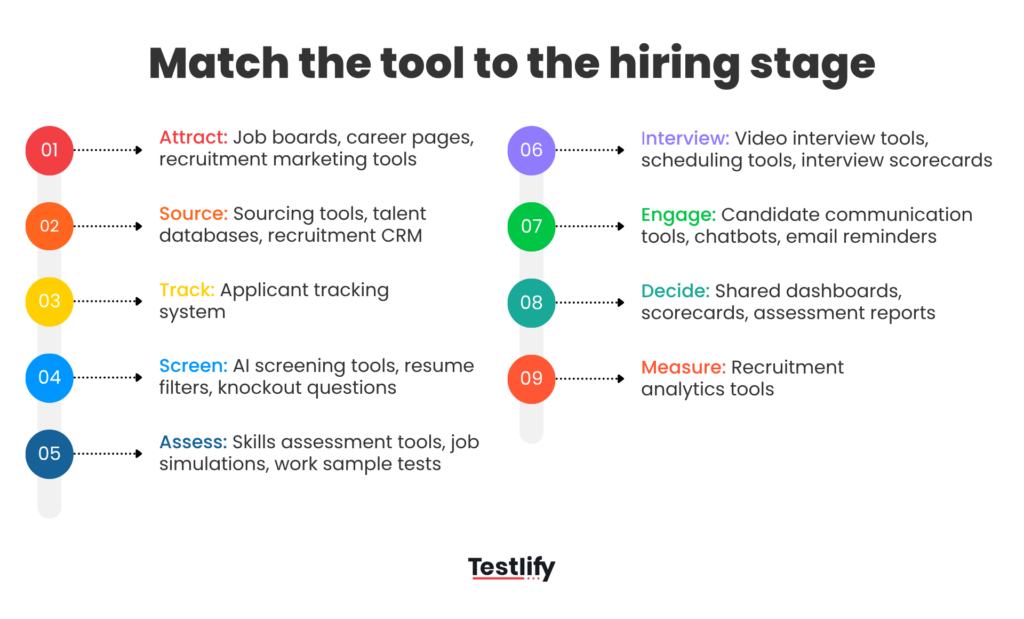
For example, if a company gets enough applications but most candidates are not a good fit, the problem is likely in the screening or assessment stage. In that case, adding more job boards may only increase the volume, not the quality.
If candidates are dropping off before interviews, the issue may sit in scheduling or communication. Long delays, unclear updates, or too many manual follow-ups can make strong candidates lose interest.
If hiring managers are struggling to compare candidates, the team may need better scorecards, structured interviews, or assessment reports. This is where tools like Testlify can support the process by helping recruiters compare candidates on role-relevant skills before the final interview stage.
Which hiring problems can recruitment technology solve?
For many teams, the first problem is candidate quality. They may get enough applications, but very few match the role. In that case, the issue may sit in the job description, job boards, sourcing strategy, or how candidates are matched to the role.
Another common problem is resume overload. When too many applications come in, recruiters cannot review every profile with the same depth. Screening tools can help organize candidate data and highlight relevant profiles, but the hiring team still needs to review the criteria behind those filters.
Screening quality is different from screening speed. A candidate may look strong on paper but still lack the skills needed for the job. Skills assessments, job simulations, and structured scorecards help teams compare candidates on role-relevant ability, not just resumes or interview confidence.
This is where Testlify fits naturally. Hiring teams can use job-relevant assessments before interviews, so recruiters spend more time with candidates who have already shown the right skills.
Recruitment technology also helps reduce delays. Scheduling tools, reminders, and candidate communication tools cut down manual follow-ups and keep the process moving.
It also gives hiring teams better visibility. An applicant tracking system keeps resumes, notes, stages, and feedback in one place. Analytics tools can show where candidates drop-off, which sources work better, and where decisions get stuck.
Final takeaway
The best recruitment technology is not the biggest set of tools. It is the set that makes hiring easier to manage.
Start with the problem your team is facing. If screening is weak, look at assessments. If candidates are dropping off, improve communication and scheduling. If hiring data is scattered, fix tracking and reporting first.
Good technology should help recruiters save time, give hiring managers clearer information, and make the process easier for candidates.
If you want to assess candidates with more confidence before interviews, book a demo with Testlify and see how skills-based hiring can fit into your recruitment process.
Frequently asked questions (FAQs)

B2B SaaS Content Writer
Rishav Kumar is a B2B SaaS content writer with 4 years of experience. He loves crafting engaging content. Always exploring fresh ideas, he's passionate about helping businesses grow through impactful writing.
LinkedInRelated resources
View all
Recruitment Technology
Recruitment technology: Meaning, benefits and hiring use cases

Recruitment Technology
Case studies of companies that successfully used recruitment technology

Recruitment Technology
How to choose the right recruitment technology

AI in recruitment
Best practices for hiring data analysts using assessments?

Candidate assessment
What tools support voice responses for language proficiency testing?

Candidate assessment
How do ATS-integrated assessments streamline hiring workflows?
Get started.
Hire on proof, not resumes.
Run your first skills-based assessment free — no credit card required.