
How to hire a system administrator: steps, skills and costs
A step-by-step plan to hire a sysadmin: scope your stack, test skills before interviews, ask better questions and make an offer in 21 days.

A sysadmin hire usually goes wrong before the first interview, when nobody has written down which systems the person will own. Teams then screen on resumes and certificates, and find the gaps when a restore fails or a patch slips.
Learning how to hire a system administrator comes down to three decisions: what they own, how you test them, and how fast you move. Scope the stack, test skills hands-on, then interview, and three weeks to a signed offer is realistic for a mainstream role.
TL;DR:
- Scope your stack, test skills on application, run one structured interview, then make one fast offer.
- U.S. median pay is $99,130 a year (BLS, May 2025).
- Sysadmin jobs will shrink 4% by 2035, yet about 13,400 open yearly.
- Test patching hardest: exploits caused 31% of breaches in Verizon's 2026 report.
- A 60 to 90 minute practical test beats resumes and certificates.
- 21 days is realistic; niche stacks take 6 to 8 weeks.
 ChatGPT
 Gemini
 Claude
 Grok
 Perplexity
What does a system administrator do?
A system administrator keeps an organization's servers, networks, identity systems and day-to-day IT services running safely. The work is patching, backups and restores, monitoring, user accounts and permissions, incident response when something breaks, and documenting how it all fits together.
In a company under about 200 people, one sysadmin usually owns all of it.
The market for the role is unusual, and it shapes how you hire. The U.S. Bureau of Labor Statistics reports 323,600 network and computer systems administrator jobs and a median wage of $99,130 (May 2025).
The BLS Occupational Outlook Handbook projects employment to decline 4% between 2025 and 2035, while still expecting about 13,400 openings each year, all of them replacements for people who retire or move on.
Read those two numbers together. Total sysadmin headcount is shrinking as workloads move to cloud platforms, but the churn is steady.
Candidates are usually experienced, and the real question is whether their experience matches the stack you run today.

Which type of system administrator do you need?
The type of system administrator you need depends on the stack you run and on whether you need someone to run systems or design them. Job posts use "system administrator", "systems engineer", "network administrator" and "DevOps engineer" interchangeably, and that is where many bad hires start.
Role | What they own | Hire this one when |
|---|---|---|
System administrator | Servers, operating systems, patching, backups, user accounts, permissions, daily incidents | You have systems that must stay up and nobody clearly owns them |
Systems engineer | Architecture, migrations, automation at scale, capacity and platform design | You are rebuilding, migrating to cloud, or need infrastructure designed rather than maintained |
Network administrator | Switching, routing, firewalls, VPNs, wireless, segmentation | Network complexity or site count is causing your outages |
DevOps engineer or SRE | Deployment pipelines, infrastructure as code, service reliability targets | Your product runs in the cloud and engineers ship code daily |
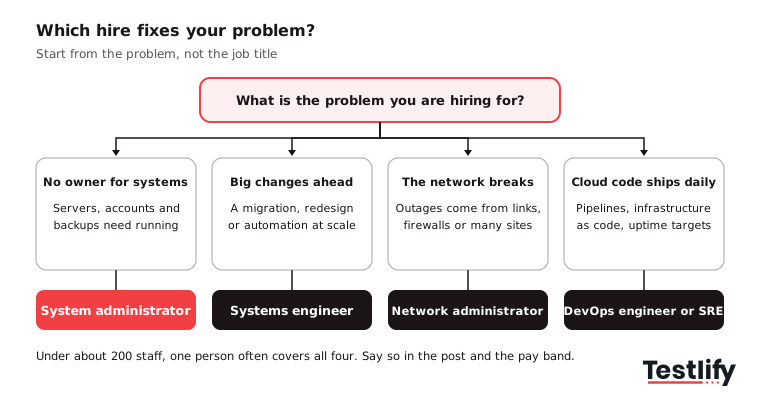
Within the sysadmin title, hire for the platform you run:
- Windows administrator: Windows Server, Active Directory, group policy, Microsoft 365 and Entra ID.
- Linux administrator: Red Hat Enterprise Linux or Ubuntu servers, Bash, package and service management, file permissions.
- Cloud or hybrid administrator: Azure or AWS compute, storage, identity and networking alongside what still runs on-premises.
- Generalist: All of the above at small scale, plus the help desk escalations nobody else takes.
O*NET's profile of the occupation lists Bash, Windows Server, Red Hat Enterprise Linux, Active Directory, Ansible, PowerShell and ServiceNow among its in-demand technologies, which is a useful check on your own list. See the O*NET summary for network and computer systems administrators.
One caveat the table hides: in a smaller company one person does all of these jobs. That is fine as long as the job post and the pay band admit it.
Advertising an administrator salary for engineering work rarely survives the first round of interviews.
How to hire a system administrator: what are the steps?
Hiring a system administrator takes eight steps: scope the stack, set the pay band and employment model, write the job post, source candidates, send a skills assessment, run a structured interview, check references, then make the offer and onboard. The order matters more than any single step, because the assessment has to come before the interviews.
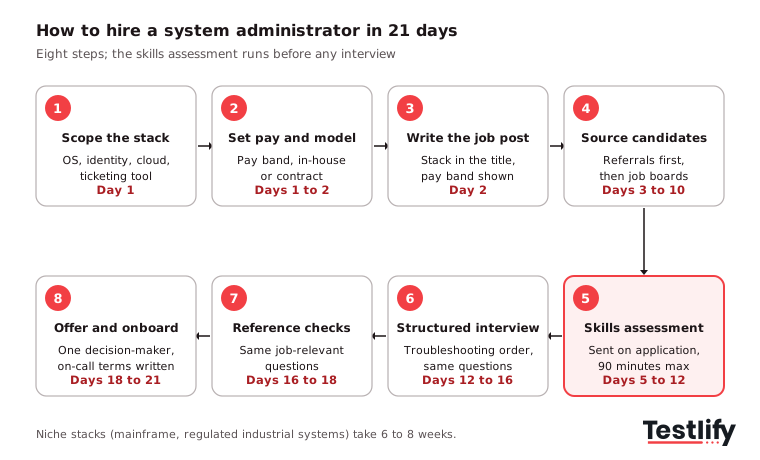
1. Scope the environment
Document the operating systems, identity management tools, virtualization or cloud platforms, backup solutions, and ticketing systems your team uses. Clarify whether the role focuses on windows, linux, or a hybrid environment. This creates a clear hiring specification.
2. Set the pay band and employment model
Decide whether you need a full-time employee, contractor, contract-to-hire resource, or managed service provider. Get the salary band approved before hiring begins to avoid delays during offer negotiations.
3. Write the job post
Include the technology stack in the job title and opening paragraph. Describe the size of the IT environment, key responsibilities, and upcoming infrastructure projects. Publish the approved pay band to attract relevant candidates and set clear expectations.
4. Source candidates
Start by asking your existing IT team for employee referrals. Expand your search through general job boards, specialist technology platforms, and professional IT communities to reach qualified system administrators.
5. Send a skills assessment on application
Introduce a practical skills assessment early in the application process. A 60 to 90-minute assessment can evaluate troubleshooting, system administration, security, and infrastructure management skills before candidates reach the interview stage.
6. Run a structured interview
Ask every candidate the same job-related questions about troubleshooting, access management, system failures, and outage resolution. Use a consistent scoring system to evaluate their technical knowledge, problem-solving abilities, and decision-making.
7. Check references
Contact previous managers or colleagues and ask consistent, job-related questions about reliability, incident management, documentation, and handovers. A structured reference check helps validate a candidate's experience beyond what appears on their resume.
8. Make the offer and onboard
Assign one decision-maker to approve the final candidate and keep the offer process moving. Confirm the salary, on-call responsibilities, and after-hours expectations in writing. Prepare an onboarding plan covering system access, infrastructure documentation, security protocols, and escalation procedures.
Pro tip: Send the hands-on assessment before the first conversation, not after it. Every interview slot then goes to someone whose skills are already evidenced, so the interview can focus on judgment and fit.
What skills should a system administrator have?
A system administrator needs fluency in the operating systems you run, working knowledge of networking, disciplined patching, sound identity and access management, and enough scripting to stop repeating tasks by hand. Certifications and years served are weak proxies for all five, so test them instead.
Operating systems, networking and virtualization
Start with your own stack rather than a generic list. A Linux specialist needs ramp time on Windows Server and Active Directory, and the reverse is just as true.
Ask about the things that break: DNS resolution, DHCP scopes, group policy, file permissions, storage layout, backup restores and virtualization hosts such as VMware or Hyper-V. A candidate who can describe a restore they performed, including what went wrong, is worth more than one who can recite the documentation.
Cloud and automation
Almost every sysadmin job now has a cloud half: identity in a hosted directory, servers in AWS or Azure, and mail and files on a platform nobody runs on-premises. Automation matters for the same reason.
Over a year, the gap between a sysadmin who scripts and one who clicks adds up to weeks of recovered time. Look for PowerShell or Bash at a level where they have written something another person maintains, and for configuration tools such as Ansible or Terraform on larger estates.
Patching and vulnerability management
Patching moved to the top of the list in 2026. According to the Verizon 2026 Data Breach Investigations Report, which analyzed more than 31,000 incidents and 22,000 confirmed breaches, exploited vulnerabilities became the most common way into a breach at 31%, up from 20% a year earlier.
The same report found that only 26% of critical vulnerabilities on the CISA Known Exploited Vulnerabilities list were fully fixed in 2025, and the median time to full resolution rose to 43 days.
That makes one interview question worth more than most: "A critical patch for an internet-facing system lands on a Friday. Walk me through the next 72 hours."
Listen for inventory, risk ranking, testing, a rollback plan, and who they tell.
Identity and access management
Identity and access is the skill with the largest downside if you get it wrong. Your sysadmin decides who has administrator rights, how service accounts are handled, whether multi-factor authentication is enforced, and how fast a departing employee loses access.
Verizon's 2026 report still puts credential abuse at 13% of breaches and found third parties involved in 48%, so vendor and contractor access belongs in the job description too.
A quick way to separate current knowledge from folklore is to ask what they would change about your password policy. The 2025 revision of NIST's digital identity guidelines, SP 800-63B-4 says verifiers "SHALL NOT require subscribers to change passwords periodically" and "SHALL NOT impose other composition rules".
A candidate still defending 90-day forced rotation and special-character rules is working from old advice.
Communication during an outage
During an outage, the sysadmin becomes the most important communicator in the building. Can they tell a non-technical manager what is broken, what the workaround is and when the next update comes, without panic or jargon?
Ask for the story of their worst outage. Good answers include what they told people, not just what they fixed.
Skill | Evidence to collect | Where it comes from |
|---|---|---|
OS administration on your platform | A hands-on task on Windows Server or Linux | Skills assessment |
Networking | Applied questions on DNS, DHCP, routing and firewalls | Skills assessment |
Patching and vulnerability management | A ranked patch plan for a realistic backlog | Assessment scenario and interview |
Identity and access | Decisions on admin rights, service accounts and offboarding | Assessment scenario and interview |
Scripting and automation | A short script that runs against test cases | Skills assessment |
Communication | A clear account of a past outage | Structured interview |
How do you assess system administrator skills before the interview?
You assess system administrator skills with a 60 to 90 minute assessment that covers operating-system administration on your platform, networking fundamentals, security and access judgment, and a scripting or troubleshooting task with a real deliverable. Anything longer costs you candidates.
Anything shorter turns into trivia.
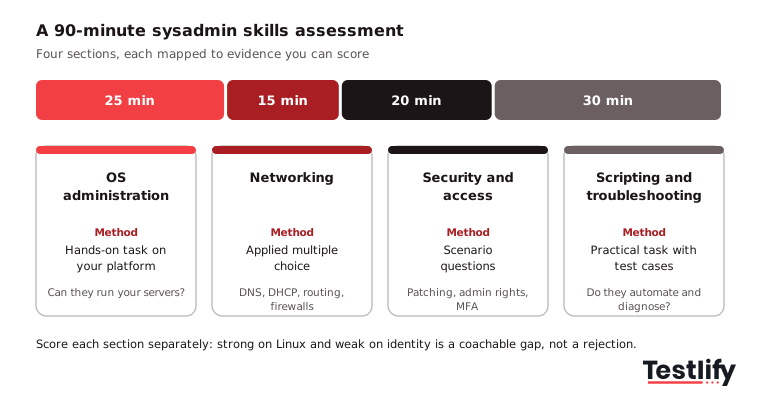
Build the assessment from the role, not from a question bank. Map each skill from your stack list to a source of evidence, then pick the method: a hands-on task for administration, applied multiple-choice questions for networking, scenario questions for access decisions and a short script for automation.
Every skill on the list has to produce evidence, or it comes off the list.
Practical tasks that work well for a sysadmin assessment:
- Troubleshooting scenario: A service is unreachable after a change. What do they check, and in which order?
- Configuration task: Set up a DHCP scope, a DNS record or a group policy object from a written requirement.
- Hardening review: Review a default server configuration and list the security gaps in priority order.
- Scripting challenge: Write a PowerShell or Bash script that reports accounts inactive for 90 days.
- Backup and recovery: Plan a restore of a failed file server and state the recovery point you would expect.
Testlify's system administrator test is a 35-minute intermediate test covering operating system and network administration, infrastructure concepts, cloud computing, backup and recovery, and security administration.
Pair it with stack-specific tests such as the Linux systems administrator test, the Windows administrator test, the cloud system administration test, the networking test, or the cybersecurity test, and add a PowerShell test or a Bash test for the scripting section.
A problem-solving test is a sensible add-on for junior roles where the stack will be learned on the job.
What should the assessment score?
The assessment should score each section separately rather than return one number, so you can see that a candidate is strong on Linux and weak on identity, which is a coachable gap rather than a rejection.
Testlify supports weighted scoring by section, a per-skill breakdown in the candidate report, and coding questions in a live coding environment that supports 45+ programming languages, so the scripting section is scored on code the candidate actually ran.
Decide one tradeoff up front. A fixed question set makes candidates comparable, while randomized questions reduce answer sharing.
If you are hiring one sysadmin rather than twenty, fixed and comparable is usually the better call.
What should you look for in an assessment platform?
Four things matter for a technical hire like this one:
- Role-relevant content: A library that covers role-specific, software, coding and cognitive tests, so you are not stitching a sysadmin assessment out of generic IT trivia. Testlify has 3,500+ tests and 25+ question types, including practical tasks and file uploads.
- Integrity controls: A remote technical test invites outside help. Testlify includes 20+ proctoring checks, such as webcam snapshots, tab and copy-paste tracking and AI assistance detection, with photo ID verification available per attempt.
- Human review: Flags should go to a person to review, not trigger an automatic rejection.
- Fit with your tools: Testlify connects with 100+ ATS and HRIS platforms, including Workday, Greenhouse, Lever and BambooHR, so your ATS stays the system of record.
What should a system administrator job description include?
A system administrator job description should name your stack, the scale of the environment, the outcomes the person owns, the on-call expectations and the pay band. Generic posts attract applicants who match nothing in particular.
Copy the template below and replace the brackets.
Job title: System Administrator ([Windows Server/Linux/hybrid], [number] users)
Location: [City, State] | [On-site/hybrid/remote] | [Pay band]
Overview: We are looking for a System Administrator to manage and maintain [Company]'s IT infrastructure: [number] servers on [platforms], [identity system], and [cloud platform]. You will keep systems available, protect company data through reliable backups and security practices, and make our IT environment simpler and more automated over time.
Responsibilities:
- Keep servers and core services available against agreed uptime targets.
- Patch operating systems and applications on a defined schedule, with emergency patching for critical vulnerabilities.
- Manage user accounts, permissions, multi-factor authentication, and offboarding.
- Run and test backups and restores, and document recovery steps.
- Monitor systems and resolve IT incidents and escalated tickets promptly.
- Automate repetitive tasks with PowerShell, Bash, or configuration tools.
- Keep documentation of systems, changes, and runbooks current.
Requirements:
- Hands-on administration of [Windows Server / Linux] in production.
- Working knowledge of networking: DNS, DHCP, TCP/IP, VPNs, and firewalls.
- Experience with virtualization ([VMware / Hyper-V]) or [Azure / AWS].
- Scripting in PowerShell or Bash.
- Troubleshooting and problem-solving under pressure.
- Clear written and spoken communication with non-technical colleagues.
Benefits:
- Competitive salary within the published band, plus [benefits].
- Paid on-call at [rate or time off in lieu].
- A training and certification budget.
- Work on [named projects, for example, a cloud migration].
- A collaborative and inclusive team.
Where do you find system administrator candidates?
You find system administrator candidates first through referrals from your own technical staff, then through general and tech job boards, professional networks, and local user groups. Referrals convert best because a sysadmin knows who actually fixed things at their last job.
Job boards that work for the role:
- Indeed: The largest volume of applicants, strong for Windows Server, Active Directory and networking roles.
- LinkedIn: Targeted outreach with searches that combine skills, certifications and cloud platforms.
- Dice: A tech-only board, useful for experienced administrators with specific platform certifications.
- Glassdoor: Candidates research reviews and pay here before they apply, so a current employer profile matters.
- Monster: Broad reach, including administrators from regulated industries such as healthcare, finance and government.
- SimplyHired: An aggregator that helps with geographic reach for on-site and hybrid roles.
Two adjustments matter more than the channel. Put your stack in the job title or first line, because "System Administrator (Windows Server, Microsoft 365, 400 staff)" draws a smaller and far more relevant pool than "System Administrator".
Publish the pay band too, since experienced infrastructure people often skip a post that hides it.
Short social posts for your team to share:
- "We're hiring a System Administrator to run our [Windows / Linux] servers and keep [number] colleagues online. Pay band [range]. Apply here: [link]"
- "Like automating the boring parts of IT? Join us as a System Administrator and own patching, backups and identity for [Company]. [link]"
- "Our IT team is growing. We need a System Administrator who can explain an outage as clearly as they fix it. Details: [link]"
When are systems administrator headhunters worth it?
Systems administrator headhunters earn their fee in two situations: a niche stack where the candidate pool is small (mainframe, a specific ERP, an unusual regulated environment), or a role you have already failed to fill through your own channels. Expect a contingency fee of roughly 15% to 25% of first-year salary, about $15,000 to $25,000 on a $99,130 base.
For a standard Windows or Linux opening, that money usually buys speed you could create yourself by fixing the job post and shortening the interview loop.
Which interview questions reveal real sysadmin skill?
The best sysadmin interview questions describe a broken system and ask what the candidate would check first, second and third. Order of investigation is what you are testing.
Anyone can name the tools; a good administrator narrows the problem before touching anything. Ask the same questions in the same order to every candidate and score each answer, which is what makes a structured interview.
Question | What to listen for |
|---|---|
Users say the shared drive is slow this morning but was fine yesterday. What do you check, in order? | Questions before action: what changed, scope, then storage, network and server load |
Walk me through your last restore from backup. What did you learn that the runbook did not say? | A real restore, a real gap, and a fix to the runbook afterwards |
A developer asks for domain administrator rights to finish a deploy today. What do you do? | Least privilege, a scoped or temporary alternative, and a record of the decision |
A patch needs downtime during business hours. How do you decide, and who do you tell? | Risk of waiting versus risk of outage, a change window, and a communication plan |
How would you configure and secure a new Windows Server for a business-critical application? | Baseline hardening, patching, least-privilege service accounts, monitoring and backups |
How would you set up role-based access control in Active Directory? | Groups mapped to roles, no direct user permissions, regular access reviews |
How do you monitor server performance and find a bottleneck? | Baselines, CPU, memory, disk and network metrics, and named tools such as Zabbix or Nagios |
Describe a backup and disaster recovery plan for a small data center. | Recovery point and recovery time targets, off-site or immutable copies, tested restores |
Tell me about a script or automation you built that someone else now maintains. | Clear purpose, error handling, documentation and handover |
From what you have seen of our environment, what would worry you most? | Strong candidates will have noticed something specific |
For a longer bank, use these system administrator interview questions and, for Linux roles, these Linux system administrator interview questions.
Which emails should you send system administrator candidates?
You need four emails to hire a system administrator: an outreach message, an interview invitation, an offer and a rejection. Keep each one short and specific to the role.
Outreach email
Subject: System Administrator role at [Company]
Hi [Candidate's name],
Your experience running [platform] environments caught our attention. We are hiring a System Administrator to look after [number] servers, our identity system, and backups, with a cloud migration planned for next year.
The pay band is [range].
If you are open to it, reply with a good time for a 15-minute call, or apply here: [link].
Best regards, [Your name], [Your title], [Company]
Interview invitation
Subject: Interview for the System Administrator role at [Company]
Hi [Candidate's name],
Thank you for completing the skills assessment. We would like to invite you to a [length] interview with [names and roles].
We will talk through a few troubleshooting scenarios, your experience with [platform], and how you handle outages. There is time for your questions too.
Please pick a slot that suits you here: [scheduling link].
Best regards, [Your name], [Your title], [Company]
Offer email
Subject: Job offer: System Administrator at [Company]
Hi [Candidate's name],
We would like to offer you the System Administrator role at [Company]. The attached contract sets out your salary, benefits, start date, and the on-call rota and how it is paid.
Please review it and let us know if you have questions. We would like your answer by [date].
We look forward to working with you.
Best regards, [Your name], [Your title], [Company]
Rejection email
Subject: Your application for System Administrator at [Company]
Hi [Candidate's name],
Thank you for applying for the System Administrator role and for the time you spent on the assessment. After careful review, we have decided to move forward with candidates whose experience more closely matches this role.
We would be glad to hear from you for future openings that fit your background. We wish you the best in your search.
Sincerely, [Your name], [Company]
More variations are in these rejection email templates.
How long does it take to hire a system administrator?
Hiring a system administrator takes about 21 days from approved requisition to signed offer for a mainstream Windows or Linux role. Treat anything past six weeks as a process problem rather than a market problem.
The assessment stage is what compresses the schedule: scores arrive before the interview, so the panel only meets shortlisted candidates.
Stage | Target days | What has to be true to hit it |
|---|---|---|
Scope the environment and write the post | Days 1 to 2 | The stack list and pay band are decided |
Sourcing and applications | Days 3 to 10 | Referrals requested on day 3, not day 9 |
Hands-on skills assessment | Days 5 to 12 | Sent automatically on application, 48-hour window, 90 minutes maximum |
Structured interview and troubleshooting discussion | Days 12 to 16 | Panel slots booked before candidates exist |
Structured reference checks | Days 16 to 18 | The same job-relevant questions for every referee |
Decision and offer | Days 18 to 21 | One decision-maker, one meeting, band pre-approved |
A niche stack breaks this plan. A role that needs mainframe experience, a specific regulated environment or a rare mix like Linux plus industrial control systems realistically takes six to eight weeks, and a headhunter starts to make sense.
Track the result against your own time to hire baseline. Those 13,400 yearly openings are competed for by employers whose loops take five weeks, so a three-week loop is itself a hiring advantage.
How much does it cost to hire a system administrator?
The cost to hire a system administrator starts with a U.S. median wage of $99,130 a year, then adds employer taxes and benefits, any agency fee, and the cost of the weeks the seat sits empty. Junior administrators handling help desk escalations sit well below the median.
Security-heavy or cloud-heavy roles sit above it.
Industry moves the number too. BLS pay data for the occupation shows May 2025 medians of $103,810 in management of companies, $101,560 in computer systems design, $101,310 in information, $101,110 in finance and insurance, and $86,180 in educational services.
Use the cost per hire calculator to add your own sourcing and interview time.
The employment model changes the number more than salary negotiation does:
Model | Best for | Watch out for |
|---|---|---|
Full-time hire | Systems specific to your business, fast response times, knowledge worth keeping | Highest fixed cost; needs a real job spec and career path |
Contract-to-hire | A first infrastructure hire where environment fit is uncertain | Many experienced administrators will not take the risk, so the pool narrows |
Contract | Projects with an end date, such as a migration or a backlog cleanup | Knowledge leaves when the contract ends unless it is documented |
Managed service provider | Companies under about 50 staff with simple needs | Slower response on anything outside the contract scope |
Key takeaway: Budget the whole cost, not the salary. Against a $99,130 median, add employer taxes, benefits, any agency fee and the cost of an empty seat, then decide honestly between an in-house hire and a managed service provider.
How should you onboard a new system administrator?
A new system administrator needs a structured first two weeks: environment documentation and access on day one, shadow shifts with senior IT staff, then a guided first ticket through your ITSM tool. Admin rights should grow in stages, not arrive all at once on the first morning.
- Week one: Read the network diagram, runbooks, and backup schedule; get named accounts with MFA; shadow on-call; resolve low-risk tickets.
- Week two: Run a test restore, join a patch cycle, take a guided first incident, and list the three things that worry them most.
- Day 30: Agree on goals for patch compliance, backup success and ticket response, and confirm the on-call rota.
What hiring mistakes should you avoid?
Four mistakes cause most failed sysadmin hires. Hiring on certifications alone is the first: a certificate proves study, not that someone can restore a failed domain controller at 7am.
Copying a generic job description is the second, and it produces applicants who match nothing in particular. Skipping the security conversation is the third, which is how a well-meaning administrator ends up handing out domain administrator rights to speed things along.
The fourth is an interview loop so long that your first choice accepts elsewhere. Beyond those four, a subtler mistake is hiring only for today's stack.
Teams hiring their first sysadmin test for the environment they have, then find that person cannot help with the cloud migration that starts eight months later. If a migration is on the roadmap, put one automation or cloud question in the assessment now and weight it lightly.
Screen sysadmin skills before the first call
The fastest fix to a sysadmin search is moving evidence to the front of it. Build a role-specific assessment for the operating systems, networking, patching, and access judgment your environment needs, and send it on application.
Book a demo and set up the sysadmin assessment with the team, or start a 7-day free trial of Testlify with no credit card.
Frequently asked questions (FAQs)

People and Talent Partner
Arushi Shah runs day-to-day talent acquisition and candidate experience at Testlify. She writes on interviewing, structured hiring, and giving candidates a fair, fast process.
LinkedInRelated resources
View all
Candidate assessment
How Testlify helps companies reduce bias in hiring

Candidate assessment
Advanced Excel Assessment: How to Test Candidate Skills (2026)

Candidate assessment
Project management skills assessment guide

Candidate assessment
Cognitive diversity at workplace: what is it and why is it important

Candidate assessment
10 Essential soft skills to assess while hiring developers

Candidate assessment
Why is attention to detail important at work and in hiring?
Get started.
Hire on proof, not resumes.
Run your first skills-based assessment free — no credit card required.