
Automated candidate scoring: how it works and speeds up hiring
How automated candidate scoring works, what it scores, where it cuts days from hiring, the laws that apply and how to set it up for a role.

Automated candidate scoring is software that rates every applicant against the same job requirements and ranks them, so recruiters start with the strongest matches instead of reading applications in the order they arrived. Scores can come from screening answers, resumes, skills tests and AI interviews, and a person still makes the hiring decision.
TL;DR: Automated candidate scoring evaluates and ranks applicants against job-specific criteria using resume data, screening answers, skills assessments, and interview responses. It speeds up hiring by automating initial screening, prioritizing qualified candidates, and reducing manual work between hiring stages. Recruiters should use weighted scorecards, review AI-generated scores, monitor bias, and track time to shortlist alongside hiring quality.
The pressure behind all of this is volume. Ashby's 2026 recruiter productivity report found that applications per hire climbed from about 121 in early 2021 to a peak of 319 in late 2024, and still sit near 291. At just two minutes per application, that is close to 10 hours of reading for every hire before anyone picks up the phone.
 ChatGPT
 Gemini
 Claude
 Grok
Grok Perplexity
What is automated candidate scoring?
Automated candidate scoring is the use of rules, weighted scorecards or AI to give each applicant a score for how well they meet a role's requirements, then rank the pool by that score. The recruiter sees a sorted shortlist with the evidence behind each score, not a pile of unread applications.
Two terms often get mixed up:
- Scoring measures each candidate against a fixed standard, for example 82 out of 100 on the role's skills.
- Ranking orders candidates within one pool. A candidate who scores 82 might rank fourth if three others scored higher.
Automated candidate scoring is not an ATS keyword filter, and it is not a robot that hires. A keyword filter only checks whether certain words appear in a resume. A scoring system weighs several kinds of evidence, including test results and interview answers, and shows how it reached the number. The final call stays with the hiring team. For a deeper look at the AI side, see AI-driven candidate scoring.

How does automated candidate scoring work?
Automated candidate scoring works in five steps: the team sets the requirements and weights, the system gathers evidence from each applicant, scores every requirement, ranks and routes candidates by threshold, and a recruiter reviews the result. Most teams then adjust the weights once they see which scores led to good hires.
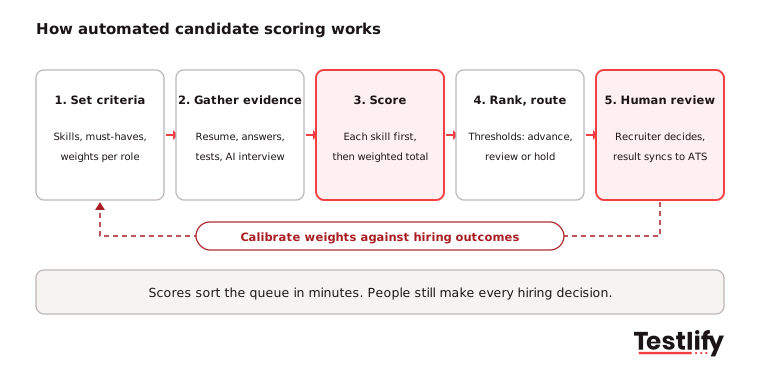
- Set the requirements. The hiring manager and recruiter agree on the must-haves (work authorization, shift availability, a required license) and the skills that separate good from great. Each skill gets a weight.
- Gather evidence. The system collects screening answers, parses the resume, and adds results from skills tests, work samples or an AI interview.
- Score. Each requirement gets its own score, then the system combines them into a weighted total. Good tools show the per-skill breakdown, not just one number.
- Rank and route. Thresholds decide what happens next: high scorers move to the next stage, the middle band goes to a recruiter for review, and candidates who miss a must-have are held for a human check.
- Human review. A recruiter reads the evidence, makes the call and the outcome syncs back to the ATS.
Pro tip: Write down the must-haves before you open the scoring tool. Teams that start inside the tool tend to copy the job description word for word, and every nice-to-have quietly becomes a requirement.
What can a candidate scoring system score?
A candidate scoring system can score five kinds of evidence: knockout answers, resume match, skills assessments, interview answers and a weighted total that combines them. The more of the score that comes from work the candidate actually did in front of you, the more it says about the job.
Input | What gets scored | Speed gain | Watch out for |
|---|---|---|---|
Knockout questions | Must-haves such as location, shift, license | Removes clear mismatches instantly | Too many knockouts shrink the pool fast |
Resume match | Skills, experience and titles against the job | Sorts large pools in seconds | AI-written resumes all look strong |
Skills assessments | Test answers, coding tasks, work samples | Scores real ability at the same time for everyone | Test must match the job, not a generic one |
AI or one-way interviews | Spoken or written answers against a rubric | Replaces first-round phone screens | Candidates need notice and a clear rubric |
Weighted composite | All of the above with role-specific weights | One ranked list per role | Weights need review after the first hires |
Resume match is the weakest input in 2026. Many applicants now use AI to tailor every resume to the job post, so keyword overlap says less about skill than it used to. Scoring that leans on assessments and structured answers holds up better. Testlify covers how scores work on open answers in automated scoring for custom questions.
How does automated candidate scoring speed up hiring?
Automated candidate scoring speeds up hiring in four places: it handles the first pass in minutes, tells recruiters who to contact first, moves candidates between stages without waiting on admin, and gives the team one shared view that shortens debate. Each lever removes a delay that has nothing to do with judging talent.
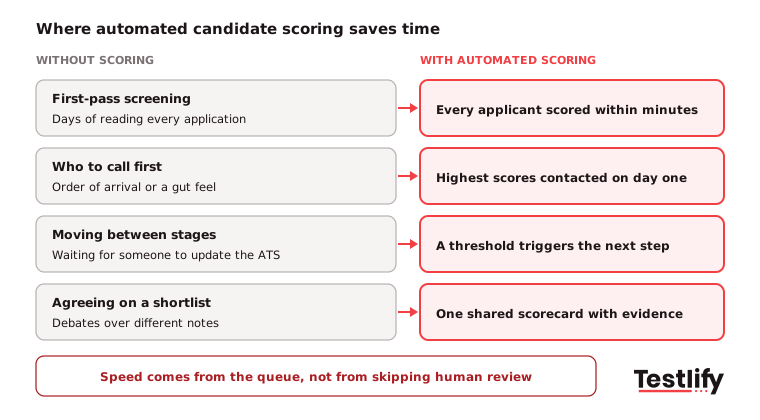
1. First-pass screening drops from days to minutes
Manual screening is the slowest stage because it scales with volume. A role that opens on Friday evening can have a scored list waiting on Monday morning, because the system scores applications as they arrive, including nights and weekends. Recruiters skip the reading and start with the review.
2. The best-fit candidates hear back first
Without scores, recruiters tend to call whoever applied first or whoever has a familiar company name on the resume. With scores, the top of the list gets contacted on day one. Strong candidates are often talking to several employers at once, so a reply in one day instead of five can decide who accepts.
3. Stage changes happen without admin
Scoring systems connected to the ATS can tag candidates by score, move them to the next stage and send the next step, such as a skills test or interview invite, as soon as they cross a threshold. Nobody waits for a recruiter to update a status between meetings.
4. One scorecard shortens the debate
When the recruiter and hiring manager each read resumes their own way, the shortlist turns into a negotiation. A shared scorecard puts the same evidence in front of everyone, so the discussion is about the candidates, not about whose notes to trust. A structured interview scorecard keeps that consistency going into later rounds.
Hiring teams expect this kind of gain. In LinkedIn's Future of Recruiting 2025 report, 72% of recruiting pros already using or testing generative AI said they expect it to improve hiring efficiency, the top benefit named.
Where does automated candidate scoring go wrong?
Automated candidate scoring goes wrong when the inputs are poor, when proxies stand in for skill, or when nobody checks the people it screens out. Speed makes these problems bigger, because a bad rule rejects hundreds of people before anyone notices.
- Proxies instead of skills. University name, employer brand, employment gaps and zip codes can track race, age or income more than ability. Score what the job needs, such as "passed the SQL task" rather than "worked at a well-known company".
- Weak resume signals. AI-written resumes make keyword scoring easy to game and hard to trust. Put more weight on assessments and structured answers.
- False negatives. Rigid knockouts and narrow keyword lists drop people with unusual but relevant backgrounds. Sample rejected candidates every month to catch them.
- Black-box scores. A number with no explanation cannot be defended to a hiring manager, a candidate or a regulator.
- Candidate trust. A Gartner survey from July 2025 found that just 26% of job applicants trust AI to evaluate them fairly. Clear notice, a human reviewer and a way to ask questions all help.
What laws apply to automated candidate scoring?
Automated candidate scoring is covered by AI hiring laws in several places, and the list is growing. The three that most hiring teams meet first are New York City's Local Law 144, Illinois HB 3773 and the EU AI Act. All three expect transparency with candidates and a check that the tool does not treat groups unfairly.
Rule | Who it covers | What it asks for | Status |
|---|---|---|---|
NYC Local Law 144 | Employers and agencies using automated tools for NYC jobs | Bias audit within one year of use, public audit summary, candidate notice 10 business days before use | Enforced since July 5, 2023 |
Illinois HB 3773 | Employers with staff in Illinois | No AI use that discriminates in hiring decisions, notice when AI is used, no zip codes as a proxy | In force since January 1, 2026 |
EU AI Act | AI used to recruit or select people in the EU | Treated as high-risk: risk management, human oversight, records | Recruitment rules apply from December 2, 2027 |
Sources: NYC Department of Consumer and Worker Protection, Fisher Phillips on Illinois HB 3773 and Cuatrecasas on the EU AI Act delay. The EU date moved from August 2026 after the Digital Omnibus amendment was published in July 2026. Illinois notice rules are still being finalised, so check with counsel before you rely on any template.
A simple monitoring habit works across all three: compare pass rates by group at each scored stage. In the US, the common rule of thumb is that a group passing at less than four-fifths (80%) of the rate of the highest group needs a closer look. Ask any vendor for its audit history too; Testlify's matching model completed a third-party NYC bias audit on June 16, 2023.
How do you set up automated candidate scoring for a role?
Automated candidate scoring is set up role by role: agree on must-haves, weight the skills, choose the evidence for each skill, set thresholds and test the scores on past applicants before going live. One role done well beats ten roles copied from a template.
- Pick one high-volume role. Customer support, sales development and operations roles give you enough applicants to see results within weeks.
- List two to four must-haves. Keep knockouts to facts a candidate can answer yes or no.
- Weight five or fewer skills. More than five dilutes the score.
- Match evidence to each skill. Use a test or work sample for hard skills and a structured question for judgment.
- Set thresholds as bands. Use advance, review and hold. Send the middle band to a person.
- Back-test. Score 50 to 100 past applicants and check that people you hired would have made the top band.
Here is what a weighting looks like for a customer support agent:
Requirement | Evidence | Weight |
|---|---|---|
Must-have: available for weekend shifts | Knockout question | Pass or hold |
Written communication | Email reply task | 30% |
Problem solving with customers | Situational judgment test | 25% |
Product and tool basics | Software skills test | 20% |
Spoken English | Voice AI interview answer | 15% |
Typing speed and accuracy | Typing test | 10% |
How do you know scoring is making hiring faster?
Automated candidate scoring is working when time to shortlist and time to first contact fall while pass rates stay fair and hiring managers accept more of the shortlist. Measure a baseline for one month before you switch it on, then compare the same role month by month.
Metric | What it tells you | Healthy direction |
|---|---|---|
Time to shortlist | Hours from application to a reviewed shortlist | Down sharply |
Time to first contact | How fast top scorers hear from you | Down, ideally under one business day |
Time to hire | Application to accepted offer | Down |
Shortlist acceptance | Share of the shortlist the hiring manager agrees to interview | Up |
Stage drop-off | Candidates who quit between steps | Flat or down |
Pass rate by group | Fairness of each scored stage | Within four-fifths of the top group |
90-day outcome | Hires who pass probation or hit early targets | Flat or up |
Testlify's time to hire calculator is a quick way to set the baseline.
Key takeaway: Speed is only a win if quality and fairness hold. Track time to shortlist next to shortlist acceptance and pass rate by group, and treat a jump in speed with a drop in either as a scoring problem, not a success.
What should you look for in candidate scoring software?
Candidate scoring software should let you control the criteria and weights, show the evidence behind every score, score real work rather than only resumes, connect to your ATS and support audits. Price and speed matter less if the scores cannot be explained.
- Control over criteria. You set must-haves, weights and thresholds per role, and can change them without a support ticket.
- Explainable scores. A per-skill breakdown and the answer behind each score, visible to recruiters and hiring managers.
- Assessments and interviews built in. Skills tests, work samples and structured AI interviews, so the score is not resume-only.
- ATS sync. Two-way sync with your ATS so scores and stage changes land where recruiters work.
- Integrity checks. Proctoring and AI-assistance detection, since a score is only useful if the candidate did the work.
- Audit support. Bias audit history, pass-rate reporting by stage, and candidate notice options.
How does Testlify score candidates?
Testlify scores candidates on skills evidence, not resume keywords alone. Hiring teams build a role-specific assessment from the job description, choose from 3,500+ tests and 25+ question types, and Testlify scores every response automatically with weighted scoring and a per-skill breakdown. AI candidate insights add pros, cons and suggested follow-up questions for the interview.
For earlier filtering, the AI resume screener gives each resume an explainable match score with High, Medium or Low fit labels and syncs results back to the ATS. Score thresholds can auto-shortlist candidates into the next stage, and 20+ proctoring checks help keep scores honest. More on the method in how Testlify AI scoring works, and for large pipelines, see volume hiring with Testlify.
Frequently asked questions
Ready to score your next role?
See automated candidate scoring on one of your own roles. Start a 7-day free trial of Testlify, no credit card required, or book a demo to see weighted scoring and ATS sync with your team.

Related resources
View all
High volume hiring
How high-volume hiring works with AI interviews

High volume hiring
How to utilize artificial intelligence for large volume hiring?

High volume hiring
11 high-volume hiring strategies for enterprises in 2026

High volume hiring
Mass recruitment: how to hire at volume without losing quality

High volume hiring
Volume hiring: An ultimate guide to plan and implement

High volume hiring
Pre-hire assessments for high-volume hiring: What to test and why it matters
Get started.
Hire on proof, not resumes.
Run your first skills-based assessment free — no credit card required.