
What Is an HR Toolkit? Components, Tools, and How to Build One
Discover the essentials of an HR toolkit and how it streamlines HR operations, boosts employee engagement, and supports company growth.

An HR toolkit is the one organized place your people team keeps every template, policy, process, and piece of software it runs on, mapped to the full employee lifecycle from hiring to offboarding. It exists so nobody rebuilds a job description, an onboarding plan, or an interview scorecard from scratch. Get it right and HR stops firefighting paperwork and starts making faster, fairer, evidence-based decisions.
People search for this in a lot of ways. You will see it written as one word (hrtoolkit), spaced out as an hr tool kit, spelled out as a human resource toolkit, or described as an HR online toolkit when everything lives in the cloud. A few teams call the self-service, employee-facing slice an employee toolkit. They all point at the same thing: a single, current, shared system for how your people function actually works.
 ChatGPT
 Gemini
 Claude
 Grok
Grok Perplexity
TL;DR
- An HR toolkit is a centralized collection of templates, policies, workflows, and software that helps HR teams manage the entire employee lifecycle consistently and efficiently.
- A well-built toolkit improves hiring consistency, reduces manual work, speeds up HR processes, and creates a better employee experience across recruitment, onboarding, performance, and compliance.
- The essential components include recruitment resources, onboarding materials, performance management frameworks, compliance documents, employee engagement tools, learning resources, and HR analytics.
- Build your toolkit by auditing existing resources, identifying gaps, standardizing templates, choosing integrated HR technology, assigning ownership, and reviewing content regularly.
- Skills-based hiring platforms like Testlify strengthen the recruitment section of an HR toolkit by helping teams evaluate candidates objectively before interviews with validated skill assessments.

What is an HR toolkit?
An HR toolkit is a curated set of documents, processes, and technology that HR teams use to run the entire employee lifecycle, from workforce planning and hiring through onboarding, performance, engagement, and offboarding. Instead of improvising each time you post a role or run a review, the toolkit gives you ready, repeatable resources. It usually holds four things:
- Standardized documents: job descriptions, offer letters, handbooks, review templates.
- Process checklists: onboarding steps, interview workflows, exit procedures.
- Policy frameworks: leave, code of conduct, remote work, data privacy.
- Digital tools: an ATS, an assessment platform, an HRMS, and engagement tools.
The point is not to collect files. It is to make good HR decisions repeatable, so every hire, review, and policy call follows the same fair, documented logic no matter which manager is running it.
Why does your HR team need a toolkit?
Because ad-hoc HR is expensive and risky. When every manager writes their own job description and invents their own interview questions, you get inconsistent decisions, quiet bias, and a lot of rework. A structured toolkit fixes that in four ways.
Consistency and fairness in people decisions
Standardized job descriptions, interview scorecards, and skills-based assessments push decisions toward objective criteria instead of gut feel. That matters more than it sounds: Gallup has found that managers account for about 70% of the variance in team engagement, so the tools and scripts you hand a manager largely decide how their team experiences work. Give them structure and the floor goes up.
Faster, cheaper hiring
Hiring is where teams first feel the pain of no toolkit. SHRM’s 2025 benchmarking puts the average cost-per-hire at $5,475 for nonexecutive roles and nearly 7 times that for executives, with screening and interviewing each averaging 8 to 9 days. Reusable job descriptions, standard screening criteria, and assessments that filter for skills up front cut that loop. A team that scores candidates before the first call can turn a six-week screen into roughly 10 days because the shortlist is already ranked on evidence.
Compliance and lower risk
Employment law, data privacy, and health and safety rules keep shifting. Policies scattered across personal drives drift out of date fast. A central toolkit keeps them version-controlled, documents who changed what and when, and gives you a clean paper trail for disputes, grievances, and terminations. For teams operating across multiple states or countries, that single source of truth is the difference between a manageable audit and a scramble.
Better experience and retention
People stay when expectations are clear and processes are predictable. That is not a soft concern right now: US Bureau of Labor Statistics data shows median employee tenure fell to 3.9 years in January 2024, the lowest since 2002. Clear handbooks, consistent onboarding, and accessible policies won’t fix pay, but they remove the friction that pushes new hires out in the first 90 days.
What goes into an HR toolkit?
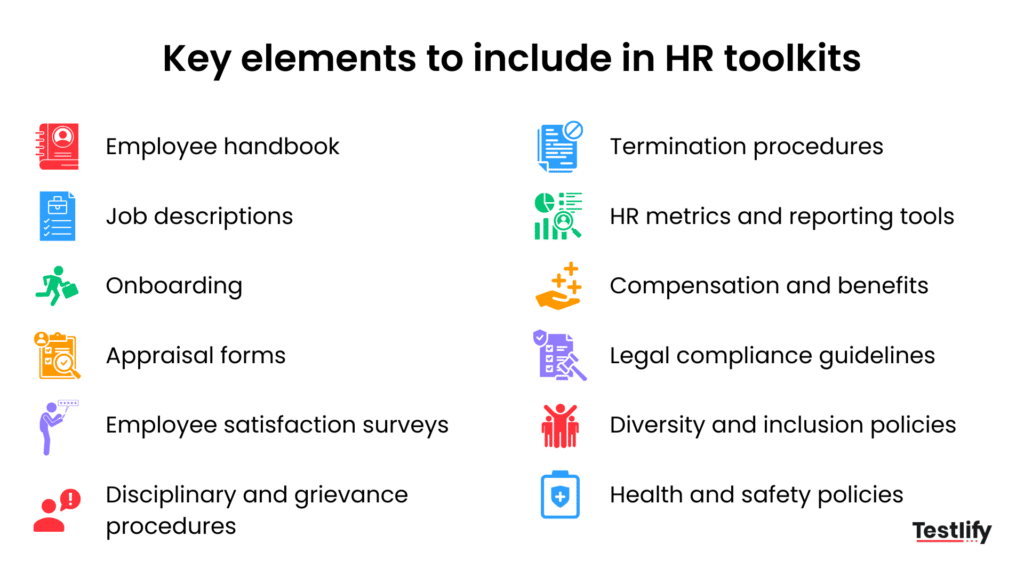
Map the toolkit to the employee lifecycle, not to your org chart. Each stage below gets its own templates, checklists, and tools. Skip the ones you don’t need yet, but leave the slot so you know where the gap is. For a deeper build-out of the paperwork, see the must-have documents in an HR toolkit and the full components of a modern HR toolkit.
1. Workforce planning and role design
Before you hire, get clear on what you are hiring for. Include role-definition templates (mission, key outcomes, responsibilities, reporting lines), skills and competencies, and job-profiling guides that tie levels and pay bands to skills rather than tenure. Anchor this on skills deliberately: the WEF Future of Jobs 2025 projects that nearly 40% of the skills a job needs will change by 2030, so a role map built on titles alone is stale before you finish it.
2. Recruitment, assessment, and selection
This is the section most teams build first. Include job-description templates by function and seniority, structured screening criteria, interview scorecards with rating scales, and email templates for outreach, invites, rejections, and offers. Add the tech: an ATS to move candidates through stages, an assessment platform to score skills and cognitive ability objectively, and video-interview tools for remote and async rounds. A skills-first setup like this is where the Testlify Competency-to-Evidence Matrix fits: you map each role to the competencies that matter, then connect every competency to measurable evidence through an assessment, a work sample, or a structured interview, so a hiring call rests on evidence instead of a resume hunch.
3. Offers and onboarding
A rough first month costs you the hire you just paid to make. Include offer-letter templates with standard clauses, pre-boarding checklists (documents, equipment, access), 30-60-90-day onboarding plans, and manager onboarding guides for week 1, month 1, and quarter 1. For distributed teams, add remote-onboarding resources: virtual intros, communication norms, and a tools checklist.
4. Policies, performance, and the rest of the lifecycle
Round out the toolkit across the stages people forget until they need them:
- Policies and handbook: code of conduct, working hours, leave, anti-harassment, data privacy, all in one accessible employee handbook.
- Performance and development: review templates, goal-setting frameworks (OKRs or SMART goals), 360-degree feedback forms, and development plans tied to skill gaps.
- Engagement and culture: pulse-survey templates, onboarding and exit surveys, and recognition playbooks.
- Employee relations: grievance procedures, investigation checklists, and clear disciplinary steps.
- Offboarding: resignation and transition templates, knowledge-transfer checklists, exit interviews, and access-removal steps for IT. Some organizations also maintain alumni programs or communities, supported by a simple CRM or communication tool, to turn former employees into advocates or future rehires.
Which digital tools belong in your toolkit?
Templates are one half of the toolkit; software is the other. You do not need every category on day one, and reading a few honest HR toolkit reviews before you buy will save you from paying for overlap. Here are the core categories and what each one is actually for.
Testlify sits in one specific box here: the assessment platform. It is not an ATS, an HRIS, or a payroll system, and it does not pretend to be. What it does is give the toolkit an evidence layer, connecting job profiles, skills tests, and hiring decisions through consistent, role-based assessments across cognitive, technical, and behavioral dimensions. For the wider stack, our guide to skills-based hiring shows how the assessment layer connects to the rest.
In practice that means a large pre-built test library (roughly 1,400 to 3,500+ tests spanning cognitive, technical, and behavioral skills), AI-powered proctoring and anti-cheating checks (identity verification, behavior monitoring, secure browsers), and direct integrations with ATS platforms like Greenhouse and Workday so scores flow straight into the candidate record. For the wider stack, our guide to skills-based hiring shows how the assessment layer connects to the rest.
None of these tools help much sitting in silos. The categories below get their value from talking to each other: ATS, assessments, and HRIS should share candidate and employee data; HRIS, payroll, and benefits should stay in sync so pay and records never drift apart; and performance tools should connect to your learning platform so skill gaps identified in a review turn into an assigned learning path automatically.
Category | What it is for | Example capabilities |
|---|---|---|
Applicant Tracking System (ATS) | Manage candidates across the hiring funnel | Job posting, pipeline tracking, interview scheduling, reporting |
Talent Assessment Platform | Score skills, cognitive ability, and behavior objectively | Pre-built and custom tests, remote proctoring, candidate analytics |
HRMS / HRIS | Central system of record for employees | Employee data, leave, attendance, benefits, documents |
Payroll and Compliance | Run salary, tax, and statutory compliance | Payroll runs, local compliance, payslips, tax reporting |
Performance Management | Structure goals and feedback cycles | Goal setting, performance reviews, 1:1 tracking, 360-degree feedback |
Employee Engagement and Surveys | Listen to employees at scale | Pulse surveys, eNPS, engagement dashboards |
Learning Management System (LMS) | Support continuous employee development | Learning paths, course libraries, certifications |
Recognition and Communication Tools | Reinforce culture in daily interactions | Peer-to-peer recognition and rewards, internal chat/intranet, templates for recognition messages and announcements |
How to build an HR toolkit step by step
Starting from scratch, or trying to tame an existing pile of documents? Work through six steps in order. For a longer walkthrough, see how to build an HR toolkit from scratch.
- Audit what you have. List every template, policy, and tool in use across hiring, onboarding, performance, and offboarding. Flag duplicates, stale versions, and gaps where a process is undocumented. Talk to recruiters and managers about where it hurts.
- Prioritize high-friction areas. Most teams get the fastest return in recruitment and assessment, onboarding, and compliance. Start where the risk or delay is worst today, not where a template is easiest to write.
- Standardize around skills. Define the core skills for each role and level, map assessments to those skills, and align job descriptions, review criteria, and development plans to the same list. One skill vocabulary across hiring, performance, and learning keeps decisions transparent.
- Pick tools that integrate. Judge each tool on integration with your ATS and HRMS, ease of adoption, ability to scale with headcount, and the quality of its analytics. A tool nobody adopts is a cost, not an asset.
- Assign owners and review cycles. Give each section an owner, set review cadences (quarterly for policies, annually for templates), keep change logs, and define who can view, edit, or approve. A toolkit nobody maintains rots within a year.
- Roll out and train. Explain the purpose to leaders and managers, run short sessions for recruiters and HRBPs, and provide quick-reference guides. Then collect feedback and iterate. The best toolkit fails if no one knows it exists.
How do you make a toolkit future-ready?
A toolkit is not just operational plumbing; it encodes how you treat people. Three moves keep it from aging badly.
Build in fairness by design. Bias creeps into job posts, screening, and review criteria. Inclusive language, standardized interview questions and scorecards, and structured, blind-where-possible assessment stages move judgment toward evidence. When fairness lives in the template, it happens by default instead of by good intentions.
Make it data-driven. A modern toolkit should track, not just store. Use it to watch time-to-hire, source quality, quality of hire, engagement trends, and turnover patterns, then act on them. Assessment data in particular tells you which hiring signals actually predicted strong performers. Round that out with offer-accept ratios, internal mobility rates, and tool-adoption metrics (how much of the ATS, assessment, and HRMS feature set your team actually uses) — these catch problems the hiring-funnel metrics alone miss.
Adopt AI with a human in the loop. The reskilling pressure is real: the WEF expects 59 of every 100 workers to need reskilling or upskilling by 2030, and 77% of employers plan to prioritize it. AI can pre-screen resumes against structured criteria and surface patterns in engagement data, but keep a person accountable for high-stakes calls like hiring and promotion. AI supports the process; humans make the decision; evidence improves confidence.
Key takeaways
- A toolkit is a decision system, not a folder. Its job is to make good HR calls repeatable across every manager, so hiring, reviews, and policy decisions follow the same documented logic instead of individual gut feel.
- Structure pays back in money and risk. With cost-per-hire at $5,475 and screening plus interviewing eating 8 to 9 days each, reusable templates and up-front assessments cut both spend and time-to-hire while giving you a clean compliance trail.
- Skills are the stable anchor. With nearly 40% of core skills set to change by 2030, a toolkit built on skills (not titles or tenure) stays useful as roles shift, and it keeps hiring, performance, and learning speaking one language.
- Managers are the multiplier. Since managers drive roughly 70% of engagement variance, the scorecards and guides you put in their hands largely decide team experience, so invest in that section, not just the hiring one.
- Governance keeps it alive. Assign owners, set quarterly and annual review cycles, and keep change logs, or the toolkit quietly rots and people drift back to personal copies within a year.
- Automate, but keep humans deciding. Use AI to pre-screen and surface patterns; keep a person accountable for hiring and promotion calls, backed by the evidence your assessment layer produces.
Frequently asked questions (FAQs)

Related resources
View all
HR & recruitment
What is predictive hiring and why does it matter?
HR & recruitment
Top 8 HR communities recruiters should join

HR & recruitment
10 best recruitment books every recruiter should read in 2026
HR & recruitment
What is talent intelligence? Definition, benefits, and implementation guide
HR & recruitment
What is a job leveling matrix? 3 powerful reasons to use it

HR & recruitment
Hire the best nursing talent with these 3 recruitment strategies
Get started.
Hire on proof, not resumes.
Run your first skills-based assessment free — no credit card required.