
HR process optimization: how to fix your core HR processes
A practical guide to HR process optimization: where to start, a 7-step method, four metrics to baseline and real examples for HR teams.

HR process optimization is the work of mapping how your core HR processes run today, removing the steps that add delay or errors, automating the repeatable parts and measuring the result. The goal is simple: hiring, onboarding, requests and reviews that finish faster, with fewer mistakes and less manual effort for HR and managers.
TL;DR / Key Takeaways
- HR process optimization means mapping a process, cutting waste, automating the rules-based steps and measuring the change against a baseline.
- Start with processes that are high in volume and high in pain: recruitment and screening, onboarding, and leave and HR requests.
- In a March 2026 Eagle Hill Consulting survey run by Ipsos, 51% of HR professionals spent at least half their week on routine admin, and 78% often re-entered the same data in several systems.
- Baseline four numbers before you change anything: cycle time, error rate, touches per case and user satisfaction.
- Redesign before you automate. Automating a broken process only makes the mistakes happen faster.
- Pilot each change with one team for 4 to 6 weeks, then roll out and repeat the loop on the next process.
 ChatGPT
 Gemini
 Claude
 Grok
 Perplexity
What is HR process optimization?
HR process optimization is a structured way to make HR workflows faster, more accurate and easier to use. It covers the core HR processes that every organization runs: recruitment and selection, onboarding, learning and development, performance management, compensation and benefits, employee relations and requests, compliance and offboarding.
Most teams use HR process optimization and HR process improvement as the same thing. If there is a difference, optimization is the ongoing discipline and an improvement is one change inside it, such as cutting an approval step from an offer letter. Both follow the same loop: map, measure, redesign, automate, test and measure again.
Optimization is also different from buying a new system. A new core HR tool can help, but only once the team knows which steps to remove, which rules to automate and what result it expects.

Why does HR process optimization matter in 2026?
HR process optimization matters because most HR teams still lose a large share of their week to manual, repeated work that adds no value for employees or the business. Fixing it frees time for hiring, manager support and workforce planning.
The numbers make the case:
- Admin load: In a March 2026 survey by Eagle Hill Consulting and Ipsos of 200 HR professionals at US organizations with $100M+ revenue, 51% said they spend at least half their week on routine, repetitive or low-value admin, and 70% said admin keeps them from strategic work.
- Duplicate data: The same survey found 78% often or always enter the same data into more than one system, 91% use two or more systems for a single task and 68% rely on spreadsheets or manual tracking as workarounds.
- Rework for the business: 84% of the senior leaders surveyed said HR requests often need extra follow-up or rework.
- Engagement cost: Gallup's State of the Global Workplace 2026 report found global employee engagement fell to 20% in 2025, its lowest level since 2020, and estimated that low engagement cost about $10 trillion in lost productivity, or 9% of global GDP.
Slow, error-prone processes are one of the everyday drivers of that disengagement: a late offer letter, a laptop that arrives a week after the start date, a leave request that sits with no answer. Each one shapes how people feel about working for you, which is why process work feeds directly into employee experience.
Which core HR processes should you optimize first?
The core HR processes to optimize first are the ones with high volume and high pain: recruitment and screening, onboarding, and leave and HR requests. They run hundreds of times a year, involve many hand-offs and are visible to candidates, new hires and managers, so a small fix pays back quickly.
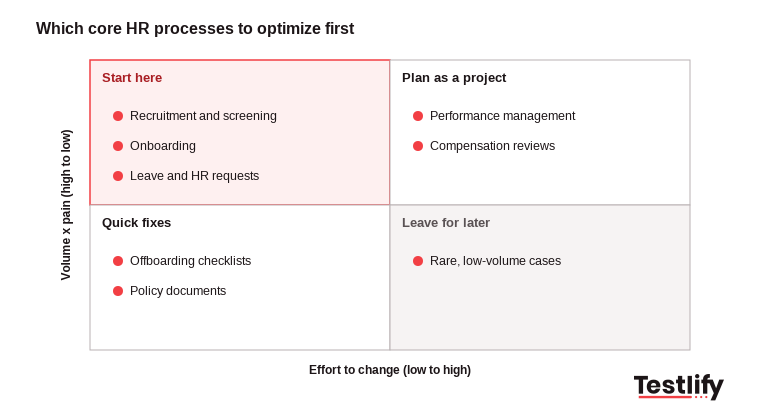
Use the table below to rank your own processes. Score each one on volume, pain and effort, then work top-down.Pro tip: Ask the people who run and use each process to score the pain, not only HR leadership. Recruiters, hiring managers and recent hires see delays that never show up in a report.
How do you optimize HR processes in 7 steps?
HR process optimization works best as a 7-step loop that you run on one process at a time: map the process, baseline it, prioritize the problem steps, redesign, automate, pilot and measure. The loop then starts again on the next process on your list.
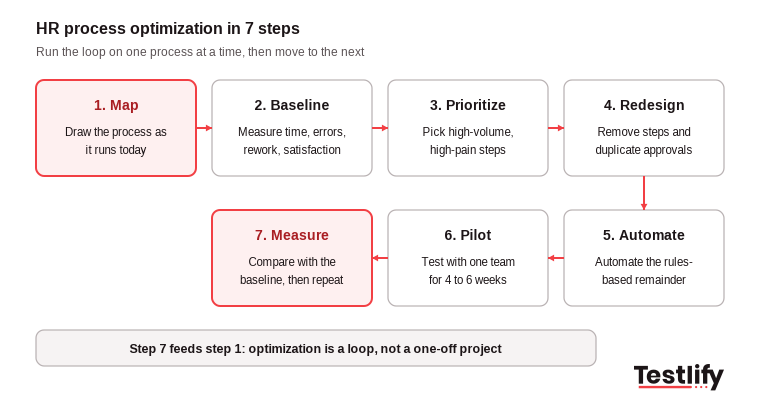
- Map the process as it runs today: Draw every step from trigger to outcome, including who does it, which system it touches and where it waits. Map what actually happens, not what the policy document says.
- Baseline the numbers: Measure cycle time, error rate, touches per case and user satisfaction for at least 30 days. Without a baseline, you cannot prove the change worked.
- Prioritize the problem steps: Mark the waits, hand-offs, duplicate data entry and approvals that add no decision. Pick the two or three that cause most of the delay.
- Redesign before you automate: Remove steps, merge approvals and standardize forms. A process with seven approvals is still slow once it is automated.
- Automate the rules-based steps: Use your ATS, HRIS and HR automation for reminders, routing, status updates, data sync and scoring. Keep human judgment for exceptions and final decisions.
- Pilot with one team: Run the new process with one team, region or job family for 4 to 6 weeks. Collect feedback weekly and fix issues before a wider rollout.
- Measure and repeat: Compare the pilot numbers with your baseline. Keep what worked, roll it out and move to the next process on your list.
Key takeaway: The order matters. Teams that automate first usually end up with a faster version of the same broken process, plus a new tool to maintain.
How do you optimize recruitment and screening?
Recruitment and screening is optimized by moving the evidence step earlier: candidates take a short, role-specific skills test before anyone reads a resume in detail or books an interview. Recruiters then spend their time on the candidates who have already shown the skills the job needs.
Recruitment is usually the core HR process with the most volume and the most manual effort. A single opening can bring hundreds of applications, and resume review is slow, inconsistent and hard to defend when a candidate asks why they were rejected. Here is how to fix the main steps:
- Define the skills first: Agree on the 4 to 6 skills that predict success in the role before the job ad goes live. Every later step scores against the same list.
- Screen on skills, not resumes: Send every applicant a short assessment built for the role. Scores give you a ranked shortlist instead of a pile of resumes.
- Automate the hand-offs: Use score thresholds to move candidates to the next stage, send invites and update the ATS without manual data entry.
- Check the rules on automated screening: If you hire in New York City, the city's rules on automated employment decision tools require a yearly bias audit and candidate notice before you use a tool that scores or ranks applicants.
- Use structured interviews: Ask every finalist the same questions and score answers against the same criteria, so interview feedback is comparable.
- Track the outcome: Measure time to hire, offer acceptance and 90-day retention for every role you change. Our guide on how to reduce the time to hire covers more fixes for slow hiring stages.
A faster, fairer first stage also improves the candidate's first impression of your company, which carries into onboarding and the first months in the role.
What metrics show HR process optimization is working?
The metrics that show HR process optimization is working are cycle time, error rate, touches per case and satisfaction of the people who use the process. Track all four for 30 days before a change and 30 days after it, so you compare like with like.
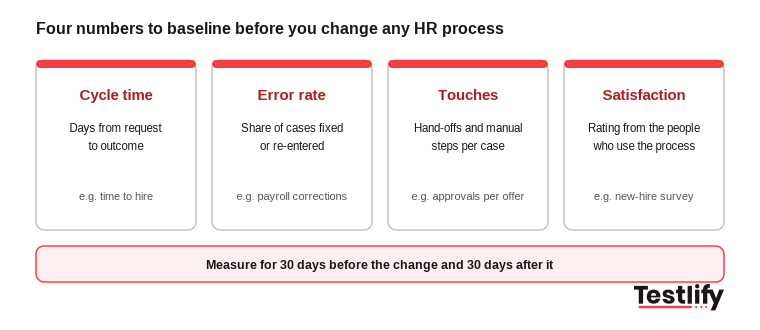
Add one business outcome to each project, such as 90-day retention for onboarding or quality of hire for recruitment. Our list of key HR metrics explains how to calculate each one.
What are HR process improvement examples?
HR process improvement examples are specific changes to one process, each with a clear before and after. These are common changes HR teams make, with the result each one targets:
- Skills tests before resume review: A high-volume hiring team replaces manual resume screening with a role-specific assessment, cutting recruiter hours per hire and shortening time to hire.
- One onboarding checklist across HR, IT and the manager: Equipment, system access and a first-week plan are triggered from the signed offer, so new hires are productive from day one. See this employee onboarding process guide for a full checklist.
- A single request form for HR questions: Email, chat and walk-up requests move into one form with routing rules and visible status, which cuts follow-ups.
- Quarterly check-ins instead of annual reviews: Short templates and goal tracking in one tool raise completion rates and give managers more frequent data. The performance management cycle shows how the stages fit together.
- Payroll data entered once: Pay changes are approved in one system that syncs to payroll, removing duplicate entry and the corrections it causes.
- Structured exit interviews: Every leaver answers the same questions, so HR can spot patterns by team and role. Use these exit interview questions as a starting set.
What challenges slow HR process optimization down?
The challenges that slow HR process optimization down are resistance to change, disconnected systems, compliance and data privacy rules, and limited HR time and budget. Planning for each one at the start keeps a project from stalling halfway.
- Resistance to change: Managers and employees are used to the old way. Involve them in mapping, explain what changes for them and share early wins from the pilot.
- Disconnected systems: Data that lives in an ATS, HRIS, payroll tool and spreadsheets is the main cause of duplicate entry. Check integrations before you add any new tool.
- Compliance and data privacy: Process changes that touch candidate or employee data need a review against the EU General Data Protection Regulation, CCPA and local labor law. Keep a person in the loop for any automated rejection.
- Limited time and budget: Optimize one process at a time and pick changes that pay back within a quarter, such as removing an approval step or moving to one request form.
- No baseline: Projects without before-and-after numbers lose support. Measure first, even if it is only a 30-day sample.
How does Testlify support HR process optimization?
Testlify supports HR process optimization in the recruitment and screening stage, which is often the first core HR process teams fix. It replaces manual resume review with role-specific skills assessments and AI interviews, and it sends scores back to the ATS automatically.
- Skills-based screening: A library of 3,500+ tests covers technical, cognitive, language, personality and role-specific skills, and the AI test builder creates a custom assessment from a job description.
- Less manual shortlisting: The AI resume screener scores resumes against the role with explainable match scores. Testlify says it cuts manual shortlisting by up to 70%.
- No duplicate data entry: Two-way integrations with 100+ ATS and HRIS platforms, including Workday, Greenhouse, Lever and SAP SuccessFactors, keep candidate data in one place.
- Fair and consistent: Every candidate takes the same assessment and is scored on the same criteria, with 20+ proctoring checks to protect results.
Testlify reports 55% faster time to hire and 94% candidate satisfaction across its customers.
Ready to fix your first HR process?
Start with the stage that has the most volume: screening. Browse the Testlify test library to find a test for your next open role, start a 7-day free trial with no credit card, or book a demo to see how assessments fit into your current hiring process.
Frequently asked questions

Content Writer
Yashika Khandelwal is a Content Writer with 3+ years of experience creating research-backed content on hiring, talent assessment, and HR technology. She is a registered Organizational Psychologist and subject matter expert who combines behavioral science with practical recruitment insights to produce accurate, evidence-based content.
LinkedInRelated resources
View all
HR & recruitment
How to hire UI designers: recruitment trends and assessment guide

HR & recruitment
Top 7 recruitment trends in event planner hiring

HR & recruitment
Top 7 recruitment trends in network administrator hiring

HR & recruitment
How HR can support sales employees: a 2026 guide for HR and sales leaders

HR & recruitment
Top 7 recruitment trends in data analyst hiring

HR & recruitment
Top 7 recruitment trends in marketing manager hiring
Get started.
Hire on proof, not resumes.
Run your first skills-based assessment free — no credit card required.