
Service desk skills: what to hire for and how to evaluate them
The 10 service desk skills worth hiring for, with a simple way to test each one using a skills test, a ticket work sample and an interview.

Service desk skills are the technical and people skills a support analyst needs to get users back to work: troubleshooting, operating system and network basics, ticketing tools and clear documentation on the technical side, and plain communication, empathy, prioritisation and composure on the people side. Hiring teams evaluate user support skills best by watching candidates handle real tickets, not by reading resumes.
TL;DR:
- The 10 service desk skills to hire for are troubleshooting, OS and hardware basics, networking basics, ITSM tool use, documentation, plain-language communication, empathy, active listening, prioritisation and composure under pressure.
- Technical skills can be trained in weeks. Empathy, listening and a calm troubleshooting method are much harder to teach, so weight them at least as high.
- The fastest way to evaluate user support skills is a short skills test, then a 20-minute ticket work sample, then a structured interview scored by two people independently.
- Never judge "presence" or appearance. Score each skill against a written anchor before you meet anyone.
- L1 hires need communication, logging and fast triage. L2 hires need deeper diagnostics, scripting and escalation judgment.
- As AI handles more routine tickets, the human desk gets the hard and emotional ones, which raises the bar for empathy and judgment.
 ChatGPT
 Gemini
 Claude
 Grok
 Perplexity
What are service desk skills?
Service desk skills are the abilities a user support analyst uses to log, diagnose and resolve IT problems while keeping the person on the other end calm and informed. Help desk skills and service desk skills overlap almost completely; the service desk label usually means the team also handles requests, changes and ITSM processes, not only break and fix.
The role is large and steady. The US Bureau of Labor Statistics counts about 750,600 computer user support specialist jobs, with a median pay of $61,860 in May 2025. The same profile names communication, customer service, listening and problem solving as the qualities that matter most, which tells you the job is half technical and half human.

Which service desk skills matter most?
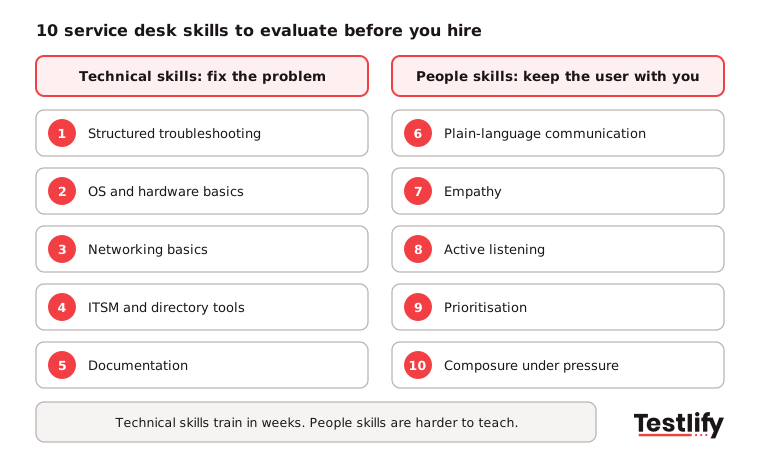
Service desk skills that matter most fall into two groups: five technical skills that let an analyst fix the problem, and five people skills that let users trust the fix. Most top candidates are strong in one group and coachable in the other, so decide which gaps your team can train.
Technical service desk skills
- Structured troubleshooting: Reproduces the issue, isolates the cause, tests one change at a time and confirms the fix with the user.
- Operating system and hardware basics: Comfortable with Windows, macOS and mobile devices, user accounts, printers and peripherals.
- Networking basics: Understands DNS, DHCP, Wi-Fi, VPN and how to tell a local fault from an outage.
- ITSM and directory tools: Logs and routes tickets in a tool like ServiceNow or Jira Service Management and handles accounts in Microsoft Active Directory. O*NET lists ServiceNow and Active Directory among the in-demand tools for this role.
- Documentation: Writes ticket notes and knowledge base articles that the next analyst can follow without asking.
People service desk skills
- Plain-language communication: Explains a technical fix to a non-technical user in short, clear steps, by phone, chat or email.
- Empathy: Treats a locked-out user as a person with a deadline, not a ticket number.
- Active listening: Asks clarifying questions before acting and repeats the problem back to confirm it.
- Prioritisation: Weighs business impact and urgency, so a payroll outage beats a slow laptop.
- Composure under pressure: Stays calm and polite with frustrated users and during major incidents.
Pro tip: Business awareness separates good analysts from great ones. Ask candidates who in the company would be hurt most if email went down for an hour. Strong candidates answer with teams and money, not servers.
How do you evaluate user support skills?
Evaluating user support skills works best when each skill has a written anchor for what good looks like, a specific way to test it, and a red flag to watch for. Agree on these before you see any candidate, so the scores reflect the skill and not how much the interviewer liked the person.
Hiring teams already know this matters. LinkedIn's Future of Recruiting 2025 found that 93% of talent acquisition professionals say accurately assessing skills is crucial to quality of hire, yet only 25% feel highly confident they can measure quality of hire at all.
Skill | What good looks like | How to test it | Red flag |
|---|---|---|---|
Troubleshooting | Clear steps, one change at a time, confirms the fix | Ticket work sample with a think-aloud | Jumps to reinstalling or reimaging first |
OS and networking basics | Correct, quick answers on common faults | Short multiple-choice skills test | Guesses without checking basics like cables or DNS |
ITSM tool use | Accurate category, priority and notes | Log a sample ticket in a mock form | Vague notes like "fixed it" |
Written communication | Short, friendly, step-by-step reply | Write a reply to a confused user email | Jargon, blame, or a wall of text |
Empathy and listening | Acknowledges impact, asks clarifying questions | Role-play with a frustrated user | Interrupts or argues with the user |
Prioritisation | Ranks by business impact, explains why | Give three tickets at once and ask for the order | Works strictly first come, first served |
Composure | Calm tone, owns next steps | Role-play during a simulated outage | Promises fixes they cannot deliver |
Across the teams we have seen hire support analysts at volume, the ticket work sample is the single most useful step. Candidates who talk through a lockout or a printer fault show their method, their patience and their honesty about what they do not know in about 20 minutes.
What does a fair support assessment process look like?
A fair support assessment process moves every candidate through the same five stages with the same scoring rules: a written scorecard, a short skills test, a ticket work sample, a structured interview, and independent scoring before any group discussion. The whole process can run in under a week for most L1 roles.
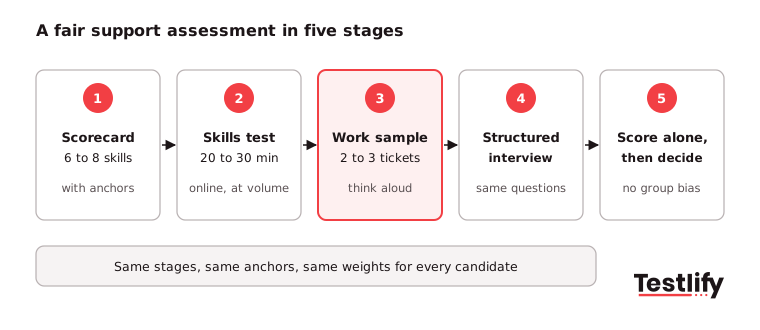
- Write the scorecard: List the 6 to 8 skills that matter for this desk and give each a weight and a 1 to 5 anchor.
- Screen with a skills test: Use a 20 to 30 minute online test on technical basics, written communication and situational judgment to shortlist fairly at volume.
- Run a ticket work sample: Give two or three realistic tickets, ask the candidate to think aloud, and score against the anchors.
- Hold a structured interview: Ask every candidate the same behavioral questions, in the same order.
- Score independently, then decide: Each reviewer scores alone before the debrief, so one loud opinion does not set the result.
If your desk is mostly chat or email, add a timed writing task and a typing check to stage 2. For broader guidance on matching test types to roles, see our overview of user skill assessments.
Which interview questions reveal service desk skills?
Interview questions that reveal service desk skills ask for real past tickets and specific decisions, not opinions about good service. Behavioral questions show method and judgment; a short scenario shows how candidates think when they cannot look up the answer.
- "Walk me through the hardest ticket you solved last month. What did you check first, and why?"
- "A user says the internet is down. What are your first three questions?"
- "Tell me about a time you had to say no to a user. How did you handle it?"
- "You have a VIP printer issue and a team-wide VPN outage at the same time. Which comes first?"
- "How would you explain multi-factor authentication to someone who hates technology?"
- "What did you learn on your own in the past six months to get better at support?"
For a longer question bank, use our help desk interview questions and the IT support specialist hiring guide.
How should L1 and L2 support hiring differ?
L1 and L2 support hiring should weight the same service desk skills differently. L1 analysts take first contact, so communication, logging and fast triage carry the most weight. L2 analysts take escalations, so deeper diagnostics, scripting and judgment about when to escalate again matter more.
Skill | L1 service desk weight | L2 support weight |
|---|---|---|
Communication and empathy | High | Medium |
Ticket logging and documentation | High | High |
Troubleshooting depth | Medium | High |
Networking and directory admin | Low to medium | High |
Scripting (for example PowerShell) | Low | Medium to high |
Prioritisation and escalation judgment | Medium | High |
Channel matters too. Phone desks need spoken clarity and composure; chat and email desks need fast, accurate writing and the ability to run two or three conversations at once.
Key takeaway: One support assessment does not fit every desk. Reweight the same scorecard by tier and channel, and keep the anchors identical so scores stay comparable.
What mistakes should hiring teams avoid?
Hiring teams evaluating support candidates most often lose good people, or hire the wrong ones, through five avoidable mistakes. Each one replaces evidence with impressions.
- Judging appearance or "presence": Looks and accent say nothing about ticket quality and open the door to bias. Score the skills on the scorecard only.
- Trusting certifications alone: CompTIA A+ or ITIL Foundation shows study, not how someone handles an angry user at 9 a.m. Treat them as a plus, not a filter.
- Testing trivia instead of method: Port numbers are easy to look up. A clear troubleshooting process is not.
- Skipping the written check: Most desks run on tickets and chat. A candidate who speaks well can still write confusing replies.
- Ignoring the AI shift: Self-service and AI agents now absorb many password resets and how-to questions, so human analysts get the harder, more emotional cases. Hire for judgment and empathy, not only speed.
We have seen hiring managers spend far less time in first-round interviews once a skills test and work sample come first, because only candidates who can already do the basics reach them. If you also hire for broader customer-facing roles, our customer service skills checklist covers those separately.
How does Testlify help evaluate service desk skills?
Testlify helps hiring teams evaluate service desk skills by putting the skills test, written and chat tasks, and AI interviews in one place, then scoring every candidate against the same criteria. Recruiters get a ranked shortlist instead of a pile of resumes.
- Ready-made support tests: The technical support help desk representative test sits in a library of 3,500+ validated tests, alongside communication, empathy and typing tests.
- Realistic tasks: 25+ question types, including typing, file upload, audio, video and Chat AI, let you build a ticket reply or a chat role-play into the support assessment. See how Chat AI interviews work.
- Fair, comparable scores: Automated scoring, weighted scoring and per-skill breakdowns let reviewers compare candidates on the same anchors.
- Integrity for remote tests: 20+ proctoring checks, including AI assistance detection and copy and paste tracking, keep remote results trustworthy. Anti-cheating and proctoring
- Fits your stack: 100+ ATS and HRIS integrations, and tests in 15+ languages for global or BPO desks.
Ready to hire your next service desk analyst?
Test real service desk skills before the first interview. Start a 7-day free trial of Testlify, no credit card required, and send the technical support help desk test to your next candidates. Hiring support teams at volume? Book a demo to see the full workflow.
Frequently asked questions

Senior SEO Specialist
Soham is a senior SEO specialist specializing in B2B HR tech. He covers search, answer, and generative engine optimization (SEO/AEO/GEO) for talent acquisition, skills-based hiring, and assessment-driven recruiting audiences.
LinkedInRelated resources
View all
Skill assessment
5 tips to evaluate network security skills

Skill assessment
5 tips to evaluate mobile app development skills

Skill assessment
5 tips to evaluate graphic designing skills

Skill assessment
5 tips to evaluate Data Mining skills

Skill assessment
How to evaluate content marketing skills

Skill assessment
How to evaluate sales skills when hiring
Get started.
Hire on proof, not resumes.
Run your first skills-based assessment free — no credit card required.