
Recruiter productivity: how to measure it and raise it
How to measure recruiter productivity fairly, which metrics to track, where recruiters lose hours and the fixes that raise output.

Recruiter productivity is the number of quality hires a recruiter delivers in a set period, weighed against the time and effort spent and the difficulty of the roles. The busiest recruiter is not always the most productive one. The most productive recruiter makes hires on time, sees offers accepted and has new hires still performing months later.
Application volume keeps rising while teams stay flat, so recruiters need a fair way to measure output and clear ways to raise it. This guide shows which metrics to track, what benchmarks to expect, where recruiters lose hours and which fixes work.
TL;DR / Key takeaways
- Recruiter productivity is quality hires per recruiter per quarter, adjusted for how hard the roles are. Calls, emails and InMails show effort, not productivity.
- Measure it in three layers: volume (hires, requisitions), speed and flow (time to fill, stage conversion) and quality (offer acceptance, 90-day retention, hiring manager rating).
- A fair benchmark is a range, not one number. Ashby's 2026 Talent Trends data puts the average at 7.3 hires per recruiter per quarter, but volume and specialist desks differ widely.
- Screening is the biggest drain on recruiter time. The average hire now takes about 291 applications, and fewer than 5% of applicants reach an interview.
- The fastest gains come from screening on skills early, cutting scheduling back-and-forth and capping requisition load, not from asking recruiters to work longer.
- LinkedIn found that recruiting teams using generative AI save about 20% of their work week. Put that time into candidate and hiring manager conversations.
 ChatGPT
 Gemini
 Claude
 Grok
 Perplexity
What is recruiter productivity?
Recruiter productivity is how much useful hiring output a recruiter produces for the time and resources spent. The output is filled roles with good hires, not activity. A recruiter who closes eight hard engineering roles with no early leavers can be more productive than one who closes twenty roles and loses a third of them in 90 days.
Three things sit inside the term:
- Output: Hires made and requisitions closed in a period.
- Efficiency: Time and effort per hire, such as days to fill and candidates screened per hire.
- Quality: Whether the hires were accepted, stayed and performed.
Most teams track the first, some track the second, and few track the third. That gap is why recruiter productivity is often misread. A team can look busy and fast while sending managers weak shortlists. Recruiter productivity is also different from recruiter workload, which is how many job requisitions a person carries at once. High workload with low output is usually a process problem, not a people problem.

Why is recruiter productivity under pressure in 2026?
Recruiter productivity is under pressure because hiring demand and application volume have grown faster than recruiting teams. Recruiters carry more requisitions and screen far more applicants for every hire, while headcount in talent acquisition has stayed flat at many companies.
The numbers show the squeeze:
- More requisitions per recruiter: SHRM's 2026 recruiting benchmarking of more than 4,600 organizations found a 67% increase in median requisitions per recruiter at extra-large organizations, and over 2 in 3 organizations reported struggles with hiring.
- More applications per hire: Ashby's 2026 Talent Trends Report, based on over 109 million applications, found that the average hire took 291 applications in early 2026, up from roughly 100 in 2021. Every hire in 2025 needed more than 300 applications on average.
- Flat teams: Gem's State of TA 2025 survey of 205 talent leaders found that 87% of companies plan to grow headcount, while 39% of recruiting teams expect to stay flat or shrink.
- More time on calls: The American Staffing Association and Prodoscore reported that recruiter call time hit 286 minutes per week in Q1 2026, double the level of Q1 2024.
When the same team has to process three times the applicants, recruiter productivity drops unless the process changes. Pushing harder leads straight to recruiter burnout, which costs more output than it saves.
How do you measure recruiter productivity?
Recruiter productivity is measured in three layers: volume, speed and flow, and quality. Track one or two metrics in each layer, compare recruiters only against peers hiring for similar roles, and review the numbers monthly. No single metric is enough, because each one can be gamed if it stands alone.
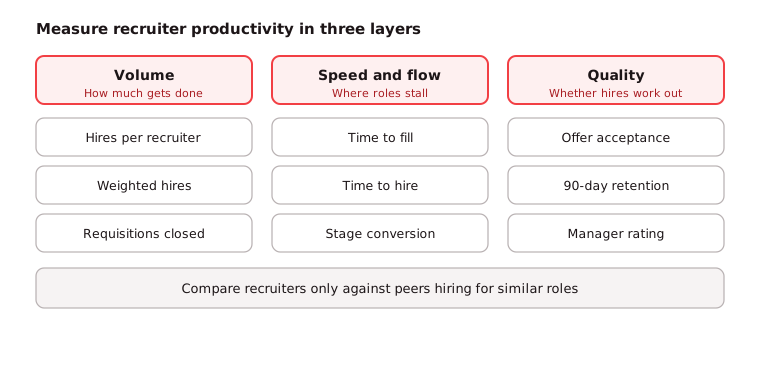
- Volume: Hires per recruiter per quarter and requisitions closed. This is the headline number leaders ask for.
- Speed and flow: Time to fill, time to hire and stage-to-stage conversion. These show where requisitions stall.
- Quality: Offer acceptance rate, 90-day retention and the hiring manager's rating of each hire. These stop speed from hiding weak hires.
Adjust for role mix: A recruiter filling contact center roles and one filling staff engineer roles should never be compared on raw hires. Give each role family a difficulty weight, for example, 1 for high-volume roles, 2 for experienced professional roles and 4 for senior or niche technical roles. Then use this formula:
Weighted hires per recruiter = sum of (hires x role weight) / number of recruiters
Set the weights from your own history: divide the average days to fill for each role family by the average for your easiest family. This keeps the comparison fair and stops recruiters from avoiding hard requisitions.
Key takeaway: Report weighted hires next to quality metrics. A weighted hire count that rises while 90-day retention falls is not a productivity gain.
Which recruiter productivity metrics should you track?
The recruiter productivity metrics worth tracking are the ones that show output, flow and quality with a clear formula. The table below lists the core set. Most teams can pull all of them from their ATS once stages and dates are recorded consistently.
Metric | Formula | What it tells you |
|---|---|---|
Hires per recruiter | Hires in period/recruiters | Raw output; use with role weights |
Requisitions per recruiter | Open requisitions/recruiters | Workload; above about 20 open roles, quality usually slips |
Time to fill | Offer accepted date - requisition open date | How long the business waits for a hire |
Time to hire | Offer accepted date - candidate application date | How fast candidates move once they apply |
Application to interview rate | Interviewed/applied x 100 | How well the top of the funnel is screened |
Interview to offer rate | Offers/candidates interviewed x 100 | Shortlist quality |
Offer acceptance rate | Offers accepted / offers made x 100 | Pay fit and candidate experience |
90-day retention | New hires still employed at 90 days/new hires x 100 | Early quality of hire |
Hiring manager satisfaction | Average rating of each hire, 1 to 5 | Whether the business got what it needed |
Cost per hire | Total recruiting cost/hires | Spend efficiency |
Two of these do the most work. Interview-to-offer rate shows whether recruiters send the right people to managers. 90-day retention shows whether those people were right for the job. See our guides to cost per hire and yield ratios for how to read the funnel numbers.
Pro tip: Record why a requisition closed, not only when. "Filled", "cancelled" and "put on hold" mean very different things for a recruiter's numbers, and mixing them makes good recruiters look slow.
What is a good benchmark for hires per recruiter?
A good benchmark for hires per recruiter depends on the roles. Ashby's 2026 data shows the average in-house recruiter making 7.3 hires per quarter in early 2026, up from a low of 4.5 in early 2023. Business roles averaged 5.0 and technical roles 3.8 hires per recruiter per quarter.
Use these ranges as a starting point:
- High-volume frontline roles: Contact center, retail and operations desks often reach 25 to 40 hires a quarter, because roles repeat and assessments can be reused.
- Mixed professional roles: About 8 to 15 hires a quarter is common for in-house recruiters handling sales, operations and support.
- Senior and specialist technical roles: 4 to 8 hires a quarter is a healthy pace when each role needs several interview rounds.
Speed benchmarks matter too. SHRM's 2026 benchmarking puts the median time to fill for nonexecutive roles at 39 calendar days. Ashby reports a median time to hire of 30 days for business roles and 40 days for technical roles.
Your own history beats any outside benchmark. Take the last four quarters, calculate weighted hires per recruiter, and set targets about 10% above that baseline once process fixes are in place.
Where do recruiters lose the most time?
Recruiters lose the most time in screening and scheduling. Application volume has roughly tripled since 2021, but the share of applicants who reach an interview has halved, so recruiters read far more resumes to find each candidate worth a conversation.
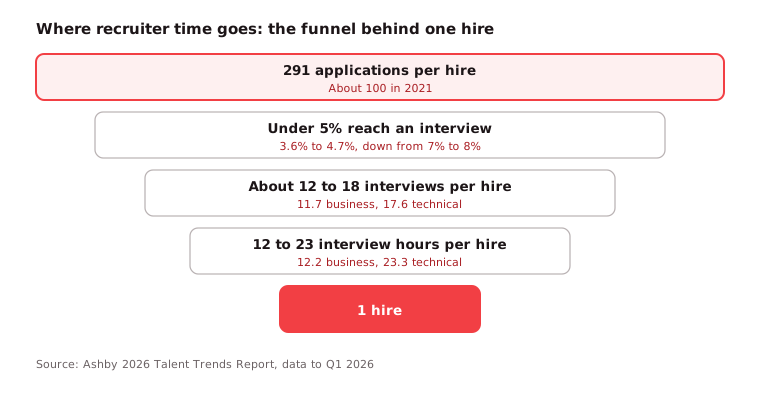
Ashby's data shows how steep the funnel has become:
- Resume review: Only 3.6% to 4.7% of applications now lead to an interview, down from 7% to 8% in 2021.
- Interview load: A business hire takes about 11.7 interviews and a technical hire about 17.6, both well above 2021 levels.
- Interview hours: Technical hires take about 23.3 interview hours each, and business hires about 12.2.
- Scheduling: Every extra round adds calendar back-and-forth between candidates, recruiters and panels. Our guide to interview scheduling covers how to cut it.
Other common time drains are vague job briefs that change mid-search, slow hiring manager feedback, and manual data entry between tools. Across the teams we work with, the pattern we have seen most often is that recruiters spend their best hours reading resumes that a short skills test would have screened out in minutes. The problems with manual candidate screening grow with every extra applicant.
How can you increase recruiter productivity?
Recruiter productivity increases when you remove low-value work from the recruiter's day and fix the handoffs that make requisitions stall. Working longer hours does not help. These eight steps give the biggest lift for most in-house teams.
- Start every role with a clear intake: Agree on the must-have skills, salary range, interview stages and feedback deadlines with the hiring manager before the job goes live. Most restarts trace back to a weak intake.
- Screen on skills before resumes: Send a short, role-based skills assessment to every applicant and review resumes only for those who pass. The recruiter then talks to fewer, better-matched people.
- Cap requisition load: Keep each recruiter at a load you can sustain, often 15 to 20 open roles for professional hiring. Move overflow to a coordinator or agency before quality drops.
- Automate scheduling and status updates: Self-scheduling links, interview templates and automatic rejection or progress emails remove hours of admin a week.
- Use structured interviews: A structured interview with set questions and scorecards cuts debrief time and makes hiring manager feedback faster.
- Set feedback deadlines for hiring managers: A 24 or 48 hour rule for interview feedback keeps candidates moving and stops offers from going cold.
- Reuse your talent pool: Silver-medal candidates from past searches are already screened. Tag them in the ATS and check them first.
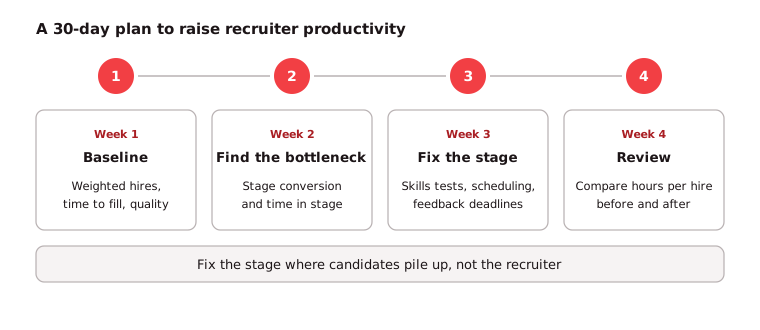
- Review the funnel monthly: Look at stage conversion by requisition and fix the stage where candidates pile up, rather than adding more sourcing.
For more ways to shorten the cycle, see how to reduce time to hire and how to build an efficient recruitment funnel.
Which tools and AI improve recruiter productivity?
Tools that improve recruiter productivity are the ones that remove manual screening, scheduling and data entry. The main ones are an applicant tracking system, scheduling software, skills assessments, AI resume screening and AI interviews. Pick tools that connect to your ATS, so recruiters do not copy data between systems.
Tool | Time it saves | Watch out for |
|---|---|---|
Tracking, stage moves, reporting | Inconsistent stage use breaks your metrics | |
Interview scheduling tool | Calendar back-and-forth | Panels still need feedback deadlines |
Skills assessments | Resume review and first-round calls | Tests must match the actual job |
AI resume screening | First pass on large applicant pools | Keep a person reviewing rejections |
One-way and AI interviews | First-round phone screens | Tell candidates how answers are scored |
CRM and email templates | Sourcing outreach and nurture | Generic messages lower reply rates |
AI is already paying off for teams that use it. LinkedIn's Future of Recruiting 2025 found that 37% of organizations are using or testing generative AI in hiring, and those teams save about 20% of their work week. Of the teams using it, 35% spend the time saved on candidate screening and 26% on skills assessment.
More tools do not always mean more output. The ASA and Prodoscore data shows recruiters using more AI tools each year while call time doubled, so measure whether each tool cuts hours per hire. For a wider list, see our roundup of recruitment automation tools.
How do you diagnose low recruiter productivity?
Low recruiter productivity is diagnosed by matching the symptom to the stage where hires stall. Look at stage conversion and time in stage for each requisition, then fix the stage, not the recruiter. Use this table as a quick guide.
Symptom | Metric to check | Likely fix |
|---|---|---|
Many applicants, few interviews | Application to interview rate | Add a skills test before resume review |
Managers reject most shortlists | Interview to offer rate | Redo the intake; agree on must-have skills |
Candidates wait days between rounds | Time in stage, feedback time | Set feedback deadlines; automate scheduling |
Offers declined | Offer acceptance rate | Check pay range and candidate experience |
Hires leave in the first months | 90-day retention | Test job skills earlier; share a realistic preview |
One recruiter far behind peers | Weighted hires, requisition load | Rebalance requisitions before coaching |
When one recruiter is behind, check load and role mix first. In most cases the slow recruiter is holding the hardest roles.
What mistakes hurt recruiter productivity measurement?
Recruiter productivity measurement goes wrong when teams count activity, ignore role difficulty or skip quality. Each mistake rewards the wrong behavior and pushes good recruiters away from hard roles.
- Counting activity as output: Calls, InMails and screens per day measure effort. Use them to diagnose a slow funnel, never to rank recruiters.
- Ignoring role mix: Raw hire counts punish recruiters who take senior or niche roles.
- Leaving out quality: Without retention or hiring manager ratings, speed can hide weak hires. The same LinkedIn recruiting report found only 25% of talent leaders are highly confident in how their company measures quality of hire.
- Blaming recruiters for business delays: Slow approvals and late feedback inflate time to fill. Track time in stage by owner.
- Changing metrics every quarter: Keep the same definitions for at least a year so trends mean something.
See how to improve quality of hire for ways to close the quality gap.
How can Testlify help recruiters work faster?
Testlify helps recruiters work faster by moving skills screening and first-round interviews to the start of the process, so recruiters spend their time on candidates who have already shown they can do the job.
- Skills tests at the top of the funnel: 3,500+ ready-made tests in the Testlify test library, or an AI test builder that turns a job description into a role-based assessment in under a minute.
- Ranked shortlists: Automated scoring, per-skill breakdowns and score thresholds for auto-shortlisting give recruiters a ranked list instead of a pile of resumes.
- First-round interviews without scheduling: One-way video and audio interviews, plus AI interviews by video, voice or chat, let candidates answer in their own time.
- Resume screening support: The AI resume screener pulls resumes from the ATS, gives an explainable match score and syncs back.
- Fits the existing stack: Two-way sync with 100+ ATS and HRIS tools through Testlify integrations, so recruiters do not move data by hand.
Ready to give your recruiters their hours back?
Try a skills-first screen on one high-volume role and compare hours per hire before and after. Start a 7-day free trial of Testlify, no credit card required, or browse the test library to find a test for your next opening.
Frequently asked questions (FAQs)

People and Talent Partner
Arushi Shah runs day-to-day talent acquisition and candidate experience at Testlify. She writes on interviewing, structured hiring, and giving candidates a fair, fast process.
LinkedInRelated resources
View all
Talent Acquisition
Interview calibration: how to get interviewers scoring alike

Talent Acquisition
Healthcare hiring: a practical guide for 2026

Talent Acquisition
Full cycle recruiting: what it is, the 6 stages and how to run it

Talent Acquisition
What is a hiring manager? Role and duties explained

Talent Acquisition
Contingent workforce management: a guide for hiring teams

Talent Acquisition
Public sector recruitment: a practical guide for hiring teams
Get started.
Hire on proof, not resumes.
Run your first skills-based assessment free — no credit card required.