
Custom question type.
Assess spreadsheet skills in a live, role-relevant environment
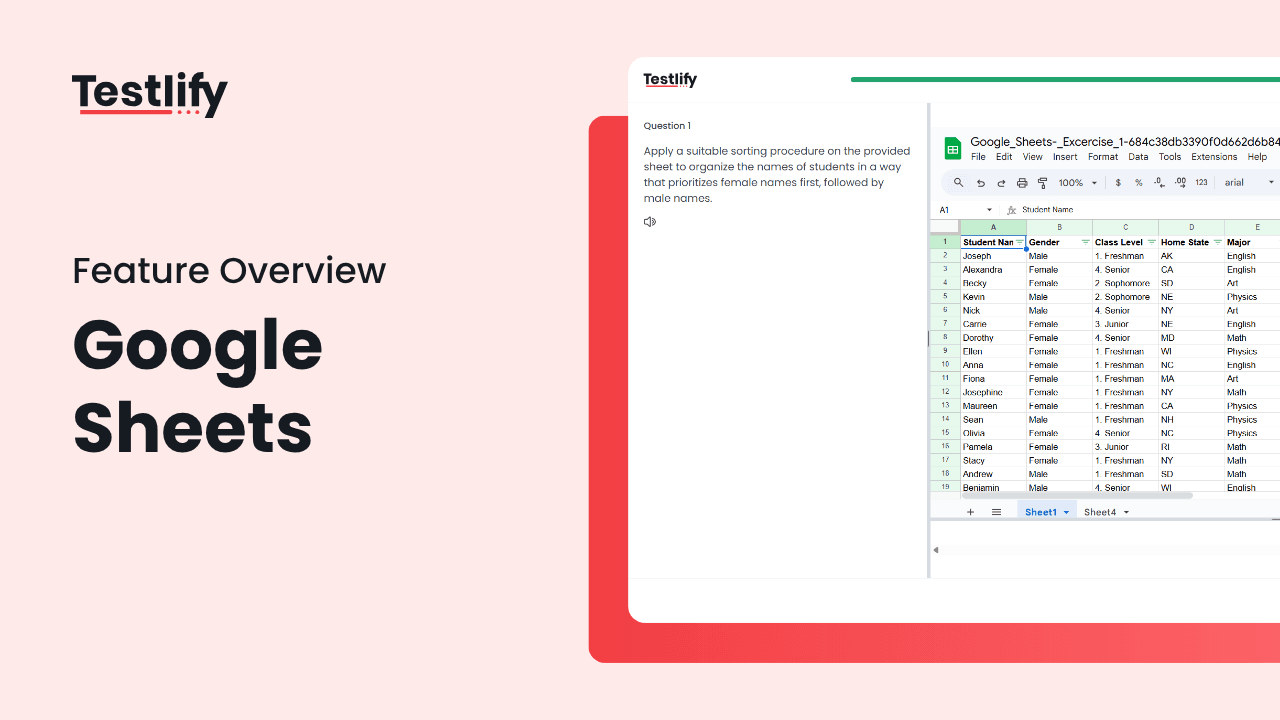
Evaluate real-world data skills directly within Google Sheets. Testlify's Google Sheet Questions provide open-ended spreadsheet-based tasks that assess candidates' ability to analyze, calculate, visualize, and communicate using the tool they'll actually use on the job.
See how Google Sheet Questions work
Test formulas, data analysis, and structured thinking through practical tasks in a live spreadsheet environment.
Why Google Sheet Questions drive better hiring outcomes
Standard quizzes can't capture how candidates think with data. Google Sheet Questions simulate real job tasks, asking candidates to organize, calculate, analyze, and explain, just like they would in a real work scenario.
- Measure formula fluency, attention to detail, and data storytelling
- Reveal how candidates clean, manipulate, and work through datasets
- Replace canned quiz answers with dynamic responses that reflect actual capability
- Align assessment tasks directly with job performance expectations

How it works
Upload a dataset
Upload a dataset or create a structured spreadsheet task
A unique sheet per candidate
Each candidate receives a unique, editable Google Sheet
Automatic tracking
Testlify tracks activity, manages timing, and auto-submits the response
Review the output
Hiring teams review formulas, formatting, logic, and final output
Hands-on testing for hands-on roles
Google Sheet Questions go beyond static inputs, they enable dynamic task execution and real problem-solving using live data and formulas.

Core product features:
Task editor
Create spreadsheet-based exercises or import templates
Live Google Sheet Workspace
Familiar, no-learning-curve interface for candidates
Data Locking & Cell Protection
Protect parts of the sheet while testing formula creation
Timed Testing
Define time limits and enforce deadlines automatically
Activity Tracking
Monitor engagement, input logs, and change history
Plagiarism and Duplication Checks
Detect reused work and copied logic
Collaboration Scoring Mode
Review formulas, logic, and output with team comments
Assess depth, not just data entry
Spreadsheet skills reflect more than technical proficiency, they reveal logic, attention to detail, and process orientation. Google Sheet Questions are designed to capture those nuances early in the hiring funnel.
- Provides deep insight into candidate thinking through structured outputs
- Surfaces strong performers through transparent, testable work samples
- Identifies candidates who think critically with numbers and structure
- Helps hiring teams compare how different candidates approach the same task
- Reduces dependency on interviews by delivering objective, documented performance

Structured review for spreadsheet-based submissions
With spreadsheet-based tasks, precision and structure matter. Testlify enables multi-dimensional scoring and collaborative evaluation for every candidate submission.

Scoring features include:
Formula validation
Review cell logic, dependencies, and functions
Output accuracy checks
Score based on final values and error-free logic
Side-by-side comparisons
Evaluate multiple submissions against the same criteria
Centralized score records
Documented decision-making for transparency and fairness
Try Testlify today
Ready to revolutionize your recruitment process? Sign up for Testlify today and try out our Google sheet questions feature for yourself. With Testlify, you can streamline your recruitment process, save time and resources, and make informed hiring decisions.
Custom question types.
Explore other custom question types
In addition to Google Sheet questions, Testlify offers a range of other customizable question types to suit your assessment needs. From multiple select to short answer and open ended questions, have the flexibility to design assessments that accurately measure candidates' skills and qualifications.
Integrations.
Connects with 100+ tools your team already uses
Plug Testlify into your ATS and HRIS. Candidate data syncs automatically, workflows stay in one place, and your hiring process moves from assessment to offer without manual handoffs.














Testimonials.
Trusted by 1,500+ companies
From staffing agencies to enterprise talent teams, recruiters use Testlify to shortlist faster and hire with evidence instead of gut feel. Here is what they say about it.
 G24.7
G24.7As a staffing agency, we frequently hire for different roles and Testlify's extensive test library across various domains was invaluable in finding the right candidates for our diverse range of client requirements.


Awards and recognitions.
Recognized by the people who use it
Recognized by G2 as a Leader and High Performer in Talent Assessment and Technical Skills Screening.






Frequently asked questions
Want to know more about Testlify? Here are answers to the most commonly asked questions about our company.
Ready to Replace Gut Instinct with Verified Skills?
Your next great hire is in your candidate pool right now. Testlify's assessments surface them in 30 minutes, with less reliance on resumes and gut feel.
- 7-Day free trial
- Unlimited assessments
- Cancel anytime