
Coding Interview: How to Run One That Tests Real Skill
How hiring teams can run a fair coding interview: main formats, a four-part scoring rubric, good questions, AI rules and cheating checks.
A coding interview is a technical interview in which a candidate solves a programming problem in real code while an interviewer, or a structured test, watches how they work. It shows whether a developer can understand a problem, choose an approach, write working code and test it, which a resume and a conversation cannot prove.
TL;DR: This guide explains what a coding interview is, what happens during one, and the five formats hiring teams use, from short screening tests to pair programming. It gives you a four-part scoring rubric, a six-step way to run the interview, the kinds of questions worth asking, and a clear stance on AI tools and cheating. The last section shows how Testlify supports coding tests and live coding interviews in one place.
 ChatGPT
 Gemini
 Claude
 Grok
Grok Perplexity
What is a coding interview?
A coding interview is a stage in developer hiring where candidates write code to solve a defined problem, usually in a shared editor, within 30 to 60 minutes. The interviewer scores how the candidate reasons, communicates, codes and tests, not only whether the final answer runs.
Coding interviews exist because developer resumes are hard to read and easy to inflate. Job titles vary between companies, and a list of languages says nothing about how well someone uses them. The interview replaces claims with evidence.
Demand keeps the stakes high. The US Bureau of Labor Statistics projects 10% employment growth for software developers, QA analysts and testers from 2025 to 2035, with about 106,100 openings a year and a median pay of $134,040. At that salary, a weak hiring signal is expensive.

What happens in a coding interview?
A coding interview usually follows the same arc: a short introduction, a problem statement, clarifying questions, planning, coding, testing and a few minutes of follow-up discussion. Most teams run two or three coding rounds across the hiring process, each with a different job.
Stage | Typical length | Main job |
|---|---|---|
Online coding screen | 30 to 90 minutes, taken any time | Filter on core skills before anyone spends interviewer time |
Live coding or technical phone screen | 45 to 60 minutes | See how the candidate thinks and talks through a problem |
Final technical round | 1 to 3 sessions of about 60 minutes | Go deeper: pair programming, debugging, design or a take-home review |
Inside a single live round, the first 5 minutes go on introductions and the problem, about 35 minutes on solving and testing, and the last 10 minutes on follow-up questions and the candidate's own questions. Interviewers who protect that structure get comparable evidence from every candidate.
What are the main coding interview formats?
Coding interview formats fall into five groups: online coding screens, live coding, pair programming, take-home projects with a review, and live debugging. Each one shows different skills, costs a different amount of interviewer time, and carries a different risk of AI-assisted or outsourced answers.
Format | What it shows | Interviewer time | AI and cheating risk | Best use |
|---|---|---|---|---|
Online coding screen | Core language and problem-solving skill | None during the test | Medium, needs proctoring | Early filter for volume |
Live coding | Reasoning, communication, speed | High | Low with follow-up questions | Mid-stage for most roles |
Pair programming | Collaboration, practical judgment | High | Low | Final round, team fit on real work |
Take-home plus review | Code quality, testing, design trade-offs | Medium | High unless the review is live | Senior roles with time to spare |
Live debugging | Reading unfamiliar code, forming hypotheses | High | Low | Roles that maintain existing systems |
No single format covers everything. A common pattern for mid-market and enterprise teams is a proctored online screen first, then one live round, then pair programming or a take-home review for the shortlist.
What do interviewers evaluate in a coding interview?
Interviewers in a coding interview usually evaluate four areas: problem solving, communication, code quality and testing. A candidate who reaches a correct answer silently and untested can score lower than one who reaches a partial answer with clear reasoning and good checks.
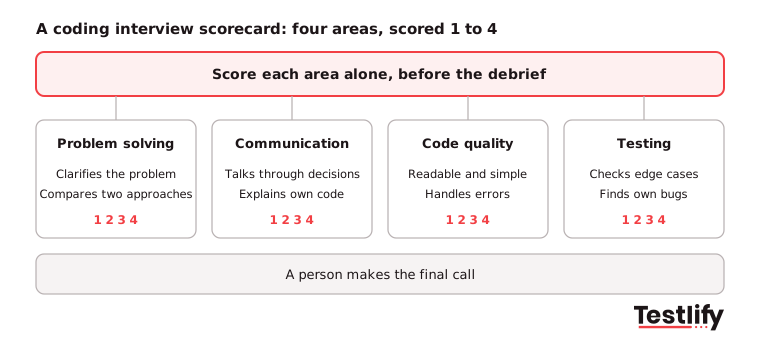
Area | What strong looks like | What weak looks like |
|---|---|---|
Problem solving | Clarifies the problem, compares two approaches, explains time and space cost | Starts typing at once, sticks to the first idea |
Communication | Talks through decisions, takes hints well, asks focused questions | Long silences, cannot explain own code |
Code quality | Readable names, simple structure, handles errors | Clever but unreadable, copy-paste blocks |
Testing | Checks normal and edge cases, finds and fixes own bugs | Declares it done without running it |
Score each area from 1 to 4 against written anchors before the debrief, not after. Skills evidence is what TA leaders want most: LinkedIn's Future of Recruiting 2025 found that 93% of talent acquisition professionals say accurately assessing skills is crucial to improving quality of hire.
How do you run a coding interview, step by step?
Running a coding interview well takes six steps: define the skills, pick the format, choose and test the problem, brief the candidate, run the session to a fixed structure, and score against the rubric before discussing the candidate. Skipping the first or last step causes most unfair outcomes.
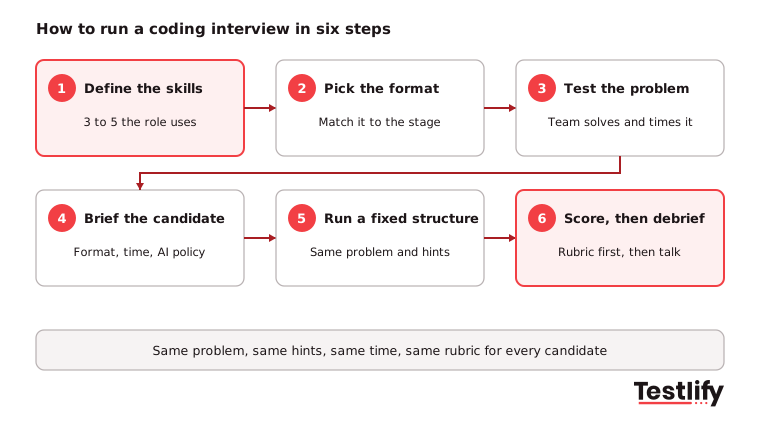
- Define the skills. List the three to five skills the role uses every week, such as SQL, REST APIs or React state management. Leave out puzzles the job never needs.
- Pick the format. Match the format to the stage: a screen for volume, live coding or pair programming for the shortlist.
- Choose and test the problem. Use a realistic task that a good candidate can finish in the time. Have a team member solve it first and time it.
- Brief the candidate. Share the format, the language options, the time limit and the AI policy in advance. Surprises measure nerves, not skill.
- Run a fixed structure. Same problem, same hints, same timing for every candidate in the role. Take notes on what the candidate did, not on how they seemed.
- Score before the debrief. Each interviewer scores the rubric alone, then the panel compares. A person makes the final call.
Pro tip: Write down two hints in advance and give them at set points, for example after 10 minutes stuck. Unplanned hints are the fastest way to make two candidates' scores incomparable.
What coding interview questions should you ask?
Coding interview questions work best when they look like a small slice of the real job: a function to write, a bug to fix, a feature to extend or a query to optimize. Puzzle questions and memorized algorithm tricks mostly test practice time, and their answers are easy to find online.
Good question types by level:
- Junior developers: write a function that cleans and validates input, parse a small file, or fix three bugs in a short module.
- Mid-level developers: build a small API endpoint with error handling, refactor a messy function and add tests, or write and tune a SQL query on a sample schema.
- Senior developers: extend an existing codebase with a new feature, debug a failing service from logs, or review a pull request and explain what you would change.
- Data and ML roles: clean a dataset and compute a metric, or explain why a model's results look wrong.
For each question, prepare a working solution, two hints, two follow-up questions that change a requirement, and the rubric anchors. Follow-ups such as "What if the input were 100 times larger?" show whether the candidate understands the code or only produced it.
Should candidates use AI in a coding interview?
Candidates may use AI in a coding interview only when the employer says so, and the right answer depends on what the round is for. Most developers already code with AI, so some teams now allow it in one round and judge how well the candidate prompts, checks and explains the output.
AI use at work is now the norm. The Stack Overflow Developer Survey 2025 found that 84% of respondents use or plan to use AI tools in their development process, up from 76% a year before, and 51% of professional developers use them daily. Trust is lower: about 46% distrust the accuracy of AI tools, against about 33% who trust it.
Policy | When to use it | What you learn | What to watch |
|---|---|---|---|
AI off | Screens and rounds that test fundamentals | Unaided skill in the core language | Needs proctoring to enforce |
AI allowed | Later rounds that mirror daily work | How the candidate checks and explains AI output | Score the review and reasoning, not the volume of code |
Whichever policy you choose, state it in the invite and apply it to every candidate in the role. Then ask the candidate to explain any code they did not type themselves.
How do you prevent cheating in a coding interview?
Preventing cheating in a coding interview takes three layers: identity checks so the right person shows up, integrity checks during the session, and live follow-up questions that only the real author of the code can answer. No single layer is enough on its own.
The problem is growing. In a 2025 Gartner survey of 3,000 job candidates, reported by HR Dive, 6% admitted taking part in interview fraud, and Gartner predicts that 1 in 4 candidate profiles worldwide could be fake by 2028. Gartner research cited by Greenhouse found that 54% of recruiting leaders say AI has made candidate fraud a significantly larger problem, yet only 7% used identity document validation in 2024.
- Before the session: private invites, photo ID with a face match, and a check that the camera and screen share work.
- During the session: full-screen mode, tab and copy-paste tracking, webcam snapshots, AI assistance detection and question-level activity logs.
- After the session: a reviewer watches flagged moments, and a live round asks the candidate to walk through and change their own code.
Treat integrity flags as a reason to look closer, never as an automatic rejection.
What should a coding interview platform include?
A coding interview platform should include a real code editor with the languages you hire for, both async tests and live sessions, structured scoring, integrity checks and an ATS connection. Without these, teams fall back to shared documents and video calls, and scores stop being comparable across interviewers.
Use this checklist when you compare tools:
- Code editor that runs code against test cases, in every language your teams use
- Online screens and live coding or pair programming in the same platform
- Ready-made coding tests plus your own questions
- Rubric-based scoring that every interviewer fills in
- Proctoring and identity checks you can switch on per round
- Reports a hiring manager can read without running the code
- Two-way sync with your applicant tracking system
Key takeaway: The platform matters less than the structure you put in it. Same problem, same hints, same rubric and a clear AI policy will improve a coding interview more than any single feature.
How does Testlify support coding interviews?
Testlify supports coding interviews with online coding tests for early screening and live coding interviews for later rounds, all inside one platform. Hiring teams can screen every applicant on real code, then spend interviewer time only on the shortlist.
- Coding tests in 45+ programming languages. Ready-made programming tests sit alongside 3,500+ tests in the wider library, and coding is one of 25+ question types you can mix into a custom assessment. coding tests
- Live coding and pair programming. Interviewers can run live coding and pair-programming interviews, and the Reviewers Portal gives the panel one place to score and comment. proctored live coding projects
- Integrity built in. 20+ proctoring checks include AI assistance detection, copy and paste tracking, tab proctoring, webcam snapshots and session recording, with photo ID and face match available per attempt. anti-cheating and proctoring
- Scores a manager can read. Automated scoring, a per-skill breakdown, AI-written strengths and gaps, and suggested follow-up questions for the live round.
- Fits your stack. Two-way sync with 100+ ATS and HRIS tools, and assessments in 15+ languages for global hiring.
- Extra interviewers when you need them. Interview-as-a-Service matches you with vetted domain-expert interviewers when your engineers are short on time.
For the full developer hiring flow, see developer hiring with Testlify and technical screening. Recruiters without a technical background can start with how to interview a software developer as a non-tech recruiter.
Frequently asked questions
Ready to run your next coding interview?
Screen developers on real code before you book a single interview. Start a 7-day free trial of Testlify, no credit card required, and send your first coding test today.

Content Writer
Yashika Khandelwal is a Content Writer with 3+ years of experience creating research-backed content on hiring, talent assessment, and HR technology. She is a registered Organizational Psychologist and subject matter expert who combines behavioral science with practical recruitment insights to produce accurate, evidence-based content.
LinkedInRelated resources
View all
Technical assessments
10 best technical assessment tools to consider in 2026

Technical assessments
Benefits of technical assessments you can’t ignore & myths you should
HR Toolkit
Performance Evaluation Template: Free Form, Rating Scale and Examples

HR & recruitment
How Do Employee Benefits Affect Total Employment Compensation?

Workplace culture
Participative Leadership: Meaning, Types, Pros and Cons

Talent assessment
What Is Talent Benchmarking? A 2026 Guide for Hiring Teams
Get started.
Hire on proof, not resumes.
Run your first skills-based assessment free — no credit card required.