
Automated candidate screening at scale: a practical playbook
How to run automated candidate screening across thousands of applicants: exceptions, score bands, human review, fairness checks and the metrics to watch.

Automated candidate screening at scale uses AI to review, test and rank thousands of job applicants against the same criteria. A hiring team gets a shortlist in hours instead of weeks. It works only when the team also plans for the candidates the system cannot handle on its own: the exceptions, the borderline scores and the people who need a human to look.
 ChatGPT
 Gemini
 Claude
 Grok
 Perplexity
TL;DR
- Automated candidate screening runs every applicant through the same steps: resume match, knockout questions, skills test and AI interview, ending in a ranked shortlist.
- Scale breaks on exceptions: dropped interviews, missed deadlines, near-miss scores and ATS status mix-ups. Give each one an owner and its own status.
- Use three score bands instead of one cut-off: auto-advance the top band, review the middle band by hand and decline the bottom band kindly.
- Screen on skills tests and structured interviews. LinkedIn found 93% of TA professionals call accurate skills assessment crucial for quality of hire.
- AI screening is regulated: NYC Local Law 144 requires a bias audit and candidate notice, and the EU AI Act classes it as high-risk.
- Track five numbers weekly: pass rate by stage, pass rate by group, human override rate, candidate drop-off and time in each status.

What is automated candidate screening at scale?
Automated candidate screening at scale is a first stage of hiring that applies the same AI checks to every applicant for a role and passes a ranked shortlist to recruiters. It usually combines resume matching, knockout questions, skills assessments and AI interviews, with people reviewing borderline cases and making the final decision.
The term matters most for high-volume roles: contact center agents, retail associates, warehouse staff, nurses, graduate programs and support teams. In these roles, recruiters cannot read every application, so the screening rules decide who gets seen at all. Our guide to AI for large-volume hiring covers the benefits stage by stage. For the basics of each stage, see our AI candidate screening guide. This post covers how to run it day to day, once the volume arrives.
How does automated candidate screening work?
Automated candidate screening works as a pipeline of short, automated checks, each one narrowing the pool on a different kind of evidence. The cheapest checks run first and the richest checks run last, so the most candidate effort goes into the people most likely to fit.
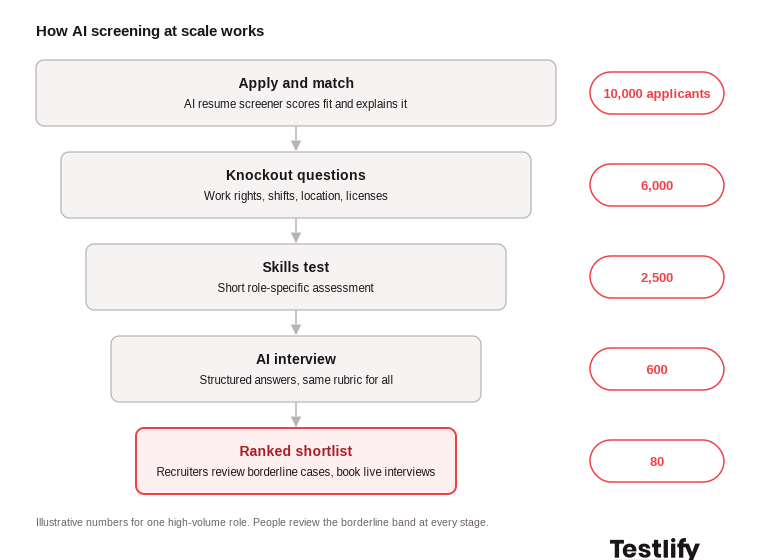
- Apply and match: The ATS sends each application to an AI resume screener, which scores it against the job requirements and explains the score.
- Knockout questions: Short questions confirm the must-haves, such as work rights, shift availability, location or a required license.
- Skills test: Candidates who pass take a short, role-specific assessment that measures what the job needs, such as typing speed, customer handling or a coding task.
- AI interview: Top scorers answer structured interview questions by video, voice or chat, scored on the same rubric for everyone.
- Ranked shortlist: Recruiters see a ranked list with per-skill scores, review the borderline cases, and book live interviews.
What should AI screen for at each stage?
AI should screen for a different kind of evidence at each stage, and each stage should answer one clear question. Mixing goals, such as judging personality from a resume, makes the results hard to explain and easy to challenge.
Stage | Question it answers | What to measure | What to avoid |
|---|---|---|---|
Resume match | Does the person meet the stated requirements? | Required skills, certifications, relevant experience | Gaps, school names, photos, anything that hints at age or background |
Knockout questions | Can the person legally and practically take the job? | Work rights, shifts, location, licenses | Questions that are nice-to-have dressed up as must-have |
Skills test | Can the person do the core tasks? | Role tasks, job knowledge, language level, typing | Long tests for entry-level roles; trivia unrelated to the job |
AI interview | How does the person handle real situations? | Structured answers scored on a fixed rubric | Scoring tone, accent or appearance |
For entry-level volume roles, keep the whole flow short enough to finish on a phone in one sitting. A skills test from a role-based test library usually tells you more in 15 minutes than a resume ever will.
Why do exceptions matter more at scale?
Exceptions matter more in automated candidate screening at scale because a rule that fails one candidate in a hundred fails hundreds of people when 50,000 apply. Recruiters used to catch these cases by judgment. Once AI runs the first stage, nobody sees them unless the process was built to show them.
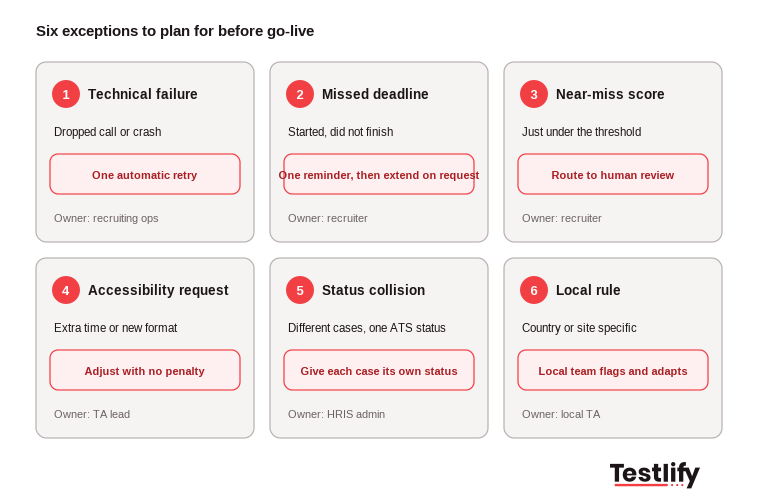
Plan for these six exceptions before go-live:
- Technical failures: A dropped voice call, a crashed browser or a bad connection during an AI interview. Give the candidate one automatic retry before any rejection.
- Missed deadlines: Candidates who start but do not finish. Send one reminder, then close the invite with a way to ask for more time.
- Near-miss scores: Candidates a few points under the threshold. Route them to a person before any auto-reject email goes out.
- Accessibility requests: Candidates who need extra time, a screen reader or a different format. Publish how to ask, and make the change without a penalty.
- Status collisions: Three different situations sharing one ATS status, such as "screen failed" for a knockout, a no-show and a low score. Give each its own status so recruiters can act on it.
- Local rules: Pay transparency, works council approval or channel limits in one country. Let local teams flag rules that head office cannot see.
Pro tip: Review a sample of exceptions every week as data. If one exception keeps growing, fix the rule behind it.
In our experience, the gap that hurts most at go-live is a missing list of exceptions, with no owner for each one.
How do you set score thresholds without losing good candidates?
In automated candidate screening, score thresholds work best as three bands instead of a single pass mark. A single cut-off treats a candidate one point below the line the same as one who scored zero. Bands send clear passes and clear fails through automatically and put the uncertain middle in front of a person.
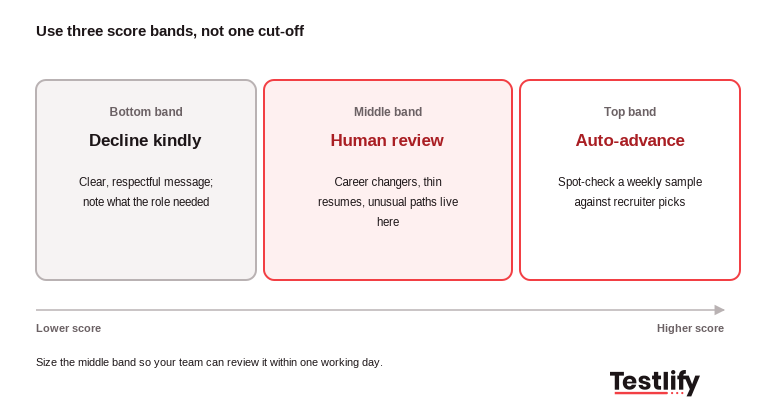
- Top band: Auto-advance to the next stage. Check a small random sample each week to confirm the AI agrees with your recruiters.
- Middle band: Human review. This is where most hidden talent sits: career changers, people with thin resumes and strong test scores, and candidates with unusual backgrounds.
- Bottom band: Decline with a clear, kind message and, where you can, a note on what the role needed.
Set the first thresholds from a pilot, not a guess. Run the screening on one role, compare its ranking with what your best recruiters would have chosen, and adjust the bands until the middle band is a size your team can review in a day. For a deeper look at the two ways to filter, see screening in vs screening out.
Where should people stay in the loop?
People should stay in the loop at every point where a decision is hard to reverse or hard to explain. AI handles the volume and the consistency. Recruiters handle judgment, context and the final call.
- Before launch: A recruiter and the hiring manager agree on the skills, the questions and the scoring rubric.
- The middle band: A person reviews every borderline candidate.
- Every rejection rule: A person approves any rule that auto-rejects, and checks a sample of rejected candidates each week.
- Appeals: Candidates have a simple way to ask for a human review.
- The final decision: No candidate is hired or rejected for the final round by the AI alone.
The EU AI Act also requires human oversight for high-risk AI, and AI used to filter and evaluate job candidates falls in that group.
How do you keep AI screening fair and compliant?
Automated candidate screening stays fair and compliant when the team audits it for bias, tells candidates how it works, collects only the data it needs and keeps a person in charge of decisions. These duties grow with scale, because a biased rule applied to 50,000 people creates a pattern regulators can see.
- NYC Local Law 144: The NYC rules on automated employment decision tools require a bias audit within a year before use, a public summary of results and advance notice to candidates.
- EU AI Act: AI used to filter applications and evaluate candidates is classed as high-risk, with duties on human oversight, transparency and record keeping.
- UK data protection: After auditing AI recruitment tools, the UK Information Commissioner's Office (UK ICO) made nearly 300 recommendations. According to the UK ICO, some tools let recruiters filter out candidates by protected characteristics, guessed gender and ethnicity from names, and kept far more personal data than needed.
In practice, ask every vendor for its latest bias audit, check what data each stage collects, and test pass rates by group on your own candidates.
Which metrics show your AI screening is working?
The metrics that show automated candidate screening is working measure speed, fairness, candidate experience and quality together. Speed alone can hide a broken process: a system that rejects everyone is very fast.
Metric | What it tells you | Warning sign |
|---|---|---|
Pass rate by stage | Whether each stage filters as planned | One stage removes far more people than expected |
Pass rate by group | Whether a stage affects some groups more | A clear gap between groups at one stage |
Human override rate | How often recruiters disagree with the AI | Rising overrides in the top or bottom band |
Candidate drop-off | Whether the process is too long or confusing | Drop-off spikes at one step, often on mobile |
Time in status | Where candidates get stuck | Exceptions waiting days for an owner |
Quality of hire | Whether shortlisted people succeed in the job | Strong screening scores, weak 90-day performance |
Quality of hire is the hardest number and the one that matters most. LinkedIn's Future of Recruiting 2025 report found that 89% of talent acquisition professionals say measuring quality of hire will become more important, yet only 25% are highly confident they can measure it well. Data from LinkedIn Talent Solutions in the same report shows 93% see accurate skills assessment as crucial to quality of hire. Linking screening scores to 90-day performance closes that gap.
What does a go-live checklist for AI screening look like?
A go-live checklist for AI screening confirms that the rules, the exceptions, the people and the legal duties are ready before the first candidate applies. Run it for every new role family, not once for the whole company.
- Skills and rubric agreed: The hiring manager has signed off on what each stage measures.
- Pilot complete: The AI ranking was compared with recruiter choices on one live role.
- Score bands set: Top, middle and bottom bands are defined, with a daily review capacity for the middle band.
- Exceptions mapped: Each of the six exceptions has a status, an owner and a response time.
- ATS statuses clean: Every outcome has its own status, and the sync has been tested end to end.
- Candidate notice live: Job posts and invites explain that AI is used, what it checks and how to ask for a human review.
- Bias audit and data check: The vendor's latest audit is on file and each stage collects only the data it needs.
- Weekly review booked: A named owner reviews the metrics table and a sample of exceptions every week.
How does Testlify support automated candidate screening at scale?
Testlify supports automated candidate screening at scale by covering every automated stage in one platform that syncs with your ATS. The AI resume screener gives each application an explainable match score with High, Medium and Low fit labels, which map directly onto score bands, and can auto-advance candidates above a threshold.
After the resume stage, teams add role-specific tests from 3,500+ options, structured AI interviews by video, voice or chat, and multi-stage workflows that send the next assessment automatically. 20+ proctoring checks protect results when thousands of people test remotely, and assessments run in 15+ languages. A multi-assessment drop-off report shows where candidates leave, and Testlify connects to 100+ ATS and HR platforms so every status lands back where recruiters work.
Ready to screen thousands of applicants fairly?
Testlify helps hiring teams turn a job description into a screening flow, rank every applicant on skills and keep people in charge of the decisions that matter. See how it handles volume hiring, then start a 7-day free trial with no credit card, or book a demo to see it with your ATS.
FAQs

Related resources
View all
AI in recruitment
Responsible AI in hiring: the decisions your team still owns

AI in recruitment
Role simulations in hiring: how to design, run and score them

AI in recruitment
What tools offer AI-generated questions for custom assessments?

AI in recruitment
How does Testlify’s AI scoring handle open-ended answers and code quality?

AI in recruitment
How to use AI in recruiting using Testlify

AI in recruitment
AI recruitment platforms: Buyer’s guide
Get started.
Hire on proof, not resumes.
Run your first skills-based assessment free — no credit card required.