
Interview feedback templates: 5 free formats with examples
Five copy-ready interview feedback templates for hiring teams, with a rating scale, strong and weak examples, and tips on keeping records.
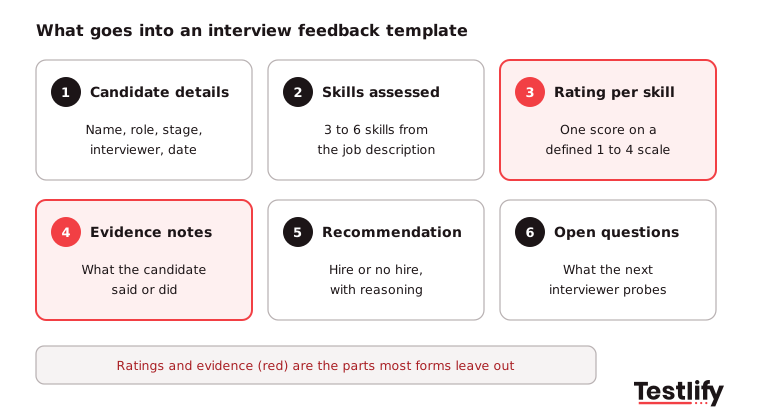
Two interviewers meet the same candidate and leave with opposite verdicts, and neither can point to why. Interview feedback templates fix that by giving every interviewer the same skills, the same scale and a place for written evidence.
Below are five copy-ready formats, a 4-point rating scale and strong and weak examples you can use in your next hiring round.
TL;DR:
- An interview feedback template is a fixed form with the candidate's details, the skills being assessed, a rating scale, evidence notes and a hire or no-hire recommendation.
- Use the template that fits the interview: a quick form for screens, a competency scorecard for core rounds, a technical template for skills tests, a debrief summary for the panel, and an email for the candidate.
- Rate on a 4-point scale with a written description for each score. An even scale stops interviewers from parking everyone on a safe middle score.
- Strong feedback quotes what the candidate said or did. Weak feedback describes the interviewer's feelings.
- Submit feedback within 24 hours and before reading anyone else's scores, then discuss it in the debrief.
- Interview notes are records. US employers must keep employment records for at least a year, and UK and EU candidates can ask to see their notes, so write every comment as if the candidate will read it.
 ChatGPT
 Gemini
 Claude
 Grok
 Perplexity
What is an interview feedback template?
An interview feedback template is a structured form interviewers complete right after an interview to record how a candidate performed against the role's requirements. The template lists the skills to assess, a rating scale, space for evidence and a final recommendation, so every interviewer judges every candidate the same way.
Most teams use the terms interview feedback form, interview evaluation form and candidate scorecard to mean the same thing. What matters is the structure, not the name: a blank notes box invites opinions, while set criteria ask for evidence.
If you want the deeper background on scoring, read our guide to the interview scorecard.
A feedback template also anchors a structured interview, where every candidate for a role answers the same core questions and is scored against the same criteria.

What should an interview feedback template include?
An interview feedback template should include six parts: candidate and interview details, the skills being assessed, a rating for each skill, evidence notes for each rating, an overall recommendation, and open questions for the next interviewer. Anything beyond that tends to lower the number of forms that come back complete.
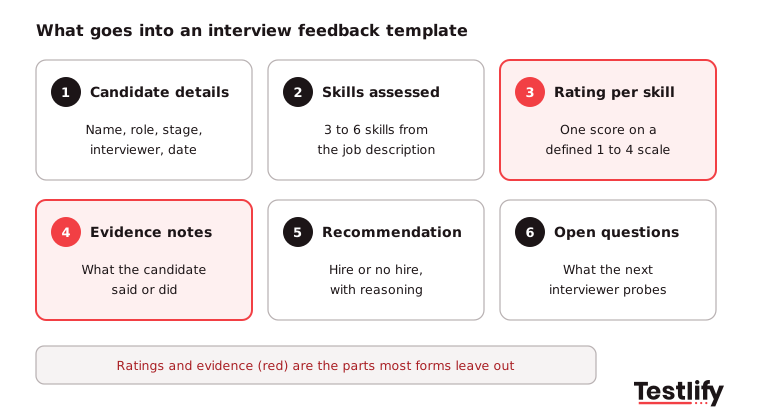
Each part of the template has one job, and together they keep feedback consistent from one interviewer to the next. Here is what to put in each part:
- Candidate and interview details: Name, role, interview stage, interviewer and date.
- Skills being assessed: Three to six skills taken from the job description and agreed before interviews start. Each interviewer can own a different set.
- Rating per skill: One score per skill on a defined scale, never a single overall score alone.
- Evidence notes: What the candidate said or did that justifies each score.
- Overall recommendation: Strong hire, hire, no hire or strong no hire, plus one paragraph of reasoning.
- Open questions: Concerns or topics the next interviewer should probe.
Pro tip: Keep the skills list short. Interviewers who must rate twelve criteria after a 45-minute conversation start guessing on half of them, and the scores stop meaning anything.
Which interview feedback templates can you copy and use?
The five interview feedback templates below cover most hiring processes: a quick form for phone screens, a competency scorecard for core interviews, a technical template for skills rounds, a panel debrief summary for the final decision, and a feedback email for candidates. Copy the one that fits the stage and swap in your own skills.
1. Quick interview feedback form (screening calls)
Use this for recruiter screens and short first calls, where you only need to know whether the candidate should move forward.
Field | What to write |
|---|---|
Candidate, role, date, interviewer | Basic details |
Meets must-have requirements? | Yes or no, with the requirement that decided it |
Motivation for the role | One or two sentences in the candidate's own words |
Salary, notice period, location fit | Facts only |
Recommendation | Advance or do not advance |
Reason | Two sentences of evidence |
2. Competency interview scorecard (core rounds)
Use this for hiring manager and team interviews. Each interviewer rates only the skills they were asked to test.
Skill | Rating (1 to 4) | Evidence from the interview |
|---|---|---|
Skill 1, for example stakeholder communication | Score 1, 2, 3 or 4 | What the candidate said or did, for example how they explained a delay to a client |
Skill 2, for example problem solving | Score 1, 2, 3 or 4 | The problem described, the steps taken and the result |
Skill 3, for example ownership | Score 1, 2, 3 or 4 | A time they raised a risk early or fixed a mistake without being asked |
Skill 4, for example role knowledge | Score 1, 2, 3 or 4 | Specific tools, methods or past work that match what the role needs |
Overall recommendation | Strong hire, hire, no hire, strong no hire | One paragraph of reasoning |
Open questions for the next round | Not rated | Concerns or topics the next interviewer should probe, for example depth of experience with a key tool |
3. Technical interview feedback template
Use this after a coding round, case study, work sample or skills test review.
Field | What to write |
|---|---|
Task given | The problem or exercise, with time allowed |
Approach | How the candidate broke the problem down |
Quality of the result | Did it work? What was missing? |
Communication while working | Did they explain trade-offs and ask clarifying questions? |
Rating per technical skill | 1 to 4 for each skill tested |
Recommendation and reason | Hire or no hire, with evidence |
4. Panel debrief summary
The hiring manager or recruiter fills this in after all interviewers have submitted their own forms.
Field | What to write |
|---|---|
Scores by interviewer and skill | A grid of every rating, copied from the individual forms |
Where scores agree | Skills with a clear signal |
Where scores differ by 2 or more points | What each interviewer saw, discussed in the debrief |
Unanswered questions | Gaps that need a reference check or another conversation |
Decision and owner | Hire, no hire or hold, and who made the call |
5. Interview feedback email to candidates
Use this when you share feedback with an unsuccessful candidate. Keep it short, specific and tied to the role.
Subject: Your interview for [role] at [company] Hi [name], thank you for your time on [date]. We have decided not to move forward with your application for this role. You showed real strength in [specific skill, with one example]. The area that decided it was [skill], where we needed [the level the role requires]. We would welcome your application for future roles in [team]. Best, [name]
For more wording ideas, see our candidate rejection email templates.
How should you rate candidates on an interview feedback form?
Candidates should be rated on a 4-point scale where each number has a written description of what that level looks like for the skill. The written anchors make two interviewers mean the same thing by a 3, and the even number of points removes the middle score people use when they are unsure.
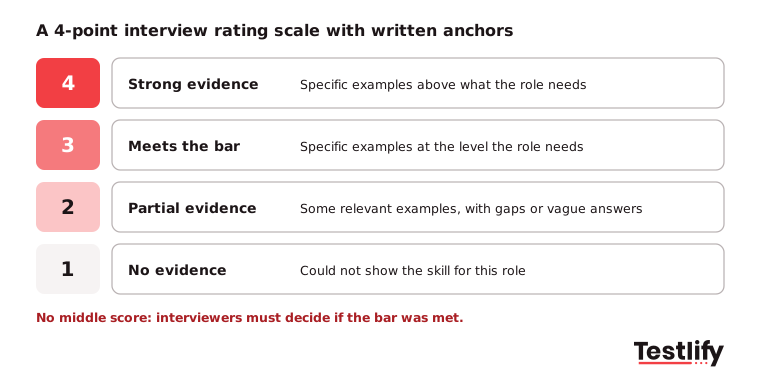
Write anchors per skill, not just per number. "Meets the bar" for problem solving in a support role is different from the same score for a data engineer.
This approach is called a behaviorally anchored rating scale, and it is the simplest way to make scores comparable across interviewers.
What do good interview feedback examples look like?
Good interview feedback examples describe observable behavior and link it to a skill and a score, while weak examples describe the interviewer's impression. The test is simple: could another person read the comment and understand why the candidate got that rating without having been in the room?
Weak feedback | Strong feedback |
|---|---|
Great communicator, really likeable. | Explained a complex billing issue in plain terms and checked that I understood before moving on. Communication: 4. |
Not technical enough. | Could not explain how she would index the orders table; solution timed out on 10,000 rows. SQL: 2. |
Seemed like a culture fit. | Gave two examples of raising a risk early with her manager, matching how our team works. Ownership: 3. |
Lacks leadership. | Has not led a team; the example given was coordinating one intern for a week. Role needs managing 4 people. People leadership: 1. |
I just did not get a good feeling. | Not usable. Name the skill and what was missing, or leave the rating blank. |
Positive interview feedback example: "Walked through how she cut ticket backlog by 30% in a quarter, including what failed first. Strong, specific evidence of problem solving, so score 4 and recommend hire."
Unsuccessful interview feedback example: "Answers on forecasting stayed general and did not include a model he had built. Forecasting: 2, because the role needs a forecast owner from day one; recommend no hire here, but consider him for the analyst opening."
How do you write interview feedback that hiring teams can use?
Interview feedback that hiring teams can use is written within 24 hours, before seeing anyone else's scores, with one piece of evidence for every rating and a clear recommendation. The process starts before the interview, when the team agrees which skills each interviewer owns.
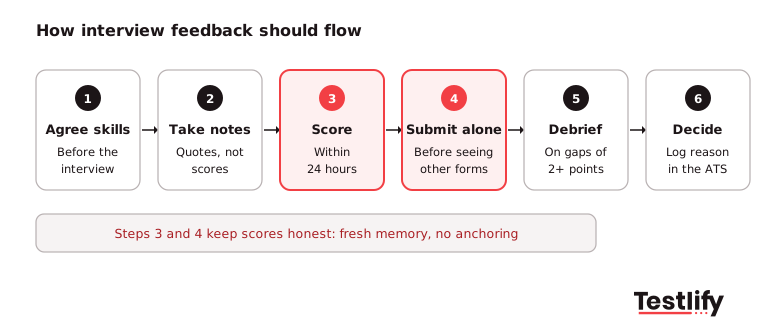
Interview feedback works best as a repeatable process with six steps. Follow them in order for every candidate, so each interviewer records evidence the same way and the team can compare scores fairly.
- Agree skills before the interview: Pick three to six skills from the job description and assign each interviewer the ones they will test.
- Take notes during the interview: Write down what the candidate said, in short quotes. Do not score yet.
- Score within 24 hours: Fill in the template the same day while details are fresh. Memory fades fast, and late forms lean on general impressions.
- Submit before reading other forms: Independent scores stop the first or most senior opinion from shaping everyone else's.
- Debrief on differences: Spend the meeting on skills where scores are 2 or more points apart, not on repeating agreement.
- Decide and record: Log the decision, the reason and who made it in your applicant tracking system.
Structured, evidence-based feedback is also how teams start measuring hiring quality. LinkedIn's Future of Recruiting 2025 found that 93% of talent acquisition professionals call accurate skills assessment crucial to quality of hire.
89% expect measuring quality of hire to become more important, yet only 25% feel highly confident they can measure it. Consistent feedback scores give you a baseline to compare against on-the-job performance later.
What mistakes make interview feedback useless?
Interview feedback becomes useless when it is late, vague, copied from other interviewers, or about personality instead of the job. Each of these mistakes lets bias in and leaves the hiring manager with impressions they cannot compare.
- Writing it days later: Detail fades and the score drifts toward a general feeling about the candidate.
- Only an overall score: A single 3 out of 5 hides whether the candidate is strong in one skill and weak in another.
- Opinion words without evidence: "Confident", "sharp" and "not a fit" tell the panel about the interviewer, not the candidate.
- Halo and horn effects: One strong or weak answer colours every other rating. Read more on the halo and horn effect.
- Culture fit as a catch-all: Replace it with the specific values or behaviors you need, or drop it. Vague fit scores are a common route for hiring bias.
- Personal details: Age, family, accent, health and appearance never belong on a feedback form. The EEOC's guidance on pre-employment inquiries warns that questions revealing protected traits such as age, religion or disability can be treated as evidence of discrimination, so keep those topics off the form too.
Key takeaway: A feedback form is only as good as the evidence written on it. If a comment would not help a stranger understand the score, rewrite it.
Who can see interview feedback, and how long should you keep it?
Interview feedback can be seen by the hiring team, by regulators or courts if a hiring decision is challenged, and in many countries by the candidate. Treat every form as a business record: keep it in your applicant tracking system, limit access to the hiring team, and follow a set retention period.
- United States: EEOC recordkeeping rules require employers to keep all personnel or employment records for one year. If a discrimination charge is filed, records related to it must be kept until the charge or any lawsuit is resolved.
- United Kingdom and European Union: Under data protection law, candidates can make a subject access request for personal data held about them, which includes interview notes, according to the UK ICO's right of access guidance.
- Your own policy: Set one retention period, delete notes when it ends, and do not keep private copies outside the system.
The practical rule follows from this: write every comment as if the candidate and a lawyer will read it, because one day they might.
How does Testlify support structured interview feedback?
Testlify gives hiring teams scored, evidence-backed results for every candidate, so interview feedback starts from data instead of a blank form. Skills tests and AI interviews score each answer against the same criteria, and reviewers see the response behind every score.
- Same criteria for everyone: Choose from 3,500+ tests and 150+ interview templates, or build your own with 25+ question types, so every candidate for a role answers the same questions. Browse the test library.
- Per-skill reports: Each candidate report shows a per-skill breakdown, AI-written strengths and gaps, and suggested follow-up questions for the next interviewer. See reporting and analytics.
- One place to review: One-way video interviews and AI interviews by video, voice or chat are scored automatically, and the Reviewers Portal lets interviewers score and comment in one place. Learn more about the video interviewing tool.
- Fits your stack: Results sync with 100+ ATS and HRIS tools, so scores and feedback sit next to the rest of the candidate record.
Ready to score every interview the same way?
Give your interviewers evidence before they write a word of feedback. Start a 7-day free trial of Testlify, no credit card required, and send your first role-based assessment today.
Prefer a walkthrough first? Book a demo and see how Testlify fits your hiring process.
For tips on sharing results with candidates, read how to give constructive feedback to candidates.
Frequently asked questions (FAQs)

People and Talent Partner
Arushi Shah runs day-to-day talent acquisition and candidate experience at Testlify. She writes on interviewing, structured hiring, and giving candidates a fair, fast process.
LinkedInRelated resources
View all
HR Toolkit
90 day employee performance review template

HR Toolkit
How to handle difficult employees: A practical guide for managers

HR Toolkit
Employee termination checklist: a step-by-step guide for HR

HR Toolkit
Email marketing specialist job description: duties, skills and a sample

HR Toolkit
Performance Evaluation Template: Free Form, Rating Scale and Examples

Workplace culture
40 stay interview questions to ask your employees
Get started.
Hire on proof, not resumes.
Run your first skills-based assessment free — no credit card required.