
Employee termination checklist: a step-by-step guide for HR
A practical checklist for letting an employee go: what HR, managers, IT and payroll do before, during and after the meeting, plus backfill.

An employee termination checklist is a step-by-step list of everything HR, the manager, IT, payroll and legal must do when an employee is let go, from checking the decision to paying final wages and closing system access. Using the same list every time keeps exits fair, legal and calm, and stops small but costly steps from being missed.
TL;DR / Key Takeaways
- Confirm a lawful, documented reason, check for retaliation risk, get sign-off and prepare the letter, final pay and benefits information.
- Hold a short, private meeting with a witness. State the decision first, give one agreed reason and cover pay, benefits and next steps.
- Pay final wages on time, send benefits and COBRA information, collect property, remove all access, file records and tell the team.
- HR runs the process, the manager owns the decision, IT owns access, payroll owns final pay, legal reviews risk and talent acquisition owns the backfill.
- Resignations add an exit interview, layoffs add selection criteria and notice rules, and remote exits add video meetings and shipped equipment.
- Surprise firings, changing reasons, late final pay, open system access and telling the team why the person left.
- Record why the hire did not work out, rewrite the job brief around the missing skills and test those skills before interviews.
 ChatGPT
 Gemini
 Claude
 Grok
Grok Perplexity
What is an employee termination checklist?
An employee termination checklist is a shared, written list of the tasks that must be completed when employment ends, with an owner and a deadline for each one. The checklist covers the decision review, the termination meeting, final pay, benefits, company property, system access, records and the plan to fill the role.
A checklist matters because terminations are where small slips turn into legal and security problems. A missed benefits notice, a late final paycheck or a laptop that still logs into the CRM a week later can all cost far more than the time saved by skipping them.
Legal risk is real. According to a CWC summary of EEOC data for fiscal year 2024, the agency received 88,531 discrimination charges, and retaliation was the most common allegation for the seventeenth year in a row, named in 42,301 charges (47.8%). Many of those charges follow a termination.

What should you do before terminating an employee?
Before terminating an employee, HR should confirm the reason is lawful and documented, check the employee's contract and recent history for risk, and plan the meeting, the paperwork and the access cut-off in advance. Most problems in a termination start with a rushed decision, not a badly run meeting.

- Confirm the reason and the paper trail: Performance cases should have warnings, reviews and, where you use one, a performance improvement plan. Misconduct cases need an investigation file with dates and witnesses.
- Check for legal risk: Has the employee recently complained, taken protected leave, filed a claim or raised a safety issue? A termination soon after any of these looks like retaliation, even when it is not. Review the employee's contract for notice periods, and remember that at-will employment has exceptions. Read up on wrongful termination if you are unsure.
- Check consistency: Compare with how similar cases were handled. If another employee kept their job after the same issue, document what is different.
- Get sign-off: The manager, HR and, for higher-risk cases, employment counsel should agree on the reason, the date and any severance offer.
- Prepare the paperwork: Draft the termination letter, the final pay calculation, the benefits and COBRA information, and any severance agreement or release. A free termination letter generator gives you a clean first draft to adapt.
- Plan the logistics: Pick a private room or video call, a witness (usually HR), a time early in the week, and a script. Agree with IT the exact minute access will be turned off.
Pro tip: Write the one-sentence reason for the termination before the meeting and get every decision-maker to agree to it. Mixed or changing reasons are one of the first things a lawyer looks for in a wrongful termination claim.
How do you run the termination meeting?
The termination meeting should be short, private and factual: state the decision in the first minute, give the main reason in one or two sentences, explain pay, benefits and next steps, hand over the letter, and end the meeting with dignity. The meeting is a notice of a decision already made, not a debate.
- Open with the decision: "We have decided to end your employment, effective today." Do not lead with small talk.
- Give the reason briefly: Use the agreed sentence. Do not argue the details or bring up new issues.
- Cover the practical points: Last day, final paycheck date, unused PTO, health coverage end date and COBRA, severance terms if offered, and any return of property.
- Hand over the documents: The termination letter, benefits information, any state-required notices, and the severance agreement with its review period.
- Confirm contact details: Check the mailing address for the final pay stub and tax forms.
- Close respectfully: Explain how personal belongings will be returned and who to contact with questions. Let the employee leave without being walked out in front of colleagues unless there is a real security reason.
Keep a witness in the room and write a short note of what was said straight after the meeting. For a remote employee, run the meeting on video, with HR on the call, and time the access cut-off for the moment the call ends.
What needs to happen after the termination meeting?
After the termination meeting, HR, payroll, IT and the manager close out the exit: pay final wages on time, send benefits and COBRA information, collect company property, remove every system and building access, update records, and tell the team. Most steps should be finished within the first day.
- Final pay: Federal law does not require immediate final pay, but many states do, as the US Department of Labor explains. Texas, for example, gives employers six days after an employer-initiated termination. Check whether your state requires unused PTO to be paid out.
- Benefits and COBRA: Tell the employee when health coverage ends and how continuation works. Under federal COBRA rules, continuation coverage usually lasts up to 18 months. The employer must tell the plan administrator within 30 days, and the administrator then has 14 days to send the election notice.
- Retirement, FSA and HSA: Explain the retirement plan options and any reimbursement deadlines for FSA balances.
- Company property: Collect the laptop, phone, ID badge, keys, cards and any documents. For remote staff, send a prepaid return kit the same day.
- System and building access: Disable email, SSO, VPN, CRM, code repositories, shared drives and building codes. Change any shared passwords the employee knew, and forward their inbox to the manager.
- Ongoing obligations: Remind the employee in writing of confidentiality, non-solicitation or noncompete terms that still apply.
- Visa holders: Notify your immigration counsel if the employee is on a temporary work visa.
- Records: File the termination letter, the documentation and the signed agreements. Keep Form I-9 for three years after hire or one year after termination, whichever is later.
- Unemployment claims: Respond to state unemployment claims on time and with the same reason given in the meeting.
- The team: Tell the team the person has left and who is covering their work. Do not share the reason.
The SHRM employee termination checklist is a useful one-page sign-off form for these steps.
Who owns each step of the employee termination checklist?
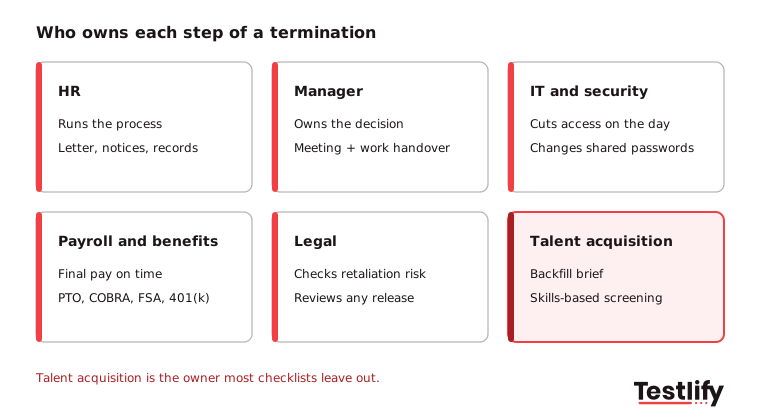
Each step of the employee termination checklist should have one named owner: HR runs the process and the paperwork, the manager owns the decision and the handover, IT owns access, payroll owns final pay and benefits, legal reviews risk, and talent acquisition owns the backfill. One owner per step is what stops items from falling between teams.
Step | Owner | When |
|---|---|---|
Confirm reason and documentation | Manager + HR | 1 to 2 weeks before |
Legal and consistency review | HR + legal | Before sign-off |
Termination letter and severance terms | HR | 2 to 3 days before |
Final pay calculation, including PTO | Payroll | Before the meeting |
Termination meeting | Manager + HR witness | Day of |
Access removed and passwords changed | IT | During or right after the meeting |
Property collected or return kit sent | Manager / IT | Day of |
Benefits, COBRA and state notices | HR / benefits | Day of, then within legal deadlines |
Final paycheck issued | Payroll | By your state's deadline |
Team told and work reassigned | Manager | Day of or next morning |
Records filed, HRIS updated | HR | Within 1 week |
Backfill brief and job opened | Talent acquisition + manager | Within 1 week |
How does the checklist change for remote, voluntary and layoff exits?
The termination checklist changes with the type of exit: a resignation adds an exit interview and a handover period, a termination for cause adds an investigation file and tighter access timing, a layoff adds selection criteria and notice rules, and a remote exit adds video meetings and shipped equipment. The core of pay, benefits, access and records stays the same.
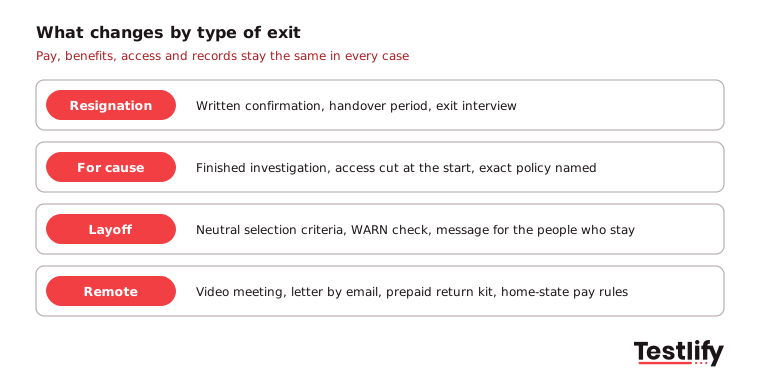
- Voluntary resignation: Confirm the resignation in writing, agree the last day, plan the handover, and hold an exit interview. These exit interview questions help you learn why people leave.
- Termination for cause: Finish the investigation before the meeting, cut access at the start of the meeting, and be precise about the policy that was broken. Read more about just cause termination.
- Layoff: Use neutral, business-based criteria to pick roles, check whether WARN notice applies, and prepare a clear message for the people who stay. See these layoff communication strategies.
- Remote employee: Hold the meeting on video, send the letter by email during the call, ship a prepaid return box, and check the final pay rules of the state where the employee works, not where your office is.
What should you avoid when terminating an employee?
When terminating an employee, avoid surprises, mixed reasons and delays: a firing with no prior warning, a reason that changes after the meeting, final pay that arrives late, or access that stays open. Each of these turns a routine exit into a complaint, a claim or a security incident.
- Terminating soon after a complaint, leave request or claim without a clear, documented reason.
- Holding the meeting in public, on a Friday evening, or by text or email.
- Debating the decision or promising things you cannot deliver, such as a glowing reference.
- Holding back final pay because property has not been returned, which is not allowed.
- Telling the team why the person was let go.
- Forgetting shared accounts, such as social media logins, vendor portals and admin passwords.
Key takeaway: A termination is defensible when the reason is documented, consistent with past cases and given once, the same way, in the meeting, in the letter and in any unemployment response.
How do you backfill the role after a termination?
Backfilling the role after a termination starts with an honest note of why the previous hire did not work out, then a job brief built around the skills that were missing, and a screening process that tests for those skills before interviews. Done well, the exit becomes the starting point for a better hire.
A backfill is rarely quick. The SHRM recruiting benchmarking brief puts the median time-to-fill at 39 calendar days for nonexecutive roles. Plan cover for the work during that gap, and see what a backfill position involves.
- Record the real reason: Was it a skills gap, a behavior issue, a mismatch in expectations, or a role that changed? Write it down while it is fresh.
- Rewrite the job brief: Turn the gap into must-have skills and examples of the work, not just years of experience.
- Test those skills early: Screen applicants with a short, role-based skills test before interviews, so the shortlist is based on proof rather than resumes. Testlify's test library has 3,500+ tests, from coding and Excel to customer support and sales.
- Structure the interviews: Ask every candidate the same questions about the gap you saw last time.
- Review after 90 days: Check the new hire against the brief, and update the brief for next time.
For more on stopping repeat mis-hires, read how to prevent a bad hire.
Frequently asked questions
Make your next exit and your next hire easier
Start with the paperwork: draft a clear, consistent letter in minutes with Testlify's free termination letter generator. When it is time to fill the role, a 7-day free trial of Testlify, no credit card required, lets you build a skills test for the backfill from your own job description.

Content Writer
Yashika Khandelwal is a Content Writer with 3+ years of experience creating research-backed content on hiring, talent assessment, and HR technology. She is a registered Organizational Psychologist and subject matter expert who combines behavioral science with practical recruitment insights to produce accurate, evidence-based content.
LinkedInRelated resources
View all
HR Toolkit
Email marketing specialist job description: duties, skills and a sample

HR Toolkit
Performance Evaluation Template: Free Form, Rating Scale and Examples

HR Toolkit
How to handle difficult employees: A practical guide for managers
.jpg?dpl=dpl_75ABbuT1EvRikFNXocSPApjupRAY)
HR compliance
Employee monitoring policy template: free sample and guide

Workplace culture
What is an upskilling strategy? A practical guide for HR teams

Workplace culture
Employee engagement metrics: 12 to track and how to measure them
Get started.
Hire on proof, not resumes.
Run your first skills-based assessment free — no credit card required.