
Online proctoring for recruitment tests: a 2026 guide for hiring teams
How online proctoring keeps recruitment tests fair: the types, the checks to use at each hiring stage, the legal rules and how to set it up.

A candidate aces your skills test, then cannot explain one answer in the interview. With an AI chatbot one tab away, an unsupervised score shows what a candidate can find, not what they can do.
Online proctoring for recruitment tests is remote monitoring of candidates during a skills test, so you know who answered and how. Below you will find the types, the checks for each hiring stage, the legal rules and a six-step setup.
TL;DR:
- Online proctoring for recruitment tests checks who is taking the test and how, using ID checks, browser controls, webcam and screen monitoring, then a human review of flags.
- Cheating is rising: CodeSignal's 2025 data shows fraud attempts on proctored assessments jumped from 16% to 35% in a year, and Gartner found 6% of candidates admit to interview fraud.
- Automated proctoring with human review of flags suits most recruitment tests. Keep live proctoring for small, high-stakes final rounds.
- Match the checks to the hiring stage: light checks for early screens, full monitoring for skills tests, ID verification before an offer.
- Never reject a candidate on an automated flag alone. A person reviews the evidence, and candidates are told up front what is monitored.
- Plan for accommodations and privacy rules: the ADA requires reasonable accommodations, biometric data is special category data in the UK, and the EU AI Act bars emotion detection at work.
 ChatGPT
 Gemini
 Claude
 Grok
 Perplexity
What is online proctoring for recruitment tests?
Online proctoring for recruitment tests is software, and sometimes a person, that supervises a candidate during a remote hiring assessment. The tool confirms the candidate's identity, limits what they can do on their device, records signals such as tab switches or a second face on camera, and flags moments a recruiter should review.
Proctoring does the job an invigilator did in a test center, without the test center. Candidates take the test from home, on their own schedule, and the hiring team still gets evidence that the result is genuine.
For a remote or global hiring process, it is what makes an online test score usable as a hiring signal. See how this fits a wider remote hiring process.

Why does proctoring matter in hiring now?
Proctoring matters because cheating on online hiring tests has become easier and more common. Candidates can paste a question into an AI chatbot in seconds, ask a friend to sit the test, or share questions online.
Without supervision, a test measures access to help, not skill. The numbers point the same way:
- AI help is normal: About 4 in 10 candidates say they use AI during the application process, including to answer assessment questions, according to Gartner's 2025 candidate survey.
- Impersonation is real: In the same Gartner research, 6% of about 3,000 candidates admitted to interview fraud, either posing as someone else or having someone pose as them. Gartner predicts that 1 in 4 candidate profiles worldwide could be fake by 2028.
- Attempts are climbing: CodeSignal reported in February 2026 that cheating and fraud attempts on proctored assessments rose from 16% in 2024 to 35% in 2025, and that score gains on unproctored tests were more than 4 times larger than on proctored ones.
Proctoring also protects honest candidates. A candidate who prepared for the test should not lose a place on the shortlist to someone who looked up the answers.
When every candidate takes the test under the same conditions, the shortlist reflects real skill, and the recruiter can defend the decision to a hiring manager.
The visible presence of proctoring is a deterrent in its own right. Most candidates who know the test is monitored simply do not try to cheat, which is why clear notice before the test matters as much as detection during it.
How does online proctoring work in a recruitment test?
Online proctoring works in three stages: checks before the test, monitoring during it, and review after it. The candidate gives consent and passes a system and identity check, the tool watches the browser, webcam and screen while they answer, and the recruiter reviews any flagged moments before the score is used.
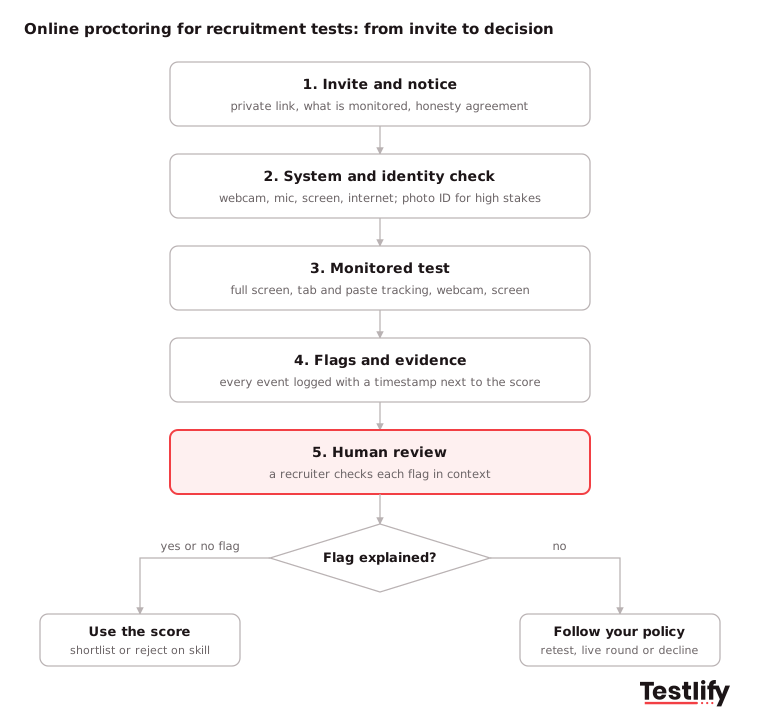
- Invite and notice: The candidate receives a private invite that explains what will be monitored and why, and accepts an honesty agreement.
- System and identity check: The tool checks the webcam, microphone, screen and internet speed. For high-stakes tests, the candidate shows a photo ID that is matched to their face.
- Monitored test: Full-screen mode, copy and paste blocking and tab tracking run in the browser. Webcam snapshots or recording, face detection and screen recording capture what happens in the room and on screen.
- Flags and evidence: Each event is logged with a timestamp: a tab switch, a second face, a pasted answer, a long look away. The tool rolls these into a report next to the score.
- Human review and decision: A recruiter checks the flagged moments, decides whether they matter, and only then uses the score to shortlist or reject.
Pro tip: Run a two-minute practice question with proctoring switched on before the real test. Candidates find camera or permission problems early, and fewer sessions end with a technical flag that has nothing to do with cheating.
What are the types of online proctoring?
The types of online proctoring are automated, record and review, live, and hybrid. They differ in who watches the candidate, when, and at what cost.
Most recruitment tests use automated proctoring with a person reviewing flags, because it scales to any number of candidates without scheduling.
Type | Who watches | When | Scale | Cost | Best for in hiring |
|---|---|---|---|---|---|
Automated | Software flags events | During the test | Thousands of candidates at once | Lowest | Early screens and skills tests at volume |
Record and review | A reviewer watches recordings | After the test | Limited by reviewer time | Medium | Tests where a few disputes need full context |
Live | A human proctor on video | During the test | A few candidates per proctor | Highest | Small final rounds, certification-style tests |
Hybrid | Software flags, a person reviews flags | During and after | High | Low to medium | Most recruitment tests |
Live proctors can intervene in the moment and add a human touch that some candidates find reassuring. The trade-off is scheduling: a candidate in another time zone has to book a slot, which slows the process.
AI-driven systems are consistent across every session and never get tired, which suits large applicant pools. For a deeper comparison, see AI vs human proctoring and the types of online exam proctoring.
Which proctoring checks should a recruitment test use?
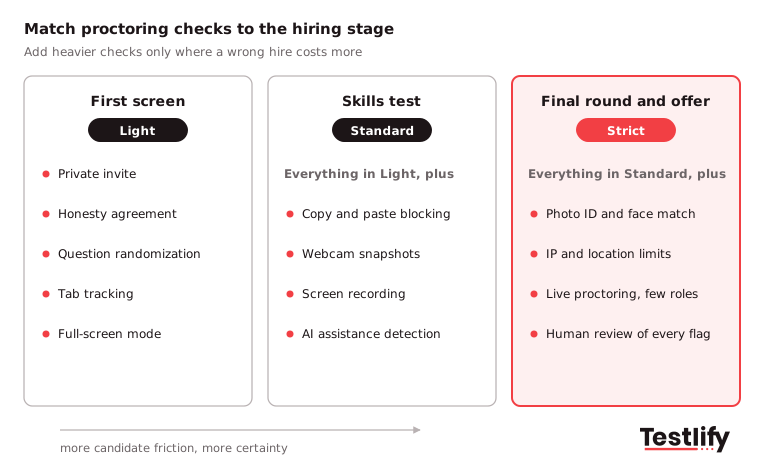
A recruitment test should use the checks that match its stakes. Early screens need light, low-friction checks such as private invites, randomized questions and tab tracking.
Skills tests that drive the shortlist need webcam and screen monitoring. Final rounds and offers justify photo ID verification and, for a few roles, live proctoring.
Check | What it catches | Candidate friction |
|---|---|---|
Private invites and honesty agreement | Shared test links, casual cheating | None |
Question randomization | Answer sharing between candidates | None |
Full-screen mode and tab tracking | Searching or opening an AI chatbot in another tab | Low |
Copy and paste blocking | Pasting questions out or answers in | Low |
Multi-monitor restriction | A second screen with notes or a helper | Low |
Webcam snapshots and face detection | A different person, a second person in the room | Medium |
Session and screen recording | Context for disputes, outside help on screen | Medium |
IP and location restriction | Tests taken from an unexpected place or shared connection | Low |
AI assistance detection | Answers written with AI tools | Low |
Photo ID verification with face match | Impersonation, proxy test takers | Medium |
Live video proctoring | Anything a person can see, in real time | High |
Five of these checks carry most recruitment tests, so they are worth understanding in detail:
- Webcam snapshots: Periodic photos create a visual timeline of who sat the test and whether anyone else was present. They deter impersonation and give the recruiter something concrete to review if a score looks out of line.
- Session recording: A record of on-screen activity shows whether a candidate opened outside resources or got help. Recordings are evidence for review, not proof of guilt on their own.
- Location and IP tracking: Comparing the candidate's connection with the expected location flags tests taken from somewhere unexpected, or several candidates on one connection.
- Disabled copy and paste and screen switching: Blocking these keeps the candidate inside the test window, which removes the easiest routes to outside answers.
- Randomized questions: When each candidate gets questions and answer options in a different order, sharing answers stops being useful.
Key takeaway: More checks are not always better. Every extra layer adds friction for honest candidates, so add the heavy checks only where a wrong hire is expensive.
What are the benefits of online proctoring for recruiters?
The benefits of online proctoring for recruiters are fairer comparisons, results the team can trust, lower cost than test centers, wider reach and faster shortlists. Recruiters can test candidates anywhere, at any time, and still defend every score in front of a hiring manager.
- Test fairness: Every candidate takes the test under the same conditions, with the same checks, so no one gains from looking up answers or getting help.
- Test integrity: Snapshots, recordings and randomized questions work together, so the score reflects the candidate's own skill and the team avoids hiring on a dishonest result.
- Lower cost: No test centers, venues, invigilators or candidate travel. A remote test costs the candidate nothing but time.
- Wider reach: Candidates in any city or time zone can take part, which opens roles to a larger and more diverse talent pool and supports volume hiring.
- Faster decisions: Candidates take the test when it suits them, flags are summarized in one report, and recruiters review only the sessions that need a second look.
- Data security: A good platform encrypts candidate data, limits who can see recordings and deletes them on a set schedule, which protects candidates and the employer.
What are the risks, and how do you keep it fair to candidates?
The main risks of online proctoring are false flags, privacy concerns, barriers for candidates with disabilities and a worse candidate experience if monitoring feels heavy. Each risk is manageable with clear notice, human review, accommodations and checks that match the stage of the hiring process.
- False flags: A candidate who reads questions aloud, looks away to think or has a slow connection can trigger a flag. Treat every flag as a reason to look, never as a verdict.
- Accommodations: Under the Americans with Disabilities Act, employers must offer reasonable accommodations in hiring, such as extra time, a screen reader or an alternative format. The EEOC's guidance on disability and employment decisions confirms the duty covers job applicants, not only employees. Say in the invite how candidates can ask for one.
- Privacy and biometrics: Face matching uses biometric data. The UK ICO treats biometric data used to identify a person as special category data, so it needs an explicit condition and often a data protection impact assessment. Say what is recorded, who sees it and how long it is kept.
- AI rules in the EU: The EU AI Act treats AI used to evaluate candidates as high-risk and bans AI that detects people's emotional state in the workplace. Proctoring that tracks attention is fine; tools that claim to read stress or honesty from a face are not.
- Candidate experience: Heavy monitoring on a first screen can make good candidates drop out. Keep early stages light, explain why checks exist and give candidates a contact for problems.
For the detailed privacy rules, see AI proctoring compliance.
How do you set up online proctoring for recruitment tests?
Setting up online proctoring for recruitment tests takes six steps: decide the checks per stage, write a violation policy, tell candidates, offer accommodations, run a practice question and review flags before any decision. Most of the work is policy, not software.
- Pick checks per stage: Use the stage table above. Light checks for early screens, full monitoring for the skills test that drives the shortlist, ID verification before an offer.
- Write a violation policy: Decide how many tab switches or flags you tolerate, whether a test ends automatically after repeated violations, and who reviews disputes.
- Tell candidates up front: State what is monitored, why, how long data is kept and how to raise a concern. Clear notice reduces drop-off and deters most cheating before it starts.
- Offer accommodations and check privacy rules: Give a simple way to request extra time or another format, and make sure the proctoring settings allow it. If you use face match for UK candidates, read the ICO's biometric recognition guidance first.
- Run a practice question: A short trial with the camera and browser checks switched on catches setup problems before they cost a candidate the real test.
- Review before you reject: A recruiter reviews flagged sessions, notes the reason for any decision and keeps the evidence for the retention period you promised.
For a step-by-step walkthrough of the settings, see how to set up a proctored exam, and for more ways to prevent cheating, how to stop cheating in online tests.
How do you choose an online proctoring tool for hiring?
Choosing an online proctoring tool for hiring starts with the tests you run and the volume you hire at. Then check five things: the range of checks, whether you can set them per test, how flags reach a reviewer, privacy and security credentials, and whether proctoring sits inside the assessment platform or bolts on.
Ask every vendor these questions:
- Can we switch each check on or off per test, and set our own violation tolerance?
- Does the tool detect AI assistance and impersonation, not only tab switches?
- Does every flag come with a timestamp and evidence a reviewer can check?
- Which security standards does the vendor hold, and where is candidate data stored?
- Is proctoring part of the same platform as the tests, scoring and ATS sync, or a separate tool?
- What does the candidate see before and during the test, and can they practice first?
A proctoring add-on that lives outside the assessment platform means a second login for candidates and a second report for recruiters. An all-in-one platform keeps the score, the flags and the evidence in one place.
How does Testlify proctor recruitment tests?
Testlify includes 20+ proctoring checks in its skills assessment platform, so every recruitment test can run with the level of monitoring the role needs. Recruiters switch checks on per test, set a violation tolerance and see flags with evidence next to each candidate's score.
- Browser and device controls: Full-screen enforcement, tab proctoring, mouse-out tracking, multi-monitor restriction, copy and paste tracking and blocking, and Focus Guard anti-cheat mode.
- Camera and screen: Webcam snapshots, camera recording, session recording, mandatory screen share, face detection and talking detection.
- Integrity signals: AI assistance detection, question-level activity logs, IP and location restriction, question randomization, private invites and honesty agreements, plus speech authenticity detection for Voice and Video AI answers.
- Higher-stakes options: Photo ID verification with face match, a system check, and live video proctoring with screen recording are available per attempt for the tests that need them.
- Policy controls: Custom violation tolerance with auto-termination, and a live environment and internet speed check before the test starts.
These checks run alongside 3,500+ tests in the Testlify test library, in 15+ languages. Testlify holds ISO 27001 and SOC 2 Type II and supports GDPR, and its matching model completed a third-party NYC Local Law 144 bias audit.
See every check on the anti-cheating and proctoring page.
Ready to run a proctored recruitment test?
Pick a role, choose a test from the library and set the proctoring checks that fit the stage. Start a 7-day free trial of Testlify, no credit card required, or book a demo to see proctoring on your own hiring process.
Frequently asked questions (FAQs)

People and Talent Partner
Arushi Shah runs day-to-day talent acquisition and candidate experience at Testlify. She writes on interviewing, structured hiring, and giving candidates a fair, fast process.
LinkedInRelated resources
View all
Talent assessment
How to interpret technical assessment results

Talent assessment
How to evaluate coding assessments

Talent assessment
Leveraging AI for cheating prevention in online assessments

Talent assessment
Maintaining fairness designing cheating resistant online tests: a guide for hiring teams

Talent assessment
Ensuring integrity in online tests with Anti-cheating measures

Talent assessment
How to choose employment assessment tools: 2026 guide
Get started.
Hire on proof, not resumes.
Run your first skills-based assessment free — no credit card required.