
Benefits of recruitment software: 10 gains for hiring teams
Ten benefits of recruitment software for TA teams, from less admin and faster hiring to fairer screening, with a metric to track for each.

A recruiter's day fills up with work that is not recruiting: copying data between tools, chasing feedback and booking interviews. The benefits of recruitment software come down to three gains: less admin, fairer decisions and clearer data.
Recruitment software is any tool that helps a team attract, track, screen, assess, interview or hire candidates. Below are ten benefits, each with a metric to track and a way to prove the gain.
TL;DR:
- Recruitment software cuts recruiter admin, puts every candidate on the same evidence and shows leaders where hiring slows down.
- SHRM puts the median time-to-fill at 39 days for nonexecutive roles, and requisitions per recruiter rose 67% at extra-large organizations.
- LinkedIn found teams using generative AI in hiring save about 20% of their work week, roughly one day.
- Companies running the most skills-based searches are 12% more likely to make a quality hire, according to LinkedIn's Future of Recruiting 2025.
- Buy for the bottleneck: an ATS for scattered applications, assessments for weak shortlists, scheduling or AI interviews for slow first rounds.
- Record a baseline for time to hire, cost per hire and drop-off, then pilot on one role for 60 to 90 days.
- Watch the limits: tool sprawl, weak ATS sync and AI rejections without human review. Remove a candidate step for every step you add.
 ChatGPT
 Gemini
 Claude
 Grok
 Perplexity
What is recruitment software?
Recruitment software is the set of tools a hiring team uses to run its process in one system instead of inboxes and spreadsheets. The core is usually an applicant tracking system, with sourcing, CRM, assessment, interview, scheduling and analytics tools connected to it.
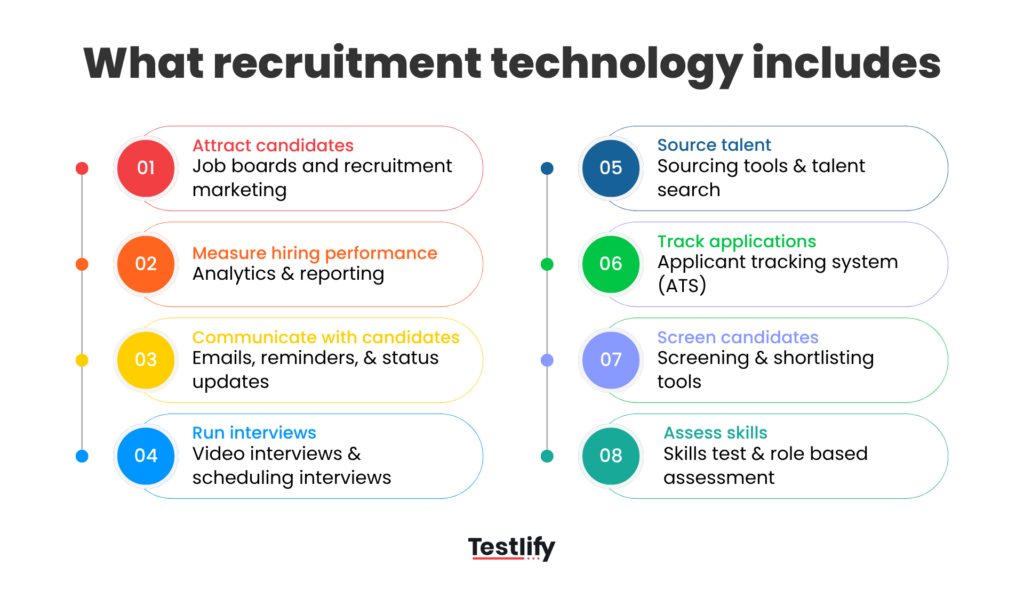
Most mid-market and enterprise teams do not buy one tool. They build a stack around the ATS and add specialist software where the process breaks.
For a fuller definition, see our glossary entry on employee recruitment software. For where the wider market is heading, read our guide to recruitment technology trends.

What are the benefits of recruitment software?
The benefits of recruitment software fall into ten gains, from less manual admin to lower cost per hire. The table below lists each gain, what changes in practice and the metric to track, so you can pick the ones that match your hiring problems.
# | Benefit | What changes in practice | Metric to track |
|---|---|---|---|
1 | Less manual admin | Posting, status emails, reminders and stage moves run automatically | Recruiter hours per hire |
2 | Faster time to hire | Candidates move as soon as they qualify, not when someone is free | Time to hire, time in each stage |
3 | More hires per recruiter | One recruiter can run more open roles at once | Requisitions per recruiter |
4 | Consistent screening | Every applicant is checked against the same role requirements | Pass rates by stage |
5 | Better quality of hire | Shortlists are based on tested skills, not resume keywords | Hiring manager satisfaction, 90-day retention |
6 | Fairer, defensible decisions | Criteria, scores and reasons are recorded for every candidate | Adverse impact by stage, audit trail coverage |
7 | Better candidate experience | Clear steps, quick updates, mobile-friendly tasks | Application completion rate, drop-off rate |
8 | Stronger collaboration | Hiring managers review the same scores and notes | Feedback turnaround time |
9 | Clearer hiring data | Every stage, source and decision is logged | Source quality, stage conversion |
10 | Lower cost per hire | Less agency spend, fewer wasted interviews, fewer bad hires | Cost per hire |
Not every team gets all ten from one tool. Which benefits you see depends on which part of the process the software replaces, which the sections below explain.
How does recruitment software save recruiters time?
Recruitment software saves recruiters time by automating the repeat work around each candidate: posting jobs, parsing resumes, sending updates, scheduling interviews and chasing feedback. The saving compounds at volume, because a task that takes two minutes per applicant becomes a full day across a few hundred applicants.
The pressure is real. SHRM's recruiting benchmarking data puts the median time-to-fill at 39 calendar days for nonexecutive roles, reports a 67% increase in requisitions per recruiter at extra-large organizations, and finds that over 2 in 3 organizations struggle to fill open positions.
Recruiters are carrying more roles, not fewer.
- Less manual admin: Status emails, reminders and stage changes run on rules, so recruiters stop copying data between tools.
- Faster time to hire: Candidates who pass a screen or test can be invited to the next step the same day, which cuts the idle days between stages.
- More hires per recruiter: When screening and scheduling are automated, the same team can run more requisitions without lowering the bar.
AI adds to the saving. According to LinkedIn's Future of Recruiting 2025, teams using generative AI in hiring save about 20% of their work week, roughly one day, and most put that time back into screening (35%) and skills assessment (26%).
For practical steps, see how to reduce the time to hire.
Pro tip: Measure time in each stage, not only total time to hire. Most delays sit in two places: waiting for hiring manager feedback and waiting to schedule the first interview, so fix those first.
How does recruitment software improve quality of hire?
Recruitment software improves quality of hire by replacing resume guesswork with evidence. Skills tests, structured interview scorecards and consistent screening rules mean every candidate is compared on what the role needs, and the strongest performers rise to the top even when their resume is unusual.
The data backs a skills-first approach. LinkedIn's Future of Recruiting 2025 found that companies running the most skills-based searches are 12% more likely to make a quality hire, and 93% of TA professionals say accurately assessing skills is crucial to improving quality of hire.
- Consistent screening: Knockout questions and screening rules apply the same requirements to every applicant, so two recruiters do not shortlist differently for the same role.
- Skills evidence before interviews: Assessments and job simulations show whether a candidate can do the work, so interview time goes to the people most likely to succeed.
- Structured interviews: Shared question sets and scorecards keep interviewers on the same criteria and make debriefs faster.
If you are moving away from degree and title filters, our guide to the benefits of skills-based hiring covers the change in more depth.
How does recruitment software make hiring fairer and more compliant?
Recruitment software makes hiring fairer by applying the same criteria to every candidate and recording why each decision was made. A logged score, a written reason and a timestamp are much easier to defend than a recruiter's memory, and they show where a stage is filtering out one group more than another.
Compliance now covers AI too. Under New York City Local Law 144, an employer may use an automated employment decision tool only if it has had a bias audit within one year of use, the audit results are public, and candidates get notice.
The EEOC has also warned employers that AI hiring tools can repeat bias when nobody checks how they score people.
- Audit trail: Every stage change, score and comment is stored, which helps with internal reviews and candidate data requests.
- Bias checks: Pass rates by stage show where a filter needs a second look.
- Data controls: Role-based access, consent records and retention rules keep candidate data handled the same way in every region.
- Human review: Good software lets a person see the evidence behind every automated score and override it with a reason.
Ask every vendor for its bias audit and security certificates before you buy. Testlify publishes its NYC bias audit for this reason.
How does recruitment software improve the candidate experience?
Recruitment software improves the candidate experience by making each step clear, quick and predictable. Candidates get confirmation when they apply, know what comes next, can complete tasks on a phone, and hear back without chasing, which keeps strong candidates in the process instead of losing them to a faster employer.
- Fewer steps: Short applications and one-click scheduling remove the forms that make people give up.
- Timely updates: Automated messages at every stage replace silence, including rejections with a clear reason.
- Flexible tasks: One-way video interviews and online tests let candidates take part outside working hours.
- Language support: Multilingual assessments let candidates answer in a language they work in, which matters for global hiring.
Watch where people leave. A sudden fall between invite and completion usually points to a test that is too long or instructions that are unclear.
Our guide to candidate drop-off shows how to find and fix those points.
How does recruitment software help hiring managers and leaders?
Recruitment software helps hiring managers by putting scores, notes and recordings for every candidate in one place, so they review evidence instead of forwarded resumes. Leaders gain a live view of the funnel: open roles, time in each stage, source quality and where candidates drop out.
Better data is the benefit most teams undervalue. According to LinkedIn's Future of Recruiting 2025, 89% of TA professionals say quality of hire will become more important to measure, yet only 25% feel highly confident their organization can measure it well.
Connected software closes that gap, because assessment scores, interview ratings and later performance can sit in the same record.
- Faster feedback: Scorecards and reminders cut the days lost waiting on hiring managers.
- Shared view of candidates: Everyone sees the same ranked shortlist and the reasons behind it.
- Reporting leaders trust: Dashboards show stage conversion, source quality and recruiter load without manual spreadsheets.
Which type of recruitment software delivers which benefit?
Each type of recruitment software delivers a different benefit, so the right buy depends on where your process breaks. An ATS organizes the pipeline, assessment software improves shortlist quality, interview and scheduling tools cut delays, and analytics shows where the next fix should go.
Software type | Main benefit | Best when your problem is | Example metric |
|---|---|---|---|
Applicant tracking system (ATS) | One record per candidate, less admin | Applications scattered across inboxes | Recruiter hours per hire |
Recruitment CRM | Warm talent pools for future roles | Starting every search from zero | Share of hires from talent pool |
Sourcing tools | Wider reach to passive candidates | Too few qualified applicants | Qualified applicants per role |
AI resume screening | Faster, consistent first review | Hundreds of applicants per role | Time to shortlist |
Skills assessment software | Shortlists based on proven skills | Interviews full of candidates who cannot do the job | Interview to offer ratio |
Video and AI interview tools | First rounds without scheduling | Slow first-round coordination | Time from apply to first interview |
Scheduling tools | Fewer back-and-forth emails | Candidates waiting days for a slot | Days to schedule |
Recruitment analytics | Visibility for leaders | No one knows where hiring stalls | Stage conversion rates |
Two cautions apply. A new tool only helps if it syncs with your ATS, otherwise recruiters end up copying data by hand.
The biggest gains usually come from the stage with the most volume: for most enterprise teams that is screening.
How do you measure the benefits of recruitment software?
Measuring the benefits of recruitment software takes a baseline, a pilot and a review. Record five to six metrics for the roles the tool will touch before rollout, run it on a defined set of roles for 60 to 90 days, then compare the same metrics on the same roles.
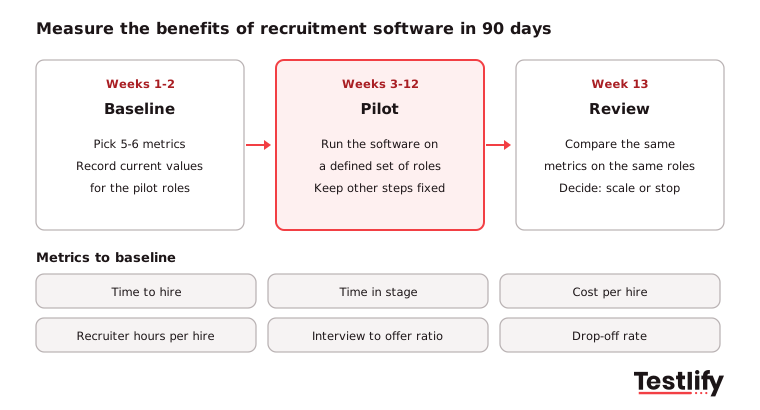
Metric | How to calculate it | Benefit it proves |
|---|---|---|
Time to hire | Days from application to accepted offer | Speed |
Time in stage | Average days candidates wait in each stage | Where automation helps |
Cost per hire | Total internal and external hiring cost divided by hires | Cost |
Recruiter hours per hire | Logged or estimated admin hours divided by hires | Admin saved |
Interview to offer ratio | Interviews held divided by offers made | Shortlist quality |
Candidate drop-off rate | Candidates who leave a stage divided by those invited | Candidate experience |
Quality of hire | Hiring manager rating and 90-day retention of new hires | Quality |
Free tools make the baseline quick: the cost per hire calculator, the time to hire calculator and the quality of hire calculator. To turn the results into a business case, see our guide to the ROI of recruitment software.
Key takeaway: Pick the metrics before you pick the tool. A team that cannot show its time to hire and cost per hire today will not be able to prove what the software changed.
What are the limits of recruitment software?
Recruitment software has limits that can cancel its benefits if nobody plans for them. The common ones are tool sprawl, poor integration, low adoption by hiring managers, AI that scores people without oversight, and a candidate process that gets longer with every tool added.
- Tool sprawl: Five disconnected tools mean five logins and five copies of candidate data. Consolidate where one platform covers several stages.
- Weak integration: If scores do not sync back to the ATS, recruiters stop using them. Check two-way sync on your actual ATS, not a list of logos.
- Low adoption: Hiring managers who ignore scorecards bring back gut-feel decisions. Keep their part short and show them the results.
- Unchecked AI: Automated rejection without human review creates legal and fairness risk. Keep a person in the loop for every rejection.
- Longer candidate journeys: Each new test or form adds drop-off. Remove a step for every step you add.
Software also cannot fix a vague role. If the hiring team has not agreed on the skills the job needs, faster screening only gets you to the wrong shortlist sooner.
How do you choose recruitment software that delivers these benefits?
Choosing recruitment software starts with the bottleneck, not the feature list. Find the stage where candidates wait longest or where the most time is lost, pick the software type that fixes that stage, confirm it connects to your ATS, then prove it on one role before rolling it out.
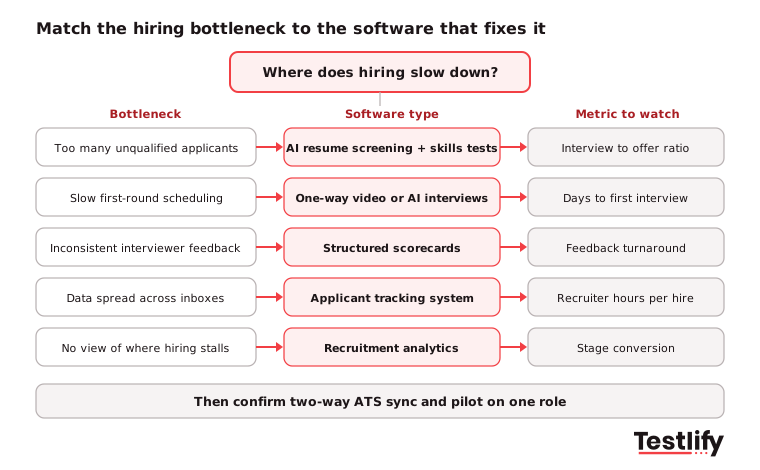
- Name the problem: Too many unqualified applicants, slow scheduling, inconsistent interviews or no visibility each point to a different tool.
- Check the fit with your stack: Ask for a live demo of the sync with your ATS and HRIS.
- Walk through it as a candidate: Apply on a phone and time every step.
- Check compliance: Ask for the bias audit, security certificates and data residency options.
- Pilot on one role: Compare the metrics from your baseline after 60 to 90 days.
For a longer buyer's checklist, read how to choose the right recruitment software.
How does Testlify add to the benefits of recruitment software?
Testlify adds the skills evidence most recruitment stacks are missing. Teams build a role-specific assessment from a job description, invite candidates from their ATS, and get a ranked shortlist with per-skill scores before anyone spends time on an interview.
- Assessments for any role: 3,500+ validated tests, 25+ question types and an AI test builder that creates a custom assessment from a job description.
- Faster first rounds: One-way video and AI interviews by video, voice or chat, plus the AI resume screener with explainable match scores.
- Fits your ATS: Two-way sync with 100+ ATS and HRIS tools through Testlify integrations, including Workday, Greenhouse, Lever and SmartRecruiters.
- Trustworthy results: 20+ proctoring checks, 15+ languages, and ISO 27001 and SOC 2 Type II certification.
Ready to add skills evidence to your hiring?
See the benefits of recruitment software on a real role. Start a 7-day free trial of Testlify, no credit card required, or book a demo to see how assessments fit into your current ATS.
Frequently asked questions (FAQs)

Co-Founder and CTO
Jiten Modi is Testlify's CTO and leads a 50-person engineering organization. He writes on technical hiring, evaluating developers with real-world assessments, and building engineering teams.
LinkedInRelated resources
View all
Recruitment Technology
Case studies of companies that successfully used recruitment technology

Recruitment Technology
How to choose the right recruitment technology in 2027

Recruitment Technology
ATS CRM software: how to choose all-in-one or integrated

Recruitment Technology
What Is Interview Intelligence? A 2026 Guide for TA Teams

Workplace culture
Enneagram type 2: the Helper at work, wings and stress lines

Interview questions
Salesforce interview questions: 40 questions with answer keys
Get started.
Hire on proof, not resumes.
Run your first skills-based assessment free — no credit card required.