
Skills Taxonomy vs Skills Ontology: A Guide for Hiring Teams
A taxonomy sorts skills into groups and an ontology maps how they connect. Here is how each one shapes hiring, with examples for both.

The difference in skills taxonomy vs skills ontology comes down to one word: relationships. A skills taxonomy is a list of skills sorted into categories, like a family tree. A skills ontology takes those same skills and maps how they connect to each other, to roles and to proficiency levels, like a network. One gives your team a shared vocabulary. The other lets software reason about who is ready for what.
TL;DR A skills taxonomy sorts skills into categories. A skills ontology links skills to each other, to roles and to proficiency levels. A taxonomy gives your team one shared vocabulary for reqs and tagging. An ontology lets software match people on adjacent skills. Most teams need a clean taxonomy first. Add ontology features when you hire at volume for hard-to-fill roles or want internal mobility. Keep the taxonomy as the base. Add levels, role links and adjacent skills one job family at a time.
 ChatGPT
 Gemini
 Claude
 Grok
Grok Perplexity
Skills taxonomy vs skills ontology: what is the difference?
A skills taxonomy and a skills ontology differ in what they store. A taxonomy stores skills in a hierarchy, where each skill sits under one parent category. An ontology stores skills plus the links between them, such as "is similar to", "is a prerequisite for" and "is required for this role at this level". A taxonomy answers "what do we call this skill?" An ontology answers "who could do this job?"
Skills taxonomy | Skills ontology | |
|---|---|---|
Shape | Tree: categories, subcategories, skills | Network: skills linked to skills, roles and levels |
What it stores | Names, definitions, groupings | Names plus typed relationships |
Main question it answers | What skills do we recognize? | Who is ready for what, and what is close? |
Proficiency levels | Often missing or generic | Usually attached to each skill and role |
Change over time | Updated in planned reviews | Updated as new skills and data appear |
Effort to build | Weeks to months for a first version | Months, plus ongoing data and governance |
Best hiring use | Job descriptions, req intake, consistent tagging | Adjacent-skill sourcing, matching, internal mobility |
Typical owner | HR or TA operations | People analytics, HR tech or a vendor |
Neither one is better in general. A taxonomy is the foundation, and an ontology is a layer you add on top when you need software to infer things your recruiters would otherwise work out by hand.

What is a skills taxonomy?
A skills taxonomy is a structured list that groups skills into categories and subcategories, so everyone in the company uses the same name for the same skill. "Data analysis" sits under "Data and analytics", which sits under "Technical skills". Each skill has one home in the tree.
Public taxonomies show the format at scale:
- ESCO, the European Commission's classification, lists 3,039 occupations and 13,939 skills, with 28 language versions, according to the ESCO overview (version 1.2.1, updated December 2025).
- Lightcast Open Skills has 34,000+ skills arranged in three levels: category, subcategory and skill.
- O*NET, sponsored by the US Department of Labor, organizes skills, knowledge and work activities in a nested content model that many HR systems build on.
For a hiring team, a taxonomy is what stops one recruiter tagging a candidate "SQL", another "Structured Query Language" and a third "databases". Clean, shared labels make search, reporting and job descriptions consistent. For a deeper build guide, see what a skills taxonomy is and how to build one.
The limit of a taxonomy is that it cannot say how skills relate. A tree puts "Python" under "Programming languages" and "Statistics" under "Mathematics", but it cannot record that a data analyst usually needs both, or that someone strong in R can pick up Python quickly.
What is a skills ontology?
A skills ontology is a model that links skills to other skills, to roles and to proficiency levels, so software can follow those links and draw conclusions. A skill can belong to several groups at once, and every link has a type that says what the connection means.
ADP Research described building one that connects nearly 9,000 job titles to more than 100,000 skills, in its 2025 skills ontology analysis. The same skill, "negotiation", shows up for used-car salespeople and for police detectives, a link no single-parent tree can show.
These are the relationship types an ontology usually adds:
Relationship | What it means | Hiring example |
|---|---|---|
Parent and child | Skill belongs to a broader group | "SQL" is part of "Data management" |
Synonym | Two labels mean the same skill | "Structured Query Language" equals "SQL" |
Adjacent | Skills often held together or easy to learn from each other | "R" is adjacent to "Python" |
Prerequisite | One skill is needed before another | "Statistics" before "Machine learning" |
Required for role | A role needs this skill at a set level | Data analyst needs SQL at intermediate |
Shared across roles | The same skill appears in different jobs | "Negotiation" in sales and in procurement |
The taxonomy is usually still inside the ontology. The ontology keeps the tree and adds these extra links around it. Read more in skills ontology explained for HR leaders.
What does the same role look like in each?
The same role reads very differently in each structure. Take a data analyst. In a taxonomy, the role's skills are filed under their categories. In an ontology, the same skills are connected to the role with a level, to each other, and to nearby roles that share them.
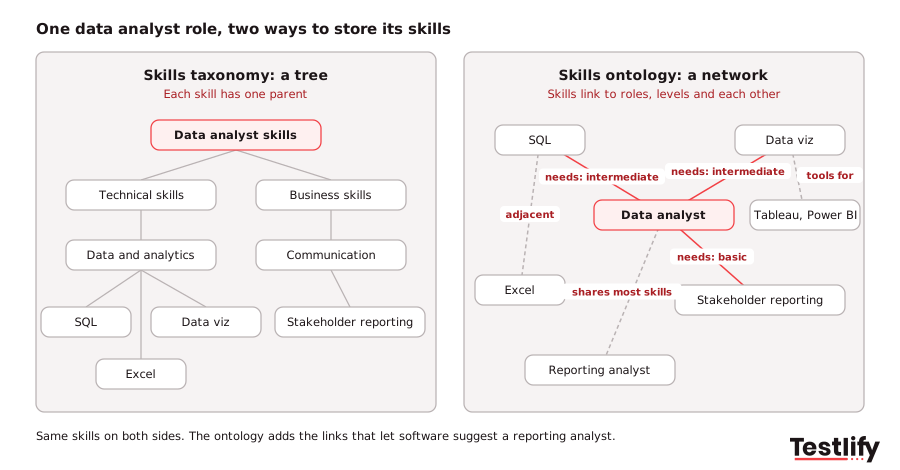
- In the taxonomy: Technical skills > Data and analytics > SQL, Excel, data visualization. Business skills > Communication > stakeholder reporting. Useful for writing the job description and tagging candidates.
- In the ontology: Data analyst requires SQL (intermediate), data visualization (intermediate) and stakeholder reporting (basic). Excel is adjacent to SQL. Tableau and Power BI are synonyms for the tool side of data visualization. Business analyst and reporting analyst share most of these skills.
The second view is what lets a system suggest a reporting analyst from finance as a strong candidate for the data role, even though the job titles do not match.
Pro tip: Before you buy anything, draw one real role both ways on a whiteboard. If your team cannot agree on the tree, an ontology will only make the disagreement harder to see.
How do skills taxonomies and ontologies support hiring?
Skills taxonomies and ontologies support different steps of the hiring process. The taxonomy does the early, language-heavy work: intake, job descriptions and tagging. The ontology does the matching work: finding candidates with adjacent skills, ranking them and suggesting internal moves. Both stop short of the last step, which is checking that the person really has the skill.
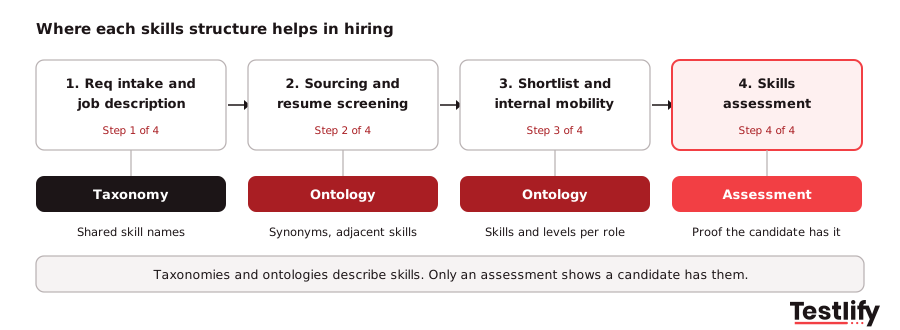
- Req intake and job descriptions. The taxonomy gives the hiring manager a fixed list of skills to pick from, so two "data analyst" reqs do not ask for different things.
- Sourcing and resume screening. The ontology widens the search beyond exact keywords and job titles to people whose skills overlap.
- Shortlisting and internal mobility. The ontology ranks fit by how many required skills a person has and at what level, inside and outside the company.
- Assessment. The skills in the taxonomy become the things you test, and the levels in the ontology become the bar each candidate has to clear.
The payoff from the matching step can be large. LinkedIn's Skills-Based Hiring 2025 Report found that a skills-based approach could expand talent pools 6.1 times globally, and 8.2 times for AI roles. Its own example is ontology thinking in plain form: logistics managers and demand planners share 17 of the top 30 skills of a supply chain manager, so they belong in the same pipeline.
Skills taxonomy vs skills ontology: which one does your hiring team need?
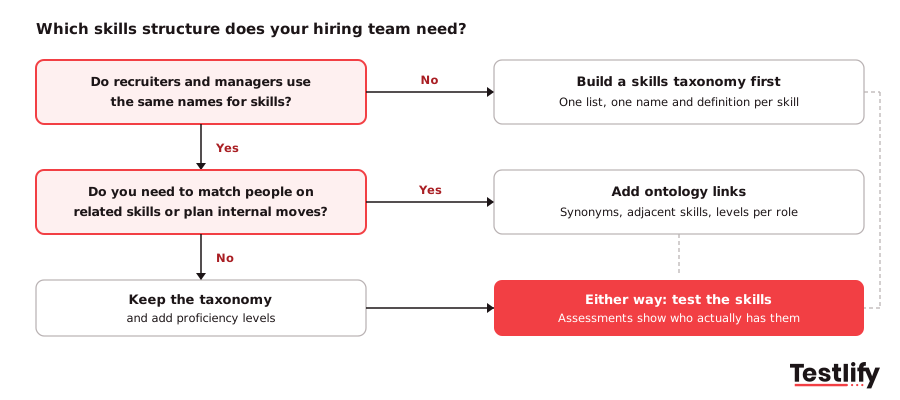
Most hiring teams need a skills taxonomy first and a skills ontology later, if at all. Start with a taxonomy when your labels are inconsistent or you are launching skills-based hiring. Add ontology features when you hire at volume for roles where adjacent skills matter, or when internal mobility is a goal.
Your situation | What to use | Why |
|---|---|---|
Recruiters and managers use different names for the same skills | Taxonomy | You need one vocabulary before anything else works |
Starting skills-based hiring for a few job families | Taxonomy plus proficiency levels | Clear skills and levels are enough to write reqs and set tests |
Hard-to-fill technical roles where titles vary a lot | Ontology features (adjacent skills, synonyms) | Matching on related skills finds people keyword search misses |
Large internal talent pool and a mobility program | Ontology | Links between roles and skills show who is close to ready |
A vendor pitches "AI matching on our ontology" | Ask to see the links | Check the relationships and levels, not just the skill count |
Ask any vendor that claims an ontology three questions: Can we see why two skills are linked? Can we edit or remove links that do not fit our roles? How are proficiency levels set and checked? A large skill count with no visible links is a taxonomy with a bigger label.
How do you move from a taxonomy to an ontology?
Moving from a skills taxonomy to a skills ontology works best in small steps on one job family at a time. You keep the taxonomy as the base and add the relationships that your hiring decisions actually use.
- Clean the taxonomy. Merge duplicates and add a short definition to every skill.
- Add proficiency levels. Three or four levels per skill, written as observable behavior.
- Link skills to roles. For each role in one job family, mark the required skills and the level for each. A skills matrix is a simple way to hold this.
- Add synonyms and adjacent skills. Start with the links recruiters already use in their heads.
- Check the links against hiring results. If candidates matched on adjacent skills keep failing the role's assessment, the link is wrong.
- Assign an owner and a review date. Skills change, and an unowned structure goes stale.
If you already use a competency framework, reuse its levels in step 2 rather than starting over.
Why do you still need skills assessments?
Skills assessments are still needed because a skills taxonomy and a skills ontology only describe skills. Neither one tells you whether a specific candidate has them. A matching engine that says a candidate is a 90% fit is reading resumes, profiles and job titles, which are claims, not evidence.
The fix is to tie the structure to a test. Each skill in your taxonomy becomes a test area, each level in your ontology becomes a pass mark, and the results feed back into your skill gap analysis so you know whether your links hold up.
Testlify fits at that last step. Its test library has 3,500+ tests across role-specific, software, coding, cognitive and situational judgment skills, and the AI test builder creates a custom assessment from a job description, with AI-suggested competencies and scoring criteria. The AI resume screener gives an explainable match score, and the assessment then checks the skills behind it.
Key takeaway: A taxonomy names the skills, an ontology connects them, and an assessment proves them. Hiring teams that only build the first two still end up deciding on claims.
Ready to test the skills in your taxonomy?
Turn the skills and levels you have defined into tests candidates actually take. Browse the Testlify test library for 3,500+ tests, or start a 7-day free trial, no credit card required, and build an assessment from your own job description. For the bigger picture, read what skills-based hiring is and why it matters.
Frequently asked questions

Related resources
View all
Skill assessment
What skills-based hiring data shows beyond the US and UK

Skill assessment
How do skills assessments correlate with on-the-job performance?

Skill assessment
How does skills mapping enable skills-based organizations?

Skill assessment
Skills mapping vs competency mapping

Skill assessment
Free skills mapping template

Skill assessment
Top skills mapping tools
Get started.
Hire on proof, not resumes.
Run your first skills-based assessment free — no credit card required.