
Recruitment software features: what hiring teams need in 2027
A stage-by-stage guide to recruitment software features, which ones to buy first, and how to test each one before you sign a contract.

Every open role brings a pile of resumes, and most teams still sort them by hand. The right recruitment software features turn that pile into a short list of candidates who can actually do the job.
Recruitment software features are the tools a hiring platform gives you to attract, track, screen, assess, interview and hire candidates. This guide shows which features matter at each stage, which to buy first, and how to test them before you sign.
TL;DR:
- The recruitment software features that matter most are applicant tracking, screening and skills assessments, interview tools, analytics and ATS integrations.
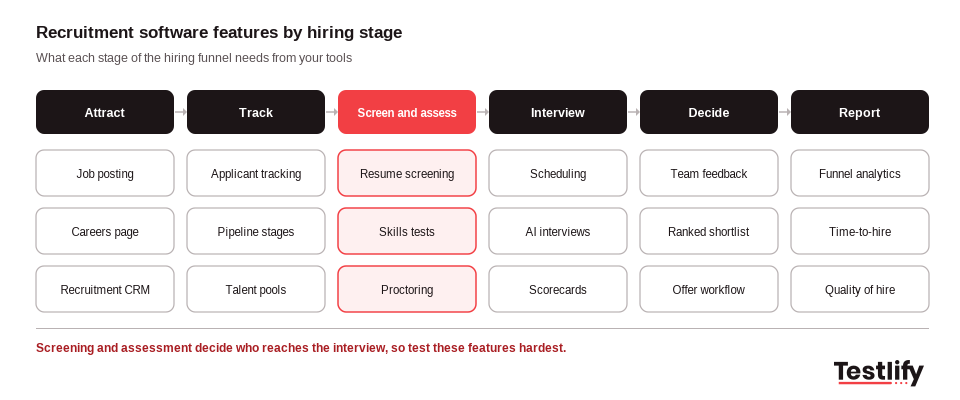
- Screening and assessment features decide who reaches the interview, so test them hardest. Most feature lists skip them.
- High-volume teams should buy automation, skills tests and AI interviews first. Low-volume teams can start with tracking, scorecards and scheduling.
- Every AI feature needs explainable scores, a human override and an audit trail, because NYC Local Law 144 and the EU AI Act both regulate AI that scores candidates.
- 37% of organizations now use or test generative AI in recruiting, and those teams save about 20% of their work week, according to LinkedIn.
- Evaluate tools on one real role with real candidates, score each feature against your must-have list, then run a short pilot.
 ChatGPT
 Gemini
 Claude
 Grok
 Perplexity
What is recruitment software?
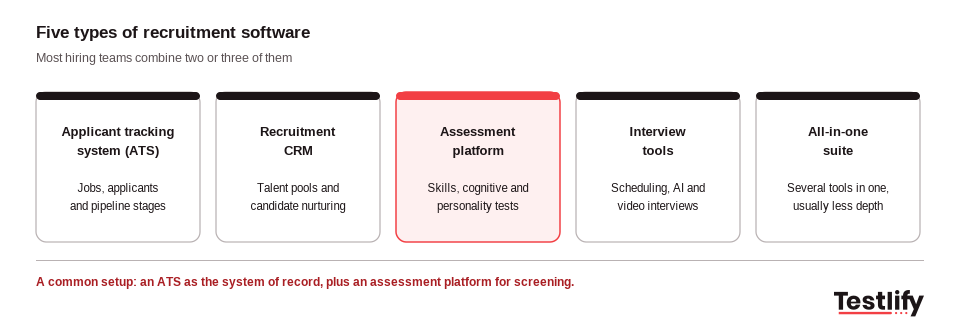
Recruitment software is any tool that helps a hiring team find, manage, evaluate and hire candidates in one place instead of across spreadsheets and inboxes. Most teams use a mix of five types, and the features you need depend on which gaps your current setup leaves open.
Applicant tracking system (ATS)
An applicant tracking system is the system of record for jobs, applicants and pipeline stages. Every hiring team needs one, because without it candidate data ends up in inboxes and spreadsheets. A good ATS shows who applied, where each person sits in the process and what happens next.
Recruitment CRM
A recruitment CRM builds and nurtures talent pools before a job opens. It suits teams that rehire from past applicants or fill the same roles again and again. Instead of starting every search from zero, recruiters contact warm candidates first.
Assessment platform
An assessment platform tests skills, cognitive ability and personality before the interview. It suits teams that get more applicants than they can read. Recruiters see proof of ability early, so interview time goes to people who can do the job.
Interview tools
Interview tools cover scheduling, one-way video, AI interviews and structured scorecards. They cut the time spent on first-round calls. Every candidate gets the same questions and is scored on the same criteria, which keeps feedback fair and easy to compare.
All-in-one suites
All-in-one suites combine several of these tools in one login. Setup is simpler and there is only one vendor to manage. The trade-off is usually lighter depth in each area, so check the screening and assessment features closely.

What features should recruitment software have?
Recruitment software should have features for every stage of hiring: attracting candidates, tracking them, screening and assessing skills, interviewing, deciding as a team and reporting on results. A tool that is strong in tracking but weak in screening still leaves recruiters reading hundreds of resumes by hand.
The pressure to get this right has not eased. SHRM's 2025 Talent Trends found that 69% of organizations still struggle to fill roles, and AI use in HR tasks rose to 43% in 2025 from 26% a year earlier.
The table below lists the core recruitment software features by hiring stage. Use it as a checklist when you compare vendors, and note which features fix your biggest bottleneck, because no team needs every row on day one.
Feature | What it does | What to look for |
|---|---|---|
Applicant tracking | Stores every job, candidate and stage | Custom stages, bulk actions, fast search |
Job posting | Publishes jobs to boards and your careers page | One-click multi-board posting, branded careers page |
Resume screening | Ranks applicants against the job | Explainable match scores, not a black box |
Skills assessments | Tests real ability before interviews | Role-specific tests, custom questions, proctoring |
Interview tools | Schedules and runs interviews | Calendar sync, AI or video interviews, scorecards |
Collaboration | Shares feedback across the hiring team | Structured scorecards, mentions, approvals |
Analytics | Tracks funnel health and outcomes | Time-to-hire, source quality, drop-off by stage |
Integrations | Connects to your ATS, HRIS and calendar | Two-way sync, open API, webhooks |
Compliance and security | Protects candidate data and decisions | GDPR, SOC 2, ISO 27001, audit logs |
Which features help you attract and track candidates?
Attract and track features help you fill the top of the funnel and keep every applicant visible. The ones to check are multi-board job posting, a careers page you can brand, a recruitment CRM for talent pools, and an applicant tracking view with custom pipeline stages.
- Job posting and distribution: Post once to several job boards and your careers page, and see which source brings applicants who pass screening, not just applicants.
- Careers page builder: A branded, mobile-friendly page with simple apply forms. Long forms cost you applicants.
- Talent pools and CRM: Tag past applicants and silver medalists so you can contact them first when a similar role opens.
- Pipeline management: Custom stages per job, bulk moves and automatic status emails, so no candidate waits weeks without an update.
If you are comparing tracking systems, our roundup of top applicant tracking systems covers the main options.
Which screening and assessment features matter most?
Screening and assessment features matter most because they decide who reaches a human interview. The strongest set combines resume screening with clear match scores, role-specific skills tests, AI interviews for the first round, and anti-cheating checks that confirm the answers are the candidate's own.
- AI resume screening: Ranks applicants against the job description and explains each match, with thresholds to auto-advance strong fits.
- Skills tests: Role-specific, coding, cognitive, language and personality tests, plus custom questions for your own scenarios.
- AI and one-way video interviews: Candidates answer structured questions any time, and every answer is scored against the same criteria.
- Proctoring and integrity checks: Tab tracking, webcam snapshots, copy-paste blocking and AI-assistance detection, so a high score reflects real skill.
Hiring teams already see skills as the core of quality of hire. LinkedIn's Future of Recruiting 2025 found that 93% of talent acquisition pros say accurately assessing skills is crucial to quality of hire, yet only 25% feel highly confident they can measure quality of hire well.
Pro tip: Ask every vendor to show what a recruiter sees after a candidate finishes screening. If the answer is a single number with no breakdown, the feature will not hold up when a hiring manager asks why someone was rejected.
Which automation and collaboration features save recruiters time?
Automation and collaboration features save time by removing the repeat work between stages: scheduling, status emails, moving candidates forward and collecting feedback. The best tools let you set rules once, such as "invite everyone above this score to the next test", and then keep a human in charge of the final decision.
- Interview scheduling: Calendar sync with Google and Outlook, self-booking links and automatic reschedules.
- Workflow rules: Auto-invites to the next stage, score thresholds for shortlists and reminders for candidates who have not started.
- Candidate messaging: Email, SMS or WhatsApp templates triggered by stage changes, so every candidate hears back.
- Structured scorecards: The same criteria for every interviewer, which keeps feedback comparable. See how structured interviews work.
- Approvals and mentions: Hiring managers approve offers and comment in one place instead of long email threads.
For more on this category, see our guide to recruitment automation tools.
What analytics and reporting features should you look for?
Analytics and reporting features show where candidates drop off, which sources produce hires, how long each stage takes and whether new hires perform well. These are the five reports to check in any demo:
- Funnel and drop-off reports: Show conversion between each stage, so you can see exactly where strong candidates leave.
- Source quality: Compare hires and assessment pass rates by source, not just application counts.
- Speed metrics: Track time-to-hire and time in each stage, split by role and recruiter.
- Assessment benchmarks: Show how a candidate scores against everyone who took the same test.
- Quality of hire: Let you compare pre-hire scores with on-the-job performance after the hire.
The recruitment analytics glossary explains which metrics to track first.
Which integration, security and compliance features matter for enterprise teams?
Integration, security and compliance features matter most for enterprise teams because recruitment software has to fit an existing ATS and HRIS and pass IT and legal review. Check for two-way ATS sync, an open API, single sign-on, recognized security certifications and data residency options.
- ATS and HRIS integrations: Two-way sync so scores and reports flow back into your system of record without manual exports.
- API and webhooks: For custom workflows and internal dashboards.
- Access control: SAML single sign-on, two-factor login and role-based permissions.
- Certifications and privacy: ISO 27001, SOC 2 Type II, GDPR and CCPA support, plus a data processing agreement.
- Data residency and retention: Choose where candidate data is stored and how long it is kept.
Regulation is tightening outside the US too. The European Commission lists AI used for recruitment, such as CV-sorting software, as high-risk under the EU AI Act, with those rules applying from 2 December 2027.
What AI recruitment software features are worth paying for?
AI recruitment software features are worth paying for when they save real recruiter hours and still show the evidence behind every decision. The most useful today are AI resume screening, AI-generated assessments from a job description, AI interviews that score answers, and candidate summaries for hiring managers.
AI feature | Worth it when | Control to insist on |
|---|---|---|
AI resume screening | You get hundreds of applicants per role | Match score explained, recruiter can override |
AI test builder | You hire for many different roles | You can edit every question and the scoring |
AI interviews | First rounds take most of your calendar | Same questions for all, clip behind each score |
AI candidate summaries | Hiring managers skip long reports | Summary links back to the raw answers |
AI-assistance detection | Candidates test remotely | Flags go to a reviewer, not straight to rejection |
Adoption is moving fast. LinkedIn's Future of Recruiting 2025 report found that 37% of organizations are integrating or experimenting with generative AI in recruiting, up from 27% a year earlier, and those teams save about 20% of their work week.
Compliance comes with that speed. Under New York City's Local Law 144, employers cannot use an automated employment decision tool unless it has had a bias audit within the past year.
A summary of the results must be public, and candidates must get notice. Ask any vendor for its audit before you switch on AI scoring.
Which features are must-haves and which can wait?
Must-have features depend mainly on hiring volume. Teams hiring a few roles a quarter need clean tracking, scorecards and scheduling first. Teams hiring hundreds of people a year need screening automation, skills tests and AI interviews from day one, because manual review stops working at that scale.
Feature | Low volume (under 50 hires a year) | High volume (500+ hires a year) |
|---|---|---|
Applicant tracking | Must-have | Must-have |
Structured scorecards | Must-have | Must-have |
Interview scheduling | Must-have | Must-have |
Skills assessments | Must-have for key roles | Must-have for every role |
AI resume screening | Can wait | Must-have |
AI interviews | Can wait | Must-have |
Proctoring | Basic checks | Full integrity checks |
Recruitment CRM | Can wait | Must-have |
Advanced analytics | Can wait | Must-have |
SSO and data residency | Only if IT requires it | Usually required |
Key takeaway: Buy for the stage that costs you the most hours today. For most growing teams, that is screening, not tracking.
How do you evaluate recruitment software features in a demo?
Evaluating recruitment software features works best when you test the tool on one of your own open roles instead of watching a scripted demo. Follow these five steps to compare vendors fairly and pilot before you commit:
- List your must-haves: Use the table above to rank features by your hiring volume and roles.
- Run one real role: Load a live job description and invite a few real or internal candidates.
- Score each feature: Rate every must-have from 1 to 5 and note what the recruiter had to do by hand.
- Check the controls: Ask to see the evidence behind AI scores, the audit log, the security documents and a live ATS sync.
- Pilot, then decide: Compare time-to-shortlist and candidate feedback with your current process for two to four weeks.
Ask every vendor these questions during the demo:
- Can a recruiter see why each candidate was ranked where they are?
- Which ATS fields sync both ways, and how long does setup take?
- How do you detect AI-assisted answers and impersonation?
- Do you have an independent bias audit we can share?
- What happens to candidate data when we leave?
Where does Testlify fit in a recruitment software setup?
Testlify covers the screening, assessment and interview features that most applicant tracking systems leave thin, and it connects to the ATS you already use. Hiring teams use it to turn a job description into a role-specific assessment, run AI interviews, and send ranked, explainable results back to their ATS.
- Skills tests for any role: Choose from 3,500+ validated tests and 25+ question types across tech and non-tech roles, in 15+ languages. Browse the Testlify test library.
- AI screening and interviews: Use the AI resume screener for explainable match scores. Run Video AI, Voice AI and Chat AI interviews that score every answer.
- Integrity checks: Apply 20+ proctoring checks, including AI-assistance detection, so a high score reflects the candidate's own work. Learn more about anti-cheating and proctoring.
- Fits your current stack: Connect to 100+ ATS integrations and keep results in your system of record. See the full list of Testlify ATS integrations.
- Bias audit available: Review the third-party NYC bias audit of the matching model before you switch on AI scoring.
Ready to add skills-based screening to your hiring?
See how role-specific assessments and AI interviews work on one of your open roles. Start a 7-day free trial of Testlify with no credit card needed, or book a demo to see it on your own hiring process.
Frequently asked questions (FAQs)

Human Resources Lead
Snehi Parmar leads People at Testlify, owning hiring, culture, performance, and retention for a 90-person team. She writes on practical HR strategy and building people processes that scale.
Related resources
View all
Recruitment Technology
What Is Interview Intelligence? A 2026 Guide for TA Teams

Recruitment Technology
Benefits of recruitment software: 10 gains for hiring teams

Recruitment Technology
Case studies of companies that successfully used recruitment technology

Recruitment Technology
How to choose the right recruitment technology in 2027

Recruitment Technology
ATS CRM software: how to choose all-in-one or integrated

AI in recruitment
Autonomous AI hiring agents for enterprise: a 2027 guide
Get started.
Hire on proof, not resumes.
Run your first skills-based assessment free — no credit card required.