
I-9 verification: a step-by-step guide for employers
How US employers verify identity and work authorization on Form I-9: deadlines, documents, remote checks, E-Verify, retention and fines.

I-9 verification is the process every US employer uses to confirm that a new hire is who they say they are and is allowed to work in the United States. The employee fills in Section 1 of Form I-9 by their first day, and the employer examines their documents and completes Section 2 within three business days.
TL;DR:
- I-9 verification confirms a new hire's identity and work authorization on Form I-9. Every US employer must do it for every person it hires, citizens included.
- The employee completes Section 1 by the first day of work. The employer completes Section 2 within three business days of the start date.
- The employee chooses which documents to show: one from List A, or one from List B plus one from List C. Asking for a specific document can be discrimination.
- Remote examination by live video is allowed only for employers enrolled in E-Verify and in good standing. Everyone else needs an in-person check, often by an authorized representative.
- Keep each form for 3 years after the date of hire or 1 year after employment ends, whichever is later.
- Paperwork errors cost $288 to $2,861 per form under the current federal penalty table, so a yearly self-audit pays for itself.
- Run I-9 verification only after the job offer is accepted. Check skills before the offer; check work authorization after it.
 ChatGPT
 Gemini
 Claude
 Grok
 Perplexity
What is I-9 verification?
I-9 verification is the employer's check of a new employee's identity and employment authorization, recorded on Form I-9, Employment Eligibility Verification. The employee attests to their status in Section 1, then the employer physically examines original documents (or uses an approved remote procedure) and certifies them in Section 2.
The requirement comes from the Immigration Reform and Control Act of 1986. According to USCIS's Form I-9 page, all US employers must properly complete Form I-9 for every individual they hire for employment in the United States, both citizens and noncitizens. The form is not filed with any agency. The employer keeps it on file and shows it to government officials when they ask.
For a plain definition of the form itself, see the Testlify glossary entry on Form I-9. I-9 verification is the act of completing it correctly, on time, for every hire. It is part of proving a person's right to work, and it is separate from a background check, which looks at criminal, education or employment history.
Key takeaway: I-9 verification is not optional and not limited to noncitizens. A missing or late form for a US citizen is still a violation.

Who needs I-9 verification?
I-9 verification is needed for every employee hired after November 6, 1986 who works for pay in the United States, whatever their citizenship. That includes full-time, part-time, seasonal and temporary employees, and it applies to employers of every size.
Some people do not need a Form I-9 from you, according to the USCIS Handbook for Employers (M-274):
- Independent contractors: People who are genuinely self-employed and not your employees. Misclassifying an employee as a contractor does not remove the duty.
- Workers placed by a staffing agency: The agency is the employer and completes the I-9, not the client company.
- Long-standing employees: People hired on or before November 6, 1986 who have stayed with the same employer.
- Casual domestic workers: People doing sporadic, irregular work in a private home.
Remote employees are not an exception. If a person works for you in the United States, you verify them, even if they never set foot in an office.
How does the I-9 verification process work?
The I-9 verification process works in four steps: the employee completes Section 1, the employer examines documents and completes Section 2, the employer creates an E-Verify case if enrolled, and the form is stored and reverified when needed. The deadlines are fixed and short, so most errors come from timing.
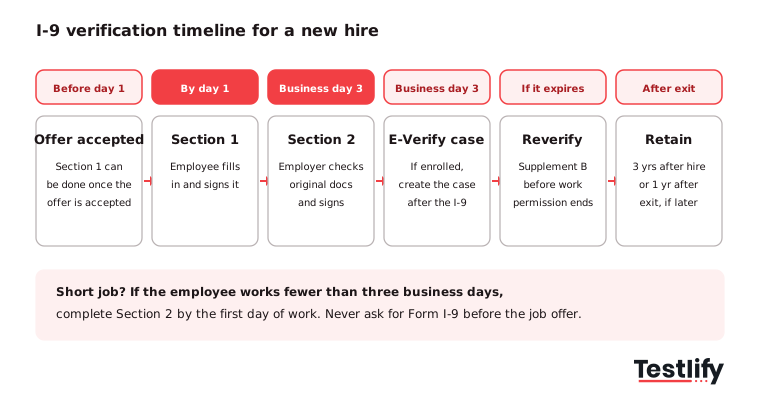
- Hire the person first: Form I-9 is completed only after a job offer is accepted. You can let the new hire fill in Section 1 any time between accepting the offer and their first day.
- Section 1 by day one: The employee enters their name, address, date of birth and citizenship or immigration status, then signs the attestation. They must complete it no later than the first day of employment. A preparer or translator who helps them fills in Supplement A.
- Section 2 within three business days: The employer or an authorized representative examines the original documents the employee chooses to present, checks that they reasonably appear genuine and relate to the person, and records the document details. If the employee starts on a Monday, Section 2 is due by Thursday.
- Shorter jobs: If the employee will work fewer than three business days, Section 2 is due by the first day of work.
- E-Verify, if you use it: Enrolled employers create a case from the completed form, generally no later than the third business day after the employee starts work for pay.
- Store and track: File the form with any document copies, and set a reminder for any work permission that expires.
The USCIS Handbook for Employers is clear that you cannot tell an employee which documents to bring. You can give them the list of acceptable documents and let them choose.
Pro tip: Send the list of acceptable documents with the offer letter or the onboarding checklist. New hires who know what to bring on day one rarely miss the three-day deadline.
What documents are acceptable for I-9 verification?
Acceptable I-9 verification documents fall into three lists. A List A document proves both identity and work authorization on its own. Otherwise the employee shows one List B document for identity plus one List C document for work authorization. The employee picks which documents to present.
List | What it proves | Common examples |
|---|---|---|
List A | Identity and work authorization | US passport or passport card, Permanent Resident Card (Form I-551), Employment Authorization Document with photo (Form I-766), foreign passport with Form I-94 endorsing work for a specific employer |
List B | Identity only | State driver's license or ID card, government ID card, school ID with photo, voter's registration card, US military card, Native American tribal document, Canadian driver's license |
List C | Work authorization only | Unrestricted Social Security card, certified US birth certificate, Certification of Report of Birth (DS-1350, FS-545, FS-240), Native American tribal document, certain DHS-issued employment authorization documents |
A few rules trip up hiring teams:
- No extra documents: USCIS says an employee who presents an acceptable List A document should not be asked for anything else.
- Originals, unexpired: Documents must be originals (a certified birth certificate counts) and unexpired. Photocopies are not acceptable for in-person examination.
- Receipts for a short time: A receipt for a replacement of a lost, stolen or damaged document can be accepted for a limited period, then the employee shows the replacement.
- Minors: Employees under 18 who cannot show a List B document may use a school record, report card or medical record.
The full current list is on the USCIS acceptable documents page. Check it before you train new HR staff, because the lists change with new document types.
How does remote I-9 verification work?
Remote I-9 verification works in one of two ways. Employers enrolled in E-Verify and in good standing can use the DHS alternative procedure: they review copies of the documents, then see the same documents on a live video call. Employers not in E-Verify must arrange an in-person check, usually through an authorized representative.
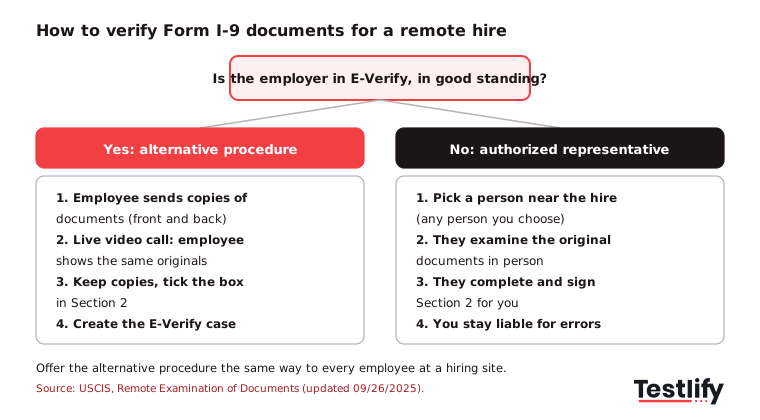
The alternative procedure took effect on August 1, 2023, when the pandemic-era flexibilities ended. According to USCIS guidance on remote examination, an employer using it must:
- Review copies first: Examine copies (front and back, if two-sided) of the documents or an acceptable receipt to confirm they reasonably appear genuine and relate to the employee.
- Hold a live video call: The employee presents the same documents on video.
- Keep the copies: Retain clear, legible copies of every document examined.
- Tick the box: On the 08/01/23 and 01/20/25 editions, check the alternative procedure box in Section 2.
USCIS adds a consistency rule. If you offer the procedure at a hiring site, you must offer it to all employees at that site. You may offer it only to fully remote hires and use in-person checks for onsite and hybrid staff, but never for a discriminatory reason or based on citizenship, immigration status or national origin.
Without E-Verify, you can name an authorized representative near the new hire, such as a colleague, a notary acting as a private person or a vendor. That person examines the original documents in person and completes Section 2. The employer stays liable for any mistake they make, so give them written instructions.
For teams that hire across states and countries, our guide to remote hiring covers the rest of the distributed hiring process.
What is the difference between Form I-9 and E-Verify?
Form I-9 and E-Verify are different steps. Form I-9 is the mandatory paper or electronic record of the document check, and every employer must complete it. E-Verify is an online system that compares the information from a completed Form I-9 against Social Security Administration and DHS records. E-Verify is voluntary for most employers.
Form I-9 | E-Verify | |
|---|---|---|
Required? | Yes, for every employer and every hire | Voluntary for most; required for some federal contractors and by some state laws |
What it does | Records the document check | Confirms the I-9 data against government records |
Social Security number | Optional for the employee (unless you use E-Verify) | Required |
List B documents | Photo not required | Must have a photo |
Reverification | Done on Supplement B | Cannot be used to reverify |
Remote examination | Only through the E-Verify alternative procedure or a representative | Enrolment is what unlocks the alternative procedure |
The comparison above follows the official E-Verify and Form I-9 page on e-verify.gov. E-Verify is mandatory for federal contractors whose contracts include the FAR E-Verify clause, and a number of states require it for some or all private employers. Check your state's own rules before you decide.
Never use E-Verify to screen candidates before an offer. A case is created only for a person you have already hired and who has completed Form I-9.
When do you need to reverify an employee?
Reverification is needed when an employee's employment authorization, or the document that shows it, is about to expire. The employer completes Supplement B (formerly Section 3) no later than the date the authorization expires, and the employee again chooses which List A or List C document to present.
Reverification is not needed for:
- US citizens and noncitizen nationals.
- Lawful permanent residents who presented a Permanent Resident Card (Form I-551). An expired green card does not mean the person lost permission to work.
- List B identity documents that expire.
Supplement B is also used for rehires. If you rehire someone within three years of the date their original Form I-9 was completed, you can update that form instead of starting a new one, provided the original is still valid.
Set expiry reminders in your HRIS on the day you complete Section 2. Late reverification is a paperwork violation, and continuing to employ someone whose authorization has expired can be a far more serious one.
How long should employers keep Form I-9?
Employers should keep Form I-9 for every current employee for as long as they work for you. After someone leaves, keep their form until 3 years after the date of hire or 1 year after employment ended, whichever date is later.
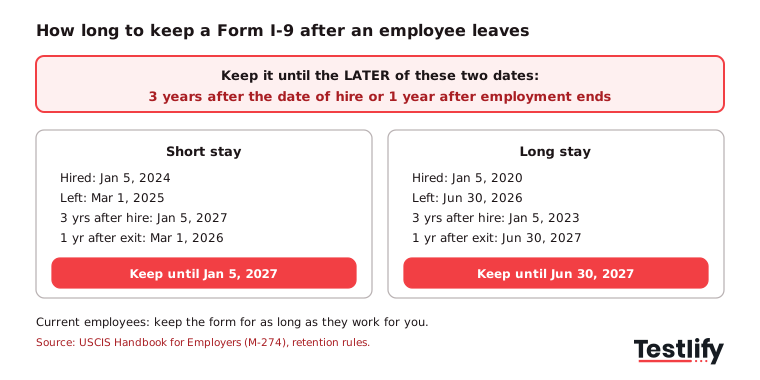
Two worked examples make the rule easier to apply:
- Short tenure: Hired January 5, 2024 and left March 1, 2025. Three years after hire is January 5, 2027; one year after exit is March 1, 2026. Keep the form until January 5, 2027.
- Long tenure: Hired January 5, 2020 and left June 30, 2026. Three years after hire is January 5, 2023; one year after exit is June 30, 2027. Keep it until June 30, 2027.
Forms can be stored on paper, microfilm or microfiche, or electronically, according to USCIS retention and storage guidance. Store any document copies with the form they belong to. Electronic systems need integrity controls, an indexing system and the ability to print legible copies, and they must not block access by a government agency.
Officers from DHS, the Department of Labor or the Department of Justice give at least three business days' notice before an inspection, so keep forms where you can produce them quickly. Then purge expired forms on a schedule: keeping forms longer than required only adds risk in an audit.
What are the penalties for I-9 mistakes?
The penalties for I-9 mistakes depend on the type of violation. Paperwork errors, such as a missing signature or a late Section 2, carry a civil fine of $288 to $2,861 per form. Knowingly hiring or continuing to employ an unauthorized worker costs $716 to $5,724 per worker for a first offense, rising to $8,586 to $28,619 for a third or later offense.
Those figures come from the federal penalty table in 8 CFR 274a.10, last adjusted for inflation in January 2025 and applying to violations after November 2, 2015. They are adjusted from time to time, so check the current table when you budget for risk.
Fines are only part of the exposure:
- Discrimination charges: Asking for specific or extra documents, or rejecting documents that reasonably appear genuine, can be an unfair documentary practice if it is based on citizenship, immigration status or national origin. The Justice Department's Immigrant and Employee Rights Section handles these charges. See our glossary entry on discrimination.
- Criminal exposure: The M-274 handbook notes fines and up to six months in prison for a pattern or practice of knowingly hiring unauthorized workers, and up to five years for document fraud or false statements.
- Contract risk: Federal contractors can lose contracts or be debarred.
DHS weighs the size of the business, good faith, the seriousness of the violation and past violations when it sets a fine. Technical errors corrected within 10 days of DHS notice can qualify for a good-faith defense, which is another reason to self-audit.
What are the most common I-9 verification mistakes?
The most common I-9 verification mistakes are missed deadlines, asking for specific documents, incomplete fields and poor tracking of expiry dates. Most are process failures rather than fraud, which means a clear checklist and one owner fix most of them.
- Late Section 2: Counting calendar days instead of business days, or waiting for a manager who is out.
- Specifying documents: Telling a new hire to "bring your passport" or refusing a valid List B and C combination.
- Blank fields: Missing dates of hire, missing signatures, or an undated Section 1 or Section 2.
- Wrong form edition: Electronic systems had to move to the version expiring 05/31/2027 by July 31, 2026, according to the USCIS Form I-9 page.
- Pre-offer I-9s: Asking candidates to complete Form I-9 during screening, before an offer exists.
- Missed reverification: No reminder on an Employment Authorization Document that expires.
- Inconsistent remote checks: Offering video examination to some new hires at a site and not others.
- Over-retention: Keeping every form forever instead of purging on the retention date.
A short internal self-audit once a year, and more often for high-volume roles, catches most of these. Fix errors by striking through, entering the correct data, and initialling and dating the change. Never backdate a form or white out an entry. Our post on how recruiters ensure hiring compliance covers the wider checklist.
How should hiring teams fit I-9 verification into the hiring process?
Hiring teams should treat I-9 verification as the first step of onboarding, never as a screening step. The legal order is simple: decide on skills and fit before the offer, then verify identity and work authorization after the offer is accepted. Mixing the two creates discrimination risk and slows the hire.
This order has practical consequences for recruiting ops:
- Keep questions about status out of screening: Before the offer you may ask whether a candidate is authorized to work in the US and whether they will need sponsorship, but you should not ask for I-9 documents or for a specific status.
- Verify skills early: Use structured, job-related skills assessments and interviews to decide who gets the offer. A verified skill check before the offer and a verified document check after it give you two clean records.
- Plan for volume: For high-volume hiring, the three-business-day deadline lands on dozens of hires at once. Assign one owner per site, and give remote hires a clear path (video examination or a named representative) before their start date.
- Hand off cleanly: Pass start dates from the ATS to whoever completes Section 2 the moment an offer is accepted, so the clock does not start without them.
On the assessment side, identity matters too. Testlify's anti-cheating and proctoring includes 20+ proctoring checks, with photo ID verification and face match available per attempt, so the person who took the test is the person you hire. That is a hiring integrity check, not an I-9: Form I-9 still has to be completed after the offer.
For the bigger picture of rules that apply across the hiring funnel, see our entry on HR compliance.
Hire on verified skills, then verify the paperwork
I-9 verification protects the business after the offer. The decision that comes before it, who gets the offer, deserves the same rigor. Testlify helps hiring teams check job skills before the offer with 3,500+ ready-to-use tests, AI interviews and proctoring, with a 7-day free trial and no credit card. Browse the Testlify test library to find tests for the roles you hire most.
Frequently asked questions (FAQs)

Related resources
View all
HR compliance
Employee monitoring policy template: free sample and guide

HR compliance
What is Personally Identifiable Information (PII) and how’s it protected?

HR compliance
How to write an HR audit report: format, template and example

Hiring Guide
Startup hiring: a guide to your first 20 hires

Hiring Guide
How to hire your first engineer as a founder: a step-by-step guide

Workplace culture
12 employee motivation strategies that actually work
Get started.
Hire on proof, not resumes.
Run your first skills-based assessment free — no credit card required.