
Recruiting email templates for tech startups: 12 emails to copy
Twelve ready-to-send recruiting emails for tech startups, from first outreach to the offer, with subject lines, timing and follow-up rules.

Engineers see a lot of recruiting emails that read like the same message. The ones that get a reply sound like a person wrote them for one candidate.
Tech startups feel this more than most, because the founder, a hiring manager and one recruiter often share the inbox. Silence after a test or an interview costs you candidates you cannot afford to lose.
Recruiting email templates for tech startups fix this by giving every stage a short, ready email that you adapt in minutes. Below are 12 you can copy, from first outreach to the offer and the rejection, with subject lines, timing and follow-up rules.
TL;DR:
- Tech startups need one ready template for every point a candidate waits on you, from cold outreach to offer and rejection, about 12 emails in total.
- Keep emails to 50 to 150 words with a 5 to 9 word subject line, the best performers in hireEZ's 2025 benchmark of 2.7 million emails.
- Lead with the technical problem the candidate would own, not the funding round. Engineers respond to scale, latency and architecture.
- Stop after three to four touches, which captured 90 to 95% of all replies. Give each follow-up a new reason to reply.
- Answer within two working days after tests and interviews. In an iHire survey, 53% of job seekers said an employer had ghosted them.
- Fill three to five fields with real detail, such as name, one thing they built and the team, instead of rewriting each email.
- Send from an authenticated domain with SPF, DKIM and DMARC, from a real person, and include an opt-out line.
 ChatGPT
 Gemini
 Claude
 Grok
Grok Perplexity
Why do tech startups need recruiting email templates?
Tech startups need recruiting email templates because they hire against bigger brands with a smaller team and less time. A startup rarely has a full recruiting team, so the founder, a hiring manager and one recruiter often share the inbox.
Templates give all of them the same structure, the same facts about the role and the same next steps. Candidates get a clear, consistent experience whoever writes to them.
Templates also stop the most common failure in startup hiring: silence. In an October 2025 iHire survey of 1,024 job seekers, 53% said an employer had ghosted them.
The most common moments were after applying (28%), after one interview (20%) and after a skills assessment (9%). A ready template for each of those moments turns a forgotten follow-up into a two-minute task.
Across the teams we work with at Testlify, the startups that hire fastest are not the ones that write the most creative emails. They are the ones that send the right short email at every stage, on the same day the stage ends.

What makes a recruiting email work for tech candidates?
A recruiting email works for tech candidates when it is short, specific to the person and the problem, and ends with one easy next step. The hireEZ 2025 email outreach benchmark, built on more than 2.7 million recruiting emails sent between January and June 2025, puts numbers on each of those points.
What to get right | What the 2025 data shows | What it means for a tech startup |
|---|---|---|
Reply rate | Average reply rate of 15.2%, with 41.8% of replies showing real interest | Judge outreach by replies, not opens |
Subject line | 5 to 9 words performed best | Name the role and one hook, nothing more |
Body length | 50 to 150 words performed best | Three short paragraphs and a link |
Personalization | Subject lines with the company and candidate name reached a 24% reply rate | Use their name, your name and one real detail |
Sequence length | 3 to 4 touches captured 90 to 95% of all replies | Stop after the fourth email |
Send time | Early weekday mornings and Sunday mornings got nearly double the replies of Friday or Saturday afternoons | Schedule sends for early morning in the candidate's time zone |
Company size | Small companies do best when they lead with decision speed, scope and direct impact | Sell ownership, not perks |
The same report says engineers respond to specifics about scale, latency and architecture. For a tech startup, that means the strongest line in a first email is usually the technical problem the candidate would own, not the funding round.
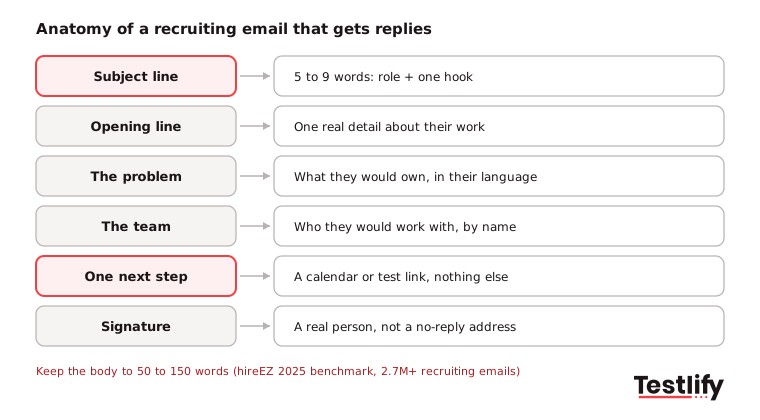
Pro tip: Write the subject line last. Once the body says why this person, why this problem and what to do next, the subject line is usually the most specific phrase already in the email.
Which recruiting emails does a tech startup need at each stage?
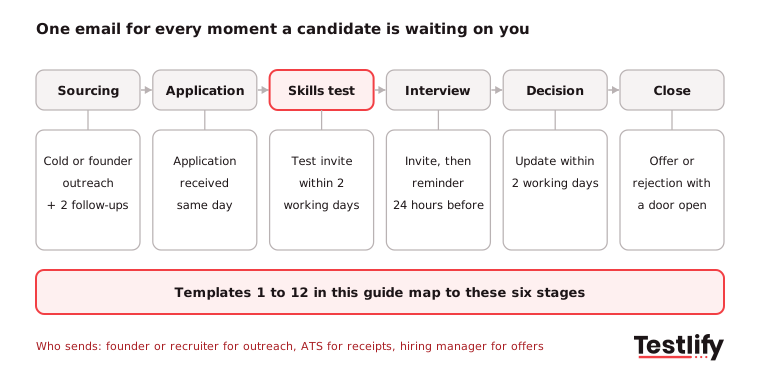
A tech startup needs one recruiting email for every point where a candidate is waiting on you: first contact, follow-ups, application received, skills test, interview, decision and offer. The map below shows when each email goes out and who should send it in a small team.
What are the best recruiting email templates for tech startups?
The best recruiting email templates for tech startups cover all 12 moments in the stage map above, and they work best as a starting point. Replace every bracketed field, cut any sentence that does not apply, and read the email once on your phone before you send it.
Each template below has a subject line and a note on when to use it.
1. Cold outreach to a passive engineer
Use this for a candidate who is not looking. Lead with the problem and one real detail from their work.
Subject: [Role] at [Company]: help us [solve one problem] Hi [First name], Your [post / talk / repo] on [specific topic] stuck with me, especially [detail]. At [Company] we build [one line on product] and just hit [scale fact, for example 2 million API calls a day]. We are hiring a [Role] to own [specific problem], working directly with [CTO or team lead name]. Open to a 20-minute call next week? Here is my calendar: [link] [Your name], [Company]
2. Founder outreach for a key hire
Use this for a first engineer, a team lead or any hire that shapes the company. A note from the founder signals how much the role matters.
Subject: [First name], a note from [Company]'s founder Hi [First name], I am [Your name], co-founder of [Company]. We are [stage, for example a 25-person Series A team] building [product] for [customer]. I am writing myself because the [Role] will shape how we [build X] for years. Your work on [specific project] is the closest thing I have seen to what we need. Could we have a 20-minute call this week or next? [Calendar link] [Your name]
3. First follow-up after no reply
Send this 3 to 4 days after the first email. Add one new piece of information instead of repeating yourself.
Subject: Re: [original subject] Hi [First name], One thing I left out: the team you would join just [recent change, for example moved our data pipeline to event streaming], so the [Role] gets to design the next version, not maintain the old one. If the timing is wrong, a quick "not now" is completely fine and I will not keep writing. [Your name]
4. Final follow-up
Send this 10 to 14 days after the first email. It closes the loop politely and often gets the most replies, because it asks for very little.
Subject: Should I close your file, [First name]? Hi [First name], I have not heard back, so I will assume the timing is not right and stop writing about the [Role]. If anything changes, reply to this email any time and it will come straight to me. Good luck with [current project]. [Your name]
5. Referral intro
Use this when an employee refers someone. Name the referrer in the subject line so the email gets opened.
Subject: [Referrer name] suggested I get in touch Hi [First name], [Referrer name] on our [team] team said you would be great for the [Role] we are hiring for, and that you two worked together on [project]. I have copied [Referrer] here. The short version: [one line on the role and the problem]. The full job description is here: [link]. Would a short call this week work? [Calendar link] [Your name]
6. Application received
Automate this in your ATS so it goes out the same day. Tell the candidate exactly what happens next and when.
Subject: We got your application for [Role] at [Company] Hi [First name], Thanks for applying for the [Role]. A real person on our team will review your application by [date]. Here is how our process works: a short skills test, one call with the hiring manager, and a final conversation with the team. Most candidates hear a decision within [number] weeks of applying. If you have questions before then, just reply to this email. [Your name], [Company] hiring team
7. Skills test invitation
Send this within two working days of an application or a good first call. Be clear about time, format and why you test, so strong candidates do not drop off.
Subject: Next step for the [Role]: a [length]-minute skills test Hi [First name], Our next step for the [Role] is a short skills test, so everyone is judged on the same real tasks.
- What it covers: [skills, for example JavaScript, React and debugging]
- How long it takes: about [number] minutes
- Deadline: [date]
- Link: [test link]
Everyone who finishes the test hears back within [number] working days. [Your name]
8. Interview invitation
Send this as soon as you have reviewed the test. Give everything the candidate needs in one email so there is no back-and-forth.
Subject: Interview for [Role] at [Company]: pick a time Hi [First name], Your test results stood out, especially [specific strength]. We would like to invite you to a [length]-minute [video / onsite] interview with [interviewer name, title]. We will talk through [topics, for example a system you have designed and a short live coding task]. Please choose a time here: [scheduling link]. [Your name]
9. Interview reminder
Send this 24 hours before the interview. It cuts no-shows and answers the questions candidates are too polite to ask.
Subject: Reminder: your [Company] interview tomorrow at [time, time zone] Hi [First name], A quick reminder that you are meeting [interviewer name] tomorrow at [time, time zone].
- Join here: [video link or address]
- Bring: [anything needed, for example a laptop with your usual editor]
- Need to move it? Reply here and we will find another time.
See you tomorrow, [Your name]
10. Post-interview update
Send this within two working days of the interview, even if there is no decision yet. A short update is what stops candidates from feeling ghosted.
Subject: Thanks for your time, [First name]: next steps Hi [First name], Thank you for speaking with [interviewer name] on [day]. The team liked [specific point from the interview]. We are finishing interviews this week and will share a decision by [date]. If you have other offers moving, tell me and I will do my best to speed things up. [Your name]
11. Job offer email
Send this the same day as your verbal offer, with the formal offer letter attached. Put equity and the key terms in plain words, because startup offers are harder to compare than big-company ones.
You can draft the letter with the free offer letter generator.
Subject: Your offer to join [Company] as [Role] Hi [First name], As promised, here is your offer to join [Company] as [Role], reporting to [manager name].
- Base salary: [amount] per year
- Equity: [number] options, vesting over [number] years with a [number]-year cliff
- Start date: [date]
- Location: [remote / office]
The offer letter is attached. Please reply by [date] to accept, and ask us anything before then. [Your name]
12. Rejection with a door open
Send this within two working days of the decision. Thank the candidate, give one honest reason if you can, and keep the relationship for future roles.
Subject: Your application for [Role] at [Company] Hi [First name], Thank you for the time you put into our process, including the skills test and your interview with [interviewer name]. We have chosen another candidate whose experience with [specific area] is closer to what we need right now. It was a close call. I would like to keep you in mind for future [type of] roles. Reply "yes" and I will reach out when one opens. [Your name]
For more variations, see the full sets of interview invitation email templates, job offer email templates, candidate rejection email templates and onboarding email templates for the week after the offer is signed.
How often should you follow up with a candidate who has not replied?
A recruiter should follow up with a candidate who has not replied two or three times, then stop. The hireEZ 2025 benchmark found that three to four touches captured 90 to 95% of all replies, and extra emails added very little.
A simple cadence for tech startups is the first email on day 0, then a follow-up with new information on day 3 or 4. Add an optional LinkedIn message on day 7, and a final close-the-loop email on day 10 to 14.
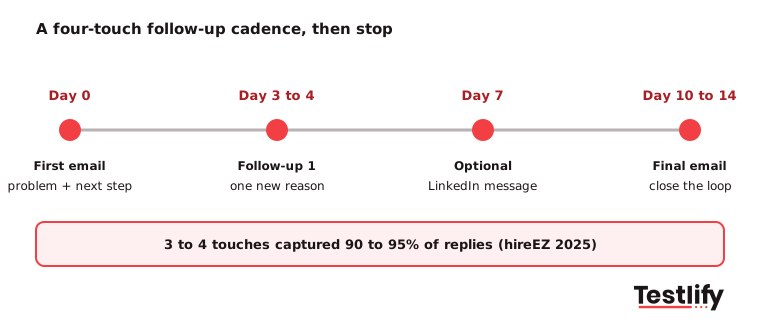
Each follow-up should give the candidate a new reason to reply: a team change, a product launch, a salary range or a short demo of what they would build. Resending "just bumping this" adds a touch without adding a reason.
How do you personalize a template without losing the time savings?
Personalizing a template quickly comes down to filling three to five fields with real detail and leaving the rest of the email alone. The hireEZ 2025 report found that three to five personalized variables consistently drove stronger replies, so there is no need to rewrite each email from scratch.
- Their name and your name in the subject line or the first line.
- One specific thing they did, such as a repo, a talk, a post or a product they shipped.
- The problem they would own, written in their language (scale, latency, architecture for engineers).
- The team or person they would work with, by name.
- One concrete next step, such as a calendar link or a test link.
AI writing tools can draft these fields from a profile, and LinkedIn's Future of Recruiting 2025 report found that recruiters who use AI-assisted messaging most are 9% more likely to make a quality hire. Read every AI draft before it goes out, though.
A wrong project name or a made-up detail does more damage than a plain template.
How do you keep startup recruiting emails out of spam?
Startup recruiting emails stay out of spam when they come from an authenticated domain, go to a clean list, and give people an easy way to opt out. New startup domains have no sending history, so they are judged more strictly than an established company's.
- Authenticate your domain: Google's email sender guidelines, in force since February 2024, require SPF or DKIM for every sender and SPF, DKIM and DMARC for anyone sending more than 5,000 emails a day to Gmail addresses. Ask whoever runs your domain to set all three.
- Keep spam complaints low: Google asks senders to keep their reported spam rate below 0.3%. Mass-mailing a scraped list is the fastest way to cross it.
- Send from a person, not a no-reply address: Candidates reply to people, and replies help your sender reputation.
- Offer an opt-out line: A sentence such as "Reply 'no' and I will not contact you again" respects the candidate and protects your domain.
- Know when email law applies: The FTC's CAN-SPAM guide covers commercial email, makes no exception for business-to-business email, and requires opt-outs to be honored within 10 business days. Keep recruiting emails about the job, and check with your counsel before adding any product promotion to them. Candidates in the EU and UK also have data protection rights over how you store their details.
What mistakes make tech candidates ignore recruiting emails?
Tech candidates ignore recruiting emails that look like they were sent to hundreds of people. These are the mistakes we have seen cost startups the most replies:
- Opening with the company, not the person: "We are a fast-growing startup" is the first line of thousands of emails.
- Listing a tech stack instead of a problem: Engineers want to know what they would build and why it is hard.
- Hiding the basics: Leaving out location, seniority or a salary range makes candidates assume the worst.
- Asking for too much too soon: A first email that asks for a resume and a cover letter gets fewer replies than one that asks for a 20-minute call.
- Going silent after the test or interview: The iHire survey shows candidates feel ghosted most after applying and after interviews, which is exactly when a template takes two minutes.
- Getting details wrong: A misspelled name or a wrong project name ends the conversation.
Key takeaway: Short, specific and on time beats clever. If every candidate gets the right two-minute email at every stage, your startup will already stand out from most of the companies competing for the same people.
How does Testlify help tech startups after the first email?
Testlify helps tech startups turn replies into a ranked shortlist, so the emails after the first one are based on what candidates can do, not on their resumes. That matters: in LinkedIn's Future of Recruiting 2025 report, 93% of TA professionals said accurately assessing skills is crucial to quality of hire.
- Skills tests for tech roles: The Testlify test library has 3,500+ tests, including coding tests and role tests such as the full stack developer test. You can also build a custom assessment from a job description.
- AI interviews: Structured video, voice or chat interviews that every candidate takes on their own time, scored on the same criteria.
- Fair, secure testing: 20+ proctoring checks, such as tab tracking, copy and paste tracking and webcam snapshots, so remote results reflect the candidate's own work.
- Fits your stack: 100+ ATS and HRIS integrations, so test invites and results sit next to your recruiting emails.
- Built for growing teams: Credit-based pricing where you pay only when a candidate starts a test, and a 7-day free trial with no credit card. See how it works for startups.
Pair template 7 with a Testlify test for the role, and your skills test invitation goes out with a link that is ready to send.
Ready to hire faster with a skills-first process?
Book a demo to see how Testlify helps tech startups test skills and shortlist candidates faster. You can also start a 7-day free trial with no credit card.
Frequently asked questions (FAQs)

Human Resources Lead
Snehi Parmar leads People at Testlify, owning hiring, culture, performance, and retention for a 90-person team. She writes on practical HR strategy and building people processes that scale.
Related resources
View all
Hiring Guide
Interview questions for hiring a Data analyst

Hiring Guide
10 employee reward ideas to boost morale

Hiring Guide
A quick guide to integrate your CRM with other tools

Hiring Guide
How to set up lateral hires for success in their new roles

Hiring Guide
Top unconventional techniques to make lateral hires

Hiring Guide
How to address salary parity concerns in lateral hires
Get started.
Hire on proof, not resumes.
Run your first skills-based assessment free — no credit card required.