
Asynchronous video interview: a hiring team's 2027 guide
How hiring teams set up, score and run asynchronous video interviews, when to use them, and the rules on AI review of recorded answers.

Booking fifty phone screens means days of emails, missed calls and rescheduled slots. Meanwhile strong candidates wait, and some accept other offers.
An asynchronous video interview removes the scheduling: candidates record answers to the same questions on their own time, and your team reviews later. Below, you will learn how to set one up, score it fairly and meet the rules on AI review.
TL;DR:
- An asynchronous video interview is a one-way, recorded screen: candidates answer fixed questions on video when it suits them, and reviewers watch and score the answers later.
- Use it for high-volume, early-career, shift-based and multi-time-zone roles. Keep live interviews for senior hires, small talent pools and roles where you need to sell the job.
- Keep it short: 3 to 5 questions, 1 to 3 minutes per answer, 30 to 60 seconds of thinking time, one retake and a 3 to 5 day deadline.
- Score every answer against a written rubric, with two reviewers on borderline candidates, so the format stays fair.
- Candidate trust is the main risk. Gartner found only 26% of job candidates trust AI to evaluate them fairly, so tell candidates who reviews their answers and how.
- If AI analyzes the videos, check the law first: Illinois requires notice, an explanation and consent, and New York City requires a yearly bias audit and advance notice.
 ChatGPT
 Gemini
 Claude
 Grok
 Perplexity
What is an asynchronous video interview?
An asynchronous video interview is a recorded interview where the employer sets the questions in advance and the candidate answers them on camera at a time that suits them, usually within a few days. The hiring team then watches the answers, scores them and decides who moves on to a live interview.
You will also see it called a one-way interview, a one-way video interview, a pre-recorded interview or an on-demand interview. "Asynchronous" describes the timing: the candidate and the reviewer are never in the session together.
"One-way" describes the format: questions go one way and answers come back, with no back-and-forth.
Most teams use an asynchronous interview as the first conversation after an application or a short skills test, in place of a 20 to 30 minute recruiter phone screen.

How does an asynchronous video interview work?
An asynchronous video interview works in five steps: the team sets up questions and rules, invites candidates by email or text, candidates record their answers in a browser or on their phone, reviewers score the recordings against a rubric, and the best candidates move on to a live interview. The whole loop usually closes within a week.
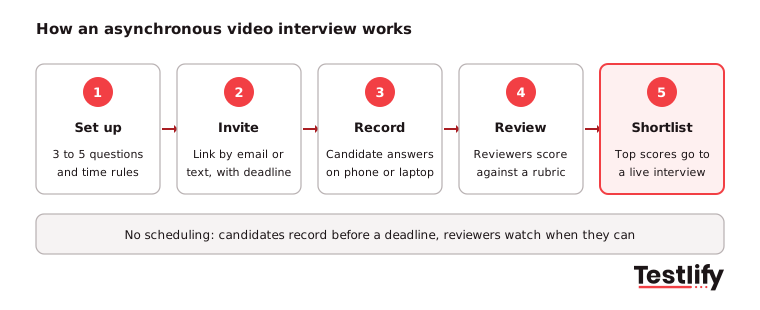
Here is what happens at each of the five steps, from the first setup to the final shortlist:
- Set up: The recruiter and hiring manager agree on the skills to check, write 3 to 5 questions and set the rules for thinking time, answer length, retakes and the deadline.
- Invite: Candidates get a link with clear instructions, how long it takes, who will watch the answers and the deadline.
- Record: The candidate reads or watches each question, gets a short time to think, then records an answer. Most tools run in a browser or on a phone with no download.
- Review and score: Reviewers watch the answers when they have time, often at higher playback speed, and score each answer against the same criteria. Some tools add AI scoring or transcripts for a reviewer to check.
- Shortlist: Scores roll up into a ranked list. The strongest candidates are invited to a live interview, and everyone else gets a timely decision.
How is an asynchronous video interview different from a live interview?
An asynchronous video interview differs from a live (synchronous) video interview in timing, consistency and depth. Async interviews need no scheduling and ask every candidate the same questions, so they work well at volume. Live interviews allow follow-up questions and a real conversation, so they suit depth and selling the role. The table below compares the two formats side by side.
Feature | Asynchronous video interview | Live video interview |
|---|---|---|
Scheduling | None, candidates record any time before a deadline | A slot for every candidate and interviewer |
Questions | Same questions, same order, same time limits for all | Can drift from candidate to candidate |
Follow-up questions | Not possible | Possible, so you can probe deeper |
Reviewer time per candidate | About 5 to 10 minutes to watch and score | 30 minutes or more, plus scheduling |
Who can review | Several reviewers, each on their own time | Only the people on the call |
Candidate experience | Flexible, but can feel impersonal | Personal, but harder to schedule |
Best stage | First screen | Later rounds and final interviews |
For a deeper look at how each format assesses candidates, see our guide to video and audio interviews.
Why are hiring teams using one-way video interviews?
Hiring teams use one-way video interviews because they cut the scheduling work out of the first round, put every candidate through the same questions, and let hiring managers see candidates earlier without joining a call. The gains are biggest when one recruiter screens hundreds of applicants for the same role.
- Faster first rounds: No calendar back-and-forth. A candidate who applies on Friday night can finish the interview on Saturday.
- More consistent screening: Every candidate gets the same questions and time limits, which is the core of a structured interview.
- Shared review: The hiring manager can watch the same answers as the recruiter, so fewer candidates are passed on and then rejected after the first live call.
- Reach across time zones and shifts: Night-shift workers, people in work and candidates in other countries can all take part.
- Spoken skills on show: For customer-facing roles, hearing how someone explains a problem says more than a resume line.
The pressure to screen faster has not gone away. SHRM's 2025 Talent Trends report found that 69% of organizations still struggle to fill roles, while AI use in HR tasks rose to 43% in 2025 from 26% in 2024.
What are the drawbacks of asynchronous interviews?
Asynchronous interviews have four main drawbacks: candidates can find talking to a camera awkward and impersonal, strong candidates may drop out, reviewers cannot ask follow-up questions, and AI scoring raises trust and legal questions. Each one can be reduced with good setup, but none disappears completely.
- It can feel like a filter: Candidates on recruiting forums often describe one-way interviews as a filter rather than a conversation. Senior and in-demand candidates are the most likely to decline.
- Drop-off: Every extra question, long time limit or app download costs completions.
- No follow-up: A vague answer stays vague. You cannot ask "what did you do next?"
- Camera bias: Lighting, background, accent and nerves on camera can sway a reviewer who is not scoring against a rubric.
- Trust in AI: Gartner's July 2025 candidate survey of 2,918 job candidates found only 26% trust AI to evaluate them fairly. The same release reported that 6% of candidates admitted to interview fraud, such as having someone else answer for them.
Pro tip: Record a 30 to 60 second welcome video from the hiring manager that explains the role and who will watch the answers. A human face at the start is the cheapest fix for the "this is just a filter" feeling, and it improves the candidate experience.
When should you use an asynchronous video interview, and when not?
An asynchronous video interview fits best when many candidates apply for the same role, when spoken communication matters for the job, and when candidates or reviewers work across time zones or shifts. It fits poorly for senior hires, very small talent pools and roles where the first conversation has to sell the job.
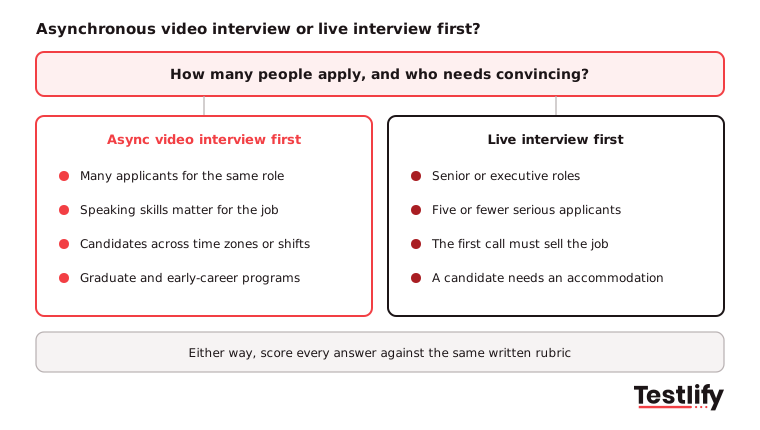
Use an asynchronous video interview for:
- High-volume roles such as customer support, sales development, retail and contact center agents, where volume hiring makes phone screens impossible to schedule.
- Graduate and internship programs with hundreds of applicants for similar roles.
- Remote and global roles, where a live slot suits only one side.
- Roles where speaking skills are part of the job: support, sales, teaching, language roles.
Start with a live conversation for:
- Senior, executive and hard-to-fill specialist roles, where the candidate is also judging you.
- Small pools of five or fewer serious applicants, where a call costs little.
- Candidates who need an accommodation. Offer an audio-only, text or live option instead.
How do you set up an asynchronous video interview?
Setting up an asynchronous video interview means choosing 3 to 5 questions tied to the role's skills, then setting thinking time, answer length, retakes and a deadline that respect the candidate's time. Short, clear interviews get more completions than long ones, and the settings matter as much as the questions.
Setting | Recommended default | Why |
|---|---|---|
Number of questions | 3 to 5 | Enough to cover the key skills; more lowers completion |
Answer length | 1 to 3 minutes per question | Long enough for a real example, short enough to review quickly |
Thinking time | 30 to 60 seconds | Lets candidates plan an answer without reading a script |
Retakes | 1 per question | Lowers nerves, keeps answers close to first attempts |
Total candidate time | Under 15 minutes | Fits a lunch break; longer interviews lose candidates |
Deadline | 3 to 5 days, with one reminder | Keeps the pipeline moving without rushing people |
Device | Browser and phone, no app download | Many candidates apply and record from a phone |
Good questions ask for a real example or a short task, not a rehearsed speech. Mix one motivation question with two or three role questions:
- "Tell us about a time a customer was upset with something you could not change. What did you say, and what happened?"
- "Walk us through how you would plan your first week in this role."
- "Explain a product or idea you know well to someone who has never heard of it, in under two minutes."
For more examples by role, see how to create video and audio interview questions.
How should you score asynchronous video interview answers?
Asynchronous video interview answers should be scored against a written rubric, one skill per question, on a simple 1 to 5 scale with an example of what each level sounds like. Reviewers score each answer before comparing notes, and borderline candidates get a second reviewer, so scores reflect the answer rather than the reviewer's mood.
- Write the rubric before inviting anyone: Describe a 1, a 3 and a 5 for each question. Use an interview scorecard so every reviewer uses the same sheet.
- Score content, not camera presence: Lighting, background, accent and how polished the video looks are not job skills, unless the role is on camera.
- Score question by question: Watch every candidate's answer to question 1, then move to question 2. Comparing like with like keeps standards steady.
- Calibrate early: Have two reviewers score the first 10 candidates and talk through gaps of 2 points or more.
- Treat AI scores as a first pass: AI can transcribe, flag missing points and suggest a score, but a person reviews and owns every rejection.
Our guide to scoring video and audio interview responses covers rubrics in more detail.
Key takeaway: The format does not make an interview fair. The same questions, a written rubric and a person who owns the decision do.
What laws apply to AI analysis of recorded interviews?
Recording a video interview is legal in most places with the candidate's knowledge, but using AI to analyze or score the recordings brings extra rules. Illinois and New York City have the clearest ones: Illinois requires notice, an explanation and consent, and New York City requires a bias audit and advance notice for automated tools.
Illinois
The Artificial Intelligence Video Interview Act applies when an employer uses AI to analyze recorded video interviews for roles based in Illinois. Before the interview, employers must tell each applicant that AI may be used, explain how it works and what it looks at, and get consent. Videos can be shared only with people needed to evaluate the applicant, and must be deleted within 30 days if the applicant asks.
New York City
Under Local Law 144, an automated employment decision tool needs a bias audit within one year before use, a public summary of the results, and notice to candidates 10 business days before it is used.
Everywhere else
Tell candidates what is recorded, who watches it, how long you keep it, and how to ask for an alternative format. Under privacy laws such as GDPR, recordings are personal data, so set a retention period and stick to it.
Testlify's matching model completed a third-party bias audit under Local Law 144 on June 16, 2023. Whatever tool you use, keep a person in the loop for every decision.
What should you look for in asynchronous video interview software?
Asynchronous video interview software shapes how candidates feel and how fairly your team scores them. Tools look similar in a demo but differ in the details. The six checks below help you compare options, so you pick one that is easy for candidates, consistent for reviewers and safe to run.
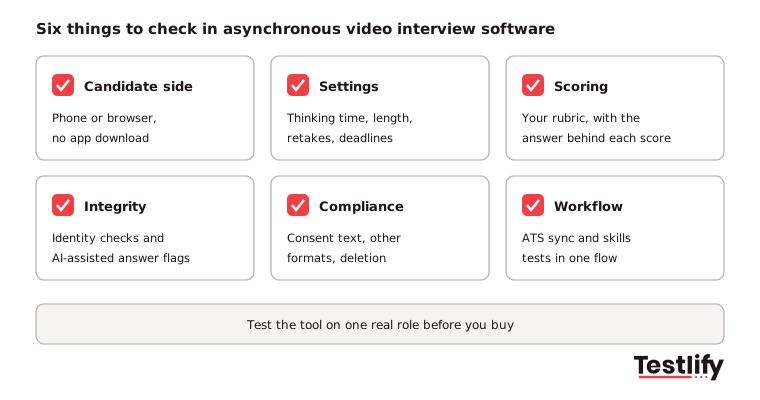
Use these six questions to compare tools before you commit:
- Candidate side: Can candidates record on a phone browser with no app, and practice before the real question?
- Settings: Can you set thinking time, answer length, retakes and deadlines per question?
- Scoring: Can reviewers score against your own rubric and see each other's scores? If AI scores, can a reviewer see why?
- Integrity: Does the tool check that the person on camera is the applicant, and flag read-from-screen or AI-assisted answers?
- Compliance: Can you add consent text, offer an alternative format and delete recordings on request?
- Workflow: Do results sync back to your ATS, and can a skills test and the video interview sit in one candidate flow?
How does Testlify run asynchronous video interviews?
Testlify runs asynchronous video interviews inside the same assessment as its skills tests, so a candidate can finish a role test and a one-way video interview in one sitting, and reviewers see both results in one report. Teams set their own questions, thinking time, time limits and retake rules.
- One-way video and audio questions: Video and audio answers are two of 25+ question types, and they sit alongside 3,500+ tests in the test library.
- Scoring with review: Answers can be auto-scored with the option for manual review, and the Reviewers Portal gives interviewers one place to score and comment.
- AI interviews when you want a conversation: Video AI, Voice AI and Chat AI interviews ask role-based follow-ups, which async recordings cannot do. Read more on AI interviews.
- Integrity built in: 20+ anti-cheating and proctoring features, including face detection and speech authenticity detection for voice and video AI answers.
- Global and connected: Assessments run in 15+ languages and sync with 100+ ATS and HRIS tools.
See the full feature set on the video interviewing tool page.
Ready to run your first asynchronous video interview?
Build a short one-way video interview for a role you are hiring for now, and pair it with a skills test. Start a 7-day free trial with no credit card, or book a demo to see it run.
Frequently asked questions (FAQs)

People and Talent Partner
Arushi Shah runs day-to-day talent acquisition and candidate experience at Testlify. She writes on interviewing, structured hiring, and giving candidates a fair, fast process.
LinkedInRelated resources
View all
Candidate Screening
Overt vs covert integrity tests: What is the difference?

Candidate Screening
Preliminary Screening: How to Run the First Filter in Hiring

Candidate Screening
Technical assessment with live proctoring: a guide for hiring teams

Candidate Screening
Language fairness in assessments: The complete guide for global hiring teams

Candidate Screening
Best Pre-Hire Assessment Platforms for Enterprises: An Honest Buyer’s Guide (2026)

Candidate Screening
What to look for in candidate screening software
Get started.
Hire on proof, not resumes.
Run your first skills-based assessment free — no credit card required.