
What is timesheet management? Benefits and best practices
Learn everything about timesheet management: benefits, tools, challenges, and how to create a system that boosts productivity and accuracy for your business.
Time is money, but are you keeping track of it? Every ticking second impacts a project’s success, an employee’s productivity, and your business’s bottom line. Timesheet management is about understanding where your resources go. Think of it as the silent backbone of successful operations.
Timesheet management is crucial for businesses to keep track of billable hours and plan for time off requests. Through this you can ensure they remain organized and profitable.
However, it’s no longer just about spreadsheets and manual entries. Modern tools have revolutionized time management to be smarter, quicker, and more effective.
In fact, a survey revealed that the U.S. economy wastes a staggering $7.4 billion per year in productivity due to employees who haven’t recorded their hours.
This guide unpacks what makes timesheet management essential and how to master it. If you’ve ever been curious about turning hours into valuable insights, keep reading—you’re in for some great information.
 ChatGPT
 Gemini
 Claude
 Grok
Grok Perplexity
What is timesheet management?
At its simplest, timesheet management is the process of recording the time employees spend on tasks or projects. It’s basically about gaining clarity on how time is allocated and used across the organization. Traditionally, timesheets were manual logs maintained on paper or spreadsheets.
Today, with the rise of time-tracking tools and management software, this process has become more automated and efficient. From real-time tracking to automated time entry, modern systems take the hassle out of managing time. Timesheet management acts as a link between productivity and accountability. It allows businesses to:
- It allows businesses to keep track of work hours versus billable hours with clarity.
- Identifies inefficiencies within project tasks.
- It helps to maintain accurate compliance with labor laws
- It Facilitates smooth employee scheduling and time-off requests.
At its core, timesheet management is not only about logging time but rather using the data for more intelligent decision-making. Additionally, it is useful in effective resource utilization, and every hour should contribute to business growth.

Key features of timesheet management systems
A robust timesheet management system is a comprehensive solution designed for the enhancement of productivity, accountability, and decision-making. Below are some of the key features that make these systems essential for today’s businesses:
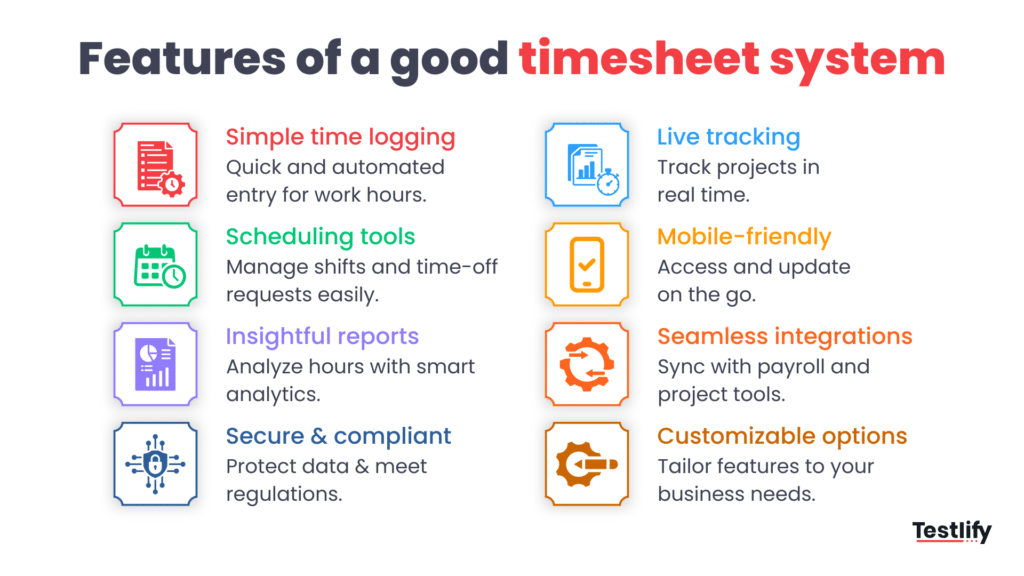
- Seamless time entry – Manually entering work hours can be laborious and error-prone. Timesheet systems are designed to make this simple by providing user-friendly interfaces. Some tools even offer automated tracking that eliminates the need for any manual inputs.
- Real-time tracking – Track time as it occurs. With real-time tracking, you can track ongoing projects and adjust workloads ahead of time. This feature is important to keep projects on schedule and within budget.
- Employee scheduling and time off management – Manage employee availability effectively with built-in scheduling tools. Timesheet systems usually integrate time off requests and vacation planning, so you always have the right resources with you at the right time.
- Mobile app integration – With mobiles dominating the world these days, the access of timesheets on the go is a must. All systems have dedicated mobile applications where employees can log in their hours, submit requests, and view schedules from anywhere, anytime.
- Comprehensive reporting and analytics – Turn data into insights using rich reports. Modern time-tracking systems analyze logged hours for insights into billable hours. That allows managers to make strategic decisions and optimize performance.
- Integration into other project and management tools – Timesheet systems perfectly integrate with other tools and services, such as with project management software, payroll systems, and invoicing platforms. This integration would enable smooth data flow within all business functions.
- Compliance and data security – Time sheet systems are integrated with safeguards that ensure data integrity and compliance. They will help the business adhere to labor laws and keep the records safe. This is particularly important for industries with strict regulatory requirements.
- Customization and scalability – Every business is unique, and time sheet systems understand this. Most platforms offer customizable features in line with specific needs; whether it is tracking project tasks or monitoring department-specific Key Performance Indicators (KPIs).
An elegantly designed timesheet management system is a strategic advantage. In short, it’s a strategic asset that enhances workflow efficiency, supports accurate billing, and provides actionable insights for business growth.
Benefits of timesheet management
Implementing a solid timesheet management system offers several advantages that can improve both operational efficiency and employee satisfaction. Below are some of the key benefits,
- Improved productivity – Tracking employees’ hours accurately allows businesses to find time-consuming tasks and, therefore, optimize their workflows for better productivity.
- Accurate payroll processing – Automated time entry and employee timesheets minimize errors in calculating wages or billable hours.
- Smarter resource allocation – Timesheets provide detailed insights into work hours and task distribution. Managers can allocate resources efficiently.
- Better employee scheduling – Integrated employee scheduling features help organizations plan shifts effectively while managing time off requests. This helps in consistent productivity without overburdening teams.
- Real-time insights – With real-time data from time tracking tools, managers can make immediate adjustments, preventing delays and ensuring projects remain on schedule.
- Compliance and audit readiness – Maintaining accurate employee time tracking records ensures compliance with labor laws and simplifies audits. Businesses can avoid potential legal issues while demonstrating accountability.
- Improved transparency and accountability – A transparent time-tracking software system encourages employees to manage their time responsibly.
- Cost optimization – Detailed timesheet data enables businesses to cut unnecessary expenses by identifying unproductive activities. This helps in optimization of management tools, and reallocating resources where required.
- Performance evaluation and feedback – time-tracking data lets managers assess performance against objective, measurable metrics such as productivity and time utilization, which supports more accurate feedback and helps target improvement and training where employees actually need it.
- Enhanced project planning and scheduling – historical time-tracking data helps managers estimate how long similar projects will take, build more realistic timelines, and allocate resources proactively, so future projects are more likely to finish on time and within budget.
- Remote work and flexibility – with mobile access to time-tracking tools and software, businesses can monitor and manage remote and flexible teams effectively, keeping accountability, transparency, and collaboration high regardless of where employees are working from.
- Employee empowerment and well-being – giving employees visibility into their own logged hours lets them identify areas for improvement, set goals, and take ownership of their productivity. It also helps prevent burnout by supporting a healthier work-life balance and keeping workloads realistic.
How to create a timesheet system?
Building an efficient timesheet system isn’t rocket science. It is always possible to design a good system that will track working hours correctly and simplify work for your team. Just follow these steps:
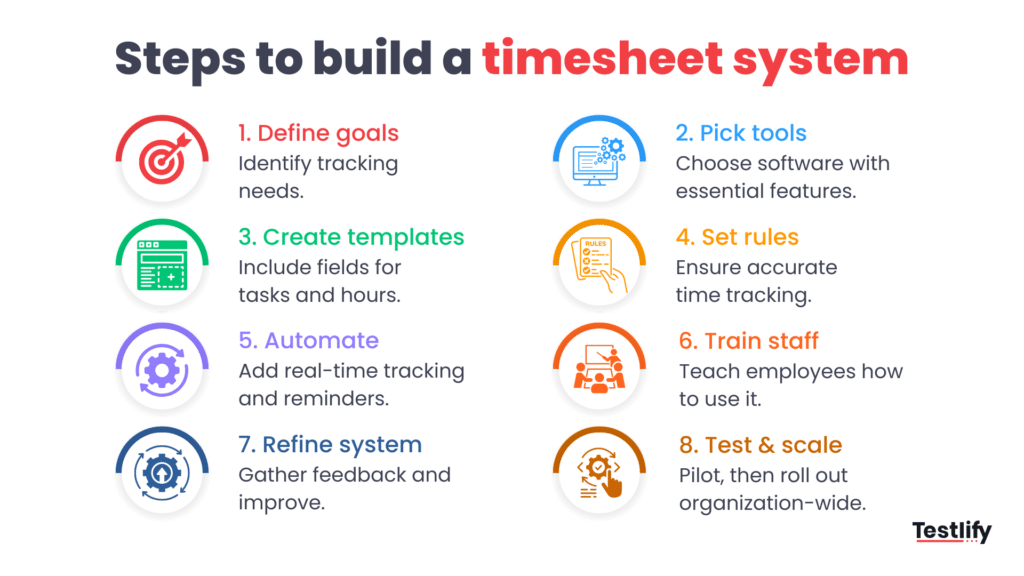
Step 1: Identify your business needs
Determine the purpose of your timesheet system, such as tracking billable hours, managing project tasks, or monitoring employee scheduling. Decide on the level of detail required, such as tracking by task, project, or department.
Step 2: Select the right time-tracking tools
Choose time-tracking software or online timesheet software that can meet your business needs. Consider features such as real-time tracking, mobile access, and interoperability with other management software. Ensure the tool provides support for time off requests, time entry, and detailed reporting for easy analysis.
Step 3: Set up timesheet templates
Make the templates user-friendly. Include necessary fields such as employee name, date, task description, and hours worked. Add sections that include information such as the time spent on tasks or comments about the progress of the project. Using an employee timesheet template can help streamline this process and ensure consistency across records.
Step 4: Define clear policies and guidelines
Set rules for how the timesheet system is to be used. Explain the need for employee time tracking to be as accurate as possible to avoid mistakes or discrepancies.
Step 5: Automate where possible
Automate as much as possible to eliminate manual work. Features like real-time tracking and automatic reminders for overdue timesheets can save time and enhance accuracy.
Step 6: Train your employees
Train employees on the use of the timesheet system. Train them on the use of mobile apps and automated features. Educate them on common issues such as logging tasks or correction.
Step 7: Monitor and refine
Monitor the performance of your system regularly. Utilize the information gathered from the time tracking tools to point out areas for improvement. Seek feedback from your employees to keep the system user-friendly and efficient.
Step 8: Test and scale
Start with a pilot run involving a small team to identify potential issues. Once refined, scale the system to the entire organization so it can handle increased data and users.
By going through these steps, you can develop an efficient and accurate timesheet system that’s tailored to your organization’s needs. It’s not just about time tracking; it’s more about the productivity and transparency across teams that a good system helps achieve.
Challenges in timesheet management and how to overcome them
Implementing and maintaining a timesheet management system can present various challenges. However, recognizing these issues and tackling them head-on can help businesses maximize the benefits. Below are some common challenges and strategies to overcome them,
1. Manual errors and inaccuracies
Manual timesheet entries are prone to errors, which may lead to discrepancies in payroll or billable hours. These errors often arise from the failure of employees to log their time or misrepresenting the duration of tasks.
Solution: Implement automated time tracking tools that record time accurately in real time. Automation reduces reliance on manual inputs and ensures precision.
2. Employee resistance to adoption
Employees might find it as a form of micromanagement or added workload and might not use the system appropriately.
Solution: Communicate to them that it would help in easy payroll processing and balanced employee scheduling. Train employees and address all their concerns.
3. Complexity of the system
A complicated online timesheet software is going to overwhelm the employees. This may lead to irregular usage and errors.
Solution: Choose user-friendly management tools that are intuitively easy to use and require minimal training. Ensure the system is mobile and desktop-compatible for immediate accessibility.
4. Integration problems with other systems
Timesheet systems that do not integrate with existing project management or payroll tools can cause inefficiencies and repetitive work.
Solution: Choose a timesheet system that permits smooth integration of your existing management software. Test compatibility at the implementation phase to avoid stirring up unnecessary differences.
5. The inability of employees to take responsibility
Some employees will forge or misrepresent hours logged, which directly influences project time and costs.
Solution: Develop open systems whereby the employees are allowed to see and verify logged hours. Regular audits and tracking features in real-time are great at keeping people responsible.
6. Security risks in confidential data
Timesheets normally hold sensitive information about the employee and the project involved, hence susceptible to security compromises.
Solution: Invest in time-tracking software with robust encryption and secure storage features. Regularly update systems to mitigate the risk of security.
7. Insufficient insights and reports
The basic timesheet system fails to provide actionable insights into time spent on tasks or the resource utilization level. This makes it less valuable for decision-making purposes.
Solution: Use advanced timesheet tools offering comprehensive reporting and analytics.
8. Overhead costs of implementation
Some businesses are hesitant to go for timesheet systems based on perceived costs, which include software, training, and maintenance costs.
Solution: Begin with scalable systems that fit your budget. Many time tracking tools offer tiered pricing plans so that businesses pay only for what they need.
Popular tools for timesheet management
Here are five reliable tools for efficient timesheet management:
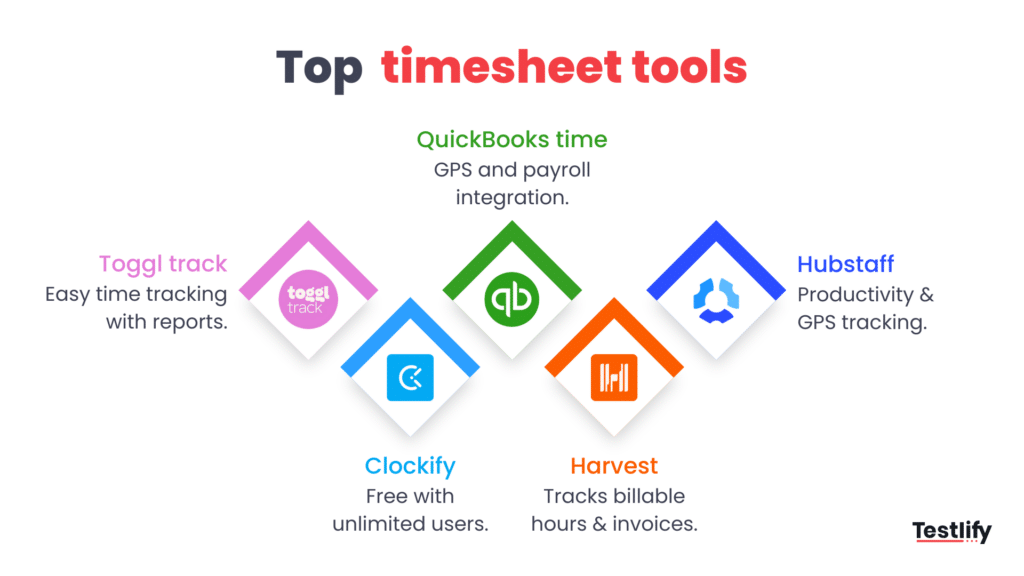
- Toggl Track – A simple yet powerful time-tracking tool with real-time tracking and reporting.
- Clockify – Free online timesheet software offering unlimited users and task tracking.
- QuickBooks Time – Comprehensive employee time tracking with GPS and payroll integration.
- Harvest – Ideal for tracking billable hours and generating invoices effortlessly.
- Hubstaff – Advanced time tracking software with productivity monitoring and GPS tracking.
Choose the tool that best suits your business needs for seamless time management.
Final thoughts
Every second counts. The way you manage this time can make or break your business. Timesheet management isn’t just about keeping track of hours; it’s about unlocking insights to make things more efficient while creating a culture of accountability.
With the right system in place, you aren’t saving time; you empower your team and fuel growth. So the clock is ticking now, and the question here is, are you prepared to take control?
Frequently asked questions (FAQs)

B2B SaaS Content Writer
Rishav Kumar is a B2B SaaS content writer with 4 years of experience. He loves crafting engaging content. Always exploring fresh ideas, he's passionate about helping businesses grow through impactful writing.
LinkedInRelated resources
View all![What are HR SOPs and how to create them? [+Free template]](/api/media/file/Blog_featured_image_37-2.png?dpl=dpl_9Ai1hrmD1YZ8yPSLhy5MhtJd5zy3)
HR tools
What are HR SOPs and how to create them? [+Free template]

HR tools
What is HR automation? Benefits, use cases, and how to get started

HR tools
Are recruitment chatbots necessary for talent acquisition?

HR tools
Tech Tools for Enhancing HR Efficiency

HR tools
How to find the right senior developer

HR tools
Leading with Data: 6 Tech Strategies for Executive Leaders
Get started.
Hire on proof, not resumes.
Run your first skills-based assessment free — no credit card required.