
Testlify vs. TalentLens: Which Skills Assessment Platform is Best for HR Teams?
Testlify vs. TalentLens: Discover which skills assessment platform best suits your hiring needs
Testlify and TalentLens both measure what a candidate can actually do, but they are built on opposite bets. TalentLens sells a small set of deeply validated psychometric instruments from Pearson, delivered through a test platform. Testlify sells a wide screening and interviewing platform: 3,500+ tests, 25+ question types, AI video and voice interviews, and proctoring, priced publicly per candidate credit.
That difference decides most of this comparison. If the hiring team needs one named, norm-referenced instrument and has someone qualified to administer it, TalentLens is the safer answer. If a small team needs to screen for many different roles without hiring a psychologist first, Testlify covers more ground for less money.
 ChatGPT
 Gemini
 Claude
 Grok
Grok Perplexity
TL;DR
- TalentLens is Pearson's psychometric arm. Its catalogue is narrow and old in the best sense: Watson-Glaser critical thinking, Raven's Progressive Matrices, mechanical and aptitude batteries with decades of published norms behind them.
- Testlify is a screening platform: 3,500+ tests across 4,500+ roles, 25+ question types, coding and Office-app work samples, and AI video, voice and phone interviews in the same tool.
- Administering Watson-Glaser requires a BPS Test User: Occupational Ability qualification. That is a real adoption cost for an in-house team with nobody qualified.
- Testlify publishes its prices. Starter is $139 a month billed at $1,668 a year for 100 credits. TalentLens is quote-only, priced per candidate and per test.
- TalentLens does not run conversational AI interviews. Testlify does not schedule live human interview panels. Neither gap is fatal, but they point at different hiring processes.
- Pick TalentLens when the instrument itself is the requirement. Pick Testlify when role coverage, interview evidence and predictable cost matter more than a specific published test.

What is TalentLens?
TalentLens is Pearson's talent assessment business. It sells psychometric tests built on more than 80 years of research, delivered through an online test platform with three stated uses: hiring, upskilling and leadership development. The catalogue is deliberately small and heavily validated rather than broad.
The best-known instrument is the Watson-Glaser Critical Thinking Appraisal, a 40-item test that runs up to about 30 minutes and scores comprehension, analysis and evaluation of arguments. Law firms and graduate recruiters have used it for decades. Alongside it sit Raven's Progressive Matrices for non-verbal reasoning, the Bennett Mechanical Comprehension Test (BMCT-II), the DAT Next Generation aptitude battery and the SOSIE personality inventory.
How the TalentLens platform works
Administrators set up an assessment in the TalentLens portal, choose which subtests to include, configure timing and retake rules, create candidate records and email secure test links. Reports come back as narrative PDFs with scaled scores, percentile ranks against a published norm group and interpretive commentary written for a reader who is not a psychologist.
Platform access comes at two subscription levels. Standard gives a client-branded platform, group management, custom demographic fields and custom reporting. Professional adds integration with third-party systems, an advanced reporting module and an authoring tool for writing your own test content. Access is contract-free and tiered by purchase volume.
For test security, Pearson partners with the proctoring provider HirePro. That integration records the full session and applies video, audio, image and browser monitoring, flagging face mismatches, tab changes and camera-view problems, then hands the reviewer AI-generated recommendations on where to look.
What is Testlify?
Testlify is a pre-hire assessment and interviewing platform. One workspace holds the test library, the interview formats, the proctoring controls and the candidate reports, which is the practical difference for a team that screens ten different roles a year rather than one role a thousand times.
The library runs to 3,500+ tests drawn from 180,000+ validated questions, covering 4,500+ roles across 50+ industries. Categories include cognitive ability, psychometric and personality, role-specific skills, situational judgement, language, software skills, blue collar, coding across 45+ programming languages, simulation and gamified formats.
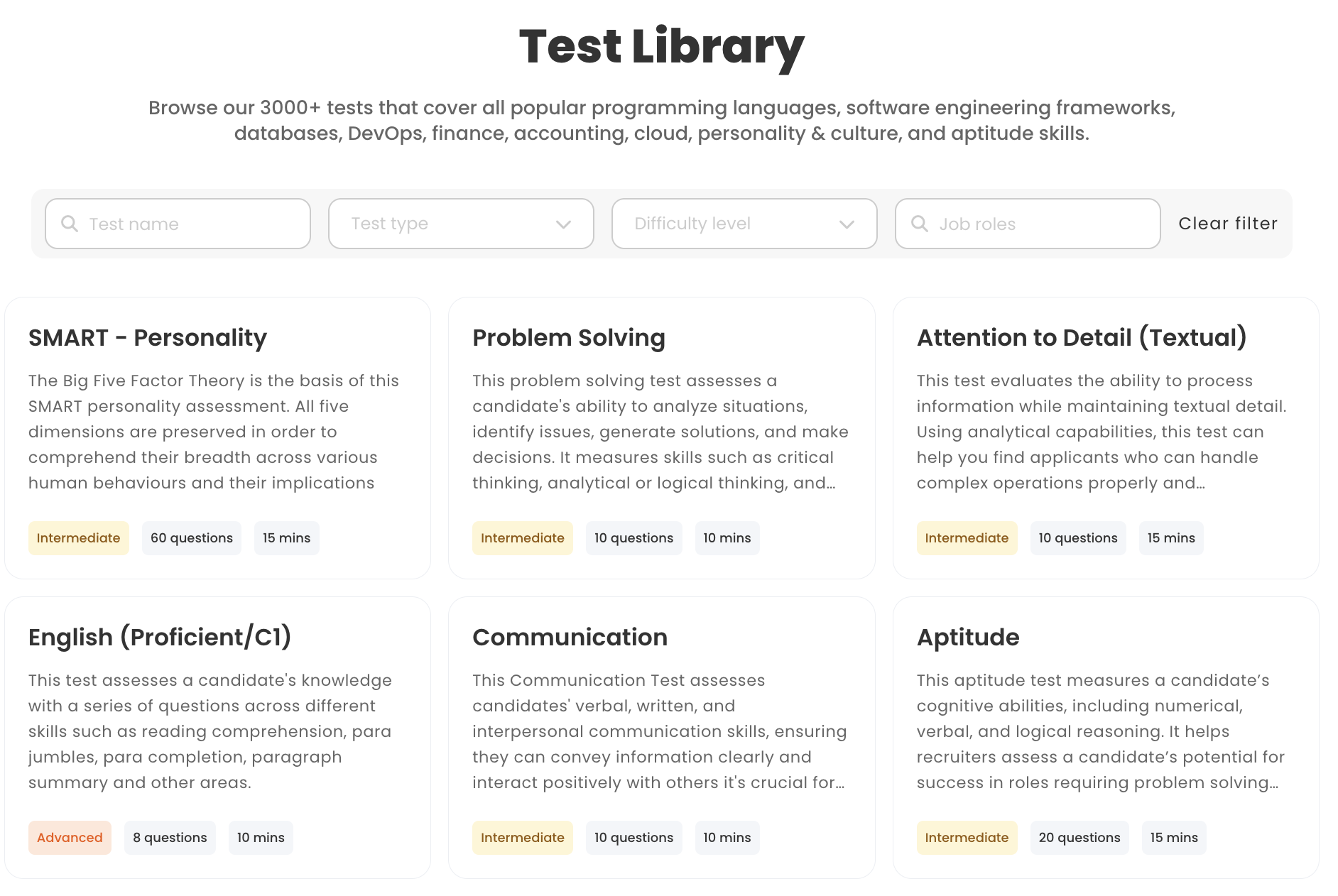
Question types matter as much as test count. Testlify ships 25+ of them, including single and multiple select, ranking, fill in the blank with dropdown or free-text blanks, file upload, practical hands-on submissions, typing tests scored on 60% accuracy and 40% speed by default, and live coding in an embedded VS Code editor with up to 20 test cases per question.
Two of those types are hard to find anywhere else. Office-app questions run inside the real products, so a candidate builds the actual spreadsheet in Microsoft Excel or the actual deck in Google Slides. And vibe coding questions let candidates direct AI tools toward a working solution instead of writing syntax by hand, which is closer to how most engineers now work than a whiteboard exercise is.
The World Economic Forum's Future of Jobs Report 2025 found employers expect 39% of workers' core skills to change by 2030, down from 44% two years earlier. A test catalogue that only measures reasoning ability will not track that shift. A library that adds new role tests and new question formats can.
Testlify vs TalentLens: feature comparison
The table below only carries rows that both vendors document publicly. The previous version of this page ran 93 checkmark rows and marked TalentLens absent on things like mobile support and candidate support with nothing behind the claim, which is not a comparison, it is a scorecard one side filled in for itself.
Capability | Testlify | TalentLens |
|---|---|---|
Test library size | 3,500+ tests, 180,000+ questions | A curated catalogue of published Pearson instruments |
Role coverage | 4,500+ roles, 50+ industries | Cognitive, personality, skill and motivation families |
Custom question types | 25+, including coding, Office apps, typing, file upload | Authoring tool on the Professional subscription |
Coding assessment | 45+ languages, embedded VS Code, 20 test cases, vibe coding | Not part of the published catalogue |
AI conversational interviews | Video, voice and outbound phone, with avatars and custom prompts | No |
Proctoring | Built in: 3 presets, 20+ measures, dual-device | Via the HirePro partnership, plus a proctoring service |
Item-level psychometrics for recruiters | Difficulty, discrimination and quality-risk indices per question | Published technical manuals and norm tables per instrument |
Norm-referenced published instruments | Percentile benchmarking against other candidates and reviewers | Yes, the core of the product |
Qualification needed to administer | None | BPS Test User: Occupational Ability for Watson-Glaser |
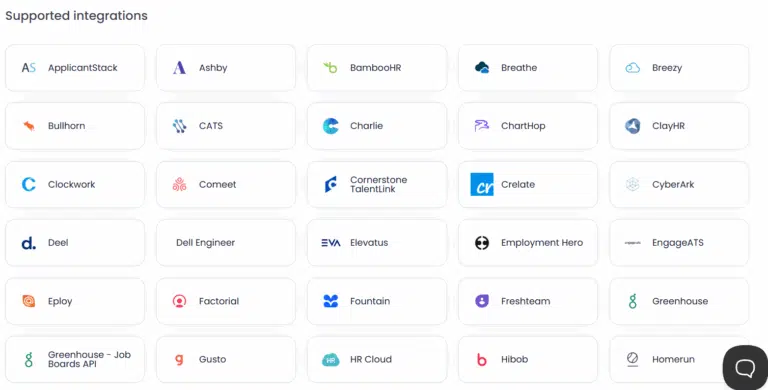
ATS integrations | 100+, sold as a $2,388/year add-on on self-serve tiers | Third-party integration on the Professional subscription |
Built-in hiring pipeline | A simple built-in ATS for teams that have none | No |
White labelling | Custom domain and branding, $2,388/year add-on | Client-branded platform from Standard upward |
Published pricing | Yes, on the pricing page | No, quote only |
Free trial | 7 days, no card required | Not published |
How do the test libraries compare?
Testlify covers more ground; TalentLens goes deeper on less. Testlify's 3,500+ tests span 4,500+ roles, so a team hiring a warehouse supervisor, a paid-media analyst and a back-end engineer in the same quarter finds all three off the shelf. TalentLens sells a curated set of instruments, each with published norms and a technical manual behind it.
Breadth and depth solve different problems. If the job is "screen 300 applicants for six roles and get a defensible shortlist", breadth wins, because the alternative is stitching a generic reasoning test onto every role and hoping it predicts something. If the job is "measure critical thinking in trainee solicitors against a graduate norm group", a validated instrument with decades of published data wins, and no amount of role coverage substitutes for it.
There is a version of this that goes wrong. Teams buy the broad library, build a 90-minute battery because everything is available, and candidates drop out. Testlify assessments average 40 to 60 minutes for a reason. Three well-chosen tests beat eight.
Pro Tip: start from the role, not the catalogue. Write down the four things a person must be able to do in the first 90 days, then pick one piece of evidence for each. If a test does not map to one of those four, it is making the assessment longer without making the decision better.
Which platform handles AI interviews?
Only one of them does. TalentLens is a test delivery platform: candidates take published assessments and administrators read the reports. There is no conversational AI interviewing in the product. Testlify runs interviews in three formats inside the same assessment as the tests.
The formats are one-way asynchronous video, two-way conversational AI video, and outbound AI phone interviews billed at $0.18 per minute. Audio and voice questions sit alongside them, and there are 150+ interview templates to start from.
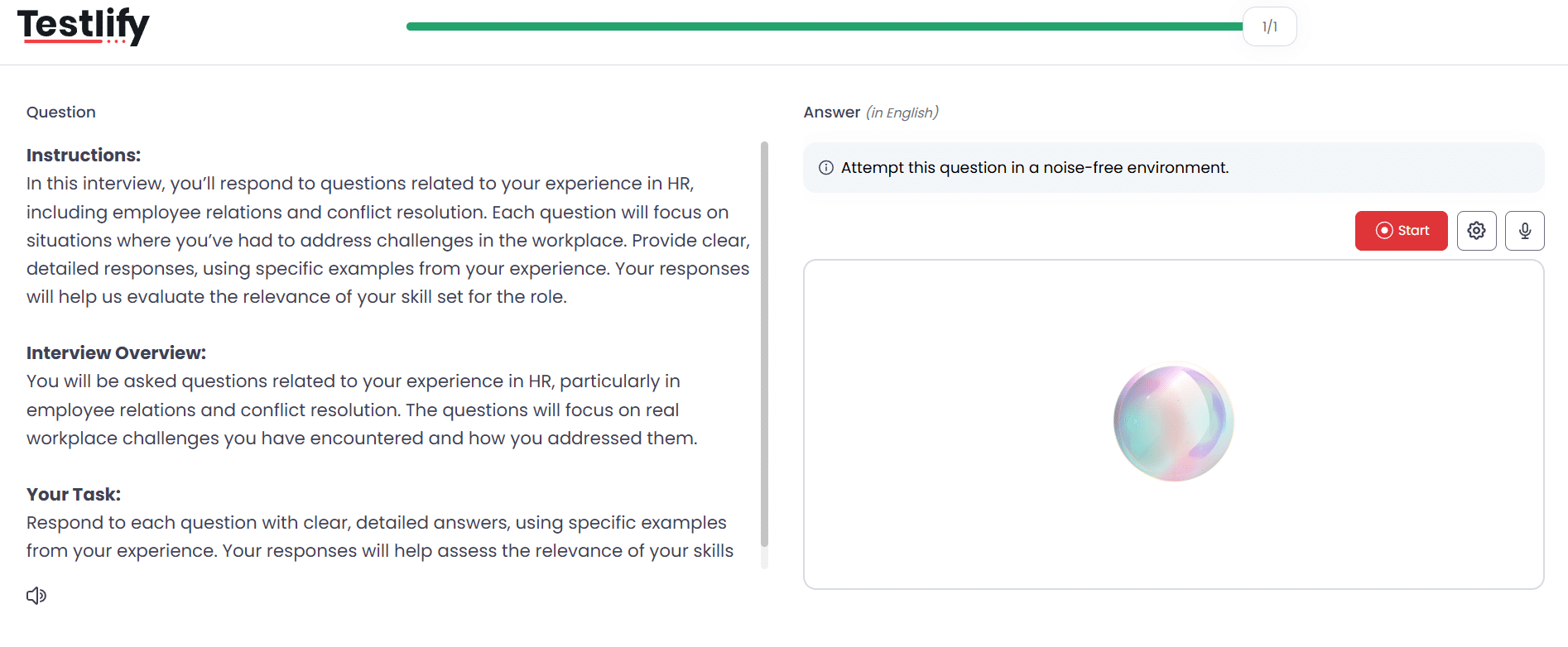
The configuration is where this stops being a checkbox. Recruiters pick the AI avatar, the AI voice, the persona and the context, and write custom prompts or upload a job description to generate them. They set the number of attempts (including no limit), the recording time, the completion time, and a preparation window before auto-start so a candidate can read the question and get ready. Maximum video length is five minutes per response.
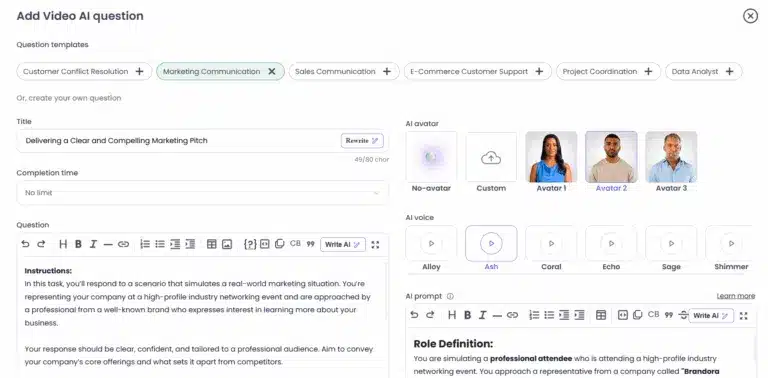
During a live AI voice interview the candidate sees "You're muted while the AI is speaking", which is a small detail that tells you it is genuine turn-taking rather than a set of recorded prompts. Transcripts generate automatically and multilingually for any recording of at least 30 seconds. Reviewers can watch the video, download the audio, replay the screen, regenerate the interview report and export the transcript.
Scoring is AI-assisted and human-led by design. The product ships the disclaimer "AI scores and insights are for guidance only. Use human judgment for final decisions", and both "Display AI scores to the reviewer" and "Include AI score in the final average" are toggles, so a team can run AI scoring as advice that never touches the number a candidate is ranked on.
The honest limit: Testlify does not schedule live human interview panels. There is no calendar coordination for a four-person loop. That work stays in the ATS or the calendar tool, and any page that tells you otherwise is selling.
How do proctoring and test security compare?
Both platforms proctor. They arrive at it differently, and the difference shows up in who owns the evidence.
TalentLens integrates HirePro for automated proctoring. The session is recorded end to end, with video, audio, image and browser monitoring detecting face mismatches, tab changes and camera problems in real time, live candidate warnings, and AI-generated recommendations pointing the reviewer at possible infractions. HirePro's platform carries ISO 27001 certification and GDPR compliance.
Testlify builds proctoring into the assessment itself, with three presets (Standard, Strict and Custom) and more than 20 measures: full-screen enforcement, tab-switch detection, Focus Guard, face detection and single-presence checks, photo ID verification with face match against the ID, timed webcam snapshots, screen and camera recording, copy-paste tracking, multi-monitor restriction, AI-tool and browser-extension detection, IP proctoring, location tracking and a candidate honesty agreement.
Dual-device proctoring, the part nobody else ships
The candidate's phone becomes a second camera, positioned to capture both the person and the laptop screen. It is a hard gate, not a suggestion: "You will not be able to start the assessment until mobile monitoring is active." Disconnecting blocks the session and is reported to the administrator. For a remote take-home that decides a real hire, that second angle closes the gap a webcam cannot see.
What the recruiter gets back is deliberately evidence-shaped rather than a verdict. Sessions come back green ("No suspicious behavior was observed"), yellow ("Some behavior during the session wasn't ideal. A quick manual review is recommended") or red ("Cheating was confirmed during the test"). Auto-termination exists but is opt-in with a recruiter-set violation threshold, so a flag never rejects anyone on its own. That separation matters when a rejected candidate asks why.
On privacy, face verification data is deleted after 30 days and candidates can withdraw consent at any time. Video and audio responses are removed after six months with warnings at two days and one day.
This is the Testlify Assessment Integrity Framework in practice: identity assurance, environment control, behaviour monitoring, AI-assistance detection, reviewable evidence and configurable strictness, with the final call left to a human.
How do reporting and scoring differ?
TalentLens reports are the product of a test publisher. A Watson-Glaser report shows each subtest score, a percentile rank against the relevant norm group and interpretive text a hiring manager can read without training. When the question is "how does this candidate compare to the population of graduate applicants", that is exactly the right shape.
Testlify reports answer a different question: how good is this assessment, and how confident should you be in this score? Recruiters see item-level psychometrics that usually stay inside a test publisher's research team. Every question carries a difficulty index, a discrimination index and a quality-risk flag ("Indicates if the question may have issues like very low accuracy or high skips"), plus answer distribution, score and time distributions, and correct and attempted percentages.
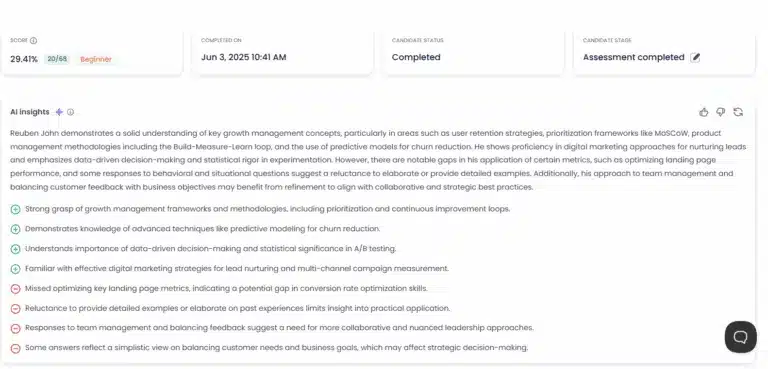
Scoring is configurable at question, test and assessment level. Teams choose score-based weighting, where each test's impact follows its total score, or weights-based, where a test can be dialled from x0 to x5. Negative marking has two explicit modes. Personality and cultural tests are qualitative and carry no total score, which the product states plainly rather than manufacturing a number.
There is also an AI checker that classifies an answer as Human, AI generated or Mixed, and a speech authenticity estimate in beta for spoken responses. Both are evidence for a reviewer, not a rejection trigger.
Reports export as PDF (single, combined, per-section or summary), ZIP, CSV, transcripts and score logs, and shareable reports have granular show and hide controls for AI insights, correct answers, proctoring detail and candidate information.
Do you need a qualification to run these tests?
This is the question that quietly kills more TalentLens deals than pricing does. Administering the Watson-Glaser requires a BPS Test User: Occupational Ability qualification, and Pearson runs the accredited training to obtain it. For an organisation with an occupational psychologist on staff, that is a formality. For a 60-person company where the head of people also runs payroll, it is a course, a fee and a delay before the first candidate takes a test.
Testlify has no qualification requirement. That is a genuine advantage in speed and a genuine responsibility: an unqualified administrator can build a badly designed assessment faster than a qualified one can. The controls that keep this honest are the ones above, item-level quality flags and human-led scoring, and they only help if somebody looks at them.
Either way, the legal bar is the same. The EEOC's guidance on employment tests and selection procedures is clear that a selection procedure with disparate impact must be "job-related and consistent with business necessity", and the Uniform Guidelines adopted in 1978 set out three ways to demonstrate that. A test does not become defensible because a publisher's name is on it, and it does not become indefensible because it was built in-house.
If any part of the process is automated and the hiring happens in New York City, Local Law 144 adds two hard requirements: a bias audit within one year of using the tool, published publicly, and notice to candidates at least 10 business days before the tool is used. Ask both vendors how they support that before signing, not after.
What do Testlify and TalentLens cost?
Testlify publishes its prices. TalentLens does not. Pearson prices per candidate and per test, tiered by volume, and points buyers at its sales team. That is normal for a test publisher and it is still a real cost: a quote cycle before you know whether the tool fits the budget.
Testlify runs on credits. One credit is one started assessment by a qualified candidate, and credits do not roll over.
Plan (billed annually) | Credits per year | Price | Per credit | Seats |
|---|---|---|---|---|
Starter | 100 | $139/mo, billed $1,668/year | $16.68 | 3 |
Basic | 300 | $279/mo, billed $3,348/year | $11.16 | 5 |
Business | 1,000 | $699/mo, billed $8,388/year | $8.39 | 10 |
Premium | 3,000 | Contact sales | Volume-based | 20 |
Enterprise | 10,000 | Contact sales | Volume-based | 30 |
Custom | 25,000+ | Contact sales | Volume-based | 40 |
A worked example. Say a 90-person agency screens 240 candidates a year, each taking one assessment made of three tests. On Testlify that is 240 credits, so the Basic plan at $279 a month covers it at $11.16 per candidate, and the three tests inside the assessment cost nothing extra because the credit is charged per started assessment, not per test. On a per-test model, the same 240 candidates times three tests is 720 chargeable tests, and the arithmetic depends entirely on the negotiated per-test rate. Ask for that rate in writing before comparing.
Two things to check on the Testlify side rather than assume. ATS integrations and white labelling are $2,388-a-year add-ons on the self-serve tiers and included only on Custom, so a team that needs a live sync into its ATS on day one should price that in. Additional seats are $15 per seat per month. There is a 7-day free trial with no card, a 30-day money-back guarantee, prices locked for 24 months and a 25% non-profit discount. Current figures are on the published plan pricing page.
Metered extras exist on both models and nobody advertises them: AI phone interviews at $0.18 a minute, a system check at $0.25, face verification at $0.50 per attempt.
Which platform fits your hiring team?
Testlify fits a company under about 200 people that hires across several different roles, has no occupational psychologist, wants the interview and the test in one place, and needs to know the annual cost before a sales call. That is most growing companies, and it is where the credit model is cheapest per hire.
TalentLens fits an organisation that already runs structured psychometric assessment, has a qualified assessor or budget to train one, and needs a specific published instrument because the role, the regulator or the graduate scheme demands it.
Neither answer depends on which tool has more features. It depends on what evidence the decision needs and who is allowed to collect it. The Testlify Multi-Signal Talent Evaluation Model is the frame worth borrowing here: one signal is fragile, several independent signals build confidence. A candidate should move forward when a skills test, an interview response and a reviewer's structured feedback all point the same way, not because one score was high.
The research supports that instinct better than it supports any single test. The 2022 reanalysis of personnel selection validity by Sackett and colleagues, published in the Journal of Applied Psychology, revised structured interviews to an operational validity of .42 and general cognitive ability down to .31, overturning decades of received wisdom that reasoning tests were the strongest single predictor. Structured interview evidence plus role-relevant skills evidence beats either alone.
For a broader view of the market, the talent assessment tools worth shortlisting round-up and this buyer's guide to choosing assessment software cover the evaluation criteria in more depth, and there is a wider list of assessment vendors for teams still building a shortlist.
When is TalentLens the better choice?
Three cases, stated plainly.
The instrument is the requirement
Graduate law and consulting schemes often specify Watson-Glaser by name, sometimes because a client or a professional body expects it. When the test is written into the process, a broader library does not help. Buy the instrument.
You need published norms and a technical manual
If an assessment decision has to survive a formal challenge, being able to point at a published norm group, a documented validation study and a technical manual is worth a great deal. Percentile benchmarking against your own candidate pool is useful, but it is not the same evidence.
The use case is development, not hiring
TalentLens sells into upskilling and leadership development as well as recruitment, with interpretive reports designed for a coaching conversation. Testlify is a pre-hire platform. It runs reference checks and 360 feedback reports, but development is not what it is built for.
Get a shortlist you can defend
The fastest way to settle this is to run both against one real role. Build the assessment you would actually send, invite five recent applicants, and read the reports side by side. Testlify's 7-day trial needs no card, so the only cost is an hour of setup.
To see how the platform handles the roles you hire most, book a demo and bring a live job description. Or compare Testlify against other platforms first if the shortlist is still open.
Key takeaways
- Breadth and depth are different purchases. Testlify's 3,500+ tests across 4,500+ roles solve "screen many roles well"; TalentLens's curated Pearson instruments solve "measure one construct defensibly". Decide which sentence describes your hiring before comparing feature lists, because the wrong choice costs a year of the wrong evidence.
- The qualification requirement is a real adoption cost. Watson-Glaser needs a BPS Test User: Occupational Ability qualification to administer. A team without a qualified assessor is buying a training course as well as a licence, which changes both the timeline and the budget.
- Published pricing beats a quote when you are small. Testlify's Basic plan is $279 a month for 300 credits, or $11.16 per candidate, and one credit covers a whole multi-test assessment. Per-test pricing multiplies with battery length, so ask for the per-test rate in writing before you model anything.
- Interview evidence is where the two products stop overlapping. Testlify runs AI video, voice and phone interviews with configurable avatars, prompts, attempts and transcripts, scored with human override. TalentLens does not run them at all. If interviews are part of screening, that gap decides it.
- Proctoring depth should match the stakes, not the vendor. Dual-device proctoring, three presets and green/yellow/red evidence flags give a remote take-home the second camera angle it needs. Turn strictness up for high-stakes roles and down for a 20-minute screen, and never let a flag auto-reject anyone.
- Validity research moved, and buying should move with it. Structured interviews now sit at .42 operational validity against .31 for general cognitive ability. A process built only on reasoning tests is optimising for the weaker signal, whichever vendor sells the test.
- Compliance is your obligation, not the vendor's. Job-relatedness and business necessity apply whoever built the test, and any automated tool used for New York City hiring needs an annual bias audit and 10 business days' notice to candidates.
FAQs

Director of Marketing
Akash Patange is the Director of Marketing at Testlify, where he works closely with HR leaders and recruiters to help organizations improve hiring outcomes. He writes about talent assessment, recruitment technology, and data-driven hiring practices.
LinkedInRelated resources
View all
Competitor Comparisons
Testlify vs. TalentMesh: Which Skills Assessment Platform is Best for HR Teams?
Competitor Comparisons
Testlify vs. Maki People: Which Skills Assessment Platform is Best for HR Teams?
Competitor Comparisons
Testlify vs. TestGenius: Which Skills Assessment Platform is Best for HR Teams?
Competitor Comparisons
Testlify vs. Thrive: Which Skills Assessment Platform is Best for HR Teams?
Competitor Comparisons
Testlify vs The Talent Games: Which Is Best for HR Teams?
Competitor Comparisons
Testlify vs. TalentMetrix: Which Skills Assessment Platform is Best for HR Teams?
Get started.
Hire on proof, not resumes.
Run your first skills-based assessment free — no credit card required.