
Testlify vs SalesDrive: A detailed comparison
Discover the perfect solution for evaluating your candidates’ skills with Testlify. Dive into our comprehensive Testlify vs SalesDrive…
 ChatGPT
 Gemini
 Claude
 Grok
Grok Perplexity
Looking for a SalesDrive alternative?
Testlify and SalesDrive both screen sales candidates, and they answer different questions. SalesDrive's DriveTest measures one construct: the personality traits behind sales drive. Testlify measures role-relevant skills, cognitive ability, personality and technical ability across many job families. The right pick depends on how many kinds of roles you hire, not on which tool has more checkmarks.
That distinction gets lost in most comparisons, which line up two feature tables and let the longer column win. A longer column is not always the better buy. A company hiring nothing but field sales reps may be better served by a focused personality test. A company hiring reps plus the sales engineers, CRM admins and support staff around them will leave most of its shortlist unscored by a single narrow test.

TL;DR: Testlify vs SalesDrive at a glance
- SalesDrive's DriveTest is a 42-question sales personality assessment scoring three traits, and it takes about 20 minutes.
- Testlify is a multi-role assessment platform: role-based skills tests, cognitive ability, personality, coding and video responses, combined into one candidate report.
- SalesDrive quotes its pricing on request. Testlify publishes its plans openly, billed monthly or annually.
- Testlify documents proctoring and anti-cheating controls (session recording, snapshot capture, IP and location checks) that SalesDrive does not publish.
- Pick SalesDrive if sales is the only role you screen and personality is the only signal you want. Pick Testlify if you screen several role types, or want more than one signal per candidate.
- They are not mutually exclusive. Running a drive-style personality read alongside a skills assessment is a reasonable setup, and the last section explains when it is worth the extra step.
What is the difference between Testlify and SalesDrive?
SalesDrive is a single sales personality assessment. Testlify is a multi-role assessment platform. SalesDrive scores whether a candidate is wired to sell. Testlify scores what a candidate can actually do, across sales and every other role you hire for, then combines several signals into one report.
That gap has a name in how Testlify approaches evaluation. The Testlify Multi-Signal Talent Evaluation Model combines several role-relevant signals, including assessments, interviews, simulations, references and reviewer feedback, instead of resting a decision on one score. One signal is fragile. Several pointing the same direction is confidence. For a sales hire that might mean a situational judgment test, a written-communication task and a short role simulation, read together rather than in isolation.
There is evidence behind that caution. A 2022 validity re-analysis published in the Journal of Applied Psychology found the predictive power of widely used selection methods had been overstated for decades: work sample tests came in 0.21 lower and cognitive ability tests 0.20 lower than earlier meta-analyses reported. No single instrument, personality assessments included, carries a hiring decision on its own. That is the strongest argument for reading two or three signals instead of one, whichever vendor you buy from.
Feature-wise comparison for Testlify vs SalesDrive
The table below sets the two platforms side by side. Read it for shape rather than score: SalesDrive's blanks are mostly things a sales personality test was never built to do, and counting them as losses misreads what the product is.
Features | Testlify | SalesDrive |
|---|---|---|
Test Library | ||
Role-specific tests | Yes | Yes |
Cognitive ability tests | Yes | No |
Programming tests | Yes | No |
Programming languages supported | 45+ | None |
Situational judgment tests | Yes | Yes |
Typing test | Yes | No |
Software skills tests | Yes | No |
Non-technical tests | Yes | Yes |
Psychometric tests | Yes | Yes |
Personality tests | Yes | Yes |
Motivation test | Yes | Yes |
Assessment templates | Yes | No |
Custom assessments creation | Yes | No |
Test recommendations by job role | Yes | No |
Coding tests | Yes | No |
Assessments | ||
Custom assessment builder | Yes | No |
Custom coding questions | Yes | No |
Multiple-choice questions | Yes | Forced-choice format only |
Descriptive questions | Yes | Not stated |
Video interview questions | Yes | No |
Assessments curated by I/O psychologists | Yes | Not stated |
Google Docs, Sheets and Slides tests | Yes | No |
Audio questions | Yes | No |
Qualifier questions | Yes | No |
File upload questions | Yes | No |
Quality check | Peer reviews, sample testing and psychometrician review | Consistency scale to flag faking |
Video interviews | ||
One-way video interview | Yes | No |
Custom video questions | Yes | No |
Recording attempts per question | Yes | No |
Live video interview | No | No |
Candidate experience | ||
Customizable email templates | Yes | No |
Custom invitation and rejection email | Yes | Yes |
Mobile-friendly | Yes | Not stated |
Candidate support | Yes | Not stated |
Instructions before assessment | Yes | Yes |
Typical assessment length | 40 to 60 minutes | About 20 minutes |
Anti-cheating features | ||
Session recording | Yes | Not stated |
Snapshot capturing | Yes | Not stated |
Mouse tracking | Yes | Not stated |
Copy-paste disabled | Yes | Not stated |
Microphone and camera access | Yes | Not stated |
Location access | Yes | Not stated |
IP address tracking | Yes | Not stated |
Randomized question sequence | Yes | Not stated |
Time limit on tests | Yes, typically 10 minutes per test | About 20 minutes total |
Reporting and analytics | ||
Detailed reports | Yes | Yes |
Easy to share reports and scorecards | Yes | Not stated |
Exportable reports | Yes | Not stated |
Recruiting analytics | Yes | Yes |
Candidate benchmarking | Yes | Not stated |
Completion rate and response insights | Yes | Not stated |
Enterprise readiness | ||
White label feature | Yes | No |
Custom branding | Yes | No |
ATS integration | Yes | Yes |
User, role and access management | Yes | Not stated |
Bulk candidate invite | Yes | Not stated |
Public link invite | Yes | Yes |
Candidate pipeline management | Yes | Yes |
Internationalization | Yes | Not stated |
Campus hiring support | Yes | No |
Dedicated account manager | Yes | Not stated |
GDPR compliant | Yes | Not stated |
Multilingual assessments | Yes | Not stated |
Customer support | ||
24/7 support | Yes | Not stated |
On-call support | Yes | Yes |
Email support | Yes | Yes |
Product demo | Yes | Yes |
Training and onboarding | Yes | Not stated |
Cells marked "Not stated" mean the vendor does not publish that detail, which is different from confirming the feature is absent. Ask in the sales call rather than assuming either way.
How does the SalesDrive DriveTest work?
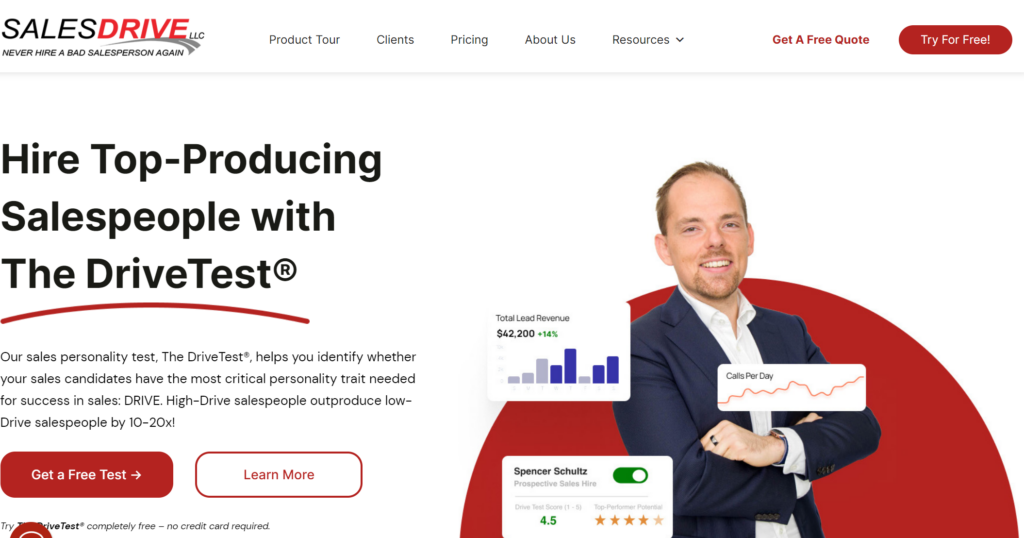
The DriveTest is a 42-question forced-choice personality assessment that takes about 20 minutes. It scores the three traits SalesDrive groups under Drive: need for achievement, competitiveness and optimism. Results come back on a five-point color-coded scale, along with a read on whether the candidate suits a hunter or a farmer sales role.
The forced-choice design is the interesting part. Candidates choose between options that all sound equally positive, which makes the test harder to game than a straight agree-or-disagree questionnaire. A consistency scale flags candidates whose answers contradict each other. On its own product page, SalesDrive reports more than 150,000 assessments administered and an accuracy rating above 80 percent for predicting sales performance. Those are vendor-reported figures rather than independent validation, and they deserve reading as such.
What the DriveTest does not do is measure skill. It does not test CRM proficiency, written communication, product knowledge, numerical reasoning or anything technical. That is a design decision, not a defect. It is a personality instrument and it says so plainly, which is more than a lot of assessment marketing manages.
Pro Tip: if a candidate lands in a low band on a drive-style personality test but has a track record that contradicts it, do not auto-reject. These screens describe probability, not certainty. A single low score is the weakest possible reason to end a candidacy, and it is the fastest way to lose a good rep to a competitor who bothered to interview them.
How does Testlify assess sales candidates?
Testlify builds a role-specific assessment from a test library, then combines the results into one candidate report. For a sales hire that can mean a situational judgment test, a personality measure, a written-communication task and a CRM or software skills test, scored together rather than reviewed one at a time.
The practical difference shows up when the shortlist is not all reps. A team hiring an SDR cohort, a sales engineer and a revenue operations analyst in the same quarter can run all three through sales hiring software on one platform, with a role-appropriate test for each, instead of buying a personality test for the reps and improvising for everyone else. The SDR assessment is one of several role-specific options in that library.
Breadth matters more than it did five years ago. The World Economic Forum's Future of Jobs Report 2025 puts 39 percent of key job skills on track to change by 2030. A fixed trait measure stays fixed, which is fine, because traits are meant to be stable. A test library gets re-pointed at whatever the role actually needs next quarter, which is a different kind of useful.
Testlify also carries the assessment-integrity layer that remote screening tends to need: session recording, snapshot capture, copy-paste restriction, IP and location checks, and randomized question order. Worth being honest about scope, though. Testlify is a pre-hire assessment platform. It is not an applicant tracking system and does not replace one. It integrates with the ATS a team already runs.
Testlify vs SalesDrive: Pricing
Pricing is where the two companies differ most in posture, and it is worth understanding before a procurement conversation starts.
SalesDrive pricing
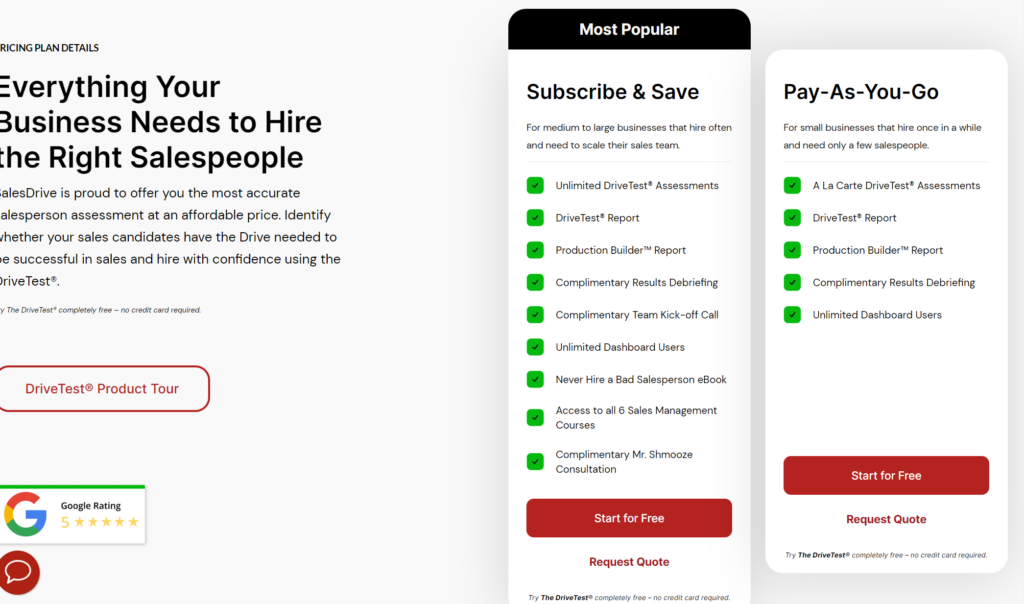
SalesDrive offers two plans, subscribe-and-save and pay-as-you-go. Neither price is published. You contact the company for a quote, which suits a buyer who wants a negotiated per-assessment rate and frustrates one trying to compare options in an afternoon.
Testlify pricing
Testlify publishes its plans on the pricing page, billed monthly or annually, with candidate credits and user seats scaling by tier. The advantage is not that it is always cheaper. It is that a hiring manager can size the cost before talking to anyone, and a finance team can model a year of screening without a sales call.
Which one should you choose?
Choose SalesDrive if sales is the only job family you screen and you want a fast, focused read on selling personality. Choose Testlify if you hire across several role types, need proctoring, want custom assessments, or want more than one signal behind each decision. The table below maps the common situations.
Your situation | Better fit | Why |
|---|---|---|
You hire field sales reps only and want a 20-minute personality read | SalesDrive | Single-construct test purpose-built for sales drive, with a hunter or farmer read |
You hire sales plus technical, support or operations roles | Testlify | One platform covers cognitive, technical, language and role-specific tests |
You screen remotely and need assessment integrity | Testlify | Session recording, snapshot capture, IP and location checks, randomized questions |
You want to write your own questions or build a custom assessment | Testlify | Custom assessment builder, custom coding and video questions |
You want two or three independent signals per candidate | Testlify | Multi-signal scoring consolidated into a single report |
You prefer a negotiated per-assessment quote | SalesDrive | Pay-as-you-go and subscribe-and-save plans, priced on request |
Hiring volume belongs in the calculation too. Bureau of Labor Statistics projections put about 1.8 million openings a year across sales occupations, driven mainly by the need to replace people who leave rather than by new headcount. A team refilling the same roles month after month gets far more out of a screen it can run cheaply and repeatedly than out of one it runs twice a year.
Can you use both together?
Yes, and for some teams it is the right answer. A drive-style personality screen and a skills assessment measure different things, so running both gives you two independent reads instead of one. The cost is candidate time, and that cost is real.
A workable sequence: run the short personality screen first on a large applicant pool, then send the surviving shortlist a role-specific skills assessment. That keeps the long assessment away from candidates who were never going to advance, and it puts the deeper signal where the decision actually gets made. A short CRM situational judgment test runs in about 10 minutes, which makes it a realistic second step rather than another hour asked of a candidate.
The caveat: do not stack assessments because more data feels safer. Every added step costs candidates, and drop-off is worst among the people with options, who are exactly the people you wanted. Two well-chosen signals beat five.
Ready to assess your sales shortlist?
Testlify's test library covers sales, technical and operations roles from one place, with proctoring and ATS integration included. Start a free trial, or book a demo and have someone walk through a sales assessment built for your specific roles.
Key Takeaways
- These tools are not competing on the same axis. SalesDrive measures one construct, personality-driven sales drive; Testlify measures many role-relevant skills across many job families. Comparing them on feature count misses the actual decision, which is about the range of roles you hire. Start by listing the job families you screened last year, not by counting checkmarks.
- Single-instrument hiring is weaker than it looks. The 2022 Journal of Applied Psychology re-analysis cited above cut the estimated validity of every common selection method once the statistics were corrected. Whatever tool you buy, plan for two or three independent signals per candidate rather than one score with a lot of confidence attached to it.
- Blank cells are not always losses. Most of SalesDrive's gaps in the comparison table are things a sales personality test was never designed to do. Read the table for shape, and treat "Not stated" as a question for the sales call rather than a confirmed absence.
- Pricing posture affects your buying timeline. SalesDrive quotes on request; Testlify publishes plans. If you need to model a year of screening cost before a vendor call, that difference decides your week.
- Remote screening raises the integrity bar. If candidates test unsupervised, proctoring controls stop being a nice-to-have. Session recording, snapshot capture and IP checks are the difference between a score you can defend and one you cannot.
- Running both is legitimate, but sequence it. Short personality screen on the wide pool, deeper skills assessment on the shortlist. Stacking assessments in parallel costs you the candidates who have other offers.
FAQs
Related resources
View all
Competitor Comparisons
Testlify vs Paradox: A detailed comparison
Competitor Comparisons
Testlify vs Drawmetrics: A detailed comparison
Competitor Comparisons
Testlify vs EVA: A detailed comparison
Competitor Comparisons
Testlify vs Pulsifi: features, pricing and proctoring compared for 2026
Competitor Comparisons
Testlify vs Prevue: A detailed comparison
Competitor Comparisons
Testlify vs Ducknowl: A detailed comparison
Get started.
Hire on proof, not resumes.
Run your first skills-based assessment free — no credit card required.