
What is job profiling? Everything you need to know
Discover what job profiling is, its importance in hiring, and how it helps define roles, responsibilities, and the ideal candidate fit.

Hiring is no longer just about writing a job description, posting it, and hoping the right candidate shows up. If you’ve ever hired someone who looked perfect on paper but struggled in the role, you’ve already seen what happens when job profiling is missing. Job profiling is the process that connects what a role really needs with the people you bring into your team.
In this blog, we’ll break down what job profiling is, why it matters, how to do it step by step, and how it fits into modern, skills-based hiring.
 ChatGPT
 Gemini
 Claude
 Grok
Grok Perplexity
What is job profiling?
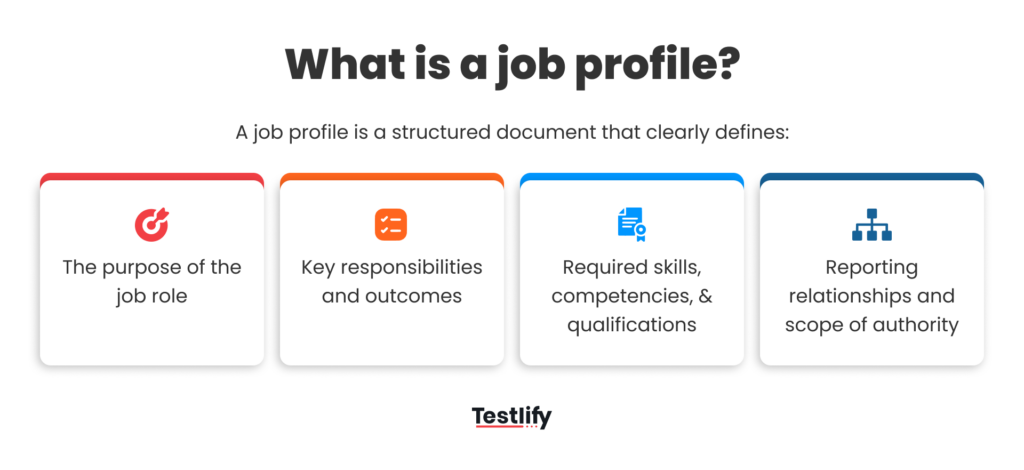
Job profiling is the process of deeply defining what a role actually requires, skills, behaviors, responsibilities, tools, mindset, and success metrics, so you can hire, manage, and develop people more accurately. Think of it as building a “blueprint” for a role before you go looking for the person to fill it.
Instead of only listing titles and generic duties, a strong job profile answers questions like:
- What does a great performer in this role do daily?
- What decisions do they make, and how complex are those decisions?
- What skills are must-haves versus nice-to-haves?
- How will their success be measured after 3, 6, or 12 months?
While a job description is written mostly for candidates and often used in job postings, a job profile is more internal, practical, and detailed. It guides hiring, onboarding, performance reviews, promotions, and even training plans.

Why does job profiling matter in hiring today?
Most companies say they want the “best talent,” but many still rely heavily on resumes, gut feeling, and unstructured interviews. Just like aptitude tests bring structure and predictability to candidate evaluation, job profiling brings clarity and consistency to how roles themselves are defined.
Here’s why it matters so much in 2026-style hiring:
You avoid vague or inflated requirements
When roles aren’t clearly profiled, it’s easy to ask for “excellent communication,” “leadership skills,” and “flexibility” in every posting, whether it’s for a data entry operator or a product manager. Job profiling forces you to be specific about what those words mean in the context of that role.
You reduce mis-hires and turnover
A bad hire can be costly, not just in salary but in lost time, morale, and delayed projects. A clear profile ensures you’re not hiring someone who is good in general, but someone who is good for this role, at this stage of your company.
You align managers, recruiters, and leadership
Without job profiling, everyone involved in hiring may be working with a slightly different picture of the “ideal candidate.” Profiling creates a single, shared view so the recruiter, hiring manager, and decision-makers are all on the same page.
You support skills-based hiring
As more teams move toward skills-based hiring, job profiling becomes the bridge between the role and the assessments or tests you use. If you know which skills truly matter, you can select the right aptitude, cognitive, behavioral, or technical tests to evaluate them.
Example: If you’re hiring for a Customer Success Manager, a basic job description might say “build relationships with clients” and “reduce churn.” Job profiling takes it further: it defines how many accounts they handle, what level of decision-making they have, what tools they must know (like CRM software), what metrics they own (NPS, renewal rate), and what kind of communication style works best with your customer base.
Key elements of a strong job profile
A useful job profile is more than a list of tasks. It combines responsibilities, required skills, behaviors, tools, and measurable outcomes. Here are the core elements you typically include:
Role overview
This is a short, practical summary of why the role exists and how it contributes to the organization. It answers: “If this role didn’t exist, what would break?” Example: “The Sales Operations Specialist ensures the sales team can perform at peak efficiency by maintaining accurate data, optimizing CRM workflows, and generating performance reports for leadership.”
Core responsibilities
These are the main tasks and duties the person will handle regularly. Instead of generic lines like “handle documentation,” good profiles list real, observable responsibilities, such as:
- Maintain and clean CRM data weekly
- Prepare monthly performance dashboards for the sales head
- Create and refine sales process documents and playbooks
Technical and functional skills
These are the abilities directly related to doing the job, software, tools, domain knowledge, and task-specific skills. For example, a data analyst role might list skills like SQL, Excel, dashboard tools, and basic statistics.
Cognitive and problem-solving requirements
Just as different aptitude tests target numerical, verbal, logical, or abstract reasoning, roles also differ in the type of thinking they demand. A strong job profile defines whether the role is more about pattern recognition, decision-making, data interpretation, or creative problem-solving.
Behavioral and soft skills
This includes communication style, collaboration, adaptability, resilience, and other interpersonal traits. Many organizations also map these to personality or behavioral assessments to see how well someone fits a role’s typical demands.
Experience and qualifications
Rather than blindly demanding “5+ years,” a better job profile clarifies what that experience should look like: industry exposure, project types, team environments, or tools used.
Success metrics and performance indicators
This is one of the most powerful but often missing pieces. The profile should answer: “If this person is successful, what will we see in the numbers?” This could be sales revenue, time-to-resolution, error rates, project delivery time, user satisfaction scores, and so on.
Work context and environment
Here you capture whether the role is individual-contributor or people-management, remote or on-site, client-facing or internal, structured or ambiguous. These details help attract candidates whose working style matches your environment.
How job profiling connects to assessments and interviews?
Once you have a clear job profile, everything else in your hiring process becomes easier to design, and much more intentional. You’re no longer picking interview questions or tests randomly; you’re mapping them to specific parts of the profile.
Here’s how it links together:
From job profile to tests
If the profile says the role requires strong numerical analysis, structured thinking, and data-based decision-making, you can pair it with numerical reasoning tests, logical reasoning tests, or data interpretation tasks. For roles that involve constant communication or client interaction, you might focus more on verbal reasoning tests or language proficiency assessments.
From job profile to interview questions
Instead of asking the same generic questions for every role, interviews become targeted. For example, if a role requires situational judgment, like handling escalated customer issues, you can design scenario-based questions that mirror real situations from the profile.
From job profile to work samples and case studies
Many modern teams use work samples, take-home tasks, or live case studies. The job profile helps you make sure these are realistic and aligned with the actual work, not random puzzles or trick questions.
From job profile to cultural and team fit
Personality or behavioral assessments become more meaningful when tied to a profile. Instead of trying to find the “perfect” personality, you’re looking for someone whose natural style matches what the role really demands, such as calm decision-making under pressure or comfort with ambiguity.
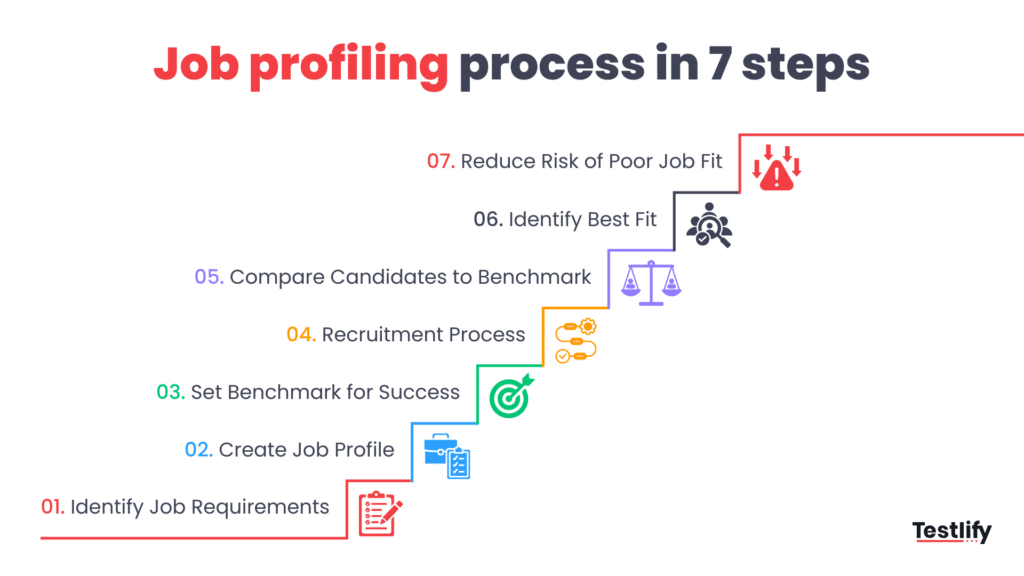
Step-by-step: how to create a job profile
If you’re building job profiles for the first time, or improving existing ones, here’s a practical way to approach it. You don’t need a huge HR team or complex software to get started.
1. Talk to the people closest to the role
Start by collecting inputs from:
- The current person in the role (if there is one)
- Their manager
- A few colleagues who interact with them regularly
Ask simple but revealing questions:
- What does a typical day look like?
- When do you feel most challenged in this role?
- What skills do you rely on the most?
- What mistakes hurt the team the most when they happen?
These conversations give you real-world insights that job descriptions alone never capture.
2. List responsibilities as real activities
Avoid writing responsibilities as abstract phrases. Instead, describe them as concrete activities. For example:
- “Own monthly reporting and present insights to leadership”
- “Handle 20–30 customer tickets per day while maintaining agreed response times”
- “Design, execute, and measure at least two campaigns per month based on product priorities”
This makes the role easier to understand and easier to measure.
3. Identify must-have vs good-to-have skills
Not every skill has equal weight. If everything is a must-have, you end up shrinking your talent pool unnecessarily. Based on your conversations and the role’s goals, split skills into two buckets:
- Must-have: Without these, the person cannot perform the role properly.
- Good-to-have: These make ramp-up easier but can be learned within a reasonable timeframe.
This distinction also helps you design fair assessments that don’t filter out good potential hires just because they don’t check every box on day one.
4. Define cognitive and behavioral expectations
Ask questions like:
- Does this role require quick decision-making or careful, slower analysis?
- Is it more about independent problem-solving or collaborative brainstorming?
- Does it involve handling conflict, negotiation, or high-pressure situations?
From there, map:
- Cognitive needs → numerical, logical, abstract, or situational reasoning.
- Behavioral needs → empathy, assertiveness, patience, creativity, or structure.
These will later guide which tests, interview questions, or scenarios you use for screening.
5. Set clear success metrics
Look at the role and decide how you’ll know if someone is doing well after a few months. Ask:
- What numbers will move if this person is effective?
- What mistakes or delays would signal that something’s wrong?
Examples:
- For a recruiter: time-to-hire, offer-acceptance rate, candidate satisfaction.
- For a customer support agent: average resolution time, CSAT scores, ticket backlog.
- For a sales development rep: qualified leads per month, meeting conversion rate.
Document these metrics directly in the job profile so they’re visible from day one.
6. Capture context and constraints
Finally, add practical details:
- Working hours (fixed, shift-based, flexible)
- Travel requirements, if any
- Collaboration expectations (works mostly alone, with a small team, or cross-functionally)
- Tools and platforms that are part of daily work
These contextual details help avoid surprises later, for both the candidate and the team.
How does job profiling improve the full employee lifecycle?
Job profiling doesn’t stop at hiring. Once you do it well, it quietly improves almost every stage of the employee journey.
Better onboarding
With a clear profile, new hires know exactly what’s expected and what “good” looks like in their role. Managers can build onboarding plans that directly align tasks, learning modules, and mentoring to the profile.
Fairer performance evaluations
Instead of relying on subjective impressions, managers can evaluate performance against pre-defined responsibilities, skills, and metrics. This makes performance reviews less emotional and more objective.
Clearer career paths and internal mobility
When multiple roles have strong profiles, it becomes easier for employees to see how they can grow. For example, they can compare the profile of their current role with that of a senior version or a related role and see exactly which skills they need to develop.
Smarter training and development
Training no longer happens just because a course is available. You can identify skill gaps by comparing current employee capabilities with job profile requirements, then design targeted development plans.
Stronger team design
Job profiles help leaders design balanced teams where roles complement each other instead of overlapping or leaving critical gaps.
Common mistakes in job profiling (and how to avoid them)
Job profiling is powerful, but it’s easy to get wrong if it becomes a checkbox exercise. Here are some typical pitfalls:
Making profiles too idealistic
Sometimes profiles describe a “superhuman” who can do everything, lead, code, sell, strategize, and design. The result: almost no candidate feels like a fit. To avoid this, separate must-have from good-to-have and regularly test whether your requirements are realistic in your talent market.
Copy-pasting from other companies
Borrowing ideas is fine, but lifting profiles or descriptions directly from another company can backfire. Their business model, culture, team size, and tech stack might be very different from yours. Always adapt borrowed content to your real context.
Not updating profiles as roles evolve
Roles today change quickly, new tools, new markets, new strategies. If you only create profiles once and never revisit them, you’ll end up hiring and evaluating people against outdated expectations. Treat job profiles as living documents.
Ignoring the team context
A profile built in isolation may ignore who else is on the team. For example, if you already have two strong planners, you might actually need someone more execution-focused, even if the industry-standard profile emphasizes planning.
Over-focusing on experience and degrees
Without realizing it, some profiles become lists of credentials rather than capabilities. To keep them modern and inclusive, emphasize what the person should be able to do, not only where they’ve worked or what they’ve studied.
Top job profiling tools in 2026
Job profiling isn’t just a process, it’s increasingly backed by dedicated software. Here’s how the tooling landscape looks today and which platforms are worth knowing about.
How has job profiling evolved?
Gone are the days when job profiles were static word documents. Today:
- AI and machine learning analyze vast amounts of data from internal and external sources to define role requirements more accurately.
- Integrated platforms link job profiles directly to analytics, recruitment, performance management, and learning systems.
- Skills taxonomies and competency data continuously update profiles to reflect changing industry and technology trends.
This evolution makes job profiling an ongoing business advantage rather than a once‑a‑year task.
What to look for in job profiling tools
AI‑powered skills and competency mapping: look for tools that can automatically extract required skills from industry data, job ads, or internal performance metrics.
Analytics and reporting: visual dashboards help HR leaders see skill gaps, workforce readiness, and career pathway opportunities.
Integration with HR systems: profiles should connect to your HRIS, ATS (applicant tracking system), LMS (learning management system), and performance tools for seamless data flow.
Customization: each organization is unique, so flexibility in building and updating job profiles is key.
Predictive insights: some advanced systems forecast future role requirements based on trends and internal growth patterns.
Top job profiling and related HR tools in 2026
Below is a curated list of leading tools and platforms that help with job profiling, role analysis, talent matching, and strategic HR planning. Grouped by core strength so you can decide easily what fits your HR team’s needs.
1. Workable
Workable is an all‑in‑one recruiting platform with advanced AI features that help you source candidates, build job postings, and screen applicants based on role requirements. It has expanded to cover onboarding and some HR tasks as well, making it a flexible choice for small to midsize teams.
Best for: mid‑market companies that want simple recruitment workflows with smart role matching. Why HR loves it: easy job posting, AI candidate matching, and intuitive dashboards.
2. JazzHR
JazzHR offers a user‑friendly recruiting interface with intuitive job posting, candidate tracking, and resume parsing tools. While more focused on recruitment than deep job profiling, its emphasis on customizable application workflows helps HR teams define role requirements clearly and attract better matches.
Best for: small to mid‑sized companies.
3. Recruitee
Recruitee combines a modern ATS with collaborative tools that help teams build job postings and set clear criteria. Its drag‑and‑drop pipelines and reporting help HR teams align role expectations with outcomes early on.
Best for: teams that want an easy, visual recruitment system.
6. ADP workforce now / ADP DataCloud
Adp’s HR analytics tools give HR teams access to massive datasets and powerful reporting for workforce trends, performance metrics, and role comparisons. This can help you validate job profiles against real data and industry benchmarks.
Best for: data‑driven HR teams.
7. Oracle cloud HCM
Oracle HCM is a comprehensive HR platform with robust analytics, predictive modeling, and workforce planning tools. While not solely a job profiling tool, its ability to connect talent data across recruitment, performance, and succession planning makes it invaluable for profiling roles at scale.
Best for: large enterprises with complex HR needs.
8. Personio
Personio is a cloud‑based HR system that simplifies hiring, onboarding, payroll, and employee data admin. Its integrated design encourages consistent job profile usage across hiring and performance workflows.
Best for: small and medium enterprises (smes).
9. SAP SuccessFactors
Part of the enterprise HR suite world, SuccessFactors offers talent management, workforce analytics, and performance tools. Job profiles can be linked with learning paths, succession plans, and performance goals.
Best for: global organizations seeking structured role frameworks.
10. Workday
Workday’s HR suite excels at connecting job profiles with career development, internal mobility, and workforce planning. It supports advanced role modeling and predictive talent insights.
Best for: large organizations with emphasis on career pathways.
11. Peoplebox.ai
Peoplebox.ai blends performance, engagement, and talent analytics, useful for profiling roles by outcomes and competencies rather than just skills.
Best for: organizations focused on performance alignment.
How do these tools fit into your HR workflow?
Before recruitment: use tools to define skills, competencies, and expectations so job postings attract the right talent from day one.
During sourcing and screening: skills assessment platforms (harver, MeritTrac — named in the source page but not included in the numbered tool list above; see QA flag) and AI matching (Workable, JazzHR) help align candidate abilities with role profiles.
During onboarding and performance management: full HR suites (Personio, Workday) connect job profiles to career paths, performance goals, and development plans.
For strategic planning: analytics platforms and talent intelligence tools help HR leaders identify skill gaps and forecast future role needs.
Real benefits of using job profiling software
- Faster hiring with higher quality matches
- Data‑backed decisions for role design
- Consistent and bias‑reduced job descriptions
- Better alignment between jobs and business objectives
- Enhanced career development and internal mobility
- Predictive workforce planning
Expert tips for choosing the right tool
Start with your HR priorities: are you focused mainly on recruitment, talent strategy, or performance alignment?
Check integrations: make sure the tool connects smoothly with your HR tech stack.
Consider scalability: tools that work for small teams may not scale to enterprise needs, and vice versa.
Leverage analytics: platforms with strong reporting help move job profiling from administrative work to strategic insight.
Conclusion
If you want to start using job profiling more systematically, you don’t have to rebuild everything at once. A practical way to begin is:
- Pick 3–5 critical roles where hiring mistakes hurt the most.
- Build or refine detailed profiles for these roles first.
- Align your interview questions, case studies, and assessments to these profiles.
- After a few hiring cycles, check: did the clarity of the profile make hiring smoother, faster, or more accurate?
Over time, you can expand job profiling to more roles and connect it with tools like skills assessments, aptitude tests, and talent analytics platforms to create a more data-backed, consistent hiring system.
When done well, job profiling doesn’t add bureaucracy, it removes confusion. It helps you attract the right candidates, ask the right questions, and set the right expectations from day one, giving both your organization and your new hires a far better chance of long-term success.
FAQs

Related resources
View all
HR & recruitment
What is text recruiting and how to start using it to hire

HR & recruitment
Career Pathing: How to Build Paths That Retain Talent

HR & recruitment
Pros and cons of cross-training employees in 2026

HR & recruitment
How to use reverse mentoring to make it work?

HR & recruitment
Recruiter burnout: causes, symptoms, and how to prevent it

HR & recruitment
How to create a strategic HR roadmap?
Get started.
Hire on proof, not resumes.
Run your first skills-based assessment free — no credit card required.