
ATS integration with assessments: how it works and 8 benefits
How ATS integration with assessments works, the 8 benefits for hiring teams, the four integration types and a checklist for choosing a tool.

ATS integration with assessments connects your applicant tracking system to your skills testing platform, so tests go out from the ATS and scores come back into each candidate record without anyone exporting a file. Recruiters stay in one system, candidates move from application to assessment in one flow, and every hiring decision sits next to the evidence behind it.
TL;DR:
- ATS integration with assessments sends a skills test when a candidate reaches a set pipeline stage and writes the score, status and report link back to the candidate record.
- The biggest gains are less manual data entry, faster invitations, one consistent scoring standard and an audit trail for every decision.
- A native or embedded integration is the only type that lets recruiters filter and rank candidates by score inside the ATS. Link-only setups keep results in a second tool.
- Speed matters: SHRM's 2025 data puts median time-to-fill at about a month and a half, and 41% of organizations report rising candidate ghosting.
- Before you buy, check two-way sync, stage triggers, which fields write back, proctoring, SSO and support for your exact ATS.
- Roll out on one high-volume role for 30 days and compare time-to-hire, completion rate and recruiter hours with your last few hires.
 ChatGPT
 Gemini
 Claude
 Grok
 Perplexity
What is ATS integration with assessments?
ATS integration with assessments is a connection between an applicant tracking system and an assessment platform that passes candidate details one way and test results the other. The ATS sends the invitation at a defined stage, the candidate takes the test, and the score, status and report land back in the ATS profile automatically.
Two pieces of software are involved. An applicant tracking system manages job openings, applications and how candidates move through hiring stages. An assessment platform measures skills, cognitive ability or behavior through structured tests. Without a connection between them, recruiters copy names and emails into the testing tool, chase completions by hand and paste scores back into the ATS.
With the connection in place, the ATS stays the single record for every candidate. Recruiters never touch a CSV file, and candidates never log in to two separate platforms.

How does ATS integration with assessments work?
ATS integration with assessments works in six steps: the recruiter links an assessment to a job stage, the ATS triggers an invite, the candidate takes the test, the platform scores it, results write back to the candidate record, and the team ranks candidates inside the ATS.
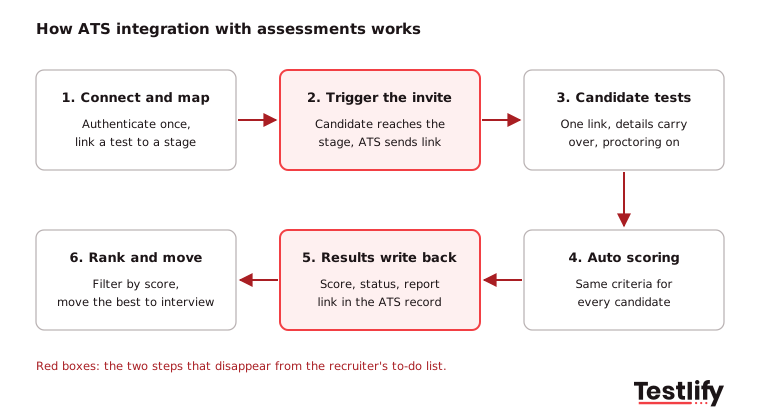
- Connect and map: An admin authenticates the assessment platform inside the ATS once, then links an assessment to a job or a pipeline stage such as "Screening".
- Trigger the invite: When a candidate moves into that stage, or submits the application, the ATS sends the test invitation. Some teams let recruiters order a test by hand from the candidate profile instead.
- Candidate takes the test: Name, email and job carry over from the ATS, so the candidate clicks one link and starts. Proctoring runs during the test.
- Automatic scoring: The assessment platform scores every answer against the same criteria for every candidate.
- Results write back: The score, completion status, completion time and a link to the full report appear in the candidate record in the ATS.
- Rank and move: Recruiters and hiring managers sort or filter candidates by score in the ATS and move the strongest ones to interview.
The fields that sync back decide how useful the integration is day to day. Most two-way integrations write at least these:
Field written back to the ATS | What the recruiter does with it |
|---|---|
Status (invited, started, completed, expired) | Chases only the candidates who have not finished |
Overall score | Sorts and filters the pipeline by result |
Report link | Opens the full breakdown without a second login |
Completion date and time | Spots delays and stalled candidates |
Per-skill scores and integrity flags (where supported) | Checks the skills that matter most and any proctoring alerts |
What are the types of ATS assessment integrations?
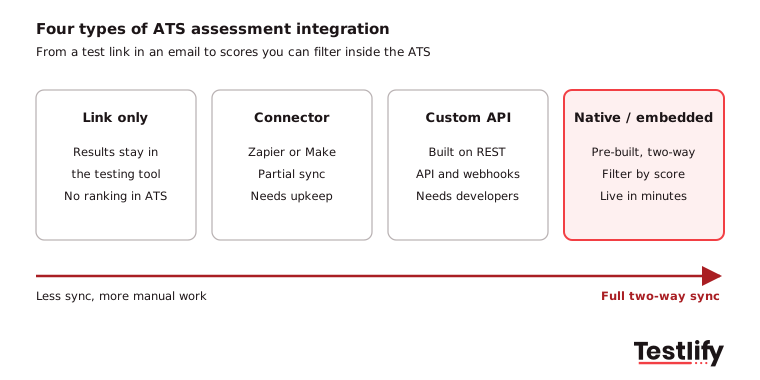
ATS assessment integrations come in four types: native, embedded order-based, connector-based and link only. They differ in what syncs back, how much setup they need and whether recruiters can rank candidates by score inside the ATS.
Type | How it works | Scores in the ATS? | Setup effort | Best for |
|---|---|---|---|---|
Native (pre-built) | The assessment vendor and the ATS ship a ready connector; you authenticate once | Yes, two-way | Minutes, no engineering | Most mid-market and enterprise teams |
Embedded order-based | Recruiters order a test from the ATS assessment tab; results return through the ATS's assessment API | Yes | Low to medium | ATS platforms with a dedicated assessment module |
Connector (Zapier, Make) | A middleware workflow moves data between the two tools | Partly, depends on the workflow | Medium, someone must maintain it | Less common ATS platforms |
Custom API | Your team builds the flow on the vendor's REST API and webhooks | Yes, if you build it | High, needs developers | Large companies with unusual workflows |
Link only | A test link sits on the application thank-you page or in an email | No, results stay in the testing tool | Very low | One-off or very low-volume hiring |
Pro tip: Ask any vendor one question: "Can my recruiters filter candidates by assessment score inside our ATS?" If the answer is no, you are buying a link, not an integration.
What are the benefits of ATS integration with assessments?
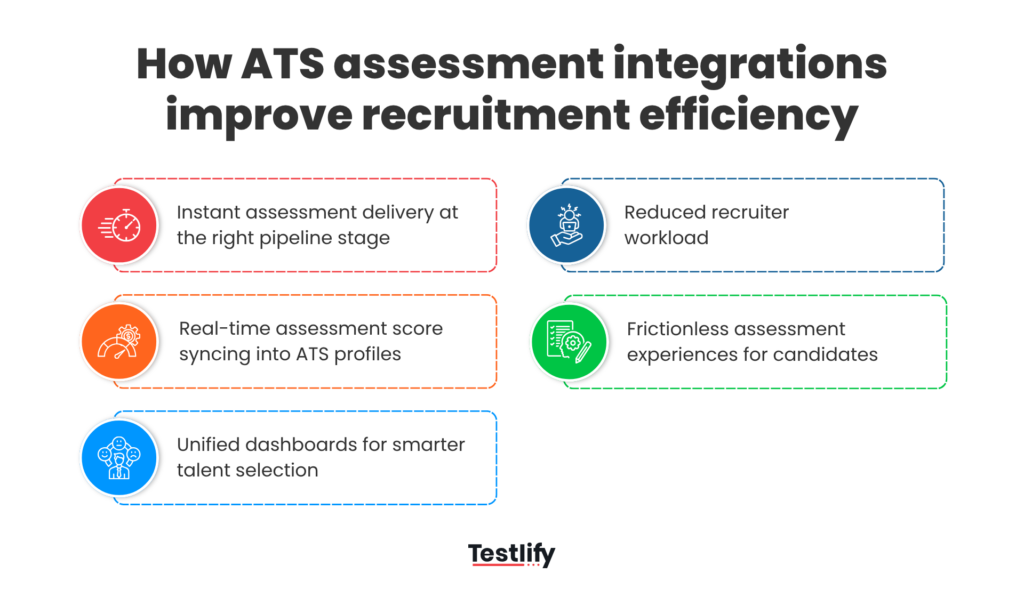
ATS integration with assessments brings eight benefits: less manual work, a better candidate experience, faster invitations, more accurate matching, richer hiring data, stronger compliance, assessments tailored to each role, and easier collaboration. Together they cut time-to-hire and free recruiters for work that needs judgment.
1. Less manual data entry and admin
Recruiters stop copying candidate details into the testing tool and pasting scores back into the ATS. Fewer handoffs mean fewer typing errors, no duplicate records and no scores attached to the wrong candidate. The hours saved move into screening calls, stakeholder conversations and offers, which is where recruitment automation pays off.
2. A better candidate experience
Candidates click one link, finish the application and take the assessment in the same flow, without re-entering their name, email or job. Talent Plus reports that clients with inline ATS integrations see assessment completion above 90%. Automatic status updates also stop candidates wondering where they stand, which lowers candidate drop-off.
3. Faster invitations and shorter time-to-hire
Stage-triggered invites go out the moment a candidate qualifies, not when a recruiter gets to the inbox. Speed matters: SHRM's State of Recruiting 2025 puts median time-to-fill at roughly a month and a half and found 50% of organizations struggle with losing talent to competitors.
4. More accurate candidate matching
Resumes show claims; assessments show skills. When test scores sit next to the resume in the ATS, recruiters shortlist on demonstrated ability rather than keywords, and fewer unqualified applicants reach the interview stage. LinkedIn Economic Graph research from March 2025 found a skills-based approach expands talent pools 6.1 times globally and 15.9 times in the US.
5. Richer hiring data and analytics
Every invitation, completion and score is stored against the candidate and the job. Teams can see completion rates, score distributions and drop-off by role in one place, then tighten criteria or adjust the test. Track the numbers in KPIs for measuring assessment impact to prove the value to finance.
6. Stronger compliance and audit trails
Each test, score and stage change is time-stamped in the ATS, so you can show who was assessed, on what and when. That record helps when a hiring decision is challenged, and US employers covered by federal anti-discrimination laws must keep employment records for at least one year under EEOC recordkeeping rules.
7. Assessments tailored to each role
The integration lets you map a different assessment to each job or stage: a coding test for engineers, a typing and situational judgment test for support agents, a language test for global roles. Recruiters can weight the skills that matter most, so candidates are judged on what the role needs.
8. Easier collaboration between recruiters and hiring managers
Hiring managers see the same scores and reports as recruiters, in the ATS they already use, as soon as a candidate finishes. Everyone compares candidates on one scoreboard, which keeps debriefs short and supports structured interviews later in the process.
Which hiring bottlenecks does an integrated setup remove?
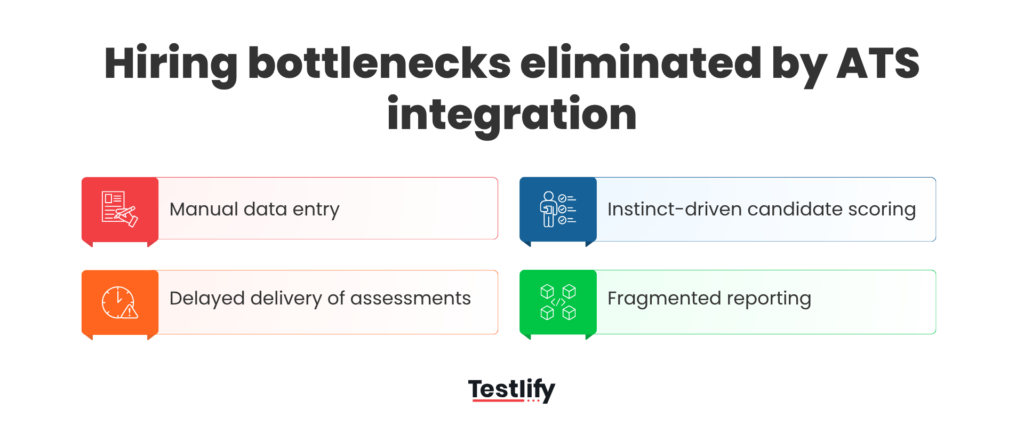
An integrated setup removes four bottlenecks: manual data entry between systems, slow assessment delivery, inconsistent scoring and scattered reporting. Each one adds days to the process or weakens the decision when left in place.
Bottleneck | Without integration | With integration |
|---|---|---|
Manual data entry | Recruiters re-key names, emails and scores across tools | Candidate details and results sync automatically |
Delayed assessment delivery | Invites wait for a recruiter, and top candidates accept other offers | Invites go out the moment a candidate reaches the stage |
Inconsistent scoring | Hiring managers compare candidates on gut feel and partial data | One scoring standard for every candidate in the role |
Scattered reporting | Metrics are stitched together from several dashboards | Funnel and assessment data sit in one view |
SHRM's 2025 recruiting research also found 41% of organizations cite rising candidate ghosting, so every day a candidate waits for a test link is a risk.
How do integrated assessments compare with standalone testing?
Integrated assessments run inside the ATS workflow, while standalone testing makes recruiters manage two systems, two logins and two sets of data. Standalone still works for one-off senior hires where volume is low; integrated setups win for almost every other scenario.
Standalone testing | ATS-integrated assessments | |
|---|---|---|
Sending tests | Recruiter copies details and sends each invite | Triggered by the pipeline stage |
Where scores live | In the testing tool, exported by hand | In the candidate record in the ATS |
Ranking candidates | Spreadsheet or two screens | Sort and filter in the ATS |
Candidate journey | Separate emails and logins | One flow from application to test |
Audit trail | Split across tools | One time-stamped record |
Best fit | Rare, low-volume or bespoke hires | Regular, volume and multi-team hiring |
The gap widens as hiring volume grows: the more requisitions a team runs, the more hours the manual handoffs cost.
What should you look for in an ATS assessment integration?
An ATS assessment integration should offer two-way sync, stage-triggered invites, score filtering inside the ATS, strong proctoring, single sign-on, a broad test library, real-time reporting and support for your exact ATS. Check each point in a live demo with your own ATS, not on a slide.
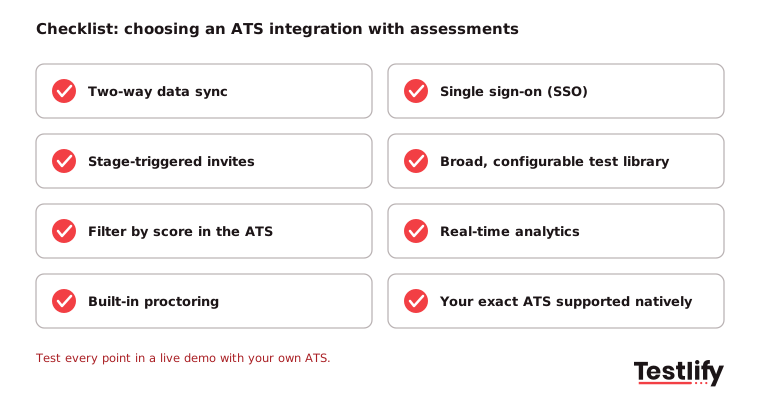
- Two-way data sync: Candidates, stages and scores move both ways with no manual refresh.
- Stage-triggered automation: Assessments send automatically based on rules you set per job or stage.
- Scores you can filter by: Recruiters can sort and filter on assessment results inside the ATS.
- Built-in proctoring: Webcam snapshots, tab and copy-paste tracking, randomized questions and AI-assistance detection protect every score.
- Single sign-on (SSO): Recruiters reach both systems through one secure login.
- A broad, configurable test library: Ready-made tests for technical, cognitive, language and role-specific skills, plus custom questions.
- Real-time analytics: Completion rates, score distributions and drop-off by role, visible as they happen.
- Your ATS, supported natively: Confirm the exact ATS and plan; some setups only send results back on higher tiers.
How do you roll out ATS-integrated assessments?
A rollout of ATS-integrated assessments works best as a 30-day pilot on one high-volume role, followed by one job family per quarter. That pace protects active hiring while you build proof that the integration saves time.
- Pick one role: Choose a role you hire for often, such as customer support or sales development, so you collect enough data in 30 days.
- Set a baseline: Record time-to-hire, assessment completion rate and recruiter hours for your last three to five hires in that role. The time-to-hire calculator helps.
- Map the stage: Link the assessment to one pipeline stage and agree on a score threshold that moves candidates forward.
- Bring hiring managers in early: Let them review the test and the report format before launch. Their buy-in decides whether the integration becomes the default or shelfware.
- Compare and expand: After 30 days, compare the same three numbers. Once the pilot proves out, add one job family per quarter.
Key takeaway: Measure before you switch on. Without a baseline, you cannot show finance what the integration saved.
What mistakes should hiring teams avoid?
Hiring teams most often go wrong by using tests that do not match the job, over-testing every candidate, skipping training and ignoring rules on automated decisions. Each one is preventable with a little planning up front.
- Tests that do not match the job: Generic tests give weak signals. Build each assessment from the role's actual skills.
- Over-assessing every candidate: Long or repeated tests lower completion and hurt the candidate experience, especially in volume hiring. Keep first-stage tests short.
- Skipping change management: Without recruiter and hiring manager training, even a strong integration gets ignored.
- Auto-rejecting without checks: If scores drive automatic decisions, follow local rules. In New York City, Local Law 144 requires a bias audit within one year of use and notice to candidates before an automated employment decision tool is used. Keep a person in the loop for final decisions.
How does Testlify connect assessments to your ATS?
Testlify connects to 100+ ATS and HR platforms, including Workday, SAP SuccessFactors, Oracle HCM, Greenhouse, Lever, SmartRecruiters, BambooHR, Workable, UKG Pro Recruiting, Ashby and Teamtailor. Candidates, stages and scores flow both ways, and most integrations connect in under five minutes with no engineering.
- Pre-built connectors: Browse every supported platform on the Testlify integrations page, or see setup for Greenhouse and Workday.
- REST API and webhooks: For custom workflows, the versioned Testlify API supports your own build.
- Tests worth syncing: 3,500+ ready-made tests and 25+ question types, plus an AI test builder that creates an assessment from a job description.
- Integrity on every score: 20+ proctoring checks are included, from tab tracking to AI-assistance detection. See anti-cheating and proctoring.
- Screening before the test: The AI resume screener pulls resumes from your ATS, scores fit and syncs the result back. It is free with Greenhouse.
- Security and audit: ISO 27001, SOC 2 Type II and GDPR, plus a third-party bias audit of the matching model completed on June 16, 2023 (NYC bias audit).
Teams using Testlify report 55% faster time-to-hire, and candidate satisfaction sits at 94%.
Ready to connect your assessments to your ATS?
Check that your ATS is on the list, then try the full flow on a real role. Start a 7-day free trial of Testlify, no credit card required, or book a demo to see the integration with your own ATS.
Frequently asked questions
Related resources
View all
Candidate assessment
Successful ATS integration stories from top companies

Candidate assessment
Are Employment Assessments Biased? The Data (and How to Fix It)

Candidate assessment
How to conduct effective pre-employment assessments in 2027

Candidate assessment
How to screen candidates for embedded systems developer

Candidate assessment
How to screen candidates for database developer

Candidate assessment
How to Screen Candidates for DevOps Engineer
Get started.
Hire on proof, not resumes.
Run your first skills-based assessment free — no credit card required.