
How to create a recruitment dashboard that drive results?
Learn how to create a recruitment dashboard that drives results! Discover key metrics and design tips to enhance your hiring process.
Recruitment is at the center of every organization’s talent acquisition strategy. A recruitment dashboard is necessary to monitor your efforts and ensure you are headed in the right direction.
It helps recruiters visualize key metrics, track performance, and make data-driven decisions.
In this blog, let’s explore a recruitment dashboard, why it matters, and how to set one up to improve your recruitment process.
 ChatGPT
 Gemini
 Claude
 Grok
Grok Perplexity
What is a recruitment dashboard?
A recruitment dashboard is a centralized place offering real-time data regarding your hiring activities. It is a control panel that gives you an overview of the whole process, from job posting to onboarding a candidate.
It centralizes all the metrics, including time-to-hire, application sources, candidate progress, and hiring costs, in one place. The dashboard makes it easy for recruiters to monitor their KPIs and adjust accordingly when necessary.

Why do you need a recruitment dashboard?
If you still use spreadsheets to maintain your recruitment data, it is high time you get out of this old-age thing.
Here are some reasons why you need a recruitment dashboard:
- Data at your fingertips: A recruitment dashboard gives you access to your recruitment data.
- Improved decision-making: A dashboard could help you know where the bottlenecks are and how successful your hiring strategies are to make data-based decisions.
- Increased productivity: You save time with automation in data collection with fewer manual tasks.
- Better candidate experience: With the optimization of the hiring process with data-driven insights, you will enhance the candidate experience.
Key metrics to track on your recruitment dashboard
To make informed hiring decisions, it’s important to monitor the right metrics. Tracking KPIs on your recruitment dashboard ensures you stay on top of your recruitment goals and continuously optimize the hiring process.
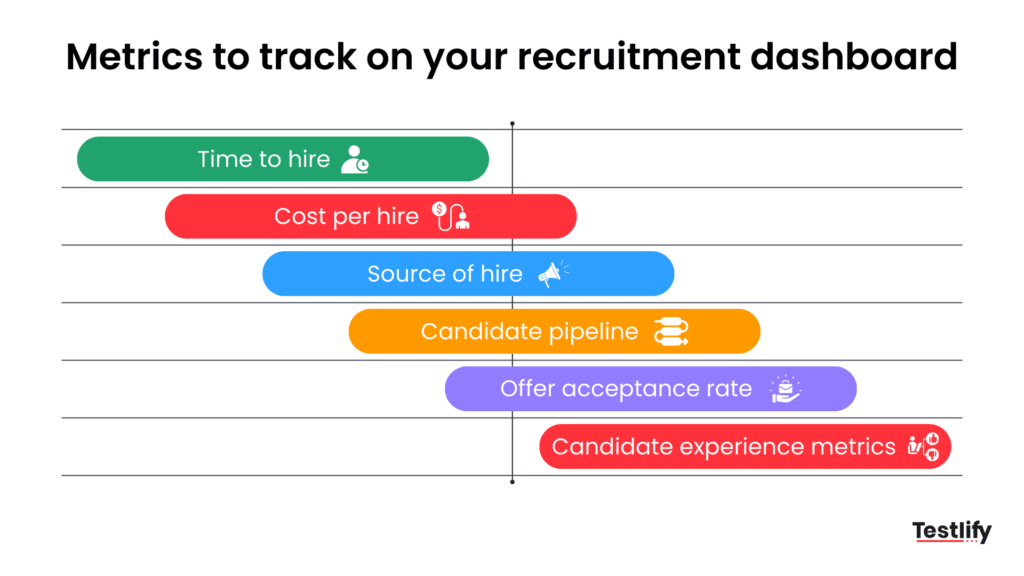
1. Time-to-hire
Time-to-hire is the amount of time it takes to hire. This metric is important since an extended hiring process will drive the cream of the crop away; such candidates can accept offers from other companies.
According to SHRM, companies with a recruitment dashboard report a reduction in time to hire by up to 20% compared to those without such tools. By tracking time-to-hire on your dashboard, you can know where exactly things have slowed down and do work to quicken things up.
2. Cost-per-hire
Recruitment is expensive, so the cost per hire is very important, and it will involve job posting fees, recruiter salaries, hiring software, and other expenses involved in hiring for a role. Monitoring this metric will help you know how to save costs and ensure you are getting the best return on your recruitment investments.
3. Source of hire
Where are your best candidates coming from? Are they coming through job boards, social media, employee referrals, or recruitment agencies? Tracking sources of hire can help you spend more money on the channels delivering better-quality candidates and less on ineffective ones.
4. Candidate pipeline
The candidate pipeline is a view of where your candidates are in the recruitment process. You can follow all stages, from application to interviews and offers.
This gives you the clearest pipeline overview on your dashboard, which helps you know everything, like candidates dropping off at which stage or anything relevant. This allows you to correct such issues in case of delays or miscommunication.
5. Offer acceptance rate
You made the perfect offer, but did the candidate accept it? The offer acceptance rate will tell you how many of your offers get accepted. A lower acceptance rate may raise a red flag of issues with your compensation packages or the overall attractiveness of your offer.
6. Candidate experience metrics
The candidate’s experience can make or break your employer brand. Use your dashboard to track candidate satisfaction surveys, response time to respond to candidates and overall communication efficiency. The better the experience, the higher the chances of attracting top talent.
How to create your recruitment dashboard
A recruitment dashboard is only as good as its design and data accuracy. Here’s how to design a dashboard that provides value.
1. Determine your objectives
You cannot design a dashboard without setting what success would look like. Do you want to reduce your time-to-hire? Do you want to reduce recruiting costs? Do you want to enhance the candidate experience? Your goals will decide which metrics you should put onto your dashboard.
2. Choose the right tools
Many tools are designed to create a recruiting dashboard, ranging from stand-alone software to integrations with Applicant Tracking Systems. Select the tool based on your needs, whether for visual appeal, customization, or friendliness in design.
For example, Zoho Recruit, Power BI, Google Data Studio, etc.
3. Focus on a user-friendly design
Your dashboard should be understandable even to a non-technical recruiter. Use clear labels, charts, and graphs. Highlight what a recruiter wants to understand. Do not litter your dashboard with irrelevant metrics.
4. Ensure data accuracy
High-quality hiring decisions depend on the accuracy of data. Your recruitment dashboard should have the most reliable data sources and be updated at the most frequent periodic intervals. Data, if wrong, may badly inform and impact some or all of your decisions.
5. Make it customizable
Recruitment needs can be dynamic, meaning that you should choose a customizable dashboard tool. This means you can have custom filters, drill-down functionality, and flexible reporting as part of a changing recruitment strategy.
How to implement a recruitment dashboard
Now that you understand why and how you can create a recruitment dashboard, it is time to begin implementing one.
1. Identify key stakeholders
Before you create your dashboard, identify who will require access to the data: recruiters, HR managers, department heads, and key leaders. Knowing the audience will help you optimize the features according to their needs.
2. Set up data integration
Then, merge the sources of data with the dashboard. In this case, it usually involves linking the Applicant Tracking System, HR software, or any other data platform to the dashboard tool. Ensure that the feed is real-time to avoid discrepancies.
3. Customize the dashboard layout
After uploading your data, personalize the dashboard structure using the metrics you want to monitor. Most tools used on dashboards usually offer drag-and-drop customization. This allows the user to shuffle charts, graphs, and tables to use as per their needs.
4. Test and iterate
Before you launch it to the whole team, you must test it a few times and ensure everything is in order. Get feedback from the most frequent users, then refine it as necessary. Once completely done, you can present it to the rest of the team.
5. Provide training
Not everyone on your team is likely familiar with data visualization or dashboard software. Consider holding training sessions so everyone knows how to use the dashboard and correctly interpret the data.
Best practices for using a recruitment dashboard
A recruitment dashboard is only effective if used correctly. By following these best practices, you can make the most out of your dashboard, streamline your hiring efforts, and drive better results.
1. Regularly review metrics
Don’t just set up your dashboard and forget about it. Track these metrics regularly to ensure the recruitment programs meet the set objectives. If some KPIs become off-track, delve deeper to understand why they are in that position and take the necessary steps.
2. Use data to drive improvements
A recruitment dashboard is only useful if you use it to make data-driven decisions. Suppose you determine your time-to-hire is getting bad, and then you can increase productivity by finding out where delays are occurring and optimizing that area of the process. Or, maybe your cost-per-hire will increase; learn how to do things more economically.
3. Keep it simple
Most people go wrong by following too many details. You may feel the need to implement everything, but if you’re given too much information, the dashboard can get cluttered, and it is harder to focus on what matters.
Target benchmarking of those KPIs that mirror recruitment objectives and avoid cluttering your dashboard with points that don’t mean much.
4. Benchmark your performance
Dashboards are useful for internal analysis but can also benchmark your performance against the industry. Use your recruitment dashboard to compare your KPIs with the average metrics in your industry, such as average time-to-hire or cost-per-hire, to see where you stand.
Examples of recruitment dashboards
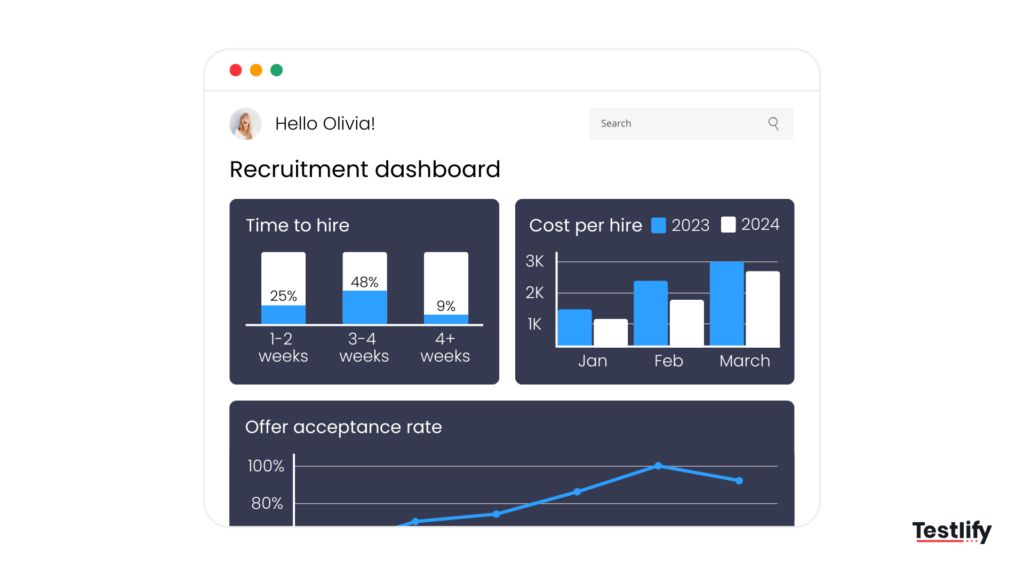
Here are a few examples to give you an idea of what a recruitment dashboard might look like:
1. Time-to-hire dashboard
This dashboard tracks the time-to-hire metrics, showing the average time to fill various roles across different departments. Other metrics in this dashboard can be how much time one spends at each hiring stage and specific data about departments.
2. Source of hire dashboard
This dashboard may track the performance of the different recruitment channels, whether job boards, referrals, or social media. This kind of dashboard gives one an idea of which produces the highest number of quality candidates to maximize or optimize the budget used.
3. Diversity recruitment dashboard
A diversity recruitment dashboard focuses on tracking diversity and inclusion metrics.
According to Harvard Business Review, Companies that track candidate diversity through dashboards see an increase in diverse hires by approximately 25%, as these tools help identify and address gaps in outreach and hiring practices.
This dashboard includes the percentage of hires from underrepresented groups, diversity within different levels of jobs, and comparison between candidates and the overall workforce.
Common challenges and how to overcome them
Implementing a recruitment dashboard comes with its own set of challenges. Understanding these common obstacles and learning how to address them will help ensure the success of your recruitment dashboard.
1. Data overload
Having too much data on your dashboard puts you into analysis paralysis. Watch out for this and focus only on those that impact your goals directly related to recruitment; avoid adding too many unnecessary data points.
2. Outdated data
This is one of the most common challenges. You should only have active data to be loaded onto your dashboard. You can do this by setting up automatic refreshes from the ATS or HR systems involved so that you’re always working with real-time data.
3. Resistance to adoption
As for some recruiters, it would be difficult to get accustomed to using a new dashboard, primarily if they have gained much practice with more manual methods, such as spreadsheets.
You must provide an extensive training session, convince them of the advantages of using a dashboard, and then show them how it will improve their workflow.
Conclusion
A recruitment dashboard is necessary for modern recruiters since it does more than make hiring a little data-driven. With a recruitment dashboard, recruitment efforts and results are streamlined clearly. It is handy whether you’re just taking that new role or simply want to pick up your recruitment game.
A well-crafted recruitment dashboard can be your secret weapon in the war for talent acquisition. This will help you better time-to-hire, cost-cutting, or enriching the candidate experience.
FAQs

Content Writer
Yashika Khandelwal is a Content Writer with 3+ years of experience creating research-backed content on hiring, talent assessment, and HR technology. She is a registered Organizational Psychologist and subject matter expert who combines behavioral science with practical recruitment insights to produce accurate, evidence-based content.
LinkedInRelated resources
View all
Hiring Guide
7 simple steps to create a hiring process flowchart

Hiring Guide
10 Recruitment challenges and how to solve them

Hiring Guide
Onboarding External Workers: A Practical 2026 HR Guide

Hiring Guide
How to optimize your resume for tech jobs

Hiring Guide
The best recruiting email templates for tech startups

Hiring Guide
Interview questions for hiring a Data analyst
Get started.
Hire on proof, not resumes.
Run your first skills-based assessment free — no credit card required.